
EVERSOLO DMP-A6 Master Gen 2-Black
Eversolo DMP-A6 Master Gen 2-Black Hi-Fi Music Streamer foydalanuvchi qo'llanmasi
Model: DMP-A6 Master Gen 2-Black
Kirish
This manual provides comprehensive instructions for the setup, operation, and maintenance of your Eversolo DMP-A6 Master Gen 2-Black Hi-Fi Music Streamer. Please read this manual thoroughly before using the device to ensure optimal performance and longevity.
The Eversolo DMP-A6 Master Gen 2-Black is an advanced Hi-Fi music streamer designed for high-fidelity audio playback. It features an upgraded Op-amp Chip OPA1612 for enhanced sound output and a newly designed linear power supply for ultra-low noise operation. It supports a wide range of audio formats and streaming services, offering versatile connectivity options for integration into various audio systems.
Xavfsizlik ma'lumotlari
Qurilmaga zarar yetkazmaslik yoki shaxsiy jarohatlarning oldini olish uchun har doim quyidagi xavfsizlik qoidalariga amal qiling:
- Qurilmani suv yoki haddan tashqari namlik ta'sirida qoldirmang.
- Haddan tashqari issiqlikning oldini olish uchun to'g'ri shamollatishni ta'minlang. Shamollatish teshiklarini to'sib qo'ymang.
- Faqat taqdim etilgan quvvat kabeli va aksessuarlaridan foydalaning.
- Qurilmani o'zingiz ochishga yoki ta'mirlashga urinmang. Barcha xizmatlarni malakali xodimlarga topshiring.
- Qurilmani to'g'ridan-to'g'ri quyosh nuri, issiqlik manbalari va kuchli magnit maydonlardan uzoqroq tuting.
- Clean the device with a soft, dry cloth. Avoid using abrasive cleaners or solvents.
Paket tarkibi
Paketda barcha narsalar mavjudligini tekshiring:
- Eversolo DMP-A6 Master Gen 2-Black Unit
- Quvvat kabeli
- USB kabeli
- Screwdriver (for internal storage installation, if applicable)
- Foydalanuvchi uchun qo'llanma (ushbu hujjat)
- Kabelni ishga tushirish
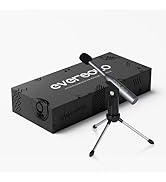
Image: Illustration of the Eversolo DMP-A6 Master Gen 2-Black package contents.
Sozlash; o'rnatish
1. Jismoniy joylashtirish
Place the DMP-A6 Master Gen 2-Black on a stable, flat surface with adequate ventilation. Ensure there is sufficient space around the unit for airflow, especially at the rear and sides where heat dissipation occurs.
2. Quvvatga ulanish
Connect the provided power cable to the AC inlet on the rear of the unit and then to a suitable power outlet. Ensure the power switch is in the OFF position before connecting.
3. Ovozli ulanishlar
The DMP-A6 Master Gen 2-Black offers various audio input and output options:
- Analog chiqishlar: Use XLR or RCA outputs to connect to active speakers or power amphayot kechiruvchilar.
- Raqamli chiqishlar: Optical, Coaxial, and HDMI (for audio only, no video output).
- Raqamli kirish: Coaxial, Optical, Type-C USB, and HD Bluetooth for connecting external digital audio sources.
- HDMI ARC: Connect your TV's HDMI ARC port to the DMP-A6's HDMI ARC input to transmit TV audio directly.

Image: Rear panel connections of the DMP-A6 Master Gen 2-Black.
4. Tarmoqqa ulanish
Connect the unit to your network via Ethernet cable for the most stable connection, or use the built-in Wi-Fi for wireless connectivity. A stable network connection is essential for streaming services and firmware updates.
5. Dastlabki yoqish
After all connections are made, switch on the power. The device will boot up, and the 6-inch LCD color touchscreen will display the initial setup wizard.
Foydalanish bo'yicha ko'rsatmalar
1. User Interface and Control
The DMP-A6 Master Gen 2-Black can be controlled via its integrated 6-inch LCD color touchscreen or through the dedicated mobile application for Android and iOS devices.

Image: Front panel and touchscreen display.
2. Mobil ilova
Download the official Eversolo mobile application from your device's app store. The app provides comprehensive control over the streamer, including music playback, settings adjustment, and personalized playlist management.

Image: Eversolo mobile application interface.
3. Music Playback and Streaming
The device supports a wide array of music services and streaming protocols:
- Integrated Services: Access Amazon Music, TIDAL, Qobuz, HIRESAUDIO, Deezer, Tuneln Radio, and more directly from the device.
- Simsiz oqim: Compatible with Roon Ready, TIDAL Connect, and DLNA for seamless streaming from compatible devices and servers.
- Local/Network Playback: Musiqa ijro eting files from local drives (USB) or network storage (NAS). The device supports cross-platform addition of music files.
- Qo'llab-quvvatlanadigan formatlar: Plays almost all ultra-high sampling master recording formats, including FLAC, WAV, APE, DSD512 (dsf/.dff/.iso/.dst) stereo/multichannel, and MQA.
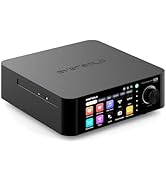
Image: Supported music services and streaming platforms.
4. Kengaytirilgan funksiyalar
- EOS Audio Engine: Utilizes an innovative audio processing engine that bypasses SRC limitations for high-resolution audio direct output.
- HDMI ARC & TRIGGER: HDMI ARC allows direct TV audio transmission. The TRIGGER function enables linked devices to automatically power on/off with the streamer.
- Professional EQ: Fine-tune your audio output with the built-in professional equalizer.
- OPA1612 Op-amp Chip: Features an upgraded Op-amp chip for a warmer voice output and improved audio quality.
- Ultra-Low Noise Linear Power Supply: Ensures a clean audio signal with noise levels below 40uV.

Image: Key technical features and specifications.
Xizmat
1. Tozalash
Regularly clean the exterior of the unit with a soft, dry, lint-free cloth. Do not use liquid cleaners, aerosols, or solvents, as they may damage the finish or internal components.
2. Mikrodasturlarni yangilash
Eversolo frequently releases firmware updates to improve performance, add features, and fix bugs. It is recommended to keep your device's firmware up to date. Updates can typically be performed directly through the device's settings menu when connected to the internet.
3. Saqlash
Agar qurilmani uzoq vaqt saqlasangiz, uni elektrdan uzing va salqin, quruq joyda, to'g'ridan-to'g'ri quyosh nuri va haddan tashqari haroratdan uzoqroq joyda saqlang.
Muammolarni bartaraf qilish; nosozliklarni TUZATISH
| Muammo | Mumkin sabab | Yechim |
|---|---|---|
| Quvvat yo'q | Power cable not connected; Power switch off; Power outlet issue. | Ensure power cable is securely connected. Check power switch. Test power outlet with another device. |
| Ovoz chiqishi yo'q | Incorrect audio output selected; Cables not connected properly; Ampko'taruvchi/dinamik muammosi. | Verify correct output in settings. Check all audio cable connections. Test amplifier/speakers with another source. |
| Tarmoqqa ulanib bo‘lmadi | Incorrect Wi-Fi password; Router issue; Ethernet cable disconnected. | Re-enter Wi-Fi password. Restart router. Check Ethernet cable connection. |
| Streaming services not loading | Poor internet connection; Service outage; App issue. | Check internet speed. Verify service status online. Restart the streamer and the app. |
| Qurilma javob bermayapti | Vaqtinchalik dasturiy ta'minot xatosi. | Perform a soft reset by holding the power button, or disconnect power for 30 seconds and reconnect. |
If the problem persists after attempting these solutions, please contact Eversolo customer support.
Texnik xususiyatlari
| Xususiyat | Tafsilot |
|---|---|
| Model nomi | DMP-A6 Master Gen 2-Black |
| Olchamlari (U x G x Y) | 10.63 x 7.36 x 5.34 dyuym (taxminan) |
| Og'irligi | 9.24 funt |
| Operatsion tizim | Android 11 (deeply tailored system) |
| Displey | 6-inch LCD Color Touchscreen |
| Ram | 4 GB |
| Ulanish | Bluetooth, Ethernet, HDMI, IR |
| Ovozli yozuvlar | Coaxial, Optical, Type-C USB, HD Bluetooth |
| Ovoz chiqishi | HDMI (audio only), USB, Optical, Coaxial, XLR, RCA |
| Supported Streaming Services | Amazon Music, Deezer, HIRESAUDIO, Qobuz, Tidal, Tuneln Radio, Roon Ready, TIDAL Connect, DLNA |
| Qo'llab-quvvatlanadigan audio formatlari | FLAC, WAV, APE, DSD512, MQA, PCM768kHz/32Bit |
| Maxsus xususiyatlar | Professional EQ, Roon Ready, Squeezelite, TIDAL Connect, HDMI ARC, TRIGGER, OPA1612 Op-amp, Ultra-Low Noise Linear Power Supply |
Kafolat va qo'llab-quvvatlash
Kafolat haqida ma'lumot
The Eversolo DMP-A6 Master Gen 2-Black typically comes with a 1 yillik cheklangan kafolat sotib olingan kundan boshlab. Ushbu kafolat ishlab chiqarish nuqsonlari va oddiy foydalanishdagi mahoratni qoplaydi. Iltimos, kafolat da'volari uchun sotib olinganligingizni tasdiqlovchi hujjatingizni saqlab qo'ying.
The warranty does not cover damage caused by misuse, accident, unauthorized modification, improper installation, or natural disasters. For detailed warranty terms and conditions, please refer to the official Eversolo websayt yoki mijozlarga xizmat ko'rsatish bilan bog'laning.
Mijozlarni qo‘llab-quvvatlash
For technical assistance, troubleshooting, or warranty inquiries, please contact Eversolo customer support through their official channels. You can typically find contact information on the Eversolo website, including support forums, email addresses, or phone numbers.
Eversolo aims to provide monthly firmware updates and encourages users to submit comments or questions via their official service channels (website forum, Facebook, Instagram, or email) for prompt responses.
Ask a question about this manual
Ask about setup, troubleshooting, compatibility, parts, safety, or missing instructions. Manuals+ will review the question and use this page’s manual context to help answer it.