
1. Mahsulot tugadiview
The Hisense 65E7Q QLED Smart TV offers a premium viewing experience with its 65-inch QLED display. This television integrates advanced technologies such as Dolby Vision and Dolby Atmos for immersive audio-visuals, AI Smooth Motion for fluid images, and dedicated modes for gaming and sports. Powered by the VIDAA operating system, it provides easy access to a wide range of streaming content and smart features, including voice control.

Old view of the Hisense 65E7Q QLED Smart TV.
Asosiy xususiyatlar:
- QLED Colour: Experience rich, vibrant, and realistic colors.
- AI Smooth Motion: Advanced MEMC and 3D Noise Reduction for fluid, blur-free images.
- Dolby Vision va Dolby Atmos: Cinematic picture and immersive sound for an enhanced entertainment experience.
- O'yin rejimi Plus: Reduces input lag to 16ms, with 60Hz VRR and ALLM for ultra-fluid gaming.
- AI Sports Mode: Optimizes picture and sound for sports content, reducing motion blur and enhancing stadium-like audio.
- AI 4K Upscaler: Enhances blurry images to near-4K quality.
- VIDAA Smart TV OS: Fast, secure, and intuitive operating system with access to popular streaming applications.
- Ovozli boshqaruv: Integrated Alexa and VIDAA Voice for convenient operation.
2. Xavfsizlik ma'lumotlari
Please read all safety instructions carefully before using your TV. Keep this manual for future reference. Always ensure the TV is placed on a stable surface to prevent tipping. Do not expose the TV to rain or moisture. Refer to the full safety guidelines in the included safety manual.
3. Paket tarkibi
Barcha elementlar qutida mavjudligini tekshiring:
- Hisense 65E7Q QLED Smart TV
- Quvvat kabeli
- Remote Control (with 1 AAAA battery included)
- Televizor stend (2 dona)
- Stendni yig'ish uchun vintlardek
- Foydalanuvchi uchun qo'llanma (ushbu hujjat)
- Kafolat kartasi
4. Sozlash
4.1 Stendni yig'ish
- Televizor ekranini shikastlamaslik uchun ehtiyotkorlik bilan yumshoq va tekis yuzaga qo'ying.
- Stend qismlarini televizorning pastki qismidagi mos keladigan uyalar bilan tekislang.
- Tayanch qismlarini berilgan vintlar yordamida mahkamlang. Ularning mahkam tortilganligiga ishonch hosil qiling.

Diagram illustrating TV dimensions and stand installation points.
4.2 Devorga o'rnatish
If you plan to wall mount your TV, ensure you use a VESA-compatible wall mount kit (not included). The Hisense 65E7Q supports a VESA mounting standard of 600 x 400 mm. Follow the instructions provided with your wall mount kit for safe installation.
4.3 Periferik qurilmalarni ulash
Connect your external devices to the TV's ports as needed. Refer to the port diagram below:

Orqa view showing available ports and connections.
- HDMI portlari (x3): Connect Blu-ray players, game consoles, and other HDMI devices. One port supports eARC for enhanced audio return.
- USB portlari (x2): Connect USB flash drives for media playback. (1x USB 3.0, 1x USB 2.0)
- Antenna Inputs (x2): Connect your terrestrial or cable antenna.
- Ethernet (LAN): Simli tarmoq ulanishi uchun.
- Optik audio chiqishi: Raqamli audio uchun ovoz paneli yoki audio qabul qilgichga ulang.
- Eshitish vositasi uyasi: Shaxsiy tinglash uchun.
- AV kirishlari: Kompozit video va stereo audio kabellardan foydalangan holda eski qurilmalarni ulash uchun.
4.4 Dastlabki yoqish
- Quvvat simini televizorga, keyin esa rozetkaga ulang.
- Masofadan boshqarish pultidagi yoki televizordagi quvvat tugmasini bosing.
- Dastlabki sozlashni yakunlash uchun ekrandagi ko'rsatmalarga amal qiling, jumladan, tilni tanlash, tarmoqqa ulanish va kanallarni skanerlash.
5. Televizoringizni boshqarish
5.1 masofadan boshqarish pulti
The included remote control allows you to navigate the TV's features. Insert the provided AAAA battery into the remote. The remote supports voice control for convenient operation.
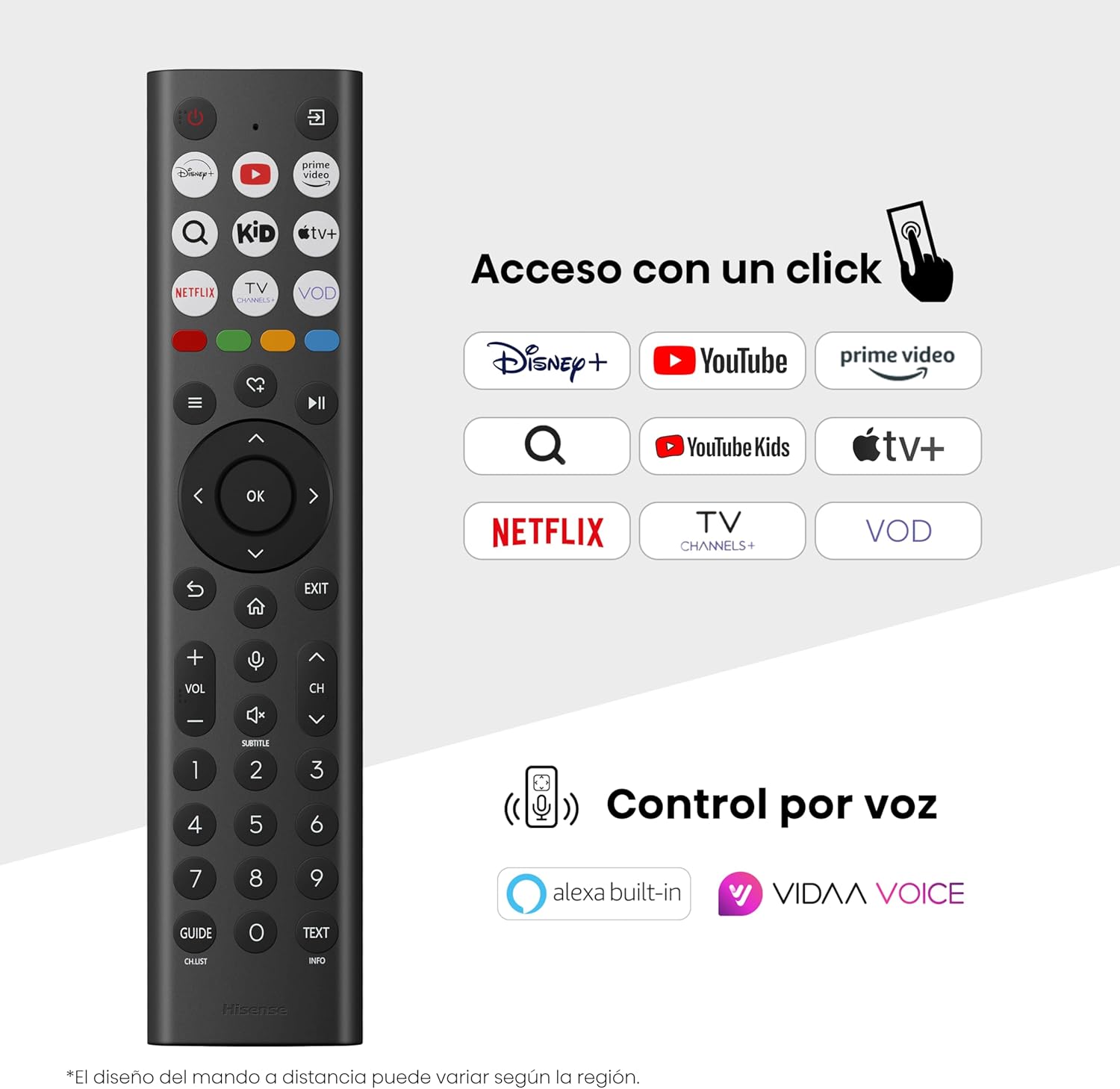
Hisense Smart TV remote control with dedicated app buttons and voice control.
5.2 Smart TV xususiyatlari (VIDAA OS)
Your Hisense TV runs on the VIDAA operating system, offering a user-friendly interface for accessing various applications and services.

The VIDAA Smart TV interface with popular streaming applications.
- Ilovalar: Netflix, YouTube, Prime Video va boshqa oldindan o'rnatilgan ilovalarga kirish.
- Ovozli boshqaruv: Use the remote's voice function to search for content, adjust settings, or interact with Alexa built-in and VIDAA Voice.
- Screen Mirroring (AirPlay): Share content from your Apple devices directly to the TV.
- Share to TV: Easily send content from your mobile devices to the TV.
5.3 Rasm sozlamalari
O'zingizni optimallashtiring viewing experience with various picture enhancement technologies:
- QLED Colour: Delivers over a billion shades of vibrant, lifelike colors.
- AI 4K Upscaler: Automatically enhances lower-resolution content to near-4K quality.
- AI Smooth Motion: Reduces motion blur in fast-paced scenes, ensuring clear and fluid visuals.
- Dolby Vision: Provides stunning brightness, contrast, and color for a dramatic visual experience.
- Rejissyor rejimi: Preserves the original aspect ratio, colors, and frame rates to display movies as intended by the director.
- Sun'iy intellekt yorug'lik sensori: Intelligently adjusts screen brightness based on ambient light for optimal viewenergiya samaradorligi va energiya samaradorligi.
- Ko'zni parvarish qilish rejimi: Reduces blue light emission to minimize eye strain.
- Energiyani tejash rejimi: Optimizes power consumption without significantly compromising picture quality.

QLED technology delivers over a billion vibrant color tones.

AI 4K Upscaler enhances lower resolution content to near 4K clarity.

AI Smooth Motion ensures fluid images without blur, especially in fast-moving scenes.

Filmmaker Mode presents content exactly as the director intended.
5.4 Ovoz sozlamalari
Enhance your audio experience with:
- Dolby Atmos: Immersive, multi-dimensional sound that fills your room.
- Birlashtirilgan dinamik: Built-in speakers with a maximum output of 1 Watt per channel.
- EzPlay: Seamlessly control compatible Hisense soundbars directly from your TV screen.

Dolby Vision and Dolby Atmos combine for a spectacular audio-visual experience.
5.5 O'yin xususiyatlari
Geymerlar uchun televizor quyidagilarni taklif qiladi:
- O'yin rejimi Plus: Reduces input lag to 16ms, ensuring responsive gameplay.
- 60Hz VRR (Variable Refresh Rate): Synchronizes the TV's refresh rate with the game console's output to prevent screen tearing.
- ALLM (avtomatik past kechikish rejimi): Automatically switches the TV to low-latency mode when a game is detected.
- O'yin paneli: An integrated control center for quick access to game settings and real-time performance monitoring.

Game Mode Plus provides ultra-fluid, lag-free gaming.

The Game Bar offers centralized control for game settings.
5.6 Sports Features
- AI Sports Mode: Automatically detects sports content and optimizes picture and sound settings for a stadium-like experience, enhancing clarity and audio effects.
6. Xizmat ko'rsatish
6.1 Televizorni tozalash
- Tozalashdan oldin har doim televizorni elektr tarmog'idan uzing.
- Use a soft, dry, lint-free cloth to gently wipe the screen and TV body.
- O'jar belgilar uchun engil dampMatoni suv yoki maxsus ekran tozalagich bilan artib oling (to'g'ridan-to'g'ri ekranga purkamang).
- Abraziv tozalagichlar, spirt, benzol yoki erituvchilardan foydalanishdan saqlaning, chunki ular televizor yuzasiga zarar etkazishi mumkin.
6.2 Dasturiy ta'minotni yangilash
Your TV may receive software updates periodically to improve performance and add new features. Ensure your TV is connected to the internet to receive these updates. You can usually check for updates manually in the TV's settings menu.
7. Muammolarni bartaraf qilish; nosozliklarni TUZATISH
Televizoringiz bilan bog'liq muammolarga duch kelsangiz, quyidagi umumiy echimlarga murojaat qiling:
- Quvvat yo'q: Elektr kabelining mahkam ulanganligini va rozetka ishlayotganini tekshiring. Boshqa rozetkani sinab ko'ring.
- Rasm/ovoz yo'q: To'g'ri kirish manbai tanlanganligiga ishonch hosil qiling. Barcha kabel ulanishlarini tekshiring (HDMI, antenna).
- Masofadan boshqarish pulti ishlamayapti: Check the battery (1 AAAA battery). Ensure there are no obstructions between the remote and the TV.
- Tarmoqqa ulanish muammolari: Wi-Fi parolingizni yoki Ethernet kabeli ulanishini tasdiqlang. Routeringizni qayta ishga tushiring.
- Rasm sifati past: Rasm sozlamalarini sozlang (yorqinlik, kontrast, aniqlik). Kirish manbai yuqori sifatli signalni ta'minlayotganiga ishonch hosil qiling.
- Ovoz buzilishi: Check audio settings. If using external speakers, ensure they are connected correctly.
For more detailed troubleshooting, consult the full electronic user manual or contact Hisense customer support.
8. Texnik shartlar
Detailed technical specifications for the Hisense 65E7Q QLED Smart TV:
| Xususiyat | Spetsifikatsiya |
|---|---|
| Model raqami | 65E7Q |
| Ekran o'lchami | 65 dyuym |
| Displey texnologiyasi | QLED |
| Rezolyutsiya | 4K (3840 x 2160) |
| Yangilanish tezligi | 60 Gts |
| HDR formatini qo'llab-quvvatlash | Dolby Vision |
| Motion Enhancement Technology | AI silliq harakat |
| Tasvir sifatini oshirish | AI 4K Upscaler, AI Smooth Motion, QLED Colour |
| Javob vaqti | 100 millisekund |
| Orqa yorug'lik konfiguratsiyasi | Direct Illumination, Dimming |
| Karnay tavsifi | Integrated speaker with Dolby Atmos |
| Maksimal karnay chiqish quvvati | 1 Vt |
| Audio kanallar | Ko'p kanalli |
| Surround Sound Format | Dolby Atmos |
| Operatsion tizim | VIDAA |
| Xotirani saqlash hajmi | 1 GB |
| Nazorat usuli | Ovoz |
| Ulanish texnologiyasi | Bluetooth, HDMI, Wi-Fi |
| Internet Applications | Netflix, YouTube, Prime Video, AirPlay 2 |
| HDMI portlari | 3 (including HDMI 2.1 with eARC) |
| USB portlari | 2 (1x USB 3.0, 1x USB 2.0) |
| Simsiz texnologiya | Wi-fi |
| Screen Mirroring Technology | AirPlay |
| VESA o'rnatish standarti | 600 x 400 mm |
| Mahsulot o'lchamlari (DxWxH) | 7.6 x 145.3 x 83.8 sm |
| Mahsulot og'irligi | 15.2 kg (stend bilan) |
| Energiya samaradorligi klassi | E |
| Yillik energiya iste'moli | 84 kWh/1000h (SDR), 160 kWh/1000h (HDR) |
| Quvvat | 1 Watt (standby) |
| jildtage | 100-240 VCA 50-60 Hz |
| Kiritilgan komponentlar | Quvvat kabeli, masofadan boshqarish pulti, stend |
| Model yili | 2025 |
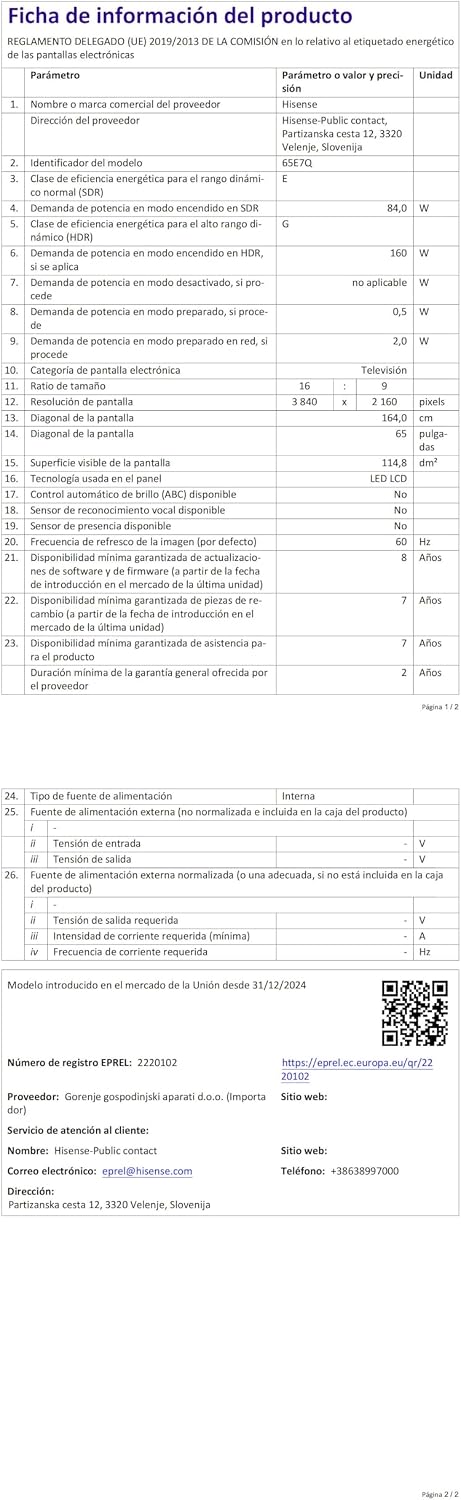
Energy label for the Hisense 65E7Q TV.
Mahsulot haqida batafsil ma'lumot olish uchun EPREL ma'lumotlar bazasiga murojaat qiling: https://eprel.ec.europa.eu/qr/2220102
9. Kafolat va qo'llab-quvvatlash
9.1 Mahsulot kafolati
This Hisense TV comes with a 3 yillik mahsulot kafolati. Iltimos, kafolat da'volari uchun sotib olinganligingizni tasdiqlovchi hujjatingizni saqlab qo'ying.
9.2 Ehtiyot qismlar mavjudligi
Spare parts for this model are guaranteed to be available in the EU for a duration of 10 yil from the product's market introduction.
9.3 Mijozlarni qo‘llab-quvvatlash
For technical assistance, troubleshooting, or warranty service, please contact Hisense customer support. Refer to the contact information provided in your warranty card or visit the official Hisense webmintaqangiz uchun sayt.