
Technaxx TX-315
Technaxx TX-315 10000mAh 3-in-1 Wireless Fast Charging Power Bank User Manual
Model: TX-315
Kirish
This user manual provides important information for the safe and efficient operation of your Technaxx TX-315 10000mAh 3-in-1 Wireless Fast Charging Power Bank. Please read this manual thoroughly before using the device and keep it for future reference.
Xavfsizlik bo'yicha ko'rsatmalar
- Quvvat bankini haddan tashqari harorat, to'g'ridan-to'g'ri quyosh nuri yoki olov ta'siriga qo'ymang.
- Qurilmani o'zingiz qismlarga ajratmang, ta'mirlamang yoki o'zgartirmang. Barcha xizmat ko'rsatish ishlarini malakali mutaxassislarga topshiring.
- Quvvat bankini suv va boshqa suyuqliklardan uzoqroq tuting.
- Do not drop, hit, or subject the device to strong impacts.
- Ensure proper ventilation when charging or discharging.
- Bolalar qo'li etmaydigan joyda saqlang.
- Powerbankni elektron chiqindilar uchun mahalliy qoidalarga muvofiq yo'q qiling.
Mahsulot tugadiview
Familiarize yourself with the components of your Technaxx TX-315 power bank:
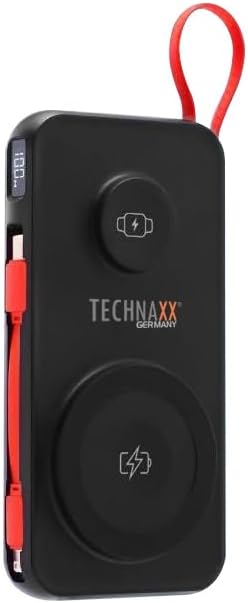
Image: The Technaxx TX-315 power bank, a black rectangular device with a red lanyard. It features a digital display on the side, a USB-C port, a USB-A port, a built-in red USB-C cable, a magnetic wireless charging pad for smartphones, and a smaller wireless charging pad for smartwatches. The Technaxx logo is visible on the front.
- Raqamli displey: Batareya foizini ko'rsataditage.
- Magnetic Wireless Charging Pad (15W): Mos keladigan smartfonlar uchun.
- Smartwatch Wireless Charging Pad (3W): For compatible smartwatches.
- USB-A Output Port (22.5W): For wired charging of various devices.
- USB-C Input/Output Port (20W PD): For charging the power bank or wired charging of devices.
- O'rnatilgan USB-C kabeli: Qurilmalarni zaryadlash uchun qulay.
- Quvvat tugmasi: Activates the display and charging functions.
Sozlash; o'rnatish
Quvvat bankini zaryadlash
- Connect the power bank to a USB wall charger (not included) using the built-in USB-C cable or a separate USB-C to USB-C cable via the USB-C port.
- Raqamli displey zaryadlash jarayonini ko'rsatadi, bu batareyaning foizini ko'rsataditage.
- The power bank is fully charged when the display shows "100%".
Ishlayotgan
Charging Smartphones Wirelessly (15W)
- Quvvat bankini faollashtirish uchun quvvat tugmasini bosing.
- Place your MagSafe-compatible or Qi-enabled smartphone onto the larger magnetic wireless charging pad. Ensure proper alignment for optimal charging.
- The phone's charging indicator will confirm charging has begun.
Charging Smartwatches Wirelessly (3W)
- Quvvat bankini faollashtirish uchun quvvat tugmasini bosing.
- Place your compatible smartwatch onto the smaller wireless charging pad.
- The smartwatch's display will indicate that it is charging.
Wired Charging via USB-A or USB-C Ports
- Quvvat bankini faollashtirish uchun quvvat tugmasini bosing.
- Connect your device to the USB-A port or the USB-C port using an appropriate charging cable.
- Quvvat banki qurilmangizni avtomatik ravishda zaryadlashni boshlaydi.
- The built-in USB-C cable can also be used for convenient wired charging.
Raqamli displeyni tushunish
The digital display shows the current battery percentage of the power bank. This allows you to monitor the remaining power and know when to recharge the unit.
Xizmat
- Quvvat bankini yumshoq, quruq mato bilan tozalang. Abraziv tozalash vositalarini yoki erituvchilarni ishlatmang.
- Quvvat bankini to'g'ridan-to'g'ri quyosh nuri va haddan tashqari haroratdan uzoqda, salqin va quruq joyda saqlang.
- Agar uzoq vaqt ishlatilmasa, batareya quvvatini saqlab qolish uchun quvvat bankini kamida uch oyda bir marta quvvatlang.
Muammolarni bartaraf qilish; nosozliklarni TUZATISH
| Muammo | Mumkin sabab | Yechim |
|---|---|---|
| Quvvat banki quvvatlanmayapti. | Cable not connected properly; charger not working; power bank battery depleted. | Check cable connections; try a different charger; allow power bank to charge for a few minutes. |
| Qurilma quvvat bankidan quvvatlanmayapti. | Power bank not activated; device not compatible; cable faulty; power bank battery low. | Press power button; ensure device supports wireless/wired charging; try a different cable; recharge power bank. |
| Wireless charging is slow or intermittent. | Misalignment of device; thick phone case; foreign objects between device and pad. | Realign device on charging pad; remove thick phone case; remove any metal objects or cards. |
| Raqamli displey ishlamayapti. | Power bank battery depleted; internal fault. | Recharge power bank; if issue persists, contact support. |
Texnik xususiyatlari
- Model nomi: TX-315
- Batareya quvvati: 10000mAh
- Batareya xujayrasi tarkibi: Lityum polimer
- Wireless Charging (Smartphone): 15 Vt (Magnit)
- Wireless Charging (Smartwatch): 3W
- USB-A chiqishi: 22.5 Vt
- USB-C kirish/chiqish: 20 Vt quvvat yetkazib berish (PD)
- Mahsulot o'lchamlari: 144 x 73 x 16 mm (approx. 7.2L x 2W x 14Th centimetres)
- Mahsulot og'irligi: 250g (approx. 0.56 Pounds)
- Ishlab chiqaruvchi: Technaxx
- Ishlab chiqaruvchi mamlakat; ta'minotchi mamlakat: Xitoy
Kafolat va qo'llab-quvvatlash
Your Technaxx TX-315 Power Bank comes with a standard manufacturer's warranty. For detailed warranty information, please refer to the warranty card included in the product packaging or visit the official Technaxx website. If you encounter any issues or require technical assistance, please contact Technaxx customer support or your retailer.
The product package includes the Powerbank 10000mAh TX-315 and this user manual.
Ask a question about this manual
Ask about setup, troubleshooting, compatibility, parts, safety, or missing instructions. Manuals+ will review the question and use this page’s manual context to help answer it.