
1. Kirish
This manual provides detailed instructions for the setup, operation, and maintenance of your HISTTON H4-T Industrial Mini PC. Please read this manual thoroughly before using the device to ensure proper functionality and safety.
2. Xavfsizlik ma'lumotlari
- Elektr ta'minoti voltage qurilma talablariga mos keladi.
- Qurilmani namlik, haddan tashqari harorat yoki to'g'ridan-to'g'ri quyosh nuri ta'siriga qo'ymang.
- Shamollatish teshiklarini to'sib qo'ymang.
- Qurilmani o'zingiz ochishga yoki ta'mirlashga urinmang. Malakali xizmat ko'rsatish xodimlariga murojaat qiling.
- Qurilmani kuchli magnit maydonlardan uzoqroq tuting.
3. Paket tarkibi
Paketda barcha elementlar mavjudligiga ishonch hosil qiling:
- 1 x HISTTON Mini PC
- 1 x quvvat adapteri
- 1 x foydalanuvchi qo'llanmasi (ushbu hujjat)
- 1 x HDMI kabeli
- Screws (for mounting/storage installation)
- Wi-Fi antennalari
- VESA Mount (if included with specific models)
- SATA Cable (for 2.5-inch drive installation)

4. Mahsulot tugadiview
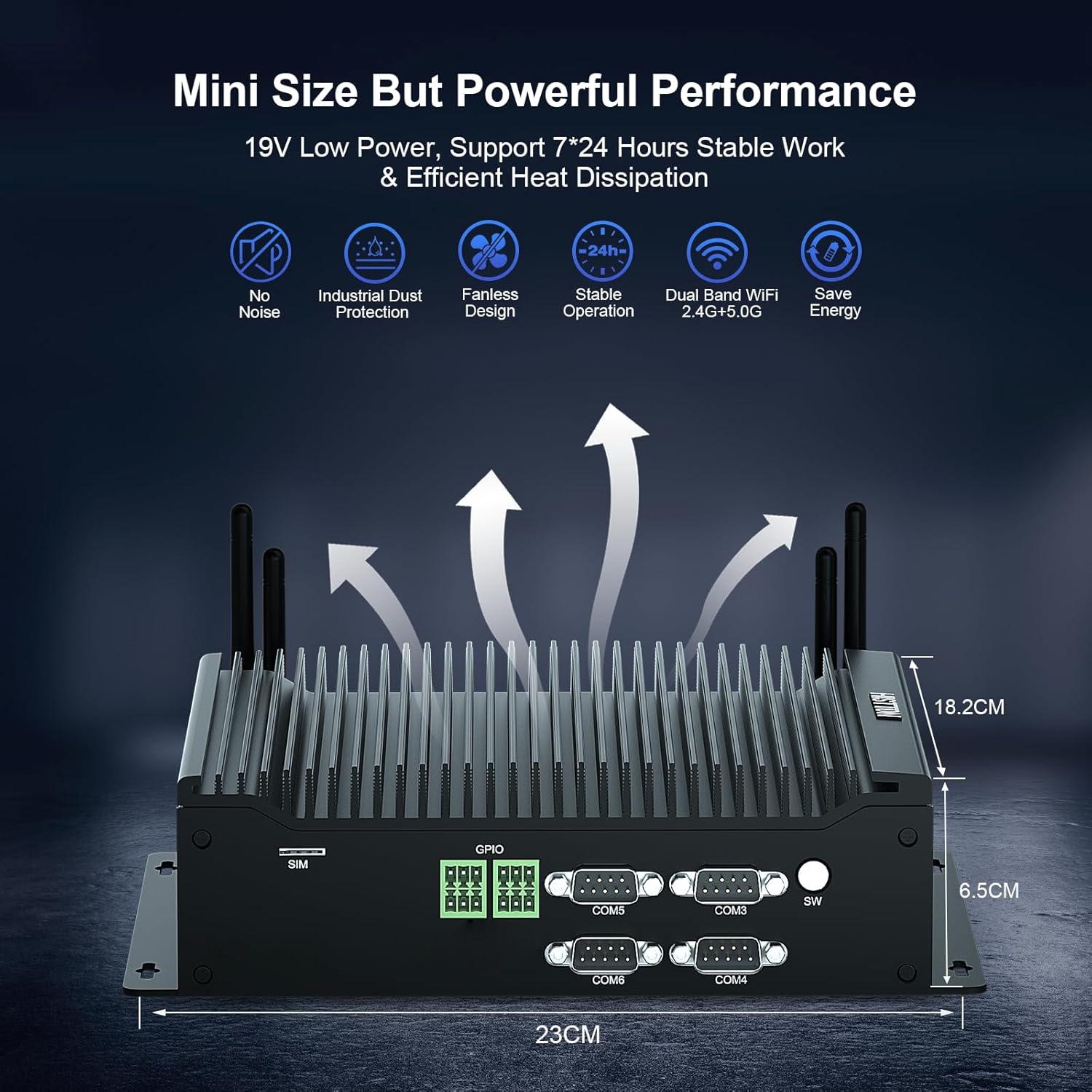
The HISTTON H4-T Mini PC is a compact, fanless industrial computer designed for various applications requiring stable performance and extensive connectivity. It features an Intel Core i7-10710U processor and supports multiple display outputs.
4.1 Old va orqa panellar

The device features a comprehensive set of ports for various industrial and general computing needs. These include multiple USB ports, LAN ports, COM ports, and video outputs.
4.2 Asosiy xususiyatlar
- Protsessor: Intel Core i7-10710U (10th Gen) with up to 4.70 GHz turbo frequency.
- Grafika: Intel UHD Graphics for 10th Gen Processors, supporting 4K resolution.
- Xotira: Dual DDR4 SO-DIMM slots, expandable up to 64GB.
- Saqlash: M.2 2280 NVME PCIe 3.0x4 / SATA 3 SSD slot and a 2.5-inch SATA HDD/SSD bay.
- Displey chiqishi: HD, DisplayPort (DP), and Type-C for triple 4K display support.
- Tarmoq: 2 x RJ45 Intel I210/211 Gigabit LAN, Dual-band WiFi 5 (2.4G+5.0G), Bluetooth 4.2.
- Ulanish: 4 x USB 3.0, 4 x USB 2.0, 6 x DB9pin COM ports (configurable for RS232/RS422/RS485), 2 x 6pin GPIO, 1 x SIM card slot.
- Sovutish: Fanless design for silent operation and industrial dust protection.
- Operatsion tizim: Pre-installed Windows 11 Pro (64-bit, activated) with support for Ubuntu.


5. O'rnatish bo'yicha ko'rsatmalar
5.1 Periferik qurilmalarni ulash
- Displeyni ulash: Use the provided HDMI cable or a DisplayPort/Type-C cable to connect your monitor(s) to the Mini PC. The device supports up to three 4K displays simultaneously.
- Klaviatura va sichqonchani ulang: Plug your USB keyboard and mouse into any available USB ports (USB 2.0 or USB 3.0).
- Tarmoqqa ulanish: For a wired connection, connect an Ethernet cable to one of the RJ45 LAN ports. For wireless, attach the included WiFi antennas to the designated ports.
- Ovozni ulash: If using external speakers or headphones, connect them to the SPK (speaker) port. A microphone can be connected to the MIC port.

5.2 Quvvatni yoqish
- Quvvat adapterini ulang: Plug the power adapter into the DC 19V 5A input port on the Mini PC, then plug the adapter into a power outlet.
- Quvvat tugmasi: Press the power button located on the front panel to turn on the Mini PC.
- The system will boot into Windows 11 Pro. Follow the on-screen instructions for initial setup if prompted.
6. Foydalanish bo'yicha ko'rsatmalar
6.1 Operatsion tizim
Your HISTTON H4-T Mini PC comes with Windows 11 Pro (64-bit) pre-installed and activated. It also supports other operating systems like Ubuntu, allowing for flexible deployment in various environments.
- Windows 11 Pro: Utilize standard Windows features for productivity, multimedia, and internet browsing.
- Ubuntu Support: For users preferring Linux-based systems, the hardware is compatible with Ubuntu installations. Refer to Ubuntu's official documentation for installation procedures.
6.2 Tarmoqqa ulanish
- Simli LAN: The two Gigabit Ethernet ports provide stable and high-speed wired network access.
- Wireless (WiFi & Bluetooth): The dual-band WiFi 5 (2.4G+5.0G) and Bluetooth 4.2 modules enable wireless internet access and connection to Bluetooth peripherals. Ensure antennas are securely attached for optimal performance.

6.3 Industrial Features
The H4-T is designed for industrial applications, offering robust connectivity:
- COM portlari: Six DB9pin COM ports support RS232, with four of them configurable for RS422/RS485, suitable for connecting industrial control devices.
- GPIO: Two 6pin GPIO interfaces provide programmable input/output capabilities for custom applications.
- SIM karta uyasi: Supports 4G/5G modules (module not included by default) for mobile network connectivity in remote locations.
7. Xizmat ko'rsatish
The fanless design of the HISTTON H4-T Mini PC significantly reduces maintenance requirements by eliminating moving parts and minimizing dust accumulation. However, regular care is still recommended.
- Tozalash: Periodically wipe the exterior of the Mini PC with a soft, dry cloth. Avoid using liquid cleaners or solvents.
- Dasturiy ta'minot yangilanishlari: Optimal ishlash va xavfsizlikni ta'minlash uchun operatsion tizimingiz va drayverlaringizni yangilab turing.
- Atrof-muhit sharoitlari: Ensure the device is operated within recommended temperature and humidity ranges to prolong its lifespan.
- Xotirani kengaytirish: If installing additional storage (2.5-inch HDD/SSD or M.2 SSD), ensure the device is powered off and disconnected from power. Follow proper anti-static procedures.
8. Muammolarni bartaraf qilish; nosozliklarni TUZATISH
If you encounter issues with your HISTTON H4-T Mini PC, refer to the following common problems and solutions:
| Muammo | Mumkin sabab | Yechim |
|---|---|---|
| Quvvat yo'q / Qurilma yoqilmaydi | Power adapter not connected or faulty; Power outlet issue; Power button not pressed correctly. | Ensure power adapter is securely connected to both the PC and a working power outlet. Try a different outlet. Press the power button firmly. |
| Monitorda displey yo'q | Display cable loose or faulty; Incorrect input selected on monitor; Monitor off or faulty. | Check display cable connections. Ensure monitor is on and set to the correct input source (HDMI, DP, Type-C). Test with a different monitor or cable if possible. |
| Internetga ulanmagan (simli) | Ethernet cable loose or faulty; Router/modem issue; Network driver issue. | Verify Ethernet cable is securely connected. Restart your router/modem. Check network adapter status in OS. |
| Internetga ulanish yo'q (simsiz) | WiFi antennas not connected; WiFi disabled; Incorrect WiFi password; Router issue. | Ensure WiFi antennas are attached. Check WiFi settings in OS. Verify WiFi password. Restart your router. |
| Peripherals (USB devices) not working | Loose connection; Driver issue; Faulty peripheral. | Try a different USB port. Reinstall or update drivers for the peripheral. Test the peripheral on another computer. |
9. Texnik shartlar
| Xususiyat | Tafsilot |
|---|---|
| Model nomi | H4-T |
| Protsessor | Intel Core i7-10710U (10th Gen), 6 Cores, 12 Threads, 12M Cache, up to 4.70 GHz |
| Grafik protsessor | 10-avlod Intel protsessorlari uchun Intel UHD Grafikasi |
| Ram | 32GB DDR4 SO-DIMM (Expandable up to 64GB) |
| Qattiq disk | 512GB M.2 NVMe SSD (Supports M.2 2280 NVME PCIe 3.0x4 / SATA 3 SSD and 2.5 inch SATA HDD/SSD) |
| Operatsion tizim | Windows 11 Pro (64-bit, activated), Supports Ubuntu |
| Displey chiqishi | HD, DisplayPort (DP), Type-C (Supports Triple 4K Display) |
| LAN | 2 x RJ45 Intel I210/211 Gigabit LAN |
| Simsiz ulanish | Dual-band WiFi 5 (2.4G+5.0G), Bluetooth 4.2 |
| USB portlari | 4x USB 3.0, 4x USB 2.0 |
| COM portlari | 6 x DB9pin (2 x RS232, 4 x RS422/RS485 configurable) |
| Boshqa interfeyslar | 2 x 6pin GPIO, 1 x SIM card slot, 1 x SPK, 1 x MIC |
| Quvvatlantirish manbai | DC19V 5A |
| Quvvat iste'moli | 15W-20W |
| Sovutish | Fanatsiz dizayn |
| Olchamlari (UxKxY) | 9.06 x 7.17 x 2.56 dyuym (23 x 18.2 x 6.5 sm) |
| Element og'irligi | 6.38 funt (taxminan 2.9 kg) |
10. Kafolat haqida ma'lumot
HISTTON products are covered by a standard manufacturer's warranty. Please refer to the warranty card included with your product or visit the official HISTTON webbatafsil kafolat shartlari va shartlari uchun sayt. Kafolat da'volari uchun xaridingizni tasdiqlovchi hujjatingizni saqlang.
11. Mijozlarni qo'llab-quvvatlash
For technical assistance, troubleshooting, or any questions regarding your HISTTON H4-T Mini PC, please contact HISTTON customer support. Contact information can typically be found on the official HISTTON websaytida yoki qadoqlash materiallarida.
Onlayn manbalar: For additional support and driver downloads, visit the official HISTTON websayt.