
OMOTON B0FCMD15TF
OMOTON Foldable Bluetooth Keyboard with Touchpad (QWERTZ Layout)
Model: B0FCMD15TF
Brend: OMOTON
1. Kirish
Thank you for choosing the OMOTON Foldable Bluetooth Keyboard with Touchpad. This portable QWERTZ keyboard is designed for convenience and efficiency, offering multi-device connectivity and an integrated touchpad. This manual provides detailed instructions for setup, operation, and maintenance to ensure optimal performance.
2. Paket tarkibi
Paketda quyidagi elementlar mavjudligini tekshiring:
- OMOTON katlanadigan Bluetooth klaviaturasi
- Uyali telefon stend
- C-toifa zaryadlovchi kabel
- Tashish sumkasi
- Foydalanuvchi uchun qo'llanma
3. Mahsulot tugadiview
The OMOTON Foldable Bluetooth Keyboard features a compact QWERTZ layout with 78 full-size keys and a multi-touch touchpad. It supports connection to up to three devices simultaneously across iOS, Android, and Windows operating systems. Its magnetic folding design makes it highly portable.
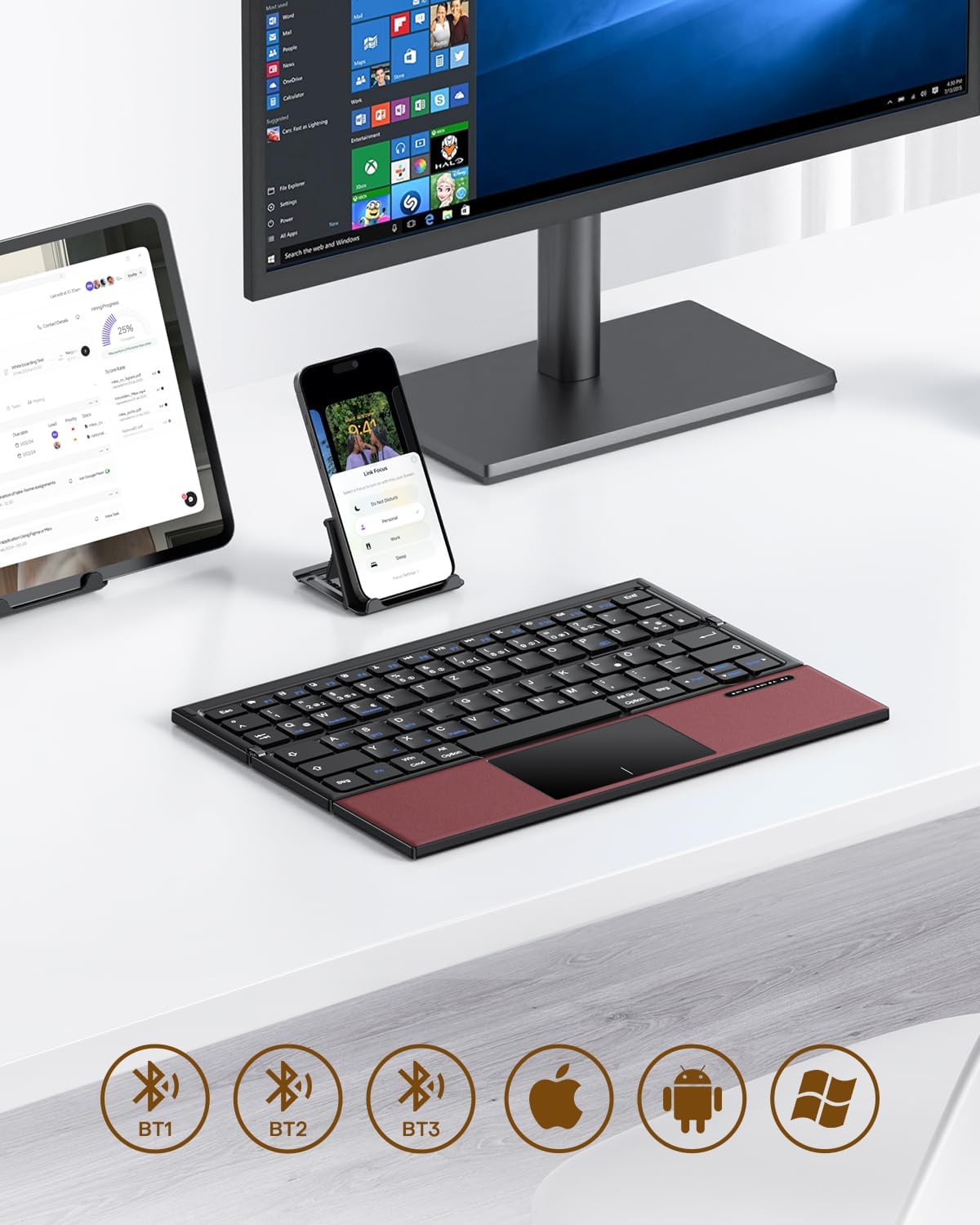
Image 3.1: The OMOTON Foldable Bluetooth Keyboard in use with a tablet, smartphone, and monitor, demonstrating multi-device connectivity via BT1, BT2, and BT3 channels.
Asosiy xususiyatlar:
- Uch qavatli dizayn: Compact and portable for travel.
- Integratsiyalashgan sensorli panel: Multi-touch functionality for navigation without an external mouse.
- Ko'p qurilma ulanishi: Connects to up to three Bluetooth-enabled devices (BT1, BT2, BT3).
- QWERTZ Layout: Standard German keyboard layout with 78 full-size keys.
- Zaryadlanuvchi batareya: Built-in 180mAh battery with Type-C charging.

Image 3.2: Close-up details of the keyboard, highlighting its magnetic closure, indicator lights, silent scissor keys, elegant PU leather finish, and durable metal hinge.
Portativlik:
The keyboard's compact, tri-fold design makes it ideal for travel and on-the-go use. It easily fits into bags and pockets, making it a convenient companion for various environments.

Image 3.3: The keyboard in use in a cafe, on an airplane, and in a meeting room, demonstrating its versatility for different work and travel scenarios.

Image 3.4: The folded keyboard being placed into a carrying case inside a bag and slipped into a jacket pocket, illustrating its compact size and ease of transport.
4. Sozlash
4.1 Klaviaturani zaryadlash
Before first use, fully charge the keyboard. Use the included Type-C charging cable to connect the keyboard to a power source (e.g., computer USB port, USB wall adapter).
- The power indicator light will show charging status.
- To'liq zaryadlash odatda 2-3 soat davom etadi.
- The keyboard offers up to 60 hours of operating time and 90 days of standby time on a full charge.

Image 4.1: The keyboard connected via its Type-C port for charging, with icons indicating charging time, working time, and standby time.
4.2 Qurilma bilan ulash
The keyboard supports up to three Bluetooth connections (BT1, BT2, BT3). Follow these steps to pair your keyboard with a device:
- Yoqilgan: Unfold the keyboard to automatically power it on. The indicator light will flash.
- Kanalni tanlang: ni bosing Fn + BT1, Fn + BT2, yoki Fn + BT3 keys simultaneously to select a Bluetooth channel. The corresponding indicator light will flash slowly.
- Ulanish rejimiga kiring: bosing Fn + C (or the Bluetooth icon key) to enter pairing mode. The selected channel indicator light will flash rapidly.
- Qurilmada Bluetooth-ni yoqing: On your device (smartphone, tablet, laptop), go to Bluetooth settings and turn on Bluetooth.
- Klaviaturani tanlang: Ni qidirish "OMOTON Keyboard" (or similar) in the list of available devices and select it to connect.
- Ulanishni tasdiqlang: Ulangandan so'ng, klaviaturadagi indikator chiroqchasi miltillashni to'xtatadi va o'chishdan oldin bir necha soniya davomida doimiy yonib turadi.
Note: The Type-C cable is for charging only and does not support wired connectivity.
4.3 Qurilmalar o'rtasida almashinish
Ulangan qurilmalar o'rtasida almashish uchun shunchaki bosing Fn + BT1, Fn + BT2, yoki Fn + BT3 to select the desired channel. The keyboard will automatically connect to the last paired device on that channel.
5. Foydalanish bo'yicha ko'rsatmalar
5.1 Keyboard Layout and Special Keys
The keyboard features a QWERTZ layout with 78 standard keys and 12 multimedia shortcuts. Familiarize yourself with the layout for efficient typing.

Image 5.1: The keyboard displaying its full-size keys and integrated multi-touch touchpad, designed for a laptop-like typing experience.
5.2 Sensorli paneldan foydalanish
The multi-touch touchpad supports various gestures for navigation. This eliminates the need for an external mouse.
- Bir marta bosish: Sichqonchaning chap tugmasini bosing.
- Ikki barmoq bilan teging: Right-click (context menu).
- Ikki barmoq bilan aylantirish: Yuqoriga/pastga yoki chapga/o‘ngga aylantiring.
- Kattalashtirish uchun chimchilash: Zoom in/out (supported on some devices/apps).
- Surish imo-ishoralari: Specific gestures may vary by operating system (Windows, Android, iOS).
Note for iPad users: You may need to enable "AssistiveTouch" in your iPad settings for full touchpad functionality. Some gestures may vary between applications. Scrolling direction can be adjusted in your device settings.
5.3 Quvvat tejash rejimi
To conserve battery, the keyboard will automatically enter sleep mode after 30 minutes of inactivity. To wake it up, press any key.
5.4 Ergonomic Usage
For comfortable and ergonomic typing, ensure your screen is positioned correctly to maintain a healthy posture.

Image 5.2: A visual guide showing the recommended ergonomic posture for using the keyboard with a screen, emphasizing proper neck and back alignment.
6. Xizmat ko'rsatish
- Tozalash: Use a soft, dry cloth to clean the keyboard surface. For stubborn dirt, slightly dampMatoni suv yoki yumshoq tozalovchi eritma bilan arting. Haddan tashqari namlikdan saqlaning.
- Saqlash: When not in use, fold the keyboard and store it in the provided carrying case to protect it from dust and scratches.
- Batareya parvarishi: Avoid fully discharging the battery frequently. Charge the keyboard regularly, especially if it will be stored for an extended period.
- Ekstremal sharoitlardan qoching: Klaviaturani haddan tashqari harorat, to'g'ridan-to'g'ri quyosh nuri yoki yuqori namlik ta'sirida qoldirmang.
7. Muammolarni bartaraf qilish; nosozliklarni TUZATISH
7.1 Klaviatura ulanmayapti
- Ensure the keyboard is powered on (unfolded).
- Qurilmangizda Bluetooth yoqilganligiga ishonch hosil qiling.
- Check if the keyboard is in pairing mode (indicator light flashing rapidly after pressing Fn+C).
- Ensure you have selected the correct Bluetooth channel (BT1, BT2, or BT3).
- Try unpairing and re-pairing the keyboard from your device's Bluetooth settings.
- Klaviatura batareyasi zaryadlanganligiga ishonch hosil qiling.
7.2 Touchpad Not Responding
- Klaviatura Bluetooth orqali to'g'ri ulanganligiga ishonch hosil qiling.
- For iPad users, verify that "AssistiveTouch" is enabled in your iPad settings.
- Klaviaturani va qurilmangizni qayta ishga tushiring.
- Clean the touchpad surface to remove any dirt or debris.
7.3 Incorrect Key Output (QWERTZ vs. QWERTY)
- This keyboard has a QWERTZ layout. Ensure your device's software keyboard setting is also set to QWERTZ (German layout) for correct character output.
- If your device is set to QWERTY, some keys (e.g., Y/Z, special characters) will not match the physical keyboard. Adjust your device's input language/keyboard layout settings.
7.4 Qisqa batareya muddati
- Ishlatishdan oldin klaviatura to'liq zaryadlanganligiga ishonch hosil qiling.
- The keyboard automatically enters sleep mode after 30 minutes of inactivity to save power.
- Avoid leaving the keyboard unfolded and powered on when not in use for extended periods.
8. Texnik shartlar
| Brend | OMOTON |
| Model | B0FCMD15TF |
| Ulanish texnologiyasi | Bluetooth |
| Mos qurilmalar | iPadOS, iOS, Android, Windows (Laptops, PCs, Tablets, Smartphones) |
| Klaviatura tartibi | QWERTZ (German Layout) |
| Tugmalar soni | 78 |
| Maxsus xususiyatlar | Foldable, Portable, Rechargeable, Integrated Multi-touch Touchpad |
| Material | Plastik, poliuretan (PU) |
| Batareya quvvati | 180 mA / soat Li-ion |
| Zaryadlash porti | C turi |
| Zaryadlash vaqti | Taxminan 2-3 soat |
| Ishlash vaqti | 60 soatgacha |
| Kutish vaqti | 90 kungacha |
| Katlangan o'lchamlar | 25.3 x 6 x 2.1 sm |

Image 8.1: Visual representation of the keyboard's dimensions when unfolded and folded, alongside a tablet and smartphone for scale.
9. Kafolat va qo'llab-quvvatlash
OMOTON products come with a standard warranty. For detailed warranty information, please refer to the warranty card included in your package or visit the official OMOTON websayt.
If you encounter any issues or have questions regarding your OMOTON Foldable Bluetooth Keyboard, please contact OMOTON Customer Support:
- Websayt: OMOTON Official Store on Amazon
Please have your model number (B0FCMD15TF) and purchase details ready when contacting support.
Ask a question about this manual
Ask about setup, troubleshooting, compatibility, parts, safety, or missing instructions. Manuals+ will review the question and use this page’s manual context to help answer it.