
1. Kirish
Thank you for choosing the THOMSON WS902DUO Cosy Bookshelf Speakers. These active stereo speakers deliver a powerful 150W audio experience with deep bass from two 10 cm woofers. They offer versatile connectivity options including Bluetooth 5.3, Optical, HDMI (ARC), RCA, and USB playback. The included remote control and side panel adjustments provide precise control over your audio. Please read this manual carefully before use to ensure proper operation and to maximize your listening experience.

Image 1.1: THOMSON WS902DUO Bookshelf Speakers in a living space, showcasing their elegant wood finish.
2. Xavfsizlik bo'yicha muhim ko'rsatmalar
- Mahsulotni ishlatishdan oldin ushbu ko'rsatmalarni diqqat bilan o'qing.
- Kelajakda foydalanish uchun ushbu ko'rsatmalarni saqlang.
- Mahsulot va foydalanish ko'rsatmalaridagi barcha ogohlantirishlarga e'tibor bering.
- Barcha ko'rsatmalarga amal qiling.
- Ushbu qurilmani suv yaqinida ishlatmang.
- Faqat quruq mato bilan tozalang.
- Hech qanday shamollatish teshiklarini to'sib qo'ymang. Ishlab chiqaruvchining ko'rsatmalariga muvofiq o'rnating.
- Radiatorlar, issiqlik moslamalari, pechkalar yoki boshqa qurilmalar (shu jumladan,) kabi issiqlik manbalari yaqiniga o'rnatmang. ampissiqlik hosil qiluvchi ko'targichlar).
- Polarizatsiyalangan yoki topraklama tipidagi vilkaning xavfsizlik maqsadini buzmang. Polarizatsiyalangan vilkada biri ikkinchisidan kengroq bo'lgan ikkita pichoq bor. Topraklama tipidagi vilkada ikkita pichoq va uchinchi yerga ulash tirgagi mavjud. Keng pichoq yoki uchinchi tirgak sizning xavfsizligingiz uchun taqdim etiladi. Agar taqdim etilgan vilka rozetkangizga mos kelmasa, eskirgan rozetkani almashtirish uchun elektrchi bilan maslahatlashing.
- Elektr shnurini, ayniqsa, vilkalar, rozetkalar va ular qurilmadan chiqadigan joyda yurish yoki qisib qo'yishdan saqlang.
- Faqat ishlab chiqaruvchi tomonidan belgilangan qo'shimchalar/aksessuarlar foydalaning.
- Faqat ishlab chiqaruvchi tomonidan belgilangan arava, stend, shtat, qavs yoki stol bilan foydalaning yoki apparat bilan birga sotiladi. Aravadan foydalanilganda, ag'darilganda shikastlanmaslik uchun arava/apparat birikmasini harakatlantirganda ehtiyot bo'ling.
- Chaqmoqli bo'ron paytida yoki uzoq vaqt foydalanilmaganda ushbu qurilmani elektr tarmog'idan uzing.
- Barcha xizmat ko'rsatishni malakali xizmat ko'rsatish xodimlariga topshiring. Agar qurilma biron bir tarzda shikastlangan bo'lsa, masalan, quvvat manbai shnuri yoki vilkasi shikastlanganda, suyuqlik to'kilgan yoki qurilma ichiga narsalar tushganda, qurilma yomg'ir yoki namlikda bo'lsa, normal ishlamasa, texnik xizmat ko'rsatish talab qilinadi. , yoki tushirilgan.
3. Paket tarkibi
Iltimos, quyida keltirilgan barcha narsalar paketingizga kiritilganligini tekshiring:
- THOMSON WS902DUO Bookshelf Speakers (2 units)
- Masofadan boshqarish
- Quvvat kabeli
- Dinamik ulanish kabeli
- 3.5mm Jack to RCA Adapter Cable
- Foydalanuvchi uchun qo'llanma (ushbu hujjat)

Image 3.1: Packaging of the THOMSON WS902DUO Bookshelf Speakers.
4. Mahsulot tugadiview
4.1. Side Control Panel (Active Speaker)
The active speaker features a side control panel for easy access to essential functions.

Image 4.1: Side control panel.
- Bass nazorati: Past chastotali chiqishni sozlaydi.
- Treble nazorati: Yuqori chastotali chiqishni sozlaydi.
- Ovozni boshqarish: Adjusts the overall sound volume.
- Quvvat tugmasi: Turns the speakers on or off.
- LED ko'rsatkichi: Shows the current status or selected input.
4.2. Rear Panel (Active Speaker)
The rear panel of the active speaker provides all necessary input and output connections.
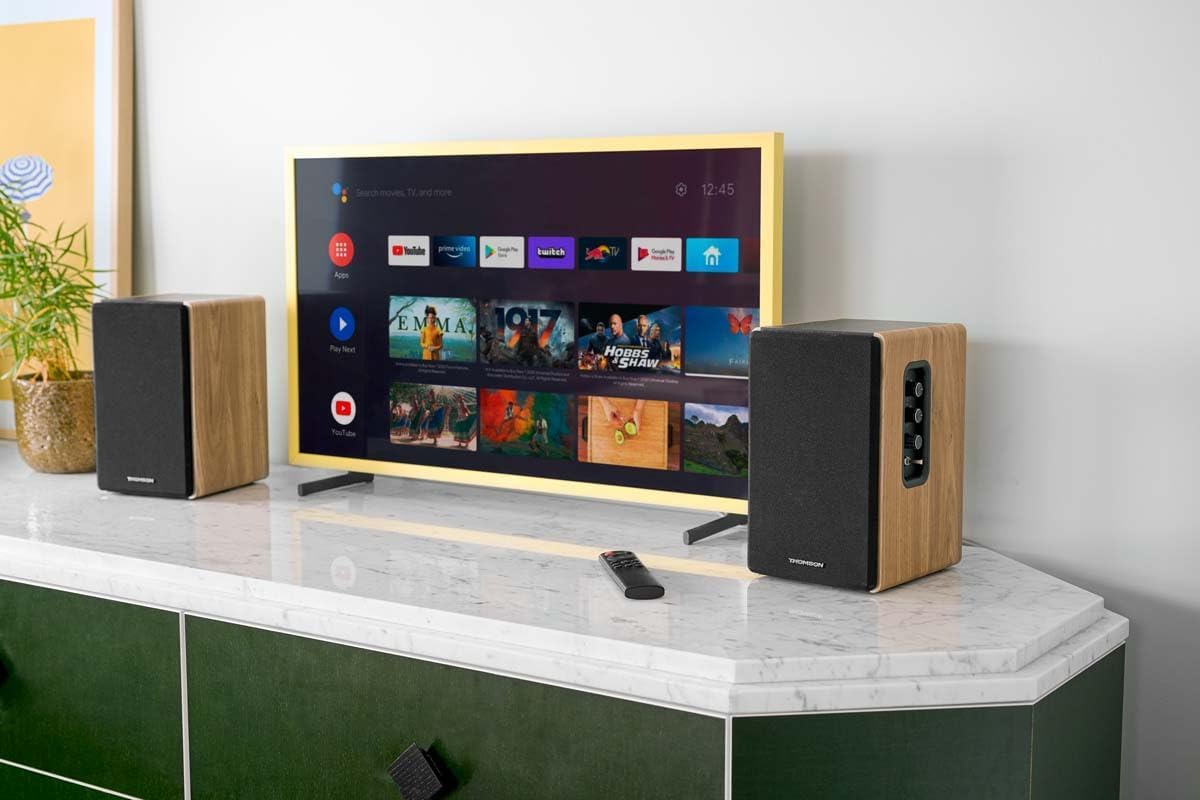
Image 4.2: Rear panel connections.
- Optik kirish: For connecting digital audio sources like TVs, game consoles, or Blu-ray players.
- Yordamchi kirish (RCA): For connecting analog audio sources such as turntables, CD players, or PCs. A 3.5mm jack adapter is provided.
- TV Audio (HDMI ARC): For connecting to a TV's HDMI ARC port, allowing TV remote control of the speaker volume.
- USB orqali ijro etish: MP3 ijro etish uchun fileto'g'ridan-to'g'ri USB flesh-diskidan.
- Sub Out: For connecting an external active subwoofer for enhanced bass.
- Karnay chiqishi: Passiv karnayga ulanadi.
- Kirish quvvati: Asosiy quvvat manbaiga ulanadi.
4.3. Masofadan boshqarish pulti
The remote control provides convenient access to all speaker functions from a distance.

Image 4.3: Remote control.
- Quvvat tugmasi: Turns the speakers on/off.
- Ovozni o'chirish tugmasi: Ovozni o'chiradi/yoqadi.
- Tovush +/-: Ovoz balandligini sozlaydi.
- Playback Controls (Play/Pause, Skip): For USB playback.
- Source Selection Buttons (OPT, BT, ARC, USB, LINE): Audio kirish manbasini tanlaydi.
- EQ Mode Buttons (MOVIE, MUSIC, DIALOG): Selects preset equalization modes.
5. Sozlash
5.1. Dinamikni joylashtirish
Place the speakers on a stable, flat surface such as a bookshelf, desk, or speaker stands. For optimal stereo imaging, position the speakers equidistant from your listening position and at ear level. Ensure there is adequate space around the speakers for ventilation.
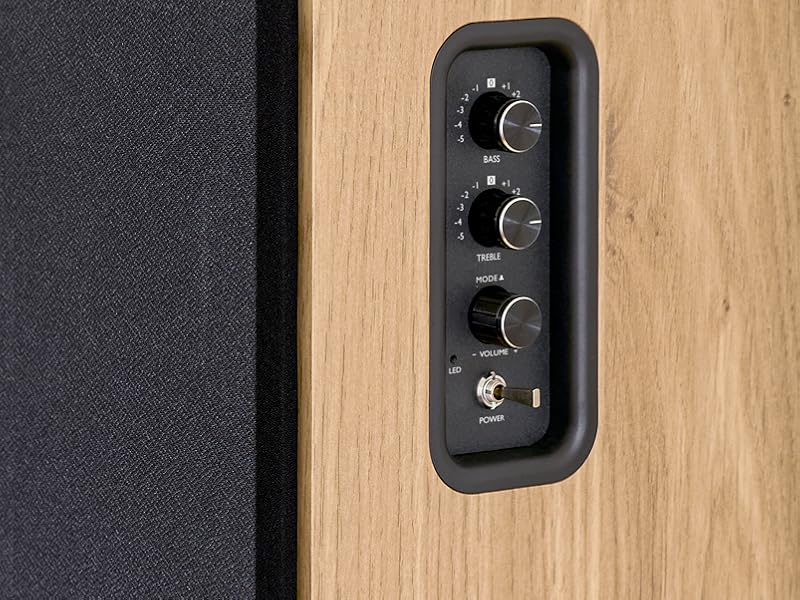
Image 5.1: Recommended speaker placement on a desk.
5.2. Dinamiklarni ulash
- Identify the active speaker (with controls and inputs) and the passive speaker.
- Connect the included speaker cable from the speaker output terminals on the active speaker to the input terminals on the passive speaker. Ensure correct polarity (+ to + and - to -).
5.3. Ovoz manbalarini ulash
Connect your desired audio sources to the active speaker using the appropriate cables.
- Optik kirish: Use an optical cable to connect your TV, game console, or Blu-ray player to the OPTICAL IN port.
- HDMI (ARC) Input: Use an HDMI cable to connect your TV's HDMI ARC port to the TV AUDIO (HDMI) port on the speaker. This allows your TV remote to control the speaker volume.
- RCA (AUX) kirish: Use an RCA cable (or the provided 3.5mm jack to RCA adapter) to connect devices like a turntable, CD player, or PC to the AUX IN (RCA) ports.
- USB usuli: MP3 o'z ichiga olgan USB flesh-diskini joylashtiring files into the USB PLAY port.

Image 5.2: Speakers connected to a television via HDMI ARC.
5.4. Bluetooth ulanishi
- Ensure the speakers are powered on.
- Press the 'BT' button on the remote control or the side panel to select Bluetooth input. The LED indicator will flash, indicating pairing mode.
- Smartfoningizda, planshetingizda yoki kompyuteringizda Bluetooth-ni yoqing va mavjud qurilmalarni qidiring.
- Select "THOMSON WS902DUO" from the list of devices.
- Ulangandan so'ng, LED indikatori miltillashni to'xtatadi va doimiy bo'lib qoladi. Endi siz audioni simsiz uzatishingiz mumkin.
5.5. Subwoofer Connection (Optional)
If you wish to enhance bass further, connect an active subwoofer to the 'Sub Out' port on the rear panel of the active speaker using an RCA cable.
6. Foydalanish bo'yicha ko'rsatmalar
6.1. Quvvatni yoqish/o‘chirish
Use the power switch on the side control panel or the power button on the remote control to turn the speakers on or off.
6.2. Manba tanlash
Press the corresponding source button on the remote control (OPT, BT, ARC, USB, LINE) to switch between connected audio inputs. The LED indicator will change to reflect the selected source.
6.3. Ovoz balandligini boshqarish
Adjust the volume using the 'Volume' knob on the side control panel or the 'VOL+/-' buttons on the remote control.
6.4. Ovozni sozlash
Fine-tune the sound to your preference:
- Bass/treble: Use the 'Bass' and 'Treble' knobs on the side control panel to adjust the low and high frequencies.
- EQ rejimlari: Press the 'MOVIE', 'MUSIC', or 'DIALOG' buttons on the remote control to select preset equalization settings optimized for different content types.
6.5. USB orqali ijro etish
When a USB flash drive with MP3 files is inserted and USB source is selected, the speakers will automatically begin playing. Use the playback control buttons on the remote control (Play/Pause, Skip) to manage your music.
6.6. Bluetooth bilan ishlash
After successful pairing (see Section 5.4), you can stream audio from your Bluetooth device. Use your device's controls or the speaker's remote control for playback and volume adjustments.
7. Xizmat ko'rsatish
To'g'ri parvarishlash karnaylaringizning uzoq umr ko'rishini va ishlashini ta'minlaydi.
- Tozalash: Wipe the speaker surfaces with a soft, dry cloth. Do not use liquid cleaners or abrasive materials.
- Ventilyatsiya: Haddan tashqari issiqlikni oldini olish uchun ventilyatsiya teshiklari bloklanmaganligiga ishonch hosil qiling.
- Saqlash: If storing the speakers for an extended period, unplug them from the power outlet and store them in a cool, dry place.
- Namlikdan saqlaning: Keep the speakers away from water and high humidity.
8. Muammolarni bartaraf qilish; nosozliklarni TUZATISH
Agar biron bir muammoga duch kelsangiz, quyidagi muammolarni bartaraf etish bo'yicha qo'llanmaga qarang:
| Muammo | Mumkin sabab | Yechim |
|---|---|---|
| Quvvat yo'q | Power cable not connected; Power switch off; Wall outlet not working. | Ensure power cable is securely connected. Turn on the power switch. Test the wall outlet with another device. |
| Ovoz yo'q | Incorrect input source selected; Volume too low; Mute function active; Audio cable not connected properly. | Select the correct input source. Increase volume. Press Mute button on remote. Check all audio cable connections. |
| Bluetooth bilan ulanish amalga oshmadi | Speakers not in pairing mode; Device too far; Bluetooth disabled on source device. | Ensure speakers are in Bluetooth pairing mode (flashing LED). Move device closer to speakers. Enable Bluetooth on your source device. |
| USB orqali tinglash ishlamayapti | USB drive not formatted correctly; Files not MP3; USB drive not inserted properly. | Ensure USB drive is FAT32 formatted. Verify files are in MP3 format. Re-insert USB drive firmly. |
| Ovoz buzilishi | Volume too high; Source audio quality poor; Bass/Treble settings too extreme. | Lower the volume. Test with a different audio source. Adjust Bass and Treble controls. |
9. Texnik shartlar
| Xususiyat | Spetsifikatsiya |
|---|---|
| Brend | TOMSON |
| Model raqami | WS902DUO |
| Maksimal karnay chiqish quvvati | 150 vatt |
| Chastotaga javob | 60 Gts |
| Ulanish texnologiyasi | Bluetooth, HDMI (ARC), Optical, RCA, USB |
| Bluetooth versiyasi | 5.3 |
| Audio chiqish rejimi | Stereo (2.0 channels) |
| Kirish hajmitage | 230 volt (AC) |
| O'rnatish turi | Raf tog'i |
| Karnay turi | Multimedia Bookshelf |
| Maxsus xususiyatlar | Stereo Pairing, USB Port, Sub-Out, Remote Control, EQ Modes |
| Tavsiya etilgan foydalanish | Smartphone, Tablet, PC, TV, Game Console, DVD Player, Turntable |
| Rang | Tabiiy yog'och qoplamasi |
| Nazorat usuli | Remote Control, Side Panel Knobs |
| Woofer hajmi | 10 santimetr |
| Olchamlari (Y x G x D) | 28 cm x 24 cm x 47 cm (approximate, per speaker) |
| Og'irligi | 5048 Grams (total for pair) |
| Elementlar soni | 2 |
| Ishlab chiqaruvchi mamlakat; ta'minotchi mamlakat | Xitoy |
10. Kafolat haqida ma'lumot
This THOMSON WS902DUO product comes with a 1 yillik cheklangan kafolat sotib olingan kundan boshlab. Ushbu kafolat normal foydalanish paytida ishlab chiqarishdagi nuqsonlar va mahoratni qamrab oladi. Noto'g'ri foydalanish, baxtsiz hodisalar, ruxsatsiz o'zgartirishlar yoki normal aşınma natijasida kelib chiqqan zararni qoplamaydi. Kafolat da'volari uchun sotib olish hujjatingizni saqlang.
11. Mijozlarni qo'llab-quvvatlash
For technical assistance, warranty claims, or any questions regarding your THOMSON WS902DUO speakers, please contact your retailer or visit the official THOMSON support website. Please have your model number (WS902DUO) and proof of purchase ready when contacting support.
Onlayn qo'llab-quvvatlash: www.thomsonconsumer.com (Iltimos, mintaqaviy qo'llab-quvvatlash kontaktlarini tekshiring)