
Kirish
This manual provides detailed instructions for the setup, operation, and maintenance of your Chameye 4K PTZ Camera (CH420). Designed for high-quality video conferencing, live streaming, and educational events, this camera features advanced AI auto-tracking, 20X optical zoom, and versatile connectivity options. Please read this manual thoroughly before using the product to ensure optimal performance and longevity.
Mahsulot tugadiview
4K UHD PTZ kamera
The Chameye 4K AI Tracking PTZ conference camera features a 1/2.5-inch CMOS sensor with 8.51 megapixels, delivering 4K (3840x2160) resolution at up to 30 frames per second (fps). Automatic exposure ensures clarity in low-light environments. It is ideal for video conferencing, church live services, worship, education, teaching broadcasts, and events.

Image: Comparison of 4K UHD versus Full HD 1080p video quality, demonstrating the superior clarity of the Chameye 4K PTZ Camera in a church setting.
20X optik kattalashtirish
Equipped with 20x optical zoom and 16x digital zoom, the camera provides high-definition images from various distances. Fast auto-focus maintains image clarity during zooming for a smooth live experience. Power over Ethernet (PoE) functionality allows power, control, and video/audio transmission over a single network cable.

Image: The Chameye 4K PTZ Camera showcasing its 20X optical zoom capability, capturing distant details within a church.
AI kuzatuvi
The 4K Conference Room Camera supports AI tracking and auto-framing. Activate AI Tracking by pressing F3 on the remote control and deactivate with F4. Tracking speed is adjustable from 1 to 10. Advanced 2D and 3D noise reduction technology, combined with a low-noise CMOS sensor, optimizes image quality in real-time.

Image: The Chameye 4K PTZ Camera utilizing AI auto tracking to keep a speaker centered on stage.
Multiple Video Output Interface
The camera offers USB3.0, HDMI, and IP video outputs. HDMI/USB connections support 4KP30/25, 1080P60/59.94/50, 1080P30/29.97/25, and 720P60/50. IP streaming supports 1080P30/29.97/25 and 720P60/50. It supports H.264/H.265 encoding for smooth and clear video even with low bandwidth.

Rasm: batafsil view of the Chameye 4K PTZ Camera's multiple video output ports, including HDMI, USB3.0, and LAN, alongside logos of compatible software and platforms.
Oson nazorat
Pan/Tilt/Zoom speed is adjustable. The camera supports 10 preset positions via the IR remote control and 255 presets with the Chameye PTZ controller E300. Network settings, previews, camera controls, and parameter settings can be accessed via the camera's web brauzeringizdagi interfeys.

Image: Screenshot illustrating the user-friendly web interface for the Chameye 4K PTZ Camera, showing login and various camera settings.
Bir nechta o'rnatish variantlari
The camera supports Desktop, Tripod mounting, Wall mounting, and Ceiling mounting to adapt to different room layouts and space requirements.
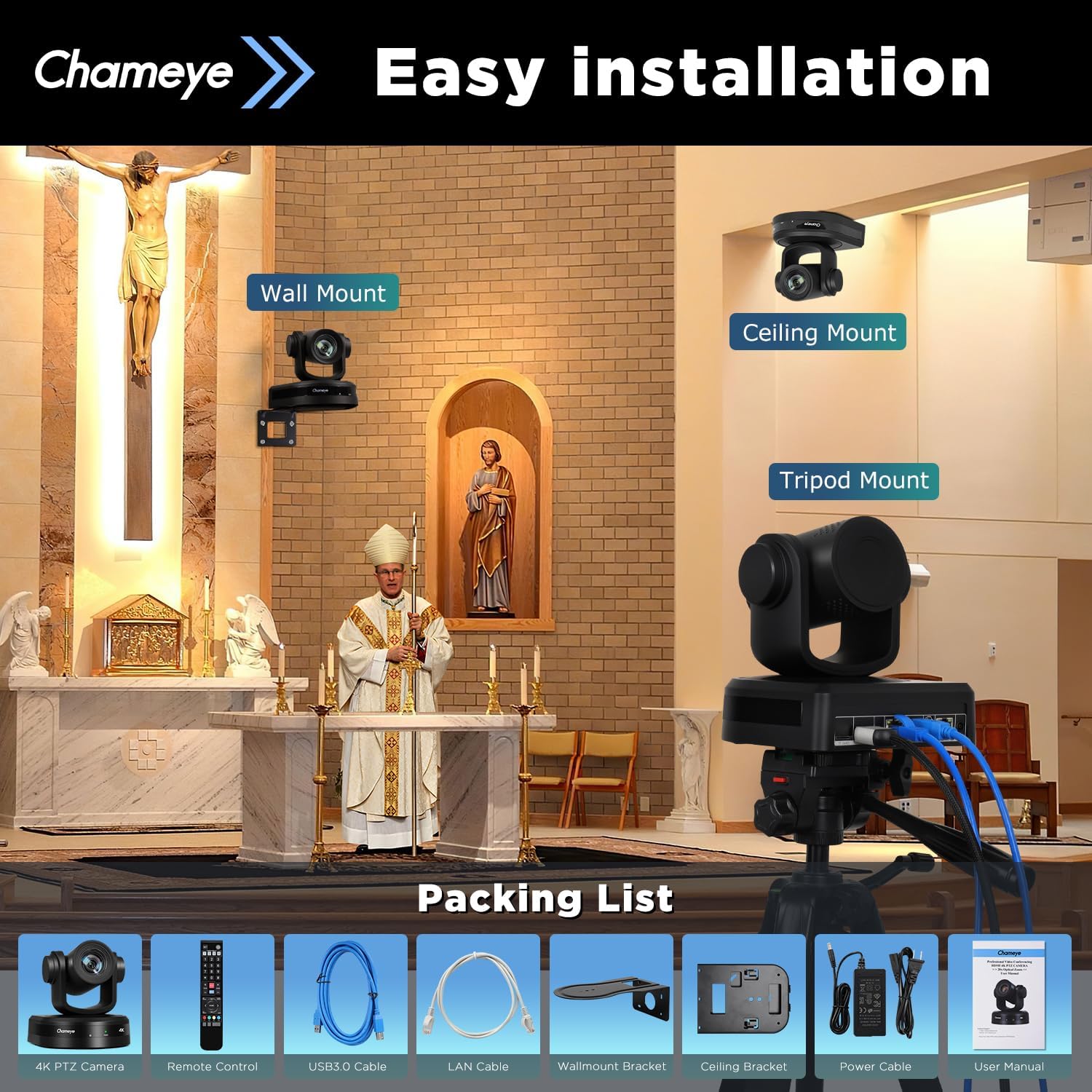
Image: The Chameye 4K PTZ Camera displayed with its versatile installation options, including wall, ceiling, and tripod mounts, in a church setting.
Keng muvofiqlik
Compatible with PTZ controllers, BlackMagic Design, and other video mixer switchers. It works with vMix/OBS, Zoom, Teams, Voov meeting, CISCO WebEx, and supports multi-camera video production for live streaming to YouTube and Facebook. Supports VISCA, PELCO P/D, and other protocols.

Image: The Chameye 4K PTZ Camera highlighting its broad compatibility with operating systems like Windows, Android, MacOS, and Linux, as well as popular streaming software such as vMix, YouTube, Zoom, and OBS Studio.
USB Plug & Play
Supports TF card storage for video recording (TF card not included). USB 2.0 supports the connection of an omnidirectional microphone, mainly used in conference scenarios for simultaneous audio and video output. USB 3.0 offers plug & play functionality, requiring no additional drivers.
Qutida nima bor
The Chameye 4K PTZ Camera package includes the following items:
- Chameye 4K PTZ Camera (CH420)
- IR masofadan boshqarish pulti
- USB3.0 kabeli
- LAN kabeli
- Wallmount qavs
- Shift qavs
- Quvvat kabeli
- Foydalanuvchi uchun qo'llanma
Image: The Chameye 4K PTZ Camera displayed with its versatile installation options, including wall, ceiling, and tripod mounts, in a church setting, also showing the included accessories in the packing list.
O'rnatish bo'yicha ko'rsatmalar
1. Jismoniy aloqalar
- Quvvat ulanishi: Connect the power cable to the DC 12V port or use a PoE-enabled LAN cable for power.
- Video chiqishi: Connect the camera to your display or video switcher using an HDMI cable, USB3.0 cable, or LAN cable for IP streaming.
- Audio kirish: If using an external microphone, connect it to the LINE IN port.
- Boshqaruv ulanishlari: For external control, connect via the RS-232 or RS-485 ports.

Rasm: batafsil view of the Chameye 4K PTZ Camera's multiple video output ports, including HDMI, USB3.0, and LAN, alongside logos of compatible software and platforms.
2. Dastlabki konfiguratsiya
Upon first use, you may need to adjust video format settings if your display does not support 4K resolution. Connect the camera via USB to a laptop and use the camera's remote control to access the on-screen menu. Navigate to 'Video Format' and select a compatible resolution (e.g., 1080P).
For network control, access the camera's menu via the remote control. Go to 'Network' settings, disable DHCP, and manually enter a static IP address and gateway that matches your network configuration. This allows the camera to be controlled via its web interface or a PTZ controller.
Video: This video demonstrates the initial setup and connectivity options for a 4K PTZ camera, including port identification and basic configuration steps. It highlights the importance of adjusting video format settings for display compatibility and network setup for remote control.
Foydalanish bo'yicha ko'rsatmalar
1. Asosiy boshqaruv elementlari
Use the IR remote control or a compatible PTZ controller (E300) to control the camera's Pan, Tilt, and Zoom functions. PTZ speed is adjustable (1-16) via the remote control.
2. Oldindan o'rnatilgan pozitsiyalar
Set up to 10 preset positions using the IR remote control for quick camera movements. Up to 255 presets can be configured with the Chameye PTZ controller E300.
3. AI kuzatuvi
Activate AI Tracking by pressing the F3 button on the IR remote control. Deactivate it by pressing F4. The tracking speed can be adjusted from 1 to 10 to suit your needs. The camera supports humanoid auto-tracking and auto-framing.
4. Video yozib olish
The camera supports video recording to a TF card (not included). Ensure a TF card is inserted into the designated slot for recording functionality.
5. Web Interfeys
Kameralarga kirish web a ga IP manzilini kiritish orqali interfeys web browser. From here, you can view oldin yashangviews, control camera movements, and adjust various parameters and settings.
Video: Ushbu video batafsil ma'lumot beradiview of the FEELWORLD 4K12X PTZ Camera, showcasing its features, connectivity, and control options. It highlights the camera's smooth pan/tilt/zoom movements, preset capabilities, and various input/output ports.
Xizmat
- Tozalash: Kamera korpusini tozalash uchun yumshoq, quruq matodan foydalaning. Ob'ektiv uchun maxsus linzalarni tozalash matosi va eritmasidan foydalaning.
- Saqlash: Kamerani to'g'ridan-to'g'ri quyosh nuri va haddan tashqari haroratdan uzoqroq joyda, salqin va quruq joyda saqlang.
- Ishlov berish: Avoid dropping or subjecting the camera to strong vibrations.
Muammolarni bartaraf qilish; nosozliklarni TUZATISH
- Video chiqishi yo'q: If your monitor does not display video, check the camera's video format settings. If the monitor does not support 4K, lower the resolution via the remote control menu (e.g., to 1080P).
- Network Control Issues: Verify that the camera's IP address, subnet mask, and gateway settings are correctly configured to match your network. Ensure DHCP is disabled if using a static IP.
- Masofadan boshqarish pulti javob bermayapti: Ensure there is a clear line of sight between the remote and the camera. Check and replace batteries if necessary.
Texnik xususiyatlari
| Xususiyat | Tavsif |
|---|---|
| Ishlab chiqaruvchi | Chameye |
| Model raqami | CH420 |
| Mahsulot o'lchamlari | 33.02 x 25.4 x 26.67 sm; 3.5 kg |
| Fotosensor texnologiyasi | CMOS |
| Video suratga olish ruxsati | 4K (3840x2160) @ 30 kadr/soniya |
| Optik kattalashtirish | 20X |
| Raqamli kattalashtirish | 16X |
| Maksimal fokus uzunligi | 110 millimetr |
| Maksimal diafragma | 2.8 f |
| Flash xotira turi | SD (for recording) |
| Video suratga olish formati | MP4 |
| Qo'llab-quvvatlanadigan audio formati | AAC |
| Ulanish texnologiyasi | HDMI, LAN (PoE), USB3.0, AI-Track, RS-232, RS-485 |
Kafolat va qo'llab-quvvatlash
All Chameye products come with a 3 yillik cheklangan kafolat. For any inquiries or assistance, please utilize our 24/7 expert support, professional technical support, and free online training resources. Your satisfaction is our top priority.