
Kirish
Thank you for choosing the SuperRC M23 Mini RC Drone. This manual provides essential information for the safe operation, setup, maintenance, and troubleshooting of your drone. Please read this manual thoroughly before operating the drone to ensure proper function and to avoid damage or injury. This drone is designed for adult beginners and features a lightweight, portable design with an HD camera and intelligent flight functions.
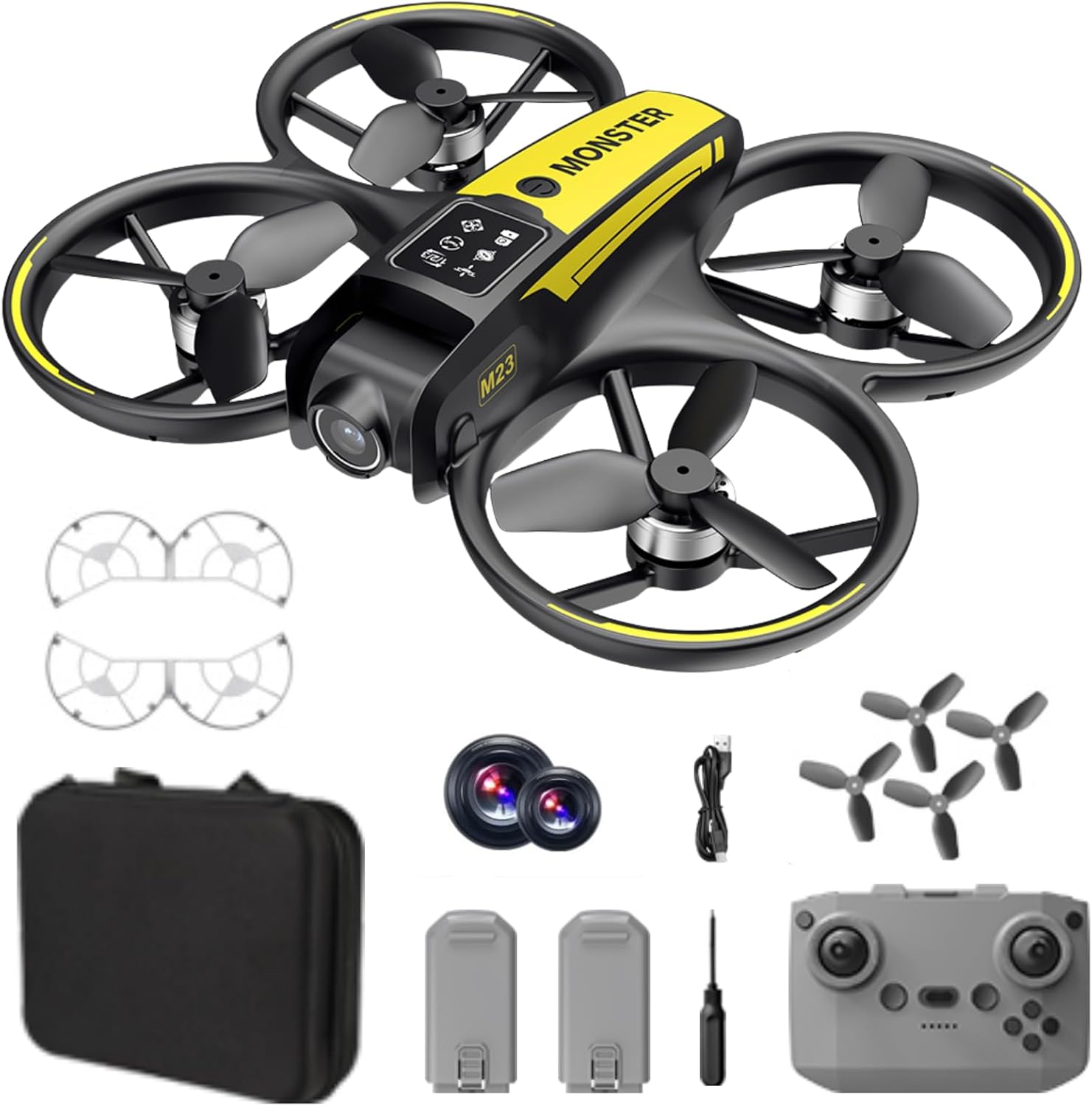
Qutida nima bor
The SuperRC M23 drone package includes the following components:
- M23 uchuvchisiz samolyot
- Masofadan boshqarish pulti
- 2 x 3.7V 1050mAh qayta zaryadlanuvchi batareyalar
- 4 ta zaxira pervanel
- 2 x parvona qo'riqchilari
- Xotira kartasi
- Karta o'quvchi
- Tornavida
- USB zaryadlovchi kabeli
- Saqlash sumkasi
- Foydalanuvchi uchun qo'llanma (ushbu hujjat)

Mahsulot tugadiview
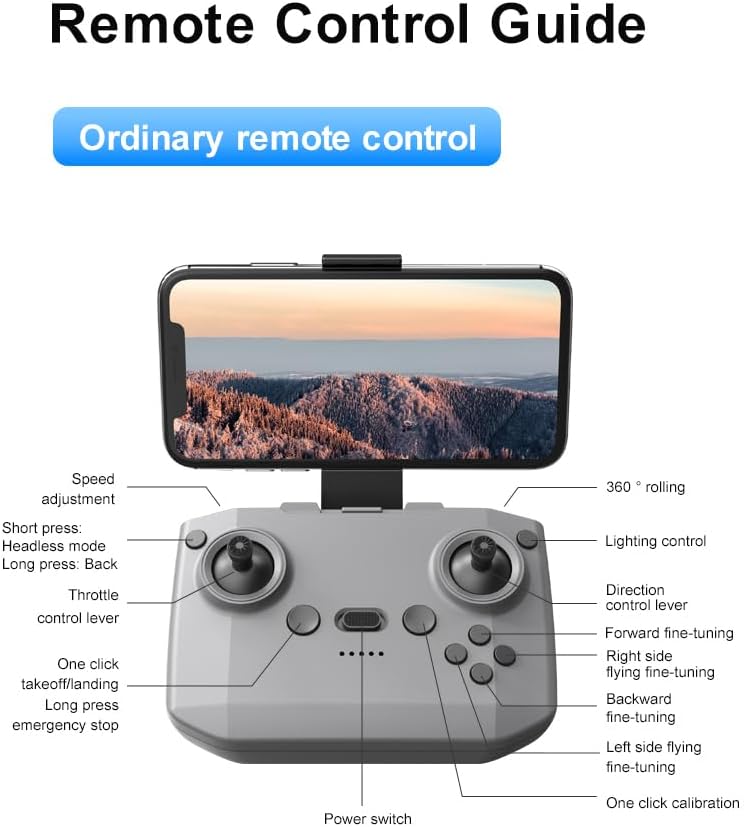
Masofadan boshqarish pulti tartibi
Familiarize yourself with the remote control buttons and their functions before flight.
Sozlash; o'rnatish
1. Batareyani o'rnatish
- Ensure the drone and remote control are powered off.
- Drondagi batareya bo'linmasini toping.
- Insert a charged 3.7V 1050mAh battery into the compartment until it clicks securely into place.
- For the remote control, open the battery cover and insert the required batteries (not specified in product data, assume standard AA/AAA, user should refer to physical manual for exact type).
2. Pervanelni o'rnatish
The drone comes with propellers pre-installed. If replacement is needed:
- Identify the 'A' and 'B' markings on the propellers and the corresponding motor arms.
- Attach 'A' propellers to 'A' motor shafts and 'B' propellers to 'B' motor shafts. Ensure they are firmly secured.
3. Pervanel himoyasini o'rnatish
For added safety, attach the propeller guards:
- Align each propeller guard with the designated slots on the drone's motor arms.
- Gently push until they snap into place.
4. Zaryadlash
Charge the drone batteries using the provided USB charging cable.
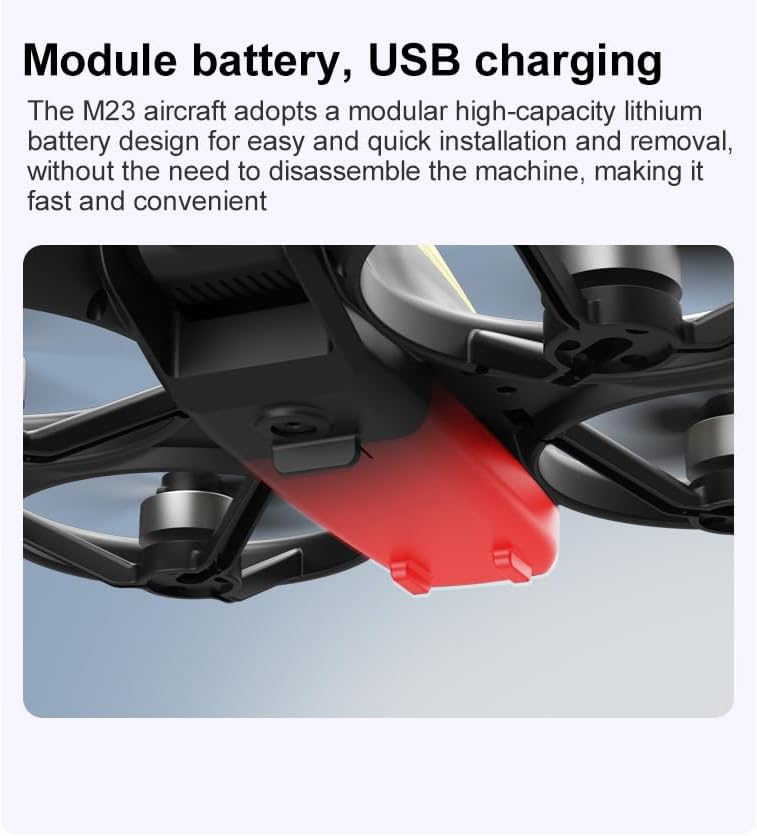
- USB zaryadlovchi simini dron batareyasiga ulang.
- Plug the other end into a USB power source (e.g., computer, USB wall adapter).
- The indicator light on the cable will show charging status (refer to physical manual for specific light indications).
- Charging time is approximately 60-90 minutes for a full charge.
Foydalanish bo'yicha ko'rsatmalar
Parvoz oldidan ro'yxat
- Dron va masofadan boshqarish pultining batareyalari to'liq zaryadlanganligiga ishonch hosil qiling.
- Pervanellar to'g'ri o'rnatilgan va xavfsiz.
- Propeller guards are attached (recommended for beginners).
- To'siqlar, odamlar va hayvonlardan xoli bo'lgan ochiq, toza joyni tanlang.
- Check local drone regulations before flying.
Asosiy parvoz operatsiyalari
The following video demonstrates key flight features including one-key takeoff, optical flow positioning, 360-degree roll, and speed switching.
One-Key Takeoff and Landing
- Yechish; uchib ketish: Place the drone on a flat surface. Press the One-Key Takeoff button on the remote control. The drone will automatically ascend and hover at a stable altitude.
- Hodisa: Press the One-Key Landing button. The drone will slowly descend and land automatically.
Flight Modes and Features
- Boshsiz rejim: Press the Headless Mode button. In this mode, the drone's orientation is relative to the pilot, making it easier to control without worrying about the drone's front direction.
- Tezlikni sozlash: Use the speed adjustment button (or switch) on the remote control to cycle through low, medium, and high speeds. This allows for adaptable flight control based on skill level and environment.
- 360 ° Rulo: Press the 360° Roll button and then move the right joystick in any direction to perform an aerial flip. Ensure sufficient altitude before attempting.
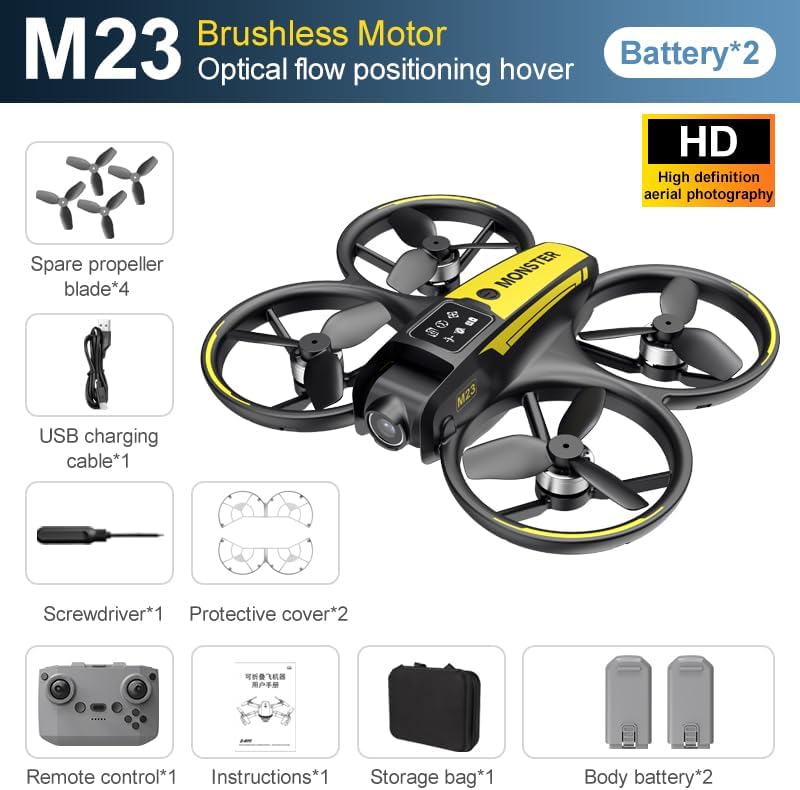
- Optik oqim joylashuvi: The drone utilizes a bottom camera for optical flow positioning, which helps maintain stable hovering, especially indoors or in areas with good ground texture. This feature assists in precise altitude hold.
- Parvoz traektoriyasi: Through the mobile application, you can draw a desired flight path on your screen. The drone will then follow this trajectory automatically.

Kamera ishlashi
The M23 drone is equipped with an HD camera with a 90-degree adjustable lens for capturing photos and videos.

- Foto/videoyozuv: Use the dedicated buttons on the remote control or the mobile app to start/stop video recording or take photos.
- Haqiqiy vaqtda tasvir uzatish: Smartfoningizni dronning Wi-Fi tarmog'iga ulang view real vaqtda footage from the drone's camera on your device.
Xizmat
Tozalash
- Regularly clean the drone body with a soft, dry cloth.
- Ensure propellers are free from dust, dirt, or debris.
- Clean the camera lens gently with a microfiber cloth to maintain image quality.
Saqlash
- Store the drone and its components in the provided storage bag to protect them from dust and physical damage.
- Keep the drone in a cool, dry place, away from direct sunlight and extreme temperatures.
Batareya parvarishi
- Batareyalarni haddan tashqari zaryadlamang yoki zaryadsizlantirmang.
- If storing for extended periods, charge batteries to approximately 50-60% capacity.
- Avoid exposing batteries to high temperatures or direct sunlight.
Muammolarni bartaraf qilish; nosozliklarni TUZATISH
If you encounter issues with your SuperRC M23 drone, refer to the following common problems and solutions:
| Muammo | Mumkin sabab | Yechim |
|---|---|---|
| Dron masofadan boshqarish pultiga javob bermaydi | Low battery on drone or remote; Not paired correctly; Interference | Charge batteries; Re-pair drone and remote (refer to physical manual for pairing steps); Move to an area with less interference |
| Uchuvchisiz uchish paytida uchib ketadi | Not calibrated; Wind interference; Damaged propeller | Perform calibration (refer to physical manual); Fly in calm conditions; Replace damaged propellers |
| Kamera tasvir sifati past | Dirty lens; Low light conditions; Wi-Fi interference | Clean camera lens; Fly in well-lit areas; Ensure strong Wi-Fi connection |
| Qisqa parvoz vaqti | Batareya to'liq zaryadlanmagan; Eski batareya; Agressiv uchish | Ensure battery is fully charged; Consider replacing old batteries; Practice smoother flight maneuvers |
Texnik xususiyatlari
Key technical specifications for the SuperRC M23 Mini RC Drone:
| Xususiyat | Tafsilot |
|---|---|
| Model nomi | M23-Drone |
| Brend | SuperRC |
| Element og'irligi | 0.2 Kilograms (Under 250g) |
| Buyum oʻlchamlari (U x G x Y) | 7" Uzunlik x 6" Kenglik x 2" Balandlik (taxminan 18 x 15 x 5 sm) |
| Material | Plastik |
| Malaka darajasi | Boshlovchi |
| Yosh diapazoni (tavsif) | Voyaga etgan |
| Kamera | HD Camera with 90° Adjustable Lens |
| Video suratga olish ruxsati | 720p |
| Video chiqishi aniqligi | 720 piksel |
| Video suratga olish formati | MP4 |
| Rasm formatini qo'llab-quvvatlaydi | JPEG |
| Optik sensor texnologiyasi | CMOS |
| Ulanish texnologiyasi | Wi-Fi, RF |
| Boshqarish turi | Masofadan boshqarish |
| Batareya quvvati | 1050 mA/soat (har bir batareya uchun) |
| Batareya xujayrasi tarkibi | Lityum ion |
| Maxsus xususiyatlar | Adjustable, One Button Return, One Key Rotation, Rechargeable, Speed Adjustment, Headless Mode, Optical Flow Positioning |
Kafolat va qo'llab-quvvatlash
SuperRC provides a standard warranty for the M23 Mini RC Drone against manufacturing defects. Please retain your proof of purchase for warranty claims.
Kafolat haqida ma'lumot
- The warranty period typically covers defects in materials and workmanship under normal use.
- Damage resulting from misuse, accidents, unauthorized modifications, or improper maintenance is not covered.
- For specific warranty terms and conditions, please refer to the warranty card included in your product packaging or contact SuperRC customer service.
Mijozlarni qo‘llab-quvvatlash
If you require further assistance, have questions, or need to report an issue, please contact SuperRC customer support through the following channels:
- Onlayn qo'llab-quvvatlash: Visit the official SuperRC webTez-tez so'raladigan savollar, qo'llab-quvvatlash resurslari va aloqa shakllari uchun sayt.
- Elektron pochta orqali yordam: Refer to your product packaging or the SuperRC webmijozlarga xizmat ko'rsatish elektron pochta manzili uchun sayt.
- Chakana sotuvchini qo'llab-quvvatlash: If purchased from a retailer, you may also contact their customer service for assistance.
When contacting support, please provide your product model (M23) and a detailed description of the issue.