
Kirish
This manual provides essential information for the safe and efficient use of your Google Pixel 9 Pro 5G smartphone. Please read these instructions carefully before operating your device.

1-rasm: Old view of the Google Pixel 9 Pro 5G.
Qutida nima bor
Paketda barcha narsalar mavjudligini tekshiring:
- Google Pixel 9 Pro smartfoni
- USB-C dan USB-C kabeliga (1m, USB 2.0)
- SIM tepsisini chiqarish vositasi
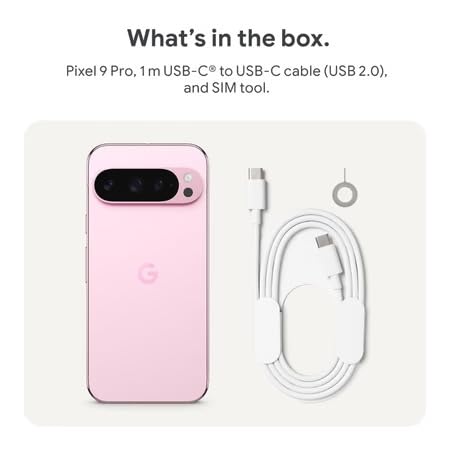
Figure 2: Included items in the Pixel 9 Pro packaging.
Sozlash; o'rnatish
1. SIM-kartani kiritish
- Locate the SIM tray on the side of your Pixel 9 Pro.
- Berilgan SIM karta chiqarish vositasini SIM karta uyasidagi kichik teshikka joylashtiring va uyasi chiqib ketguncha sekin bosing.
- Nano-SIM kartangizni oltin kontaktlarini pastga qaratib, patnisga joylashtiring. Uning to'g'ri joylashtirilganligiga ishonch hosil qiling.
- Carefully push the SIM tray back into the device until it is flush.
2. Dastlabki zaryadlash
Birinchi marta ishlatishdan oldin qurilmangizni to'liq zaryad qilish tavsiya etiladi.
- USB-C kabelini telefoningizning pastki qismidagi zaryadlash portiga ulang.
- Connect the other end of the cable to a compatible USB power adapter (sold separately) and plug it into a power outlet.
- Ekrandagi batareya belgisi zaryadlash holatini ko'rsatadi.
3. Quvvatni yoqish/o'chirish
- Yoqish uchun: Press and hold the Power button (located on the right side) until the Google logo appears on the screen.
- O'chirish uchun: Quvvat tugmasini bosib ushlab turing, so'ngra ekranda "O'chirish" tugmasini bosing.
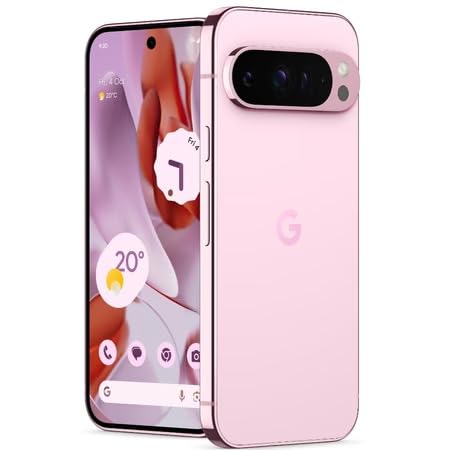
Figure 3: Power and volume buttons on the side of the device.
4. Birinchi marta o'rnatish ustasi
Upon powering on for the first time, follow the on-screen instructions to:
- Til va mintaqangizni tanlang.
- Wi-Fi tarmog'iga ulaning.
- Google hisobingizga kiring yoki yangisini yarating.
- Set up security features such as fingerprint unlock, face unlock, PIN, pattern, or password.
- Eski qurilmadan ma'lumotlarni uzatish (ixtiyoriy).
Foydalanish bo'yicha ko'rsatmalar
Asosiy navigatsiya
- Sensorli ekran imo-ishoralari: Interact with the device using taps, swipes, pinches (for zoom), and long presses.
- Bosh ekran: Access your applications, widgets, and customize your layout.
- Bildirishnomalar: Ekranning yuqori qismidan pastga suring view bildirishnomalar.
- Tez sozlamalar: Swipe down twice from the top of the screen to access quick settings toggles (Wi-Fi, Bluetooth, etc.).
Kamera ishlashi
The Pixel 9 Pro features a powerful triple rear camera system.
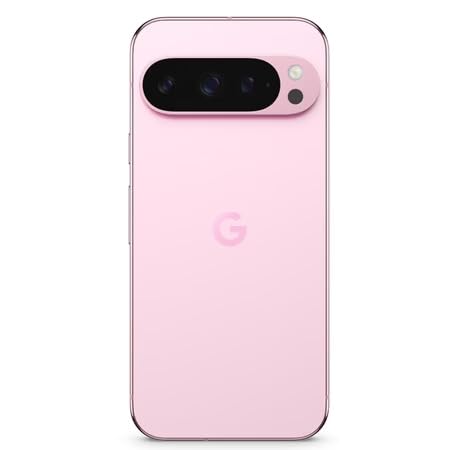
Figure 4: Rear camera system of the Pixel 9 Pro.
- Kamerani ochish: Tap the Camera app icon on your home screen or lock screen.
- Switching Lenses: Tap the icons on the viewfinder to switch between wide, ultrawide, and 5x telephoto lenses.
- Rasmga tushirish rejimlari: Select from various modes such as Night Sight for low-light conditions, Astrofotografiya for capturing stars, Ibratli for close-up shots, Uzoq ta'sir qilish for creative effects, and Portret for depth-of-field effects.
- Super Res Zoom: Pinch the screen to digitally zoom up to 30x. For video, Super Res Zoom supports up to 20x.
- Professional boshqaruv elementlari: Access advanced camera settings like shutter speed and manual focus for greater creative control.
Batareya boshqaruvi
- Batareya darajasini tekshirish: View batareya foizitage in the status bar or in Settings > Battery.
- Ekstremal batareya tejash: Enable this mode in Settings > Battery > Extreme Battery Saver to significantly extend battery life.
- Zaryadlash: Use the provided USB-C cable and a compatible power adapter for optimal charging speed.
Xavfsizlik xususiyatlari
Your Pixel 9 Pro incorporates multiple hardware security layers to protect your data.
- Barmoq izini ochish: Register your fingerprints in Settings > Security & privacy > Device unlock.
- Yuz bilan ochish: Qulay qulfni ochish uchun yuzni aniqlashni sozlang.
- PIN/naqsh/parol: Always set a strong screen lock method.
- Dasturiy ta'minot yangilanishlari: Regularly install system updates to ensure your device has the latest security patches.
Harorat sensori
The Pixel 9 Pro includes a thermometer for measuring temperature.
- Open the dedicated Thermometer app.
- Follow the on-screen instructions to measure body temperature or the temperature of objects.
- Temperature data can be saved and tracked within the Fitbit application.
Xizmat
Qurilmangizni tozalash
- Use a soft, lint-free cloth to clean the screen and body of your phone.
- Aşındırıcı materiallar, qattiq kimyoviy moddalar yoki aerozol spreylaridan foydalanishdan saqlaning.
- Do not submerge the device in water, despite its water-resistant rating.
Dasturiy ta'minot yangilanishlari
Google regularly releases software updates to improve performance, add features, and enhance security.
- To check for updates, go to Settings > System > System update.
- Ensure your device is connected to Wi-Fi and has sufficient battery charge before installing updates.
Jismoniy parvarish
The Pixel 9 Pro is built with Corning Gorilla Glass Victus 2 and is water-resistant, offering durability against everyday drops and spills.
- While durable, avoid excessive impacts or drops to prevent damage.
- Consider using a screen protector and a protective case for additional safeguarding.
Muammolarni bartaraf qilish; nosozliklarni TUZATISH
Qurilma javob bermayapti
If your phone becomes unresponsive, perform a force restart:
- Press and hold the Power button for approximately 10-15 seconds until the device restarts.
Ilovalar ishlamay qolmoqda yoki muzlayapti
- Muammoli ilovani yoping va uni qayta oching.
- Clear the app's cache: Go to Settings > Apps > See all apps > [App Name] > Storage & cache > Clear cache.
- Ilova Google Play do'konidan so'nggi versiyasiga yangilanganligiga ishonch hosil qiling.
- Telefoningizni qayta yoqing.
Network Connectivity Issues (Wi-Fi/Cellular)
- Toggle Wi-Fi or cellular data off and then back on.
- Telefoningizni qayta yoqing.
- SIM kartangiz to'g'ri kiritilganligini tekshiring.
- Reset network settings: Go to Settings > System > Reset options > Reset Wi-Fi, mobile & Bluetooth.
Batareyaning tez tugashi
- Quvvat sarflaydigan ilovalarni aniqlash uchun Sozlamalar > Batareya orqali batareya sarfini tekshiring.
- Ekran yorqinligini va ekran kutish vaqtini kamaytiring.
- Disable unnecessary features like GPS, Bluetooth, and Wi-Fi when not in use.
- Enable Extreme Battery Saver mode.
Zavod sozlamalarini tiklash (oxirgi chora)
Warning: A factory reset will erase all data from your phone. Back up all important data before proceeding.
- Sozlamalar > Tizim > Parametrlarni tiklash > Barcha ma’lumotlarni o‘chirish (zavod sozlamalarini tiklash) ga o‘ting.
- Confirm your decision when prompted.
Texnik xususiyatlari
| Xususiyat | Tafsilot |
|---|---|
| Brend | |
| Model | Pixel 9 Pro |
| Operatsion tizim | Android 15 |
| Protsessor | Google Tensor G4 (3.1 gigagertsli) |
| Ram | 16 GB |
| Ichki xotira | 256 GB |
| Displey | 6.3 Inches LTPO OLED (Actua), 1280 x 2856 Pixels, 120 Hz Refresh Rate |
| Orqa kamera | 50 MP wide + 48 MP ultrawide (Macro) + 48 MP 5x telephoto |
| Old kamera | 42 MP |
| Batareya quvvati | 4700 mlnamp Hours (up to 24 hours average life) |
| Ulanish | 5G, Wi-Fi 7, Bluetooth 5.3, NFC, UWB, USB-C |
| SIM karta | Single Nano SIM |
| Suvga chidamlilik | Suvga chidamli |
| O'lchamlari | 8 x 72 x 153 millimetr |
| Og'irligi | 198 gramm |
Kafolat va qo'llab-quvvatlash
Kafolat haqida ma'lumot
Your Google Pixel 9 Pro 5G comes with a 1 yillik ishlab chiqaruvchi kafolati sotib olingan kundan boshlab. Ushbu kafolat odatdagi foydalanish sharoitida ishlab chiqarish nuqsonlarini qoplaydi. Iltimos, kafolat da'volari uchun sotib olinganligingizni tasdiqlovchi hujjatingizni saqlab qo'ying.
Mijozlarni qo‘llab-quvvatlash
For technical assistance, warranty claims, or other support inquiries, please contact Google customer service:
- Ishlab chiqaruvchi: Google MChJ, 1600 AmpParkway gitarasi, tog ' View, CA 94043, AQSh
- Phone Support (India): +91 7718892303
- Import qiluvchi bilan bog'lanish (Hindiston): Nexora Axis Private Limited (+91 7718892303)
For the most up-to-date support information, please visit the official Google Pixel support websayt.