
Kirish
This manual provides essential information for setting up, operating, maintaining, and troubleshooting your Apple Watch Series 11 GPS + Cellular 42mm. Please read it thoroughly to ensure proper use and to maximize your device's capabilities.
- Know Your Sleep Score: Track and understand your sleep quality for improved rest.
- Health Insights: Take ECGs, receive notifications for heart rate irregularities, and monitor blood oxygen levels with the Vitals app.
- Dizayn: The thin and lightweight design ensures comfort for continuous wear, including during exercise and sleep.
- Fitness Partner: Utilize advanced metrics for workouts, including Pacer, Heart Rate Zones, training load, and Workout Buddy powered by Apple Intelligence (requires nearby iPhone).
- Batareya muddati: Enjoy up to 24 hours of normal use, with fast charging providing up to 8 hours of use in just 15 minutes.

Rasm: tugadiview of Apple Watch Series 11 features including health insights, battery life, sleep score, and 5G connectivity.
Qutida nima bor
Paketda barcha komponentlar mavjudligiga ishonch hosil qiling:
- Apple Watch uchun korpus
- Sport Band (M/L size for 160–210mm wrists)
- 1m magnit zaryadlash kabeli

Image: The Apple Watch Series 11 packaging contents, showing the watch case, sport band, and USB-C magnetic fast charging cable.
Sozlash; o'rnatish
1. Attaching the Band
Slide the band into the slots on the top and bottom of the Apple Watch case until you feel and hear a click. Ensure the band is securely fastened before wearing.
2. Apple Watch soatingizni zaryadlash
Connect the 1m Magnetic Charging Cable to a USB-C power adapter (sold separately) and plug it into a power outlet. Place the back of your Apple Watch on the magnetic charger. The watch will display a charging indicator. Allow the watch to charge fully before initial use.
3. iPhone bilan ulanish
- Ensure your iPhone is updated to the latest iOS version and has Bluetooth and Wi-Fi enabled.
- Apple logotipi paydo bo'lguncha yon tugmani bosib ushlab turish orqali Apple Watch-ni yoqing.
- Bring your iPhone near your Apple Watch. A pairing animation will appear on your iPhone. Tap 'Continue'.
- iPhone’ingizni Apple Watch soatingiz ko‘rinadigan qilib joylashtiring viewfinder in the Apple Watch app.
- Agar xohlasangiz, uyali aloqa xizmatini sozlashni o'z ichiga olgan holda, juftlashtirish jarayonini yakunlash uchun ikkala qurilmadagi ekrandagi ko'rsatmalarga amal qiling.
Foydalanish bo'yicha ko'rsatmalar
Asosiy navigatsiya
- Raqamli toj: Rotate to scroll, zoom, or adjust values. Press once to go to the watch face or app list. Double-press to switch between your last two apps. Press and hold for Siri.
- Yon tugma: Press once to open the Dock (recent apps). Double-press for Apple Pay. Press and hold for emergency services or to power off.
- Sensorli displey: Tap to select, swipe to navigate, force touch for additional options (if available).
Salomatlik monitoringi
The Apple Watch Series 11 offers advanced health features:
- EKG ilovasi: Take an electrocardiogram to record your heart's electrical activity. Open the ECG app and follow the on-screen instructions.
- Yurak urishi monitoringi: The watch continuously monitors your heart rate. You will receive notifications for unusually high or low heart rates, and irregular rhythms.
- Qon kislorodi ilovasi: Measure your blood oxygen saturation on demand.
- Uyquni kuzatish: Uyqu vaqtingizni kuzatib borish uchun soatingizni yotishdan oldin taqingtages and receive a sleep score in the Vitals app.
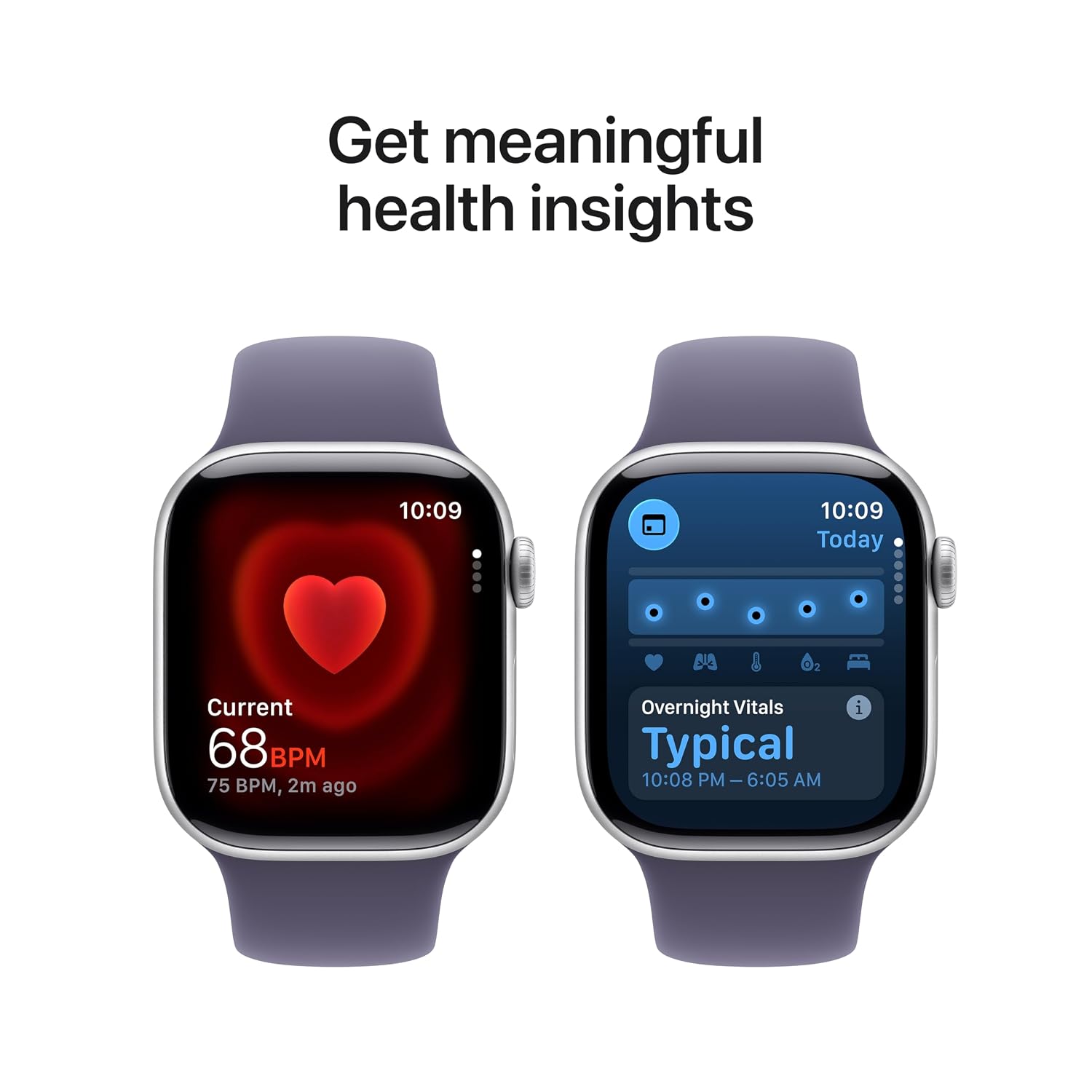
Image: The Apple Watch Series 11 showing current heart rate and overnight vitals within the Vitals app.
Fitnesni kuzatish
Track your daily activity and workouts with precision:
- Faoliyat halqalari: Monitor your Move, Exercise, and Stand goals throughout the day.
- Mashq ilovasi: Select from various workout types, including running, cycling, swimming, and more. The watch provides advanced metrics like Pacer, Heart Rate Zones, and training load.
- Workout Buddy: Utilize Apple Intelligence features from your nearby iPhone for enhanced workout guidance.

Image: The Apple Watch Series 11 showing activity rings on one screen and the interface for an Outdoor Run workout on another.
Uyali aloqa
With GPS + Cellular, your Apple Watch can make calls, send messages, and stream music even when your iPhone is not nearby, provided you have an active cellular plan with a compatible carrier.

Image: A person wearing an Apple Watch Series 11, highlighting its 5G connectivity for independent use.
Xizmat
Apple Watch soatingizni tozalash
- Turn off your Apple Watch and disconnect it from the charger.
- Wipe the watch with a non-abrasive, lint-free cloth. If necessary, lightly dampmatoni toza suv bilan to'kib tashlang.
- For the band, follow specific cleaning instructions based on its material (e.g., silicone bands can be wiped with a damp cloth and mild soap).
- Qattiq kimyoviy moddalar yoki abraziv materiallardan foydalanmang.
Suvga chidamlilik
The Apple Watch Series 11 is water resistant, but not waterproof. It can be used for shallow-water activities like swimming in a pool or ocean. It should not be used for scuba diving, waterskiing, or other activities involving high-velocity water or submersion below shallow depths. Water resistance may decrease over time. Avoid exposing the watch to soap, shampoo, conditioner, lotions, perfumes, solvents, detergent, acids, acidic foods, insect repellent, sunscreen, oil, or hair dye, as these can negatively affect water seals and acoustic membranes.
Dasturiy ta'minot yangilanishlari
Keep your Apple Watch software updated to ensure optimal performance and access to the latest features and security enhancements. Updates are managed through the Apple Watch app on your paired iPhone.
Muammolarni bartaraf qilish; nosozliklarni TUZATISH
Umumiy muammolar va yechimlar
- Tomosha yoqilmaydi: Ensure the watch is charged. Place it on the magnetic charging cable for at least 30 minutes. If it still doesn't turn on, force restart it by holding both the side button and Digital Crown for at least 10 seconds until you see the Apple logo.
- Ulanish muammolari: Ensure your iPhone's Bluetooth is on and both devices are close to each other. Restart both your iPhone and Apple Watch. If issues persist, unpair the watch from your iPhone (if previously paired) and attempt to pair again.
- Batareya muddati yomon: Check for background app refresh settings. Reduce screen brightness. Disable 'Always On Display' if not needed. Ensure software is up to date.
- Ilovalar javob bermayapti: Force quit the app by pressing the side button, then swipe left on the app and tap the 'X' button. Reopen the app. If the issue continues, restart your Apple Watch.
- Cellular Connectivity Problems: Verify your cellular plan is active and compatible with Apple Watch. Check your carrier's coverage in your area. Ensure cellular data is enabled on your watch.
Qo'llab-quvvatlash xizmatiga murojaat qilish
If you encounter issues that cannot be resolved using this guide, please visit the official Apple Support website or contact Apple customer service for further assistance.
Texnik xususiyatlari
| Xususiyat | Tafsilot |
|---|---|
| Model raqami | MF8J4HN/A |
| Operatsion tizim | WatchOS |
| Xotirani saqlash hajmi | 64 GB |
| Maxsus xususiyatlar | Activity Tracker, Alarm Clock, Always On Display, Fall Detection, GPS |
| Batareya quvvati | 0.1 mlnamp Hours (up to 24 hours normal use) |
| Ulanish texnologiyasi | Bluetooth, uyali aloqa |
| Element og'irligi | 29.6 gr |
| Ishlab chiqaruvchi | olma |
| Ishlab chiqaruvchi mamlakat; ta'minotchi mamlakat | Xitoy |
Kafolat va qo'llab-quvvatlash
Kafolat haqida ma'lumot
Your Apple Watch Series 11 is covered by Apple's standard limited warranty. For detailed terms and conditions, please refer to the warranty documentation included with your product or visit the official Apple website. Extended coverage, such as '1 Year Protect+ with AppleCare Service', may be available for purchase separately.
Mijozlarni qo‘llab-quvvatlash
For technical assistance, service, or to find authorized service providers, please visit the official Apple Support websayt (support.apple.com) or contact Apple customer service directly. Have your device's serial number ready when contacting support.