
Kirish
This manual provides detailed instructions for the setup, operation, and maintenance of your LIGE EF19-A Smartwatch. This device features a 1.85-inch HD display, Bluetooth calling capabilities, extensive health monitoring, and over 100 sports modes. It is designed for durability with IP68 waterproofing and a robust build. Please read this manual thoroughly to ensure proper use and to maximize the functionality of your smartwatch.
1. Sozlash
1.1 Paket tarkibi
- 1 x LIGE EF19-A Smartwatch
- 2 x Watch Straps (1 steel, 1 silicone)
- 1 x USB zaryadlovchi kabeli
- 1 x Type-C zaryadlovchi kabeli
- 1 x Strap Adjuster (Regulator)
- 1 x foydalanuvchi qo'llanmasi
1.2 Smart soatni zaryadlash
Before initial use, fully charge your smartwatch.
- Magnit zaryadlovchi simini aqlli soatning orqa tomonidagi zaryadlovchi kontaktlarga ulang.
- Connect the other end of the charging cable (USB or Type-C) to a compatible power source (e.g., USB wall adapter, computer USB port, power bank, car charger).
- Soat displeyida zaryadlash holati ko'rsatiladi. To'liq zaryadlash odatda taxminan 2 soat davom etadi.

Image: The smartwatch connected to a charging cable, illustrating its 1000 mAh battery capacity and charging process.
A fully charged battery provides up to 7-15 days of normal use and up to 50 days in standby mode.
1.3 Ilovani o'rnatish va ulash
To access all features, download the companion app on your smartphone. The smartwatch is compatible with Android 5.1 and higher, and iOS 9.0 and higher.
- Scan the QR code provided in the manual or on the watch packaging, or search for the app name (usually specified in the quick start guide) in your phone's app store (Google Play Store for Android, Apple App Store for iOS).
- Ilovani o'rnating va agar so'ralsa, hisob yarating.
- Smartfoningizda Bluetooth yoqilganligiga ishonch hosil qiling.
- Open the app and follow the on-screen instructions to add your device. The app will search for your smartwatch.
- Select your smartwatch (e.g., "EF19-A" or similar Bluetooth name) from the list of available devices to pair.
- Confirm the pairing request on both your smartphone and smartwatch if a prompt appears.
1.4 Strap Installation/Adjustment
The smartwatch comes with two interchangeable straps: a steel strap and a silicone strap.
- Tasmani ulash uchun: Align the spring bar with the lug holes on the watch body and slide the pin into place.
- Tasmani olib tashlash uchun: Locate the small lever on the spring bar, pull it inwards, and gently detach the strap from the watch body.
- For the steel strap: Use the provided strap adjuster (regulator) to remove or add links for a comfortable fit. Refer to the specific instructions for the strap adjuster if needed.
2. Foydalanish bo'yicha ko'rsatmalar
2.1 Asosiy navigatsiya
- Sensorli ekran: Menyular va funksiyalar bo'ylab harakatlanish uchun chapga/o'ngga, yuqoriga/pastga suring. Tanlash uchun bosing.
- Side Button(s): Typically, one button serves as a power on/off, back, or home button. Long press for power options, short press to return to the watch face or previous screen.
2.2 Bluetooth Calls and Notifications
Once paired with your smartphone, the smartwatch allows you to manage calls and receive notifications.
- Qo'ng'iroq qilish/qabul qilish: When a call comes in, the watch will display the caller ID. You can answer or reject calls directly from the watch. You can also dial numbers or select contacts from the watch interface.
- Xabar bildirishnomalari: Receive notifications for SMS, Facebook, WhatsApp, Twitter, TikTok, and other apps directly on your watch. Swipe down from the watch face to view oxirgi bildirishnomalar.

Image: The smartwatch showing an incoming call, message notifications, and the voice assistant interface.
2.3 Salomatlik monitoringi
The smartwatch continuously monitors various health metrics.
- Yurak urishi: Access the heart rate monitoring function to view your current heart rate and historical data.
- Qon kislorodi (SpO2): Qondagi kislorod darajasini o'lchang.
- Uyqu sifati: The watch automatically tracks your sleep patterns, including deep sleep, light sleep, and wake times. View detailed sleep reports in the companion app.
- Stress darajasi: Kun davomida stress darajangizni kuzatib boring.
- Nafas olish mashqlari: Engage in guided breathing exercises to help manage stress.

Image: A user wearing the smartwatch, with the display showing real-time heart rate, blood oxygen saturation, and breathing exercise prompts.
Eslatma: This device is not a medical device. Health monitoring data is for reference only and should not be used for medical diagnosis or treatment.
2.4 sport rejimlari
The smartwatch supports over 100 sports modes for tracking your physical activity.
- Navigate to the "Workout" or "Sports" menu on your watch.
- Select your desired activity (e.g., running, cycling, swimming, hiking, yoga, badminton, basketball, golf).
- The watch will begin tracking metrics such as steps, distance, calories burned, and heart rate.
- End the workout by following the on-screen prompts. Detailed summaries are available on the watch and in the companion app.

Image: A person cycling while wearing the smartwatch, with the display showing steps, distance, calories, and heart rate for different sports activities.
2.5 Torch Function
The smartwatch includes a built-in torch function for instant illumination.
- Access the torch function from the quick settings menu or app list.
- It offers different modes such as constant light, warning mode, and SOS mode.
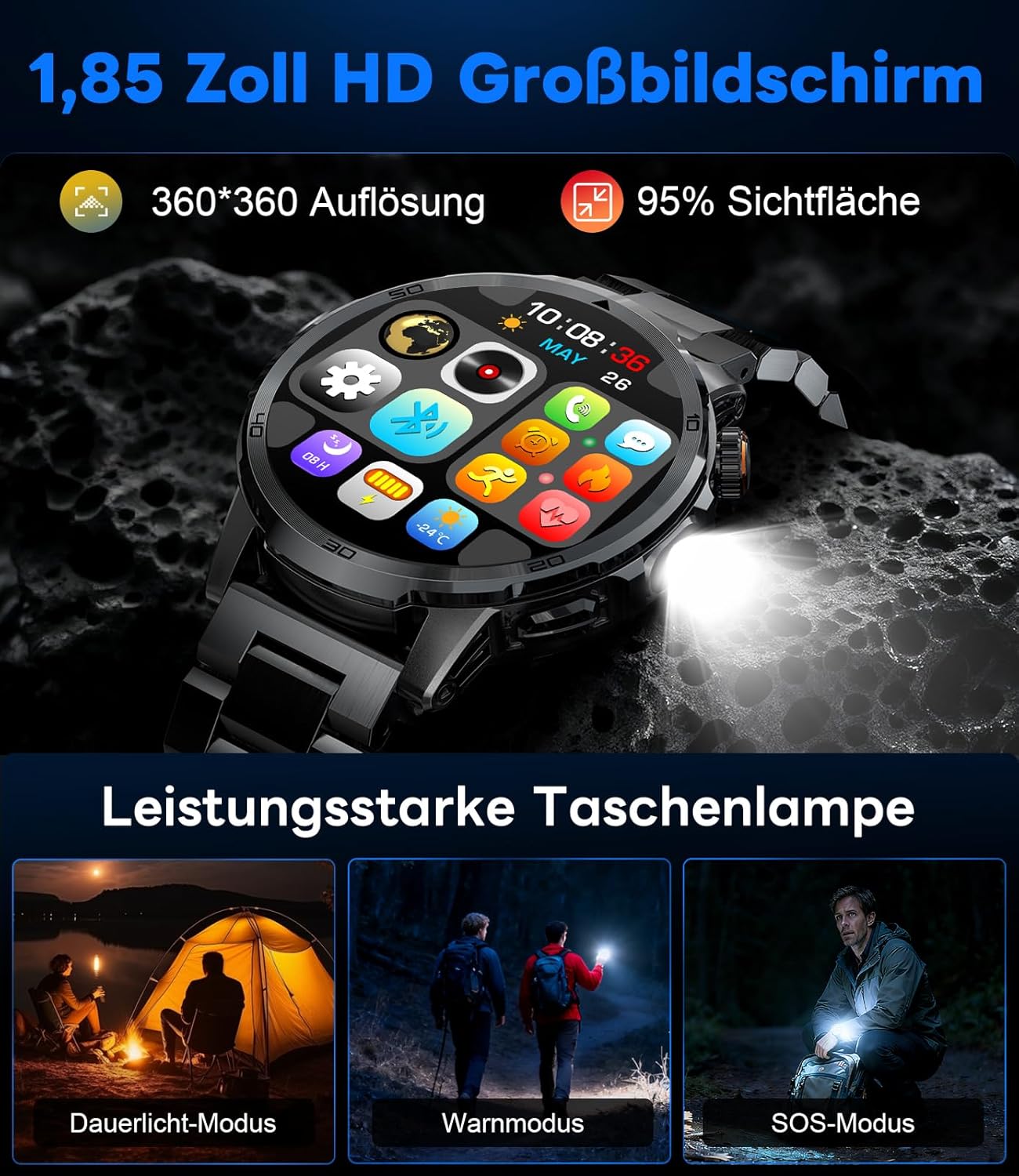
Image: The smartwatch displaying its 1.85-inch HD screen and demonstrating its powerful flashlight feature with different modes.
2.6 Boshqa funksiyalar
- Ovozli yordamchi: Activate the voice assistant to control your phone or get information (e.g., "What's the weather?").
- Musiqa nazorati: Control music playback on your smartphone (play, pause, skip tracks, adjust volume) directly from your watch.
- Kamera nazorati: Soatingizdan smartfoningiz kamerasi uchun masofadan boshqarish pulti sifatida foydalaning.
- Ob-havo ma'lumoti: View hozirgi ob-havo sharoiti va prognozlari.
- Signal va taymerlar: Set alarms and use stopwatch/timer functions.
- Ichimlik haqida eslatma: Set reminders to drink water.
- Yuzlarni tomosha qiling: Customize your watch face from over 100 options or upload your own photos via the app.

Image: The smartwatch interface displaying icons for music control, flashlight, camera control, weather, alarm, and drink reminders.

Image: A selection of diverse watch faces available for customization on the LIGE EF19-A Smartwatch.
3. Xizmat ko'rsatish
3.1 Tozalash
- Regularly clean your smartwatch and straps with a soft, dry, lint-free cloth.
- Agar kerak bo'lsa, biroz d dan foydalaningamp yumshoq sovun bilan mato bilan arting, keyin quriting.
- Kuchli kimyoviy moddalar, abraziv tozalagichlar yoki erituvchilardan foydalanishdan saqlaning, chunki ular soatning qoplamasi va muhrlariga zarar etkazishi mumkin.
- Zaryadlashdan oldin zaryadlovchi kontaktlarning toza va quruq ekanligiga ishonch hosil qiling.
3.2 Suvga chidamlilik (IP68)
The LIGE EF19-A Smartwatch is IP68 waterproof, meaning it is resistant to dust and can withstand immersion in water up to 1.5 meters for up to 30 minutes.
- It is suitable for daily use, such as hand washing, rain, and shallow water swimming.
- Avoid using the watch in hot water, saunas, or steam rooms, as steam can penetrate the seals and cause damage.
- Suv ostida tugmalarni bosmang.
- After exposure to water, wipe the watch dry before charging or using.

Image: The smartwatch highlighting its robust military-grade design, including resistance to temperature extremes, shock, dust, and IP68 water resistance.
4. Muammolarni bartaraf qilish; nosozliklarni TUZATISH
4.1 Soat yoqilmayapti
- Soat to'liq zaryadlanganligiga ishonch hosil qiling. Uni kamida 30 daqiqa davomida zaryadlovchiga ulang.
- Try long-pressing the side button for 10-15 seconds to force a restart.
4.2 Unable to Pair with Smartphone
- Smartfoningizda Bluetooth yoqilganligiga ishonch hosil qiling.
- Ensure the smartwatch is within Bluetooth range (typically 10 meters).
- Smartfoningizni ham, aqlli soatingizni ham qayta yoqing.
- Check if the app has the necessary permissions (location, Bluetooth, etc.).
- If previously paired, try "forgetting" the device in your phone's Bluetooth settings and re-pairing through the app.
4.3 Sog'liqni saqlash bo'yicha noto'g'ri ma'lumotlar
- Soat bilagingizga mahkam o'rnashib, bilak suyagidan taxminan bir barmoq kengligida taqilganligiga ishonch hosil qiling.
- O'lchovlar paytida ortiqcha harakatlanishdan saqlaning.
- Soat orqasidagi sensorni tozalang.
- Environmental factors and individual physiology can affect readings.
4.4 Bildirishnomalar ko'rinmayapti
- Verify that the watch is successfully paired with your smartphone.
- Check notification settings within the companion app to ensure desired apps are enabled for notifications.
- Ensure your phone's notification settings allow the companion app to display notifications.
- Make sure your phone is not in "Do Not Disturb" mode.
5. Texnik shartlar
| Xususiyat | Spetsifikatsiya |
|---|---|
| Model raqami | EF19-A |
| Displey | 1.85-inch IPS HD Touch Screen, 360x360 pixels |
| Batareya quvvati | 1000 mA / soat lityum polimer |
| Batareya muddati (Oddiy foydalanish) | 7-15 kun |
| Batareya muddati (kutish rejimi) | 50 kungacha |
| Zaryadlash vaqti | Taxminan 2 soat |
| Ulanish | Bluetooth 5.2 |
| Suvga chidamlilik | IP68 (suv o'tkazmaydigan) |
| Xotirani saqlash hajmi | 128 MB |
| Mos qurilmalar | Android 5.1+ / iOS 9.0+ Smartphones |
| Salomatlik monitoringi | Heart Rate, Blood Oxygen, Sleep Quality, Stress Level |
| Sport rejimlari | 100+ (e.g., Running, Cycling, Swimming, Hiking, Yoga) |
| Qo'shimcha xususiyatlar | Bluetooth Calls, Message Notifications, Torch, Voice Assistant, Music Control, Camera Control, Weather, Alarms, Timers, Drink Reminder, Customizable Watch Faces |
| GPS | Smartfon orqali |
| Maqsadli auditoriya | Erkaklar |
6. Kafolat haqida ma'lumot
The LIGE EF19-A Smartwatch comes with a 2 yillik kafolat sotib olingan kundan boshlab. Ushbu kafolat ishlab chiqarish nuqsonlari va normal foydalanishdagi nosozliklarni qoplaydi.
Kafolat quyidagilarni qamrab olmaydi:
- Damage caused by improper use, accident, abuse, neglect, or unauthorized modification.
- Normal wear and tear, including scratches, dents, or cosmetic damage.
- Damage caused by exposure to extreme temperatures, liquids (beyond IP68 rating), or corrosive environments.
- Damage to accessories (straps, charging cables) unless defective upon receipt.
To claim warranty service, please retain your proof of purchase and contact customer support.
7. Mijozlarni qo'llab-quvvatlash
If you encounter any issues or have questions regarding your LIGE EF19-A Smartwatch that are not covered in this manual, please contact our customer support team.
- Refer to the contact information provided on the product packaging or the official LIGE websayt.
- When contacting support, please provide your product model number (EF19-A) and a detailed description of the issue.