
1. Kirish
Thank you for choosing the Lefant M3L Robot Vacuum and Mop. This intelligent cleaning device is designed to simplify your home cleaning routine by efficiently vacuuming and mopping various floor types. Please read this manual thoroughly before using the product to ensure proper operation, maintenance, and safety.
For optimal performance, follow the instructions carefully and keep this manual for future reference.
2. Xavfsizlik bo'yicha muhim ma'lumotlar
Before using the Lefant M3L, please observe the following safety precautions:
- Ushbu jihozdan 8 yosh va undan katta yoshdagi bolalar hamda jismoniy, hissiy yoki aqliy qobiliyatlari cheklangan yoki tajribasi va bilimi bo'lmagan shaxslar tomonidan nazorat qilinsa yoki jihozdan xavfsiz foydalanish bo'yicha ko'rsatma berilgan bo'lsa va xavflarni tushunsa foydalanishi mumkin. .
- Bolalar qurilma bilan o'ynamasliklari uchun ularni nazorat qilish kerak.
- Tozalash va foydalanuvchiga texnik xizmat ko'rsatish bolalar tomonidan nazoratsiz amalga oshirilmasligi kerak.
- Do not use the robot in environments with open flames, flammable materials, or explosive substances.
- Ensure the charging dock is placed on a level surface against a wall, with no obstacles within 1 meter in front and 0.5 meters on either side.
- Do not immerse the robot or its electronic components in water.
- Only use the original power adapter and charging dock provided by the manufacturer.
- Ishlatishdan oldin poldan bo'shashgan kabellar, kichik buyumlar yoki mo'rt narsalarni olib tashlang, bu esa chalkashib ketish yoki shikastlanishning oldini oladi.
- Do not use the robot to clean liquids, burning objects, or sharp objects.
- Elektr shnuri shikastlangan bo'lsa, xavfni oldini olish uchun uni ishlab chiqaruvchi, uning xizmat ko'rsatish agenti yoki shunga o'xshash malakali shaxslar o'zgartirishi kerak.
3. Paket tarkibi
Please check if all accessories are present and in good condition:
- Lefant M3L Robot Vacuum and Mop
- Zaryadlash dok
- Quvvat adapteri
- Axlat qutisi
- Paspasli suv idishi
- Yon cho'tkalar (2 juft)
- HEPA filtri (1 ta o'rnatilgan, 1 ta zaxira)
- Tozalash vositasi
- Foydalanuvchi uchun qo'llanma
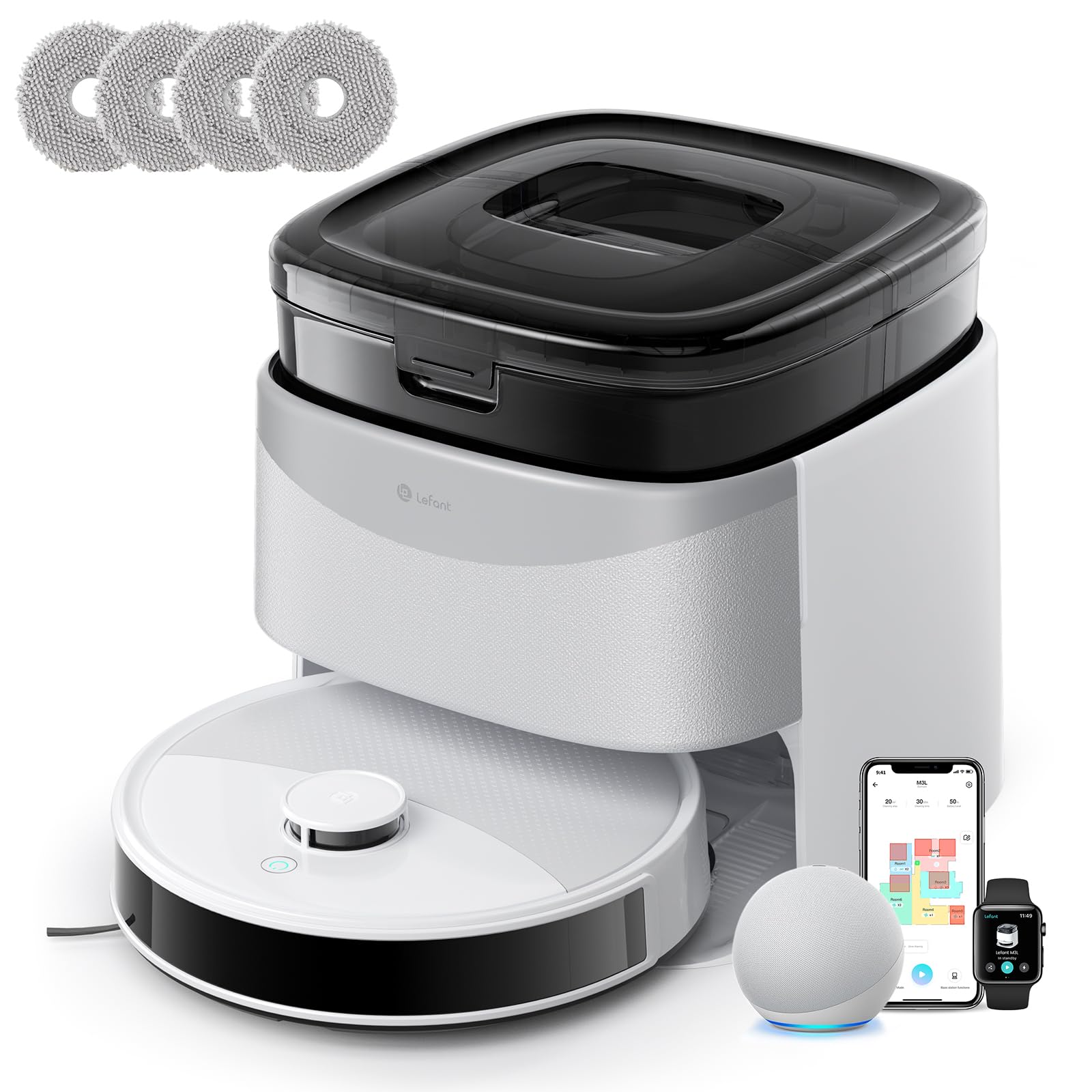
Image 1: Lefant M3L Robot Vacuum and Mop with its included accessories. This image shows the main unit, charging dock, power adapter, dustbin, water tank, mop pad, side brushes, and cleaning tool.
4. Mahsulot tugadiview
4.1 Robot Top View
- Quvvat/tozalash tugmasi: Press to start/pause cleaning. Hold to power on/off.
- Ko'rsatkich chirog'i: Shows battery status and working mode.
- Chiqindi qutisini chiqarish tugmasi: Press to remove the dustbin.
4.2 Robot Bottom View
- Yon cho'tkalar: Collect dust and debris from edges and corners.
- Haydash g'ildiraklari: Robotga turli sirtlar bo'ylab harakatlanishga ruxsat bering.
- Universal g'ildirak: 360 daraja harakatlanishni ta'minlaydi.
- Zaryadlovchi kontaktlar: Connect with the charging dock for power.
- Tushish sensorlari: Qirralarni aniqlang va tushishni oldini oling.
- Asosiy cho'tka: Central brush for deep cleaning.
- Water Tank/Mop Pad Slot: Area for attaching the water tank and mop pad.
4.3 Zaryadlovchi dok
- Zaryadlash ko'rsatkichi: Zaryadlash holatini ko'rsatadi.
- Zaryadlovchi kontaktlar: Connect with the robot for power.
- Quvvat porti: Quvvat adapteriga ulanadi.
5. O'rnatish bo'yicha qo'llanma
5.1 Preparing the Robot
- Himoya plyonkalarini olib tashlang: Remove all protective films from the robot and charging dock.
- Yon cho'tkalarni o'rnatish: Press the side brushes onto the square posts at the bottom of the robot until they click into place. Ensure the 'L' and 'R' marks match.
- Install Dustbin: Open the top cover of the robot and insert the dustbin until it locks securely.

Image 2: Illustration of attaching the side brushes to the underside of the robot. Align the brush with the corresponding post and push until it clicks.
5.2 Positioning the Charging Dock
- Place the charging dock on a hard, level surface against a wall.
- Ensure there are no obstacles within 1 meter (3 feet) in front of the dock and 0.5 meters (1.5 feet) on either side.
- Connect the power adapter to the charging dock and plug it into a wall outlet. The indicator light on the dock will illuminate.

Image 3: Diagram showing the recommended clear space around the charging dock for optimal robot navigation.
5.3 Dastlabki zaryadlash
Place the robot onto the charging dock, ensuring the charging contacts on the robot align with those on the dock. The robot's indicator light will pulse during charging and turn solid when fully charged. For first-time use, charge the robot for at least 6 hours.
5.4 Lefant ilovasiga ulanish
- Download the "Lefant" app from the App Store (iOS) or Google Play Store (Android).
- Hisob qaydnomasini ro'yxatdan o'tkazing va tizimga kiring.
- Tap "+" to add a device and select your Lefant M3L model.
- Follow the in-app instructions to connect the robot to your home Wi-Fi network (2.4GHz only).
- Once connected, you can control the robot, set schedules, and monitor cleaning status via the app.
6. Foydalanish bo'yicha ko'rsatmalar
6.1 Tozalash siklini boshlash
- Qo'lda boshlash: Press the Power/Clean button on the robot once. The robot will automatically start cleaning in Auto mode.
- Ilovani boshqarish: Open the Lefant app, select your M3L robot, and tap "Start Cleaning".
- Ovozli boshqaruv: If integrated with a smart assistant (e.g., Alexa, Google Assistant), use voice commands like "Alexa, ask Lefant to start cleaning."
6.2 Pausing/Resuming Cleaning
Press the Power/Clean button on the robot or use the app to pause a cleaning cycle. Press again to resume.
6.3 Returning to Charging Dock
The robot will automatically return to the charging dock when its battery is low or when a cleaning cycle is complete. You can also send it back manually via the app.
6.4 Using the Mopping Function
- Suv idishini to'ldirish: Open the water tank cover and fill it with clean water. Do not use cleaning solutions that are not approved by Lefant.
- Mop yostiqchasini ulang: Securely attach the mop pad to the bottom of the water tank.
- Suv idishini o'rnatish: Slide the filled water tank into the designated slot at the back of the robot until it clicks.
- Start a cleaning cycle. The robot will now vacuum and mop simultaneously.

Image 4: Steps for filling the water tank and attaching the mop pad before inserting it into the robot.
Eslatma: Remove the water tank before charging the robot or if it will be inactive for an extended period.
6.5 Cleaning Modes (via App)
- Avtomatik tozalash: The robot intelligently navigates and cleans your entire home.
- Spotni tozalash: Muayyan joyni yanada intensiv tozalaydi.
- Chetni tozalash: Devor va mebel qirralari bo'ylab tozalaydi.
- Rejalashtirilgan tozalash: Robot avtomatik ravishda tozalash uchun ma'lum vaqtlarni belgilang.
7. Xizmat ko'rsatish
Muntazam texnik xizmat ko'rsatish robot changyutgichingizning optimal ishlashini ta'minlaydi va xizmat muddatini uzaytiradi.
7.1 Cleaning the Dustbin and Filter (After each use)
- Chang qutisini chiqarish tugmasini bosing va uni tortib chiqaring.
- Chiqindi qutisi qopqog'ini oching va uning tarkibini axlat qutisiga bo'shating.
- Remove the HEPA filter and sponge filter. Tap them gently to remove dust. Do not wash the HEPA filter with water.
- Rinse the dustbin with water (ensure it's completely dry before reinstallation).
- Filtrlar va axlat qutisini qayta yig'ing, so'ngra robotga qayta joylashtiring.

Image 5: Visual guide on how to remove, empty, and clean the dustbin and its filters.
7.2 Cleaning the Side Brushes (Weekly)
Remove the side brushes by pulling them upwards. Use the cleaning tool to remove any hair or debris tangled around them. Rinse with water if necessary and allow to air dry completely before reattaching.
7.3 Cleaning the Water Tank and Mop Pad (After each mopping session)
Empty any remaining water from the tank. Remove the mop pad and wash it by hand or machine. Allow both to air dry completely before storage or next use.
7.4 Cleaning Sensors and Charging Contacts (Monthly)
Wipe the drop sensors (on the bottom of the robot) and the charging contacts (on the robot and charging dock) with a clean, dry cloth. This ensures proper navigation and charging.

6-rasm: yaqindan view of the robot's underside, highlighting the locations of the drop sensors and charging contacts for cleaning.
8. Muammolarni bartaraf qilish; nosozliklarni TUZATISH
| Muammo | Mumkin sabab | Yechim |
|---|---|---|
| Robot yoqilmaydi. | Batareya quvvati kam; Quvvat tugmasi o'chirilgan. | Charge the robot; Ensure the main power switch (usually on the side/bottom) is ON. |
| Robot zaryadlay olmaydi. | Charging contacts dirty; Dock not powered; Robot not properly aligned. | Clean charging contacts; Check power adapter connection; Manually place robot on dock. |
| Robot tez-tez tiqilib qoladi. | Too many obstacles; Loose cables; High thresholds. | Clear the cleaning area; Use virtual boundaries if available; Block off problematic areas. |
| Yomon tozalash ko'rsatkichi. | Dustbin full; Filters clogged; Side brushes worn. | Empty dustbin; Clean/replace filters; Clean/replace side brushes. |
| Tozalash funksiyasi ishlamayapti. | Water tank empty; Mop pad dirty/dry; Water outlet clogged. | Fill water tank; Clean/wet mop pad; Check water tank for blockages. |
| Ilova ulanishi bilan bog'liq muammolar. | Incorrect Wi-Fi password; Router too far; 5GHz Wi-Fi used. | Ensure 2.4GHz Wi-Fi; Re-enter password; Move robot closer to router; Restart router/robot. |
9. Texnik shartlar
| Xususiyat | Tafsilot |
|---|---|
| Model nomi | M3L |
| Brend | Lefant |
| Olchamlari (U x G x Y) | 32L x 32l x 9.7H centimeters |
| Element og'irligi | 9.7 kilogramm |
| Batareya turi | Litiy-ion |
| Filtr turi | HEPA |
| Boshqarish turi | Ilova boshqaruvi, Ovozli boshqaruv |
| Maxsus xususiyatlar | Dry and Wet Cleaning, Carpet Cleaning |
| Tavsiya etilgan sirt | Qattiq pollar, Yog'och pollar, Plitkalar, Gilamlar |
| Form faktor | Dumaloq |
| Quvvat manbai | Batareyadan quvvatlanadi |
| Kiritilgan komponentlar | Mop boshi, suv idishi |
10. Kafolat va mijozlarni qo'llab-quvvatlash
Lefant products come with a standard manufacturer's warranty. For detailed warranty terms and conditions, please refer to the warranty card included in your package or visit the official Lefant websayt.
If you encounter any issues or have questions regarding your Lefant M3L Robot Vacuum and Mop, please contact Lefant Customer Support. You can usually find contact information (email, phone, or online chat) on the official Lefant website or through the Lefant app.
Please have your model number (M3L) and purchase information ready when contacting support.