
1. Kirish
Thank you for choosing the OMOTON WK209 Wireless Keyboard and Mouse Set. This manual provides detailed instructions for setting up, operating, and maintaining your new wireless peripheral set. Please read this manual carefully before use to ensure optimal performance and longevity of your product.
2. Paket tarkibi
The OMOTON WK209 Wireless Keyboard and Mouse Set package includes the following items:
- 1 x OMOTON WK209 Wireless Keyboard
- 1 x OMOTON Wireless Mouse
- 1 x USB 2.4 GHz Receiver
Note: AAA batteries are required for operation but are not included in the package.
3. O'rnatish bo'yicha qo'llanma
3.1. Batareyalarni o'rnatish
Before using the keyboard and mouse, you need to install batteries.
- Batareya bo'linmasini klaviatura va sichqonchaning pastki qismida toping.
- Batareya qopqoqlarini oching.
- Insert two AAA batteries into the keyboard and one AAA battery into the mouse, ensuring correct polarity (+/-).
- Batareya qopqoqlarini mahkam yoping.

This image displays the battery compartments for the OMOTON WK209 keyboard and mouse. The keyboard requires two AAA batteries, and the mouse requires one AAA battery. Please note that batteries are not included with the product.
3.2. USB qabul qilgichni ulash
The OMOTON WK209 set uses a single USB receiver for both the keyboard and mouse.
- Locate the USB 2.4 GHz receiver, usually stored in the mouse's battery compartment or packaging.
- Plug the USB receiver into an available USB port on your computer (laptop or desktop PC).
- The system will automatically detect and install the necessary drivers. This is a Plug & Play process and typically requires no manual installation.
- Turn on the mouse using the ON/OFF switch located on its underside. The keyboard does not have a separate power switch; it activates when keys are pressed.

This image illustrates the 2.4 GHz wireless connection of the OMOTON WK209 keyboard and mouse set. It highlights features such as Plug & Play functionality, a stable 2.4G connection, and a wireless range of up to 10 meters (33 feet).
3.3. Moslik
The OMOTON WK209 set is compatible with a wide range of Windows operating systems.
- Operatsion tizimlar: Windows 11, Windows 10, Windows 8, Windows 7, Windows XP.
- Qurilmalar: Laptop, Desktop PC.

This image demonstrates the broad compatibility of the OMOTON WK209 set with different Windows operating systems, including Windows 7, 8, 10, and 11, across desktop PCs and laptops.
4. Foydalanish bo'yicha ko'rsatmalar
4.1. Klaviaturadan foydalanish
The WK209 keyboard features a full-size QWERTZ layout with multimedia keys for enhanced productivity. Simply begin typing after successful connection.
- Multimedia kalitlari: Access functions like volume control, play/pause, and more directly from the keyboard.
- QWERTZ Layout: Standard German keyboard layout for familiar typing experience.
- 8° Tilt: The keyboard is designed with a natural 8-degree tilt for ergonomic comfort during extended use.

This image provides the physical dimensions of the OMOTON WK209 full-size QWERTZ keyboard (43.8 cm x 12.4 cm) and mouse (10.3 cm x 6.6 cm x 3.6 cm). It also notes the keyboard's natural 8-degree tilt for comfortable typing.
4.2. Sichqonchadan foydalanish
The WK209 mouse offers precise control and several functional buttons.
- Chap tugmasini bosing: Standard selection and activation.
- O'ng tugmasini bosing: Accesses context menus.
- O'tkazish g'ildiragi: Vertikal aylantirish va o'rta tugmani bosish funksiyalari uchun.
- Orqaga tugmasi: Qayta navigatsiya qiladi web brauzerlar yoki file tadqiqotchilar.
- Oldinga yo'naltirish tugmasi: Oldinga navigatsiya qiladi web brauzerlar yoki file tadqiqotchilar.
- Desktop Show/Hide Button: Quickly minimizes all open windows to show the desktop, and restores them with another press.

This image highlights the features of the OMOTON WK209 wireless mouse, including the scroll wheel, left-click button, right-click button, back button, forward button, and a button for showing/hiding the desktop. It also emphasizes its ergonomic design and quiet click functionality.
5. Xususiyatlari
- 2.4 GHz Wireless Connection: Provides a stable and reliable connection with a range of up to 10 meters (33 feet).
- Plug & Play: Easy setup without the need for additional software or drivers.
- Full-size QWERTZ Layout: Comfortable and familiar typing experience.
- Multimedia kalitlari: Convenient access to media controls.
- Ergonomik dizayn: The mouse is shaped for comfortable use, and the keyboard features a natural 8-degree tilt.
- Sokin operatsiya: Both the keyboard and mouse are designed for silent clicks and keystrokes, ideal for quiet environments.
- Past batareya quvvati ko'rsatkichi: The keyboard features an indicator light to alert you when batteries are running low.

This image illustrates the quiet operation of the OMOTON WK209 keyboard and mouse, highlighting its silent keys and noiseless mouse clicks, suitable for quiet environments.
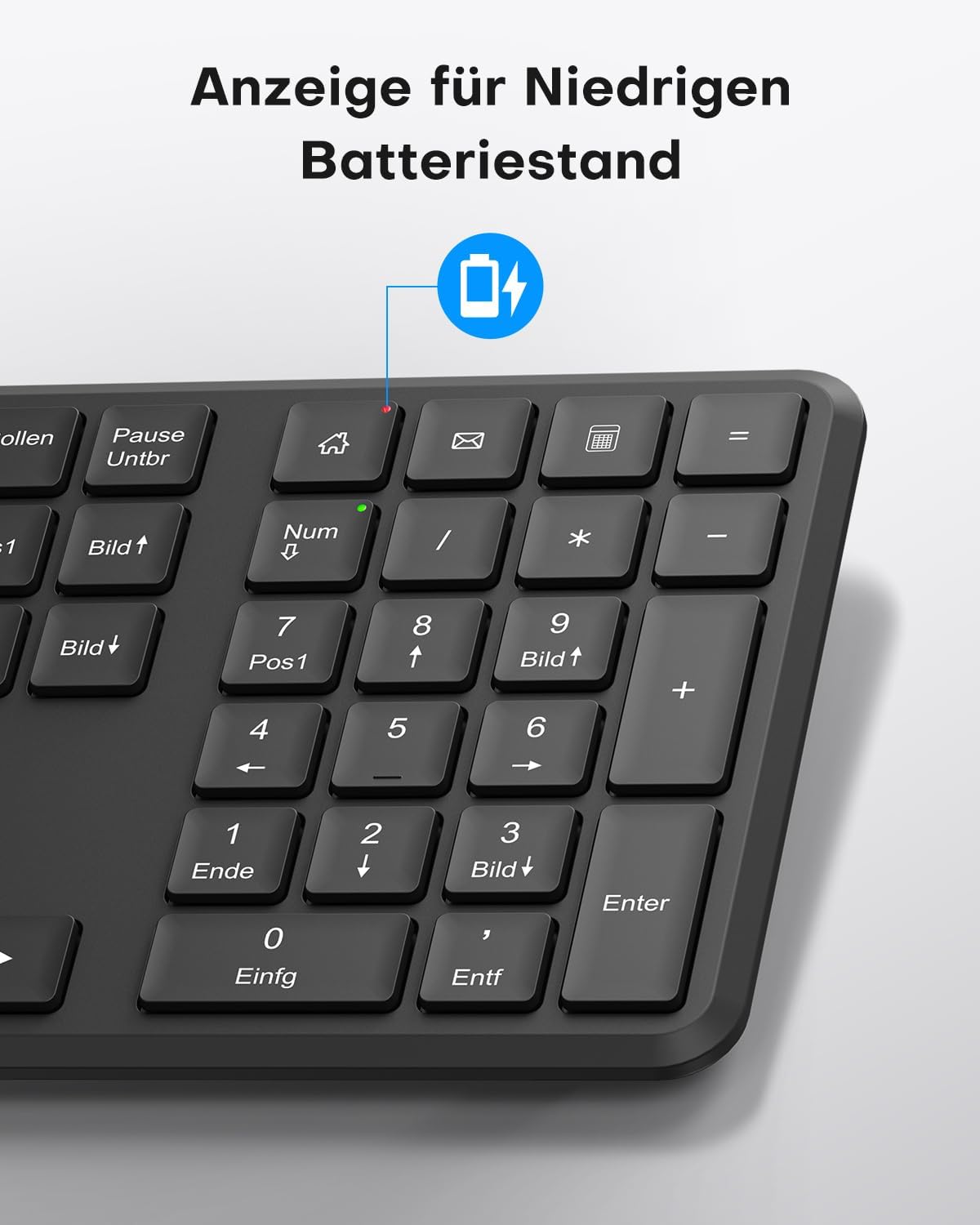
This image points out the low battery indicator on the OMOTON WK209 keyboard, which illuminates to alert the user when batteries need to be replaced.
6. Xizmat ko'rsatish
To ensure the longevity and optimal performance of your OMOTON WK209 set, follow these maintenance guidelines:
- Tozalash: Klaviatura va sichqonchaning yuzalarini tozalash uchun yumshoq, quruq matodan foydalaning. O'jar axloqsizlik uchun, bir oz damp matodan foydalanish mumkin, lekin namlik qurilmalarga kirmasligiga ishonch hosil qiling.
- Batareyani almashtirish: Replace batteries promptly when the low battery indicator appears or when performance degrades. Always use fresh, high-quality AAA batteries.
- Saqlash: Uzoq vaqt davomida ishlatilmaganda, oqishning oldini olish uchun batareyalarni chiqarib oling. Qurilmalarni salqin va quruq joyda saqlang.
- Suyuqlikdan saqlaning: Keep the keyboard and mouse away from liquids to prevent damage.
7. Muammolarni bartaraf qilish; nosozliklarni TUZATISH
If you encounter issues with your OMOTON WK209 set, try the following troubleshooting steps:
- Klaviatura/Sichqonchadan javob yo'q:
- Ensure batteries are correctly installed and not depleted. Replace them if necessary.
- Make sure the mouse's ON/OFF switch is in the 'ON' position.
- USB qabul qilgich kompyuteringizdagi ishlaydigan USB portiga mahkam ulanganligini tekshiring. Boshqa USB portini sinab ko'ring.
- Kompyuteringizni qayta ishga tushiring.
- Kechikish yoki uzilishli ulanish:
- Klaviatura va sichqonchani USB qabul qilgichga yaqinroq joylashtiring.
- Ensure there are no large metal objects or other wireless devices (e.g., Wi-Fi routers, cordless phones) interfering with the 2.4 GHz signal.
- Try plugging the USB receiver into a front USB port or using a USB extension cable to bring it closer to the devices.
- Tugmalar to'g'ri ishlamayapti:
- Tugmalar ostida qoldiqlarni tekshiring.
- Ensure the keyboard layout setting on your computer matches the QWERTZ layout.
- Sichqoncha kursori sakrab o'tmoqda yoki noto'g'ri:
- Sichqonchaning pastki qismidagi optik sensorni tozalang.
- Sichqonchani toza, aks ettirmaydigan sirtda yoki sichqoncha yostig'ida ishlating.
8. Texnik shartlar
| Xususiyat | Tafsilot |
|---|---|
| Brend | OMOTON |
| Model | WK209 |
| Rang | Qora |
| Ulanish texnologiyasi | 2.4 gigagertsli simsiz |
| Klaviatura tartibi | Full-size QWERTZ (German Layout) |
| Maxsus xususiyatlar | 2.4 GHz, Full-size, QWERTZ-layout, Battery-operated, Multimedia keys |
| Mos qurilmalar | Noutbuk, kompyuter |
| Mos keladigan operatsion tizimlar | Windows 11/10/8/7/XP |
| Quvvat manbai | Battery-Powered (2x AAA for keyboard, 1x AAA for mouse - not included) |
| Buyumning og'irligi (taxminan) | 514 Grams (total set, including packaging) |
| Paket o'lchamlari | 44.79 x 13.9 x 5.3 sm |
| ASIN | B0FQNS3FFB |
9. Kafolat va qo'llab-quvvatlash
OMOTON products are designed for reliability and performance. For warranty information and customer support, please refer to the warranty card included with your purchase or visit the official OMOTON website. If you experience any issues that cannot be resolved using the troubleshooting guide, please contact OMOTON customer service for assistance.