
1. Kirish
Welcome to the OnePlus 15 user manual. This guide provides essential information for setting up, operating, maintaining, and troubleshooting your new smartphone. The OnePlus 15 is designed for high performance and extended battery life, featuring a Snapdragon 8 Elite Gen 5 processor, a 7300mAh battery, and a triple 50 MP camera system. Please read this manual thoroughly to ensure optimal use of your device.
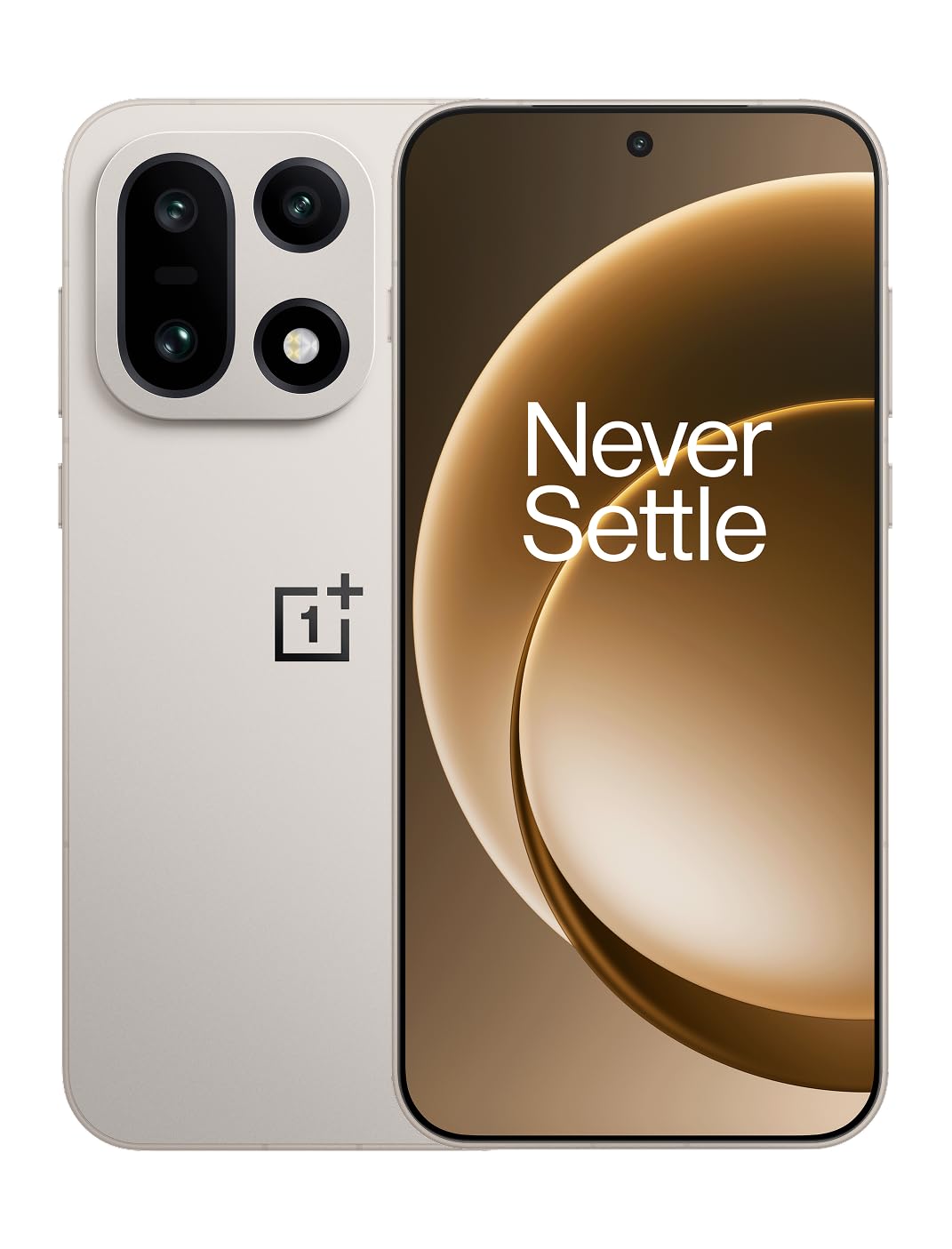
1-rasm: Old view of the OnePlus 15 smartphone.
2. Qutida nima bor
Mahsulotingizning qadoqlarida barcha elementlar mavjudligiga ishonch hosil qiling:
- OnePlus 15 Smartphone (x1)
- Zaryadlovchi (x1)
- USB Data Cable (x1)
- SIM Ejector Tool (x1)
- Tezkor qo'llanma (x1)
- Safety Guide (x1)

Figure 2: Included items in the OnePlus 15 package.
3. Sozlash
3.1. SIM kartani o'rnatish
The OnePlus 15 supports Dual-SIM functionality. To install your SIM card(s):
- Qurilmaning yon tomonidagi SIM karta tepsisini toping.
- SIM-karta chiqarish moslamasini patnis yonidagi kichik teshikka soling va laganda chiqib ketguncha mahkam bosing.
- Nano-SIM karta(lar)ingizni oltin kontaktlarini pastga qaratib, patnisga joylashtiring. Ularning to'g'ri joylashtirilganligiga ishonch hosil qiling.
- SIM karta tepsisini telefonga ehtiyotkorlik bilan qayta joylashtiring.

3-rasm: yon view of the OnePlus 15, highlighting the SIM card tray.
3.2. Dastlabki yoqish va sozlash
Qurilmangizni birinchi marta yoqish uchun:
- Press and hold the Power button (located on the right side) until the OnePlus logo appears.
- Follow the on-screen prompts to complete the initial setup, including language selection, Wi-Fi connection, Google account login, and security settings.
3.3. Batareyani zaryadlash
The OnePlus 15 is equipped with a 7300mAh battery. To charge your device:
- Simli zaryadlash: Connect the provided USB Data Cable to the Type-C port on the bottom of the phone and the other end to the charger. Plug the charger into a power outlet.
- Simsiz zaryadlash: Place the phone on a compatible wireless charging pad. Ensure the phone is centered on the pad for efficient charging.
A full charge provides approximately 68.7 hours of talk time.

Figure 4: Illustration of the 7300mAh battery capacity.
4. Qurilmangiz bilan ishlash
4.1. Displey
The OnePlus 15 features a 6.78-inch AMOLED display with a 2772x1272 resolution and a 165 Hz refresh rate. This provides smooth visuals and vibrant colors. Adjust display settings such as brightness, color mode, and refresh rate in the device settings menu.
4.2. Ishlash
Powered by the Snapdragon 8 Elite Gen 5 processor and 16GB of RAM, the OnePlus 15 delivers fast and efficient performance for multitasking, gaming, and demanding applications. The Tri-Chip System, combining the Snapdragon 8 Elite Gen 5 with a dedicated Wi-Fi chip and CPU scheduler, optimizes for speed, connectivity, and power efficiency.
Video 1: tugadiview of the OnePlus 15's performance capabilities and user experience.
4.3. Kamera tizimi
The device is equipped with a Triple 50 MP camera system, offering wide, ultra-wide, and telephoto lenses for versatile photography. The DetailMax Engine enhances photo quality in various lighting conditions, including day, night, and motion shots. Both front and rear cameras are available for capturing images and videos.

5-rasm: orqa view of the OnePlus 15, showcasing the triple camera system.
Figure 6: DetailMax Engine for stunning photos.
4.4. Ulanish
The OnePlus 15 supports a range of connectivity options:
- Simsiz: Wi-Fi, Bluetooth, NFC, Infrared.
- Simli: USB Type-C.
- Navigatsiya: Dual-band GPS (L1+L5) and Galileo (E1+E5a).
- SIM: Dual SIM support for managing multiple networks.
4.5. Operatsion tizim
The device runs on Android 16 with OxygenOS 16, providing a fast and smooth user experience. Regular software updates will be provided to enhance features and security.
5. Xizmat ko'rsatish
5.1. Chidamlilik va himoya
The OnePlus 15 is built with IP66/IP68/IP69 and IP19K ratings, offering resistance against dust and water. While designed to be durable, avoid exposing the device to extreme conditions or prolonged submersion in water.

Figure 7: OnePlus 15 demonstrating water resistance.
5.2. Qurilmangizni tozalash
Use a soft, lint-free cloth to clean the screen and body of your phone. Avoid using abrasive materials or harsh chemicals, which can damage the display or finish.
5.3. Dasturiy ta'minotni yangilash
Periodically check for software updates in the device settings. Keeping your software up-to-date ensures you have the latest features, security patches, and performance improvements.
6. Muammolarni bartaraf qilish; nosozliklarni TUZATISH
This section addresses common issues you might encounter with your OnePlus 15.
6.1. Qurilma yoqilmaydi
- Batareya zaryadlanganligiga ishonch hosil qiling. Telefonni zaryadlovchiga ulang va qayta yoqishdan oldin bir necha daqiqa kuting.
- Majburiy qayta ishga tushirish uchun Quvvat tugmasini kamida 10-15 soniya bosib turing.
6.2. Tarmoq ulanishining yomonligi
- SIM kartangiz to'g'ri kiritilganligini tekshiring.
- Verify that airplane mode is not enabled.
- Qurilmani qayta ishga tushiring.
- If issues persist, contact your network provider.
6.3. Ilovalar ishlamay qolmoqda yoki muzlayapti
- Ilovani yoping va qayta oching.
- Clear the app's cache and data in device settings.
- Ilova eng so'nggi versiyasiga yangilanganligiga ishonch hosil qiling.
- If the issue is widespread, consider restarting the phone.
6.4. Batareyaning tez tugashi
- Ekran yorqinligini va ekran kutish vaqtini kamaytiring.
- Disable unused features like Wi-Fi, Bluetooth, or GPS when not needed.
- Orqa fonda ishlaydigan energiya talab qiladigan ilovalarni aniqlang va yoping.
- Check for recent software updates, as they often include battery optimizations.
7. Texnik shartlar
Detailed technical specifications for the OnePlus 15 (Model: CPH2749).
| Xususiyat | Tafsilot |
|---|---|
| Model nomi | OnePlus 15 |
| Model raqami | CPH2749 |
| Mahsulot o'lchamlari | 6.36 x 3.02 x 0.32 dyuym |
| Element og'irligi | 1.28 funt |
| Operatsion tizim | Android 16 |
| CPU modeli | Snapdragon 8 Elite Gen 5 |
| CPU tezligi | 4.61 gigagertsli |
| O'rnatilgan operativ xotira hajmi | 16 GB |
| Xotirani saqlash hajmi | 512 GB |
| Tik turgan ekran ko'rinishi o'lchami | 6.78 dyuym |
| Rezolyutsiya | 2772*1272 |
| Yangilanish tezligi | 165 Gts |
| Batareya quvvati | 7300 mlnamp Hours (7300mAh) |
| Telefonda gaplashish vaqti | 68.7 soat |
| Ulanish texnologiyalari | Infrared, NFC, USB, Wi-Fi, Bluetooth |
| GPS | Dual band: GPS(L1+L5) Galileo(E1+E5a) |
| Maxsus xususiyatlar | Dual SIM, Wireless Charging |
| Audio Jek | Type-C headphones: supported Type-C digital headphones & Type-C analog headphones |
| Kameraning boshqa xususiyatlari | Front, Rear (Triple 50 MP Camera System) |
| IP reytingi | IP66/IP68/IP69 and IP19K rated |
| Rang | Sand Storm |
8. Kafolat haqida ma'lumot
Your OnePlus 15 device is covered by a limited manufacturer's warranty. Please refer to the included Safety Guide or visit the official OnePlus website for detailed warranty terms and conditions, including coverage duration and service procedures. Keep your proof of purchase for warranty claims.
9. Qo'llab-quvvatlash
For further assistance, technical support, or to access additional resources, please visit the official OnePlus support website or contact customer service. You can find contact details and FAQs on the OnePlus websayt.
Onlayn manbalar: www.oneplus.com/support