
1. Kirish
The THOMSON RT400DABBTBK is a versatile portable radio designed to provide a comprehensive audio experience. It features DAB+ and FM radio reception, Bluetooth connectivity for wireless audio streaming, USB playback for MP3 files, and an AUX-IN port for external devices. Additionally, it includes a dual alarm clock function, making it a practical and convenient device for various settings.
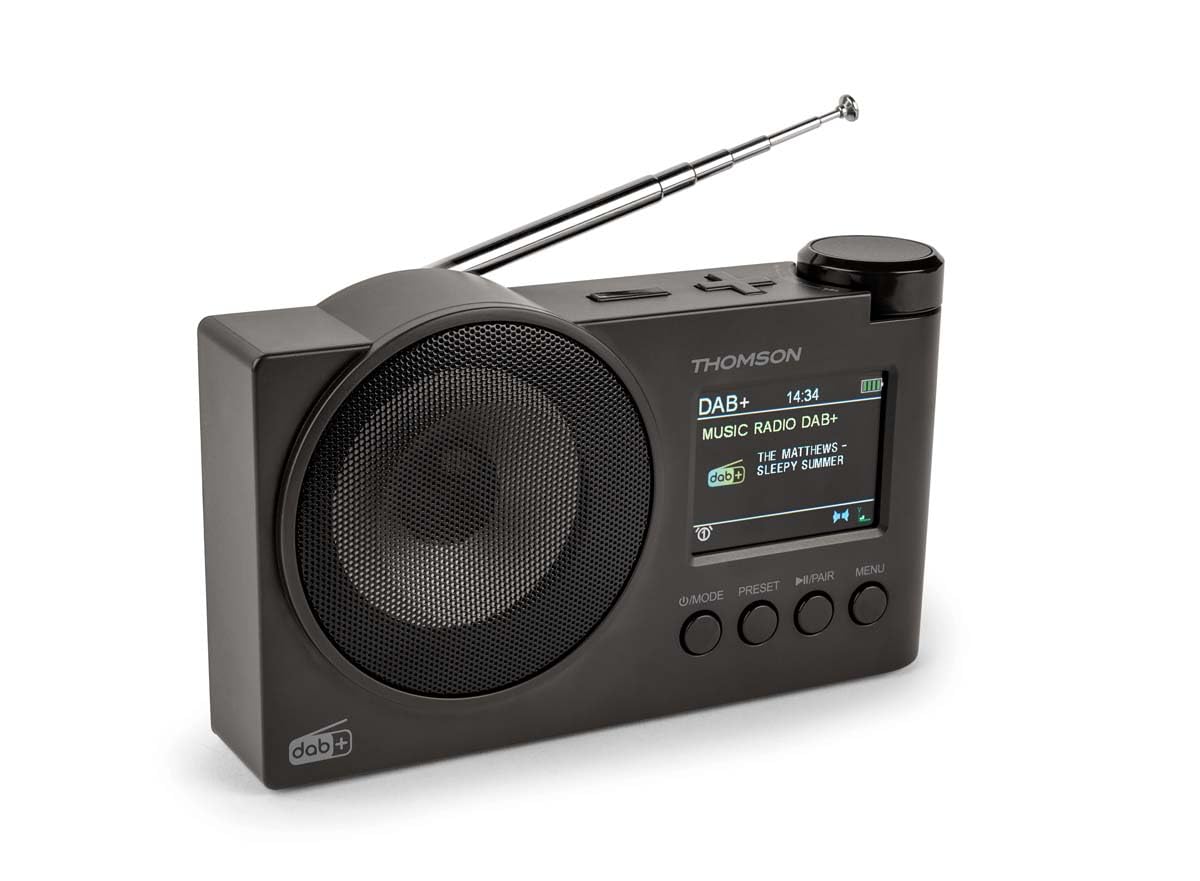
1.1-rasm: THOMSON RT400DABBTBK portable radio. This image shows the front of the radio, featuring the speaker grille on the left and the LED display with control buttons on the right. The display indicates the time, date, and battery level.
2. Xavfsizlik bo'yicha muhim ko'rsatmalar
- Qurilmani ishlatishdan oldin barcha ko'rsatmalarni diqqat bilan o'qing.
- Kelajakda foydalanish uchun ushbu qo'llanmani saqlang.
- Qurilmani yomg'ir, namlik yoki haddan tashqari harorat ta'sirida qoldirmang.
- Do not disassemble the unit. Refer all servicing to qualified personnel.
- Use only the specified power adapter (DC 5V 2A) and USB-C cable.
- Qurilma atrofida to'g'ri shamollatilishini ta'minlang.
- Qurilmani issiqlik manbalari yoki to'g'ridan-to'g'ri quyosh nuri yaqiniga qo'ymang.
3. Paket tarkibi
Iltimos, barcha elementlar mavjudligini tekshiring:
- THOMSON RT400DABBTBK Radio
- USB-C zaryadlovchi kabeli
- Foydalanuvchi qo'llanmasi (ushbu hujjat)
4. Product Layout and Controls

4.1-rasm: Front Panel Controls and Display. This image provides a detailed view of the radio's front panel, featuring the circular speaker on the left and the rectangular LED display on the right. Below the display are four control buttons: MODE, PRESET, PLAY/PAIR, and MENU. The display shows '12/8/2025 Mardi 16:24' with alarm and stop icons.
4.1. Boshqarish tugmalari
- POWER / MODE: Press to turn on/off. Press to switch between DAB+, FM, Bluetooth, USB, and AUX-IN modes.
- Oldindan o'rnatish: Access and save preset radio stations.
- PLAY / PAIR: In Bluetooth mode, press to play/pause or initiate pairing. In USB mode, play/pause.
- MENYU: Access system settings and options for the current mode.
- Rotary Knob (Top Right): Adjust volume, navigate menus, or tune frequencies. Press to confirm selections.
4.2. Ma'lumotni ko'rsatish
The LED display shows various information depending on the operating mode:
- Current time and date (12/24h format).
- Radio station name, frequency, or DAB+ service information.
- Bluetooth ulanish holati.
- USB track information.
- Batareya darajasi ko'rsatkichi.
- Alarm icons (Alarm 1, Alarm 2).
5. Sozlash
5.1. Yoqish
The radio can be powered in two ways:
- AC quvvati: Connect the supplied USB-C cable to the DC 5V 2A input on the radio and to a suitable USB power adapter (not included).
- Zaryadlanuvchi batareya: The radio has a built-in 1500mAh Lithium rechargeable battery. Ensure it is fully charged before portable use. The battery charges automatically when connected to AC power.
5.2. Antennani sozlash
For optimal DAB+ and FM radio reception, fully extend the telescopic antenna. Adjust its position for the best signal quality.
5.3. Dastlabki sozlamalar
Upon first use or after a factory reset, you may need to configure basic settings:
- Til tanlash: Use the MENU button to navigate to System Settings, then select 'Language' to choose your preferred language (French, English, German, Italian, Spanish, Portuguese, Dutch).
- Vaqt va sana: The time and date are often automatically updated in DAB+ mode. If not, navigate to System Settings > Time/Date to set manually.
6. Radiodan foydalanish
6.1. DAB+ Radio rejimi
- ni bosing REJIM button to select DAB+ mode.
- The radio will automatically perform a scan for available DAB+ stations.
- Use the rotary knob to scroll through the list of found stations. Press the knob to select a station.
- To save a station as a preset, press and hold the PRESS button, select a preset number using the rotary knob, and press the knob to confirm.
6.2. FM radio rejimi
- ni bosing REJIM FM rejimini tanlash uchun tugma.
- To auto-scan for stations, press and hold the rotary knob. The radio will scan and save stations.
- To manually tune, rotate the knob to adjust the frequency.
- To save a station as a preset, press and hold the PRESS button, select a preset number using the rotary knob, and press the knob to confirm.
6.3. Bluetooth karnay rejimi
- ni bosing REJIM button to select Bluetooth mode. The display will show 'Bluetooth Pairing'.
- On your smartphone or tablet, enable Bluetooth and search for 'THOMSON RT400DABBTBK'.
- Select the device to pair. Once connected, the display will show 'Bluetooth Connected'.
- Play audio from your paired device. Use the radio's rotary knob to adjust volume.
6.4. USB orqali ijro etish
- MP3 o'z ichiga olgan USB flesh-diskini joylashtiring files USB portiga kiriting.
- ni bosing REJIM USB rejimini tanlash uchun tugmani bosing.
- The radio will automatically start playing MP3 files. Use the rotary knob to navigate tracks and the PLAY/PAIR tugatish / pauza qilish.
6.5. AUX-IN rejimi
- Connect an external audio device (e.g., MP3 player) to the AUX-IN 3.5mm port using an audio cable (not included).
- ni bosing REJIM AUX-IN rejimini tanlash uchun tugmani bosing.
- Control playback from your external device. Use the radio's rotary knob to adjust volume.
6.6. Eshitish vositasidan foydalanish
Connect headphones (not supplied) to the 3.5mm headphone jack for private listening. The main speaker will be muted automatically.
7. Budilnik
The radio features a dual alarm clock.
- ni bosing MENU button and navigate to 'Alarm Settings'.
- Select 'Alarm 1' or 'Alarm 2' to configure.
- Vaqtni belgilash: Use the rotary knob to set the desired alarm time.
- Signal manbai: Choose your preferred wake-up sound: DAB+, FM, USB, or Bluetooth.
- Signalning davomiyligi: Set the alarm duration (15, 30, 45, 60, or 90 minutes).
- Signal chastotasi: Select how often the alarm should sound: Once, Daily, Weekdays, or Weekends.
- Hajmi: Signal balandligini sozlang.
- Yoqish/o‘chirish: Turn the alarm ON or OFF.
8. Tizim sozlamalari
Access system settings by pressing the MENU button and navigating to 'System Settings'.
- Displey sozlamalari: Adjust backlight duration (10 to 180 seconds) and choose between 12-hour or 24-hour time format.
- Til: Select the display language (French, English, German, Italian, Spanish, Portuguese, Dutch).
- Automatic Station Update: Enable or disable automatic updates for radio stations.
- Zavod parametrlarini tiklash: Barcha sozlamalarni standart qiymatlariga qaytaring.
9. Xizmat ko'rsatish
9.1. Tozalash
Wipe the radio's surface with a soft, dry cloth. Do not use abrasive cleaners, waxes, or solvents, as these may damage the finish.
9.2. Batareyani parvarish qilish
To prolong the life of the built-in Lithium battery:
- Tez-tez batareyani to'liq zaryadsizlantirishdan saqlaning.
- Charge the battery regularly, even if the radio is not in use for extended periods.
- Store the radio in a cool, dry place when not in use.
10. Muammolarni bartaraf qilish; nosozliklarni TUZATISH
| Muammo | Mumkin sabab | Yechim |
|---|---|---|
| Quvvat yo'q | Battery discharged or power cable not connected. | Connect the USB-C cable to a power source. Charge the battery. |
| Yomon radio qabul qilish | Antenna not extended or weak signal area. | Teleskopik antennani to'liq uzating va sozlang. Radioni boshqa joyga ko'chirishga harakat qiling. |
| Bluetooth ulanmayapti | Radio not in pairing mode or device already paired. | Ensure the radio is in Bluetooth mode and 'Bluetooth Pairing' is displayed. Forget the device on your phone/tablet and try pairing again. |
| USB orqali tinglash ishlamayapti | USB drive not formatted correctly or unsupported file turi. | Ensure USB drive is formatted to FAT32 and contains MP3 fileBoshqa USB drayverni sinab ko'ring. |
| Signal jiringlamayapti | Alarm disabled or incorrect settings. | Check alarm settings (time, source, frequency, enable/disable status). |
11. Texnik shartlar
| Xususiyat | Spetsifikatsiya |
|---|---|
| Brend | TOMSON |
| Model raqami | RT400DABBTBK |
| Radio diapazonlari qo'llab-quvvatlanadi | DAB+, FM |
| Ulanish texnologiyasi | Bluetooth |
| Maxsus xususiyat | Portativ |
| Quvvat manbai | Battery Powered, Corded Electric (DC 5V 2A via USB-C) |
| Batareya | 1500 mAh qayta zaryadlanuvchi lityum |
| Displey turi | LED |
| Mahsulot o'lchamlari (U x G x Y) | 8 x 5 x 15 santimetr |
| Element og'irligi | 300 gramm |
| Mos qurilmalar | MP3 Player, Speaker, Headphones, Tablet |
12. Kafolat va qo'llab-quvvatlash
This THOMSON RT400DABBTBK radio comes with a 1 yillik ishlab chiqaruvchi kafolati.
For further support, troubleshooting, or warranty claims, please refer to your point of purchase or visit the official THOMSON brand store: