
1. Kirish
The AJAZZ AKP03 Macro Keypad Stream Controller is a versatile device designed to enhance productivity and streamline workflows for gamers, streamers, and professionals. Featuring six programmable keys with LCD displays, three physical knobs, and three toggle switches, it offers extensive customization options for various tasks.
This manual provides detailed instructions for setting up, operating, and maintaining your AKP03 device, ensuring optimal performance and user experience.
2. Mahsulot xususiyatlari
- Six Programmable Macro Keys: Customizable LCD displays for single or continuous actions.
- Three Physical Knobs: For precise control over various functions.
- Three Toggle Switches: Additional control options.
- Bir marta bosish bilan ishlash: Instant execution of macro commands, text input, application launches, and media control.
- Intuitive Driver Software: Drag-and-drop functionality for easy key assignment and property configuration.
- Keng muvofiqlik: Seamless integration with platforms like Streamlabs, Twitch, YouTube, and various software applications on Windows and Mac.
- Removable 40° Stand: Provides an ergonomic viewing angle and stable placement.

2.1 -rasm: tugadiview of the AJAZZ AKP03 Macro Keypad, highlighting its programmable buttons, toggle switches, and scroll wheels.
3. Paket tarkibi
Paketingizda barcha narsalar mavjudligini tekshiring:
- AJAZZ AKP03 Macro Keypad Stream Controller
- USB-C dan USB-A kabeliga
- Removable 40° Stand
- Foydalanuvchi uchun qo'llanma (ushbu hujjat)
4. Sozlash
4.1 Jismoniy ulanish
- Attach the removable 40° stand to the bottom of the AKP03 for an ergonomic angle, if desired.
- Connect the provided USB-C cable to the USB-C port on the AKP03.
- Connect the USB-A end of the cable to an available USB port on your computer (PC or Mac).
- Qurilma avtomatik ravishda yoqiladi.

Figure 4.1: Attaching the removable 40° stand to the AKP03.
4.2 Dasturiy ta'minotni o'rnatish
To unlock the full customization capabilities of your AKP03, you must install the dedicated driver software.
- Oching web browser and navigate to the official AJAZZ websayt: www.a-jazz.com.
- Locate the 'Driver Download' section.
- Ni qidirish 'AKP03' or browse for the corresponding driver for your model.
- Download the driver software compatible with your operating system (Windows or macOS).
- O'rnatuvchini ishga tushiring va o'rnatishni yakunlash uchun ekrandagi ko'rsatmalarga amal qiling.
- Agar so'ralsa, kompyuteringizni qayta ishga tushiring.
Video 4.1: Demonstrates the software installation process and initial setup for the AJAZZ Macro Keypad.
5. Foydalanish bo'yicha ko'rsatmalar
5.1 Customizing Keys and Knobs
The AKP03's driver software provides a user-friendly interface for customization:
- Launch the 'Stream Dock AJAZZ' software from your desktop or applications folder.
- The software will display a visual representation of your AKP03.
- To assign an action, drag and drop a desired function (e.g., launch application, media control, macro command) from the software's library onto one of the six programmable keys.
- For knobs, select the knob in the software and assign functions such as volume control, scrolling, or zooming.
- You can configure properties for each assigned action, including specific file yo'llar, web URLs, or macro sequences.
- The LCD displays on the keys will update to show the assigned icon or text.
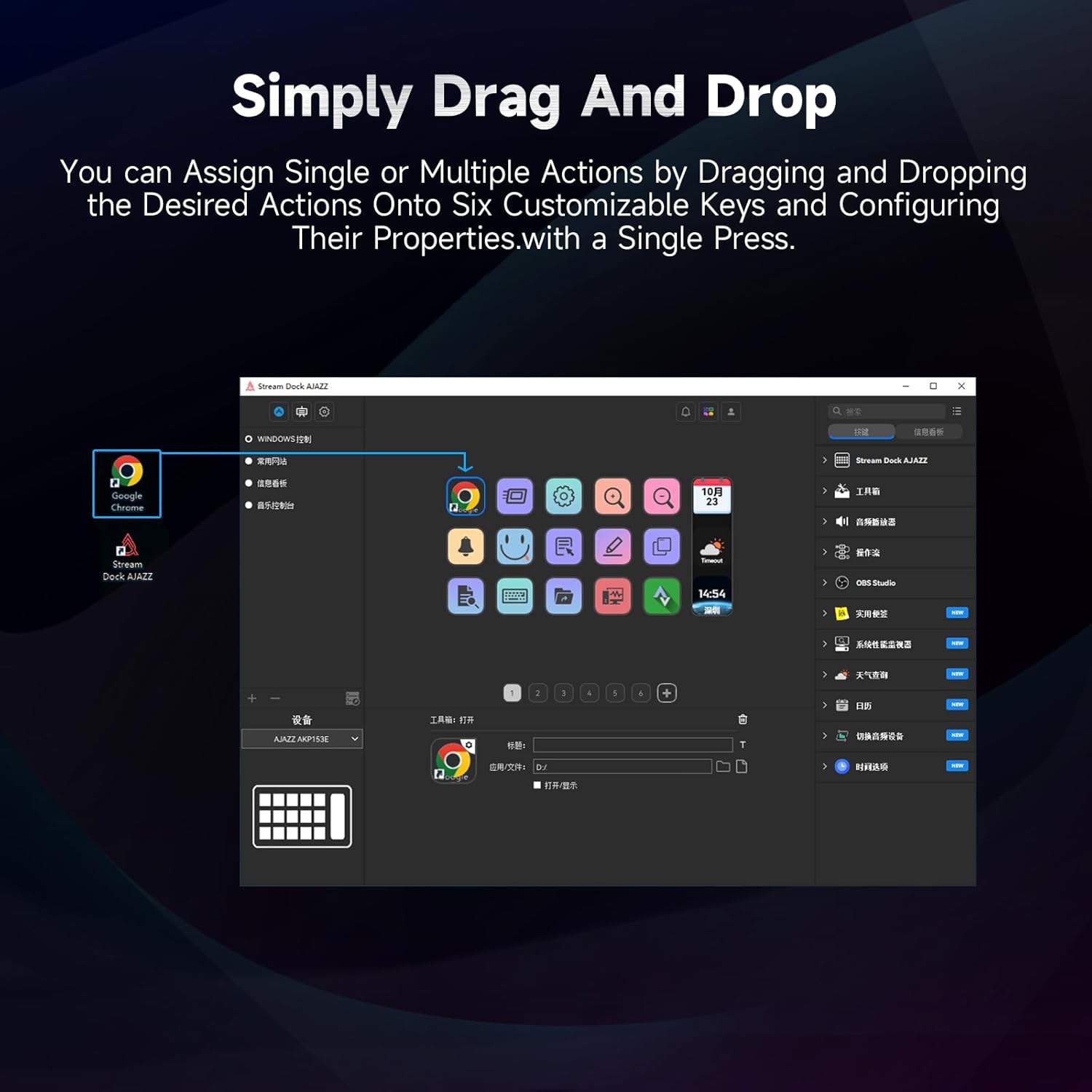
Figure 5.1: Customizing keys using the drag-and-drop interface in the AJAZZ software.
Video 5.1: Demonstration of assigning actions to keys for launching web pages and software with a single click.
5.2 Using Profiles and Pages
The software supports multiple profiles and pages, allowing you to switch between different sets of key assignments for various applications or tasks.
- Yangi professional yaratingfiles for specific games, editing software, or streaming setups.
- Har bir mutaxassis ichidafile, you can create multiple pages of key assignments, accessible by navigating through the device's buttons or software interface.
- The AKP03 automatically switches to the relevant profile when a linked application is in focus.
Video 5.2: Illustrates the multi-functional capabilities and profile switching of the AKP03 for various tasks.
6. Xizmat ko'rsatish
To ensure the longevity and optimal performance of your AJAZZ AKP03, follow these maintenance guidelines:
- Tozalash: Use a soft, dry cloth to wipe the surface of the device. Avoid abrasive cleaners or solvents.
- Saqlash: Qurilmani to'g'ridan-to'g'ri quyosh nuri va haddan tashqari haroratdan uzoqda, salqin va quruq joyda saqlang.
- Kabelni parvarish qilish: Zararni oldini olish uchun USB kabelini haddan tashqari burish yoki burishdan saqlaning.
- Dasturiy ta'minot yangilanishlari: Regularly check the AJAZZ website for software and firmware updates to ensure compatibility and access to new features.
7. Muammolarni bartaraf qilish; nosozliklarni TUZATISH
If you encounter issues with your AKP03, refer to the following common troubleshooting steps:
- Qurilma tan olinmagan:
- Ensure the USB cable is securely connected to both the AKP03 and your computer.
- Boshqa USB portiga ulanishga harakat qiling.
- Kompyuteringizni qayta ishga tushiring.
- Verify that the driver software is correctly installed and up to date.
- Javob bermaydigan kalitlar:
- Check the software to ensure keys are properly assigned and the correct profile faoldir.
- Ensure the driver software is running in the background.
- Dasturiy ta'minot bilan bog'liq muammolar:
- Reinstall the driver software.
- Check for software updates on the AJAZZ websayt.
8. Texnik shartlar
| Xususiyat | Tafsilot |
|---|---|
| Brend | AJAZZ |
| Model nomi | AKP03 |
| Mos qurilmalar | Kompyuter, noutbuk |
| Nazoratchi turi | Klaviatura |
| Ulanish texnologiyasi | USB-C |
| Tugma miqdori | 6 Programmable Keys (with LCD displays), 3 Physical Knobs, 3 Toggle Switches |
| Element og'irligi | 0.32 kilogramm |
| Buyum oʻlchamlari (U x G x Y) | 5 x 3 x 2 dyuym |
| Quvvat manbai | Simli elektr |
9. Kafolat va qo'llab-quvvatlash
9.1 Kafolat haqida ma'lumot
The AJAZZ AKP03 Macro Keypad Stream Controller comes with a 1 Yil Cheklangan Kafolat sotib olingan kundan boshlab. Ushbu kafolat ishlab chiqarish nuqsonlari va normal foydalanishdagi nosozliklarni qoplaydi. Bu noto'g'ri foydalanish, baxtsiz hodisalar, ruxsatsiz o'zgartirishlar yoki noto'g'ri o'rnatish natijasida etkazilgan zararni qoplamaydi.
Iltimos, kafolat da'volari uchun sotib olinganligingizni tasdiqlovchi hujjatingizni saqlab qo'ying.
9.2 Mijozlarni qo‘llab-quvvatlash
For technical assistance, troubleshooting, or warranty inquiries, please contact AJAZZ customer support:
- Websayt: www.a-jazz.com (Refer to the 'Support' or 'Contact Us' section)
- Email: [Insert Customer Support Email, if available]
- Telefon: [Insert Customer Support Phone Number, if available]
Our support team is available to assist you with any questions or concerns regarding your product.