
1. Kirish
This manual provides essential information for the safe and efficient use of your Haier H55C95EUX 55-inch OLED 4K HDR Smart TV. Please read these instructions thoroughly before operating your television and retain them for future reference.
The Haier H55C95EUX features a 55-inch OLED display for deep blacks and vibrant colors, 4K HDR resolution, a 144Hz refresh rate for smooth motion, integrated Harman Kardon sound, and the Google TV operating system for smart functionality and voice control.

1.1-rasm: tugadiview of Haier C95 Series OLED TV features, highlighting Harman Kardon audio, 144Hz gaming, Dolby Vision IQ, Dolby Atmos, HDR10+, Google TV, and 3GB RAM with 32GB storage.
2. Xavfsizlik ma'lumotlari
Yong'in, elektr toki urishi va shikastlanish xavfini kamaytirish uchun ushbu televizordan foydalanganda doimo asosiy xavfsizlik choralariga rioya qiling.
- Quvvat manbai: Connect the TV only to an AC 220-240V, 50/60Hz power supply.
- Ventilyatsiya: Televizor atrofida to'g'ri shamollatilishini ta'minlang. Shamollatish teshiklarini to'sib qo'ymang.
- Suv va namlik: Televizorni yomg'ir yoki namlik ta'sirida qoldirmang. Suyuqlik bilan to'ldirilgan narsalarni, masalan, vazalarni televizorga qo'ymang.
- Tozalash: Tozalashdan oldin televizorni rozetkadan uzing. Yumshoq, quruq matodan foydalaning. Suyuq tozalagichlar yoki aerozol tozalagichlardan foydalanmang.
- O'rnatish: If wall-mounting, ensure the wall mount is compatible with the VESA standard (100 x 100 mm) and can support the TV's weight.
- Bolalar: Supervise children to ensure they do not play with the television.
3. Qutida nima bor
Qutini ehtiyotkorlik bilan oching va barcha buyumlarning mavjudligiga va shikastlanmaganligiga ishonch hosil qiling.
- Haier H55C95EUX 55-inch OLED 4K HDR Smart TV
- Masofadan boshqarish
- Foydalanuvchi uchun qo'llanma (ushbu hujjat)
- Quvvat kabeli
- Televizor stendining komponentlari (agar mavjud bo'lsa)
4. Sozlash
4.1 Jismoniy o'rnatish
Before installation, consider the TV's dimensions to ensure proper placement.

4.1-rasm: Old view dimensions of the 55-inch Haier TV, indicating a width of 1225mm and a height of 749mm.

Image 4.2: Detailed dimensions of the Haier 55-inch TV, showing measurements with and without the stand.
Stend o'rnatish
- Ekran shikastlanmasligi uchun televizorni yuzini pastga qaratib yumshoq, tekis yuzaga qo'ying.
- Attach the stand components to the designated slots on the bottom of the TV using the provided screws.
- Ensure the stand is securely fastened before placing the TV upright.
Devorga o'rnatish
If wall-mounting, use a VESA-compatible mount (100 x 100 mm) and follow the mount manufacturer's instructions. Ensure the wall can support the TV's weight.
4.2 Qurilmalarni ulash
Televizoringiz tashqi qurilmalarni ulash uchun bir nechta portlar bilan jihozlangan.
- HDMI: Connect Blu-ray players, game consoles, or set-top boxes to the HDMI 2.1 ports for high-quality audio and video.
- USB: Media tinglash uchun USB xotira qurilmalarini ulang.
- Ethernet: Barqaror simli internet ulanishi uchun.
- Bluetooth: Simsiz minigarnituralarni yoki boshqa Bluetooth qurilmalarini ulang.
4.3 Dastlabki yoqish va sozlash
- Quvvat simini televizorga va devordagi rozetkaga ulang.
- Masofadan boshqarish pultidagi yoki televizordagi quvvat tugmasini bosing.
- Follow the on-screen instructions to complete the initial setup, including language selection, network connection (Wi-Fi or Ethernet), and Google TV account login.
5. Televizoringizni boshqarish
5.1 masofadan boshqarish pulti
The included remote control allows you to navigate the TV's features. It may feature a solar cell for eco-friendly charging and USB-C for backup charging.

Image 5.1: The Haier TV remote control, featuring navigation, volume, and app access buttons.
5.2 Google TV interfeysi
Your TV runs on Google TV, providing access to a wide range of streaming services, apps, and personalized content.

Image 5.2: The Google TV home screen, showcasing turli xil striming ilovalari va kontent tavsiyalari.
Ovozli boshqaruv
Use the built-in voice control feature to search for content, launch apps, and control your TV hands-free. Simply say "Hey Google" or press the voice assistant button on your remote.

Image 5.3: Demonstrating voice control functionality with the Haier TV and Google TV.
5.3 Rasm va ovoz sozlamalari
OLED texnologiyasi
The OLED display provides absolute blacks and infinite contrast for a lifelike viewtajribasi.

Image 5.4: Visual representation of OLED technology, showcasing chuqur qora va jonli ranglar.
Harman Kardon Sound
Experience immersive audio with clear dialogues and cinematic depth, delivered by the integrated Harman Kardon sound system.

Image 5.5: Depiction of the Harman Kardon sound system, emphasizing clear and powerful audio.
Dolby Atmos
Enjoy three-dimensional, immersive sound that moves around you, enhancing your audio experience.
144Hz yangilash tezligi
The 144Hz refresh rate ensures smooth and fluid motion, ideal for fast-paced content like gaming and sports.

Image 5.6: Visual comparison illustrating the fluidity of 144Hz motion compared to 60Hz, particularly beneficial for gaming.
6. Xizmat ko'rsatish
6.1 Televizorni tozalash
- Tozalashdan oldin har doim televizorni elektr tarmog'idan uzing.
- Ekran va shkafni artish uchun yumshoq, quruq, tuklarsiz matodan foydalaning.
- O'jar belgilar uchun engil dampmatoni suv yoki maxsus ekran tozalagich bilan tozalang. Hech qachon tozalagichni to'g'ridan-to'g'ri ekranga sepmang.
- Abraziv tozalash vositalari, mumlar yoki erituvchilardan foydalanishdan saqlaning.
6.2 Dasturiy ta'minotni yangilash
Your Haier TV may receive software updates to improve performance and add new features. Ensure your TV is connected to the internet to receive these updates automatically or check for them manually through the settings menu.
7. Muammolarni bartaraf qilish; nosozliklarni TUZATISH
Televizoringiz bilan bog'liq muammolarga duch kelsangiz, quyidagi umumiy echimlarga murojaat qiling:
| Muammo | Mumkin yechim |
|---|---|
| Quvvat yo'q | Check if the power cable is securely connected to the TV and the wall outlet. Ensure the outlet is functioning. Try pressing the power button on the TV itself. |
| Rasm yo'q, lekin ovoz mavjud | Kirish manbasini tekshiring. Ulangan qurilma yoqilgan va to'g'ri ishlayotganiga ishonch hosil qiling. Boshqa HDMI kabeli yoki portini sinab ko'ring. |
| Ovoz yo'q, lekin rasm mavjud | Check the volume level. Ensure the TV is not muted. Verify audio output settings (e.g., internal speakers, external sound system). Check audio cables if using external speakers. |
| Masofadan boshqarish pulti ishlamayapti | Check the remote control's battery level. Ensure there are no obstructions between the remote and the TV's IR sensor. If it's a solar remote, ensure it has sufficient light exposure. |
| Tarmoqqa ulanish muammolari | Restart your router and modem. Check Wi-Fi password. If using Ethernet, ensure the cable is connected properly. Try connecting to a different network if available. |
8. Texnik shartlar
| Xususiyat | Tafsilot |
|---|---|
| Model nomi | H55C95EUX |
| Ekran o'lchami | 55 dyuym |
| Displey texnologiyasi | OLED |
| Rezolyutsiya | 4K (3840 x 2160) |
| Yangilanish tezligi | 120 Hz (Motion Enhancement: 144Hz) |
| HDR formati qo'llab-quvvatlanadi | Dolby Vision |
| Operatsion tizim | Google TV |
| Ichki xotira | 32 GB |
| Audio tizimi | Harman Kardon 2.1 Sound System |
| Surround Sound Format | Dolby Atmos |
| Ulanish | Bluetooth, Ethernet, HDMI (x4), USB (x1) |
| Simsiz texnologiya | Bluetooth, Wi-Fi |
| Nazorat usuli | Remote Control, Voice |
| Mahsulot o'lchamlari (DxWxH) | 29.5P x 122.5l x 76.8H cm (with stand) |
| VESA o'rnatish standarti | 100 x 100 mm |
| Energiya samaradorligi klassi (SDR) | F (77 kVt/1000 soat) |
| Energiya samaradorligi klassi (HDR) | G (70 kVt/1000 soat) |
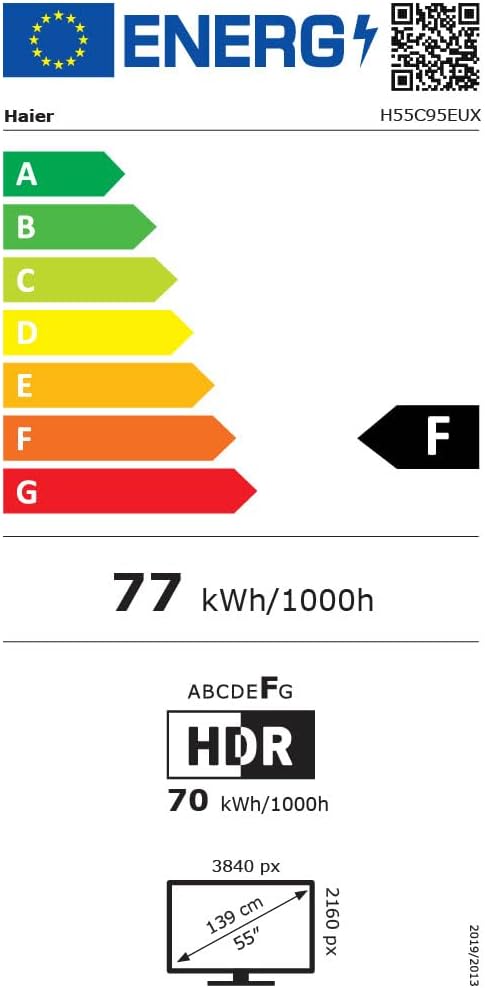
Image 8.1: EU Energy Label for the Haier H55C95EUX TV. For more details, visit the EPREL ma'lumotlar bazasi.
9. Kafolat va qo'llab-quvvatlash
Your Haier H55C95EUX television comes with a 2 yillik ishlab chiqaruvchi kafolati. Iltimos, kafolat da'volari uchun sotib olinganligingizni tasdiqlovchi hujjatingizni saqlab qo'ying.
For technical support, service, or further inquiries, please refer to the contact information provided on the official Haier website or your local authorized service center.