
Kirish
The Radtel RT-950 PRO is a high-performance handheld two-way radio designed for amateur radio enthusiasts and professional operations. It offers a wide range of features including 10W output power, multi-band reception (AM/FM/CB/SW/MW/LW RX), Bluetooth APP programming, GPS/APRS functionality, NOAA weather channel reception, and an integrated spectrum analyzer. This manual provides essential information for the proper setup, operation, and maintenance of your RT-950 PRO radio.
Qutida nima bor
Iltimos, paketingizda barcha narsalar mavjudligini tekshiring:
- 1x RT-950 PRO Main Unit (Green)
- 1x 2200mAh Li-ion Battery
- 1x Dual Band Antenna
- 1x kamar klipi
- 1x Type-C zaryadlovchi kabeli
- 1x Power Supply with USB Port
- 1x Desktop Charger
- 1x English User Manual
Mahsulot tugadiview
Familiarize yourself with the physical components and layout of your Radtel RT-950 PRO radio.

1-rasm: Old view of the Radtel RT-950 PRO with labeled components.

2-rasm: yon view and dimensions of the Radtel RT-950 PRO.
Dastlabki sozlash
1. Batareyani o'rnatish
- Batareya to'plamini radioning orqa qismidagi oluklar bilan tekislang.
- Batareya to'plamini joyiga o'raguncha yuqoriga suring.
- Batareyani olib tashlash uchun uni bo'shatish mandalini bosing va batareyani pastga siljiting.
2. Antenna qo'shimchasi
- Screw the dual-band antenna clockwise into the antenna connector on top of the radio until it is finger-tight. Do not overtighten.
3. Batareyani zaryadlash
The RT-950 PRO supports both Type-C direct charging and desktop charger charging.
- Using the Desktop Charger: Place the radio with the battery installed into the desktop charger. Ensure the charging contacts align. The indicator light on the charger will show charging status.
- Type-C kabelidan foydalanish: Connect the Type-C charging cable to the port on the side of the radio and to the provided power supply or any compatible USB power source.

Figure 3: Type-C charging port on the Radtel RT-950 PRO.
Foydalanish bo'yicha ko'rsatmalar
Quvvatni yoqish / o'chirish va ovoz balandligini boshqarish
Rotate the Power Switch/Volume Knob clockwise to turn on the radio and adjust the volume. Rotate counter-clockwise until it clicks to turn off.
Basic Communication (TX/RX)
To transmit, press and hold the PTT (Push-To-Talk) button on the side of the radio. Speak clearly into the microphone. Release the PTT button to receive. The RT-950 PRO features multiple PTT buttons (PTT A, PTT B, Side-key 1) which can be configured for different functions.

Figure 4: Programmable PTT and Side Keys.
Bluetooth APP Programming
The RT-950 PRO can be programmed wirelessly via a Bluetooth application on your smartphone. This allows for convenient configuration of channels, frequencies, and other settings without a physical cable.
- Download the official Radtel programming app from your smartphone's app store.
- Enable Bluetooth on your smartphone and the RT-950 PRO.
- Open the app, search for your radio, and connect.
- Follow the in-app instructions to read, modify, and write radio settings.

Figure 5: Mobile Programming via Bluetooth App.
NOAA Weather Channel Reception
Stay informed about weather conditions by accessing NOAA weather channels. The radio can receive real-time weather alerts, crucial for outdoor activities and emergency preparedness.
- Navigate to the NOAA weather channel function on your radio's menu.
- Select the desired NOAA channel to receive broadcasts.

Figure 6: NOAA Weather Channel display.
GPS/APRS Functionality
The integrated GPS and APRS features allow for real-time position sharing and tracking, enhancing coordination during group activities or emergencies.
- One-Click GPS Positioning: Access the GPS function through the menu or a programmable side-key to view your current coordinates and other location data.
- APRS Position Transmission: Configure APRS settings to transmit your position data to other APRS-enabled devices or networks.
Spektr analizatori
The built-in spectrum analyzer allows you to monitor frequency activity, visualize signal strength, and identify active channels within a specified range.
- Activate the spectrum analyzer mode from the radio's menu.
- Observe the graphical display to identify active frequencies and signal patterns.

Figure 7: Real-time Spectrum Analysis display.
Multi-Band Reception
The RT-950 PRO offers extensive reception capabilities across various bands:
- AM/FM Broadcast
- CB (Citizens Band)
- SW (Qisqa to'lqin)
- MW (Medium Wave)
- LW (Uzoq to'lqin)
- LSB/USB/CW (Single Sideband and Continuous Wave)
To switch between bands, use the appropriate menu options or programmable keys. For optimal shortwave reception, an external shortwave antenna (sold separately) may be required.
Wireless Frequency Copy
The wireless frequency copy feature allows you to quickly duplicate frequency and CTCSS/DCS settings from another radio without the need for cables.
- Activate the frequency copy mode on your RT-950 PRO.
- Place the transmitting radio near the RT-950 PRO.
- Initiate the copy process, and the radio will detect and store the frequency and tone settings.

Figure 8: Wireless Frequency Copy in action.
Quvvat darajasini almashtirish
The RT-950 PRO supports three power output levels (High, Middle, Low) to optimize battery life and transmission range based on your communication needs.
- Access the power level setting through the radio's menu.
- Select the desired power output: High (up to 10W), Middle, or Low.
27MHz Transmission
The radio supports 27MHz transmission and reception in FM modulation only, with a power output of 3-4W in this band.
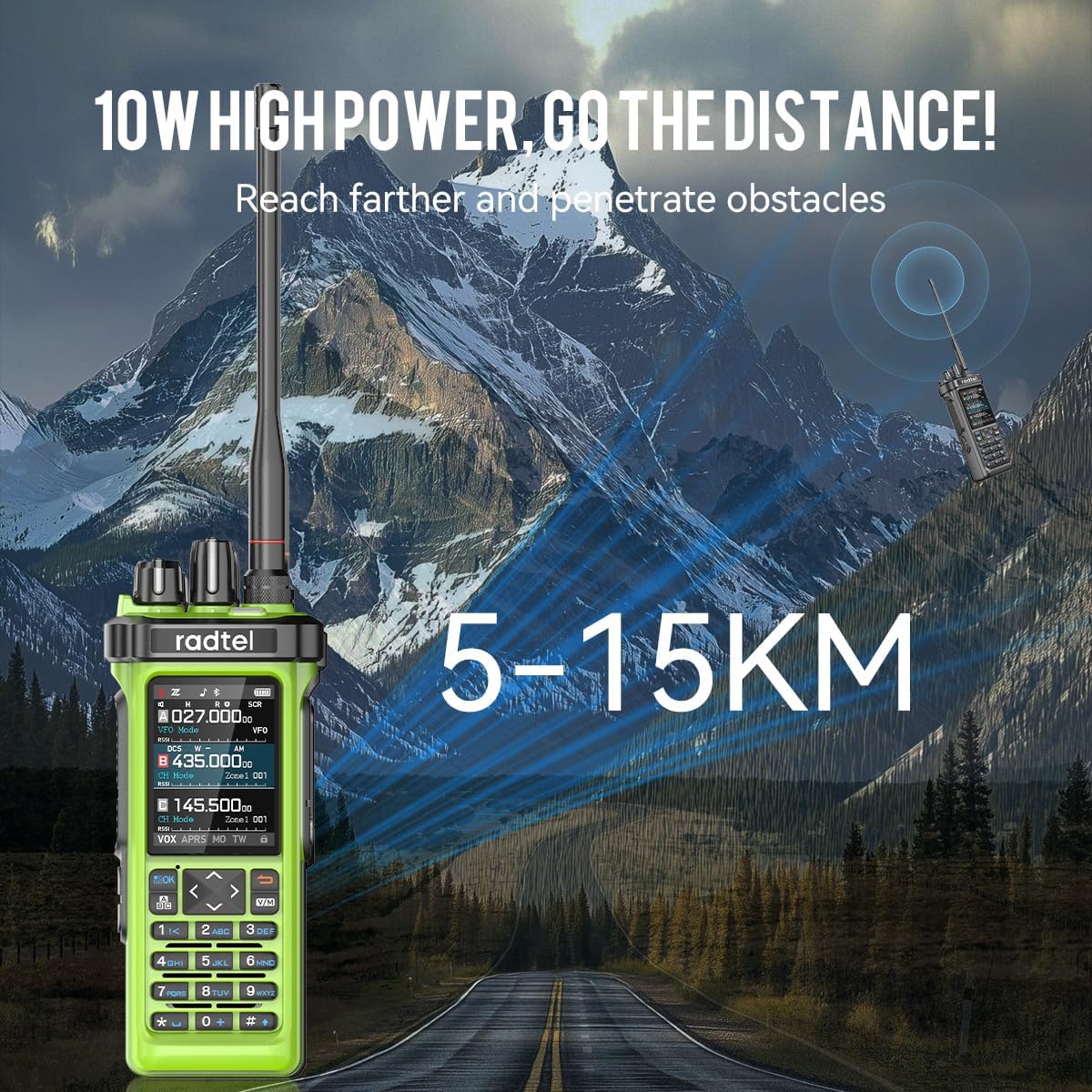
Figure 9: The 10W high power output of the RT-950 PRO for extended range.
O'zaro tarmoqli takrorlash funktsiyasi
The RT-950 PRO can function as a cross-band repeater, allowing interoperability between UHF and VHF frequencies. This extends the communication range for other radios.

Figure 10: Cross-Band Repeater capability.
Rasmiy mahsulot video
Video 1: Radtel RT-950 PRO V2 Green. This video demonstrates key features including Bluetooth programming, NOAA weather reception, power level switching, frequency spectrum analysis, one-click GPS positioning, APRS transmission, shortwave reception, 27MHz transmission, fast frequency copy, and Type-C charging.
Xizmat
- Tozalash: Yumshoqdan foydalaning, damp Radioning tashqi qismini tozalash uchun matodan foydalaning. Agressiv kimyoviy moddalar yoki erituvchilardan foydalanmang.
- Batareya parvarishi: To prolong battery life, avoid overcharging or completely draining the battery. Store the radio and battery in a cool, dry place.
- Aksessuar haqida ogohlantirish: OGOHLANTIRISH: Please use the 950/950Pro with caution. Using non-Radtel brand headphones and microphones may burn out the audio amplifier module and cause the radio to be silent. Always use original or Radtel-approved accessories.
Muammolarni bartaraf qilish; nosozliklarni TUZATISH
| Muammo | Mumkin sabab | Yechim |
|---|---|---|
| Radio yoqilmaydi | Batareya quvvati kam yoki to'g'ri o'rnatilmagan. | Batareyani zaryadlang yoki to'g'ri qayta o'rnating. |
| Yuborish yoki qabul qilish mumkin emas | Incorrect frequency/channel, antenna not connected, low power setting. | Verify frequency/channel, ensure antenna is secure, check power output setting. |
| Ovoz sifati past | Weak signal, incorrect squelch setting, faulty accessory. | Adjust squelch, move to an area with better signal, test with different accessories. |
Texnik xususiyatlari
| Xususiyat | Tafsilot |
|---|---|
| Brend | radtel |
| Model raqami | RT-950 Pro |
| Rang | Yashil |
| Kanallar soni | 960 |
| Chastota diapazoni | 144-148Mhz/420-450Mhz (TX/RX), Multi-band RX (AM/FM/CB/SW/MW/LW LSB USB CW) |
| 27MHz TX/RX | FM Modulation only, 3-4W power |
| Suhbat diapazoni maksimal | 6 Kilometr |
| jildtage | 7.4 volt |
| Suvga chidamlilik darajasi | Suvga chidamli emas |
| Batareyalar soni | 1 (shu jumladan) |
| Ulanish protokoli | Bluetooth |
| Empedans | 50 Ohm |
| Maxsus xususiyatlar | Bluetooth App Programming, High Output Power, GPS/APRS Position Sending, Channel Zone Function, Full-Color Display, PC Programming, Integrated Spectrum Analyzer, Wireless Frequency Copy, NOAA Weather Channel Support |
Kafolat va qo'llab-quvvatlash
The Radtel RT-950 PRO comes with a 1 Yil Kafolat from the date of purchase. For technical support, software updates, or warranty claims, please visit the official Radtel websaytida radtel.com or contact your authorized dealer.