
1. Mahsulot tugadiview
The NovaStar TB20 Plus is a high-performance, cost-effective asynchronous LED controller designed for managing full-color LED displays. It offers smart features such as Wi-Fi connectivity, remote management, and mobile app control, making it suitable for various applications including storefront signs, retail displays, and promotional screens.
Asosiy xususiyatlarga quyidagilar kiradi:
- High Pixel Load Capacity: Supports up to 650,000 pixels with resolutions up to approximately 1920x1080, compatible with various LED module scan configurations.
- Ikki tarmoq ulanishi: Built-in 2.4GHz Wi-Fi and 10/100M Ethernet for remote content updates and device monitoring.
- Mobil ilovalarni boshqarish: Free iOS and Android app for managing multiple devices, scheduling playlists, and performing OTA firmware updates.
- Rich Multimedia Support: Plays MP4, AVI, MOV (H.264), JPG, PNG, BMP formats, scrolling text, live clock, and real-time weather. Supports multi-zone layouts.
- Plug-and-Play o'rnatish: Compact design, powered by standard DC 5V/2A, with content loading via USB drive.
- Kengaytiriladigan xotira: 8GB internal storage with microSD/TF card expansion capability.
- Keng ish diapazoni: Functions reliably in temperatures from -20°C to +60°C.
2. Nimalar kiradi
Iltimos, paketda barcha narsalar mavjudligini tekshiring:
- NovaStar TB20 Plus Playback Controller ×1
- DC 5V / 2A Power Adapter ×1
- Quick Start Guide ×1 (includes English instructions)

Image: The NovaStar TB20 Plus controller with its Wi-Fi antenna connected, showing the various ports and indicator lights.
3. O'rnatish bo'yicha qo'llanma
Follow these steps for initial setup of your NovaStar TB20 Plus controller:
- Connect to LED Display: Connect the TB20 Plus to your LED display using an Ethernet cable from the controller's Ethernet output port to the receiving card of the LED display.
- Quvvatni ulash: Plug the DC 5V / 2A power adapter into the controller's power input port and then into a power outlet. The PWR indicator light should illuminate.
- Tarmoqqa ulanish:
- Wi-fi: Attach the provided Wi-Fi antenna to the designated port. You can configure Wi-Fi settings later via the mobile app or web interfeys.
- Ethernet: For a wired connection, connect an Ethernet cable from your network router or switch to the controller's Ethernet input port.
- Initial Content Loading (Optional): To load content directly, insert a USB drive containing your media files into the USB port. The controller can automatically play content from the USB drive after setup.
- Mobil ilovani o'rnatish: Download the official NovaStar mobile application from the iOS App Store or Google Play Store on your smartphone or tablet.
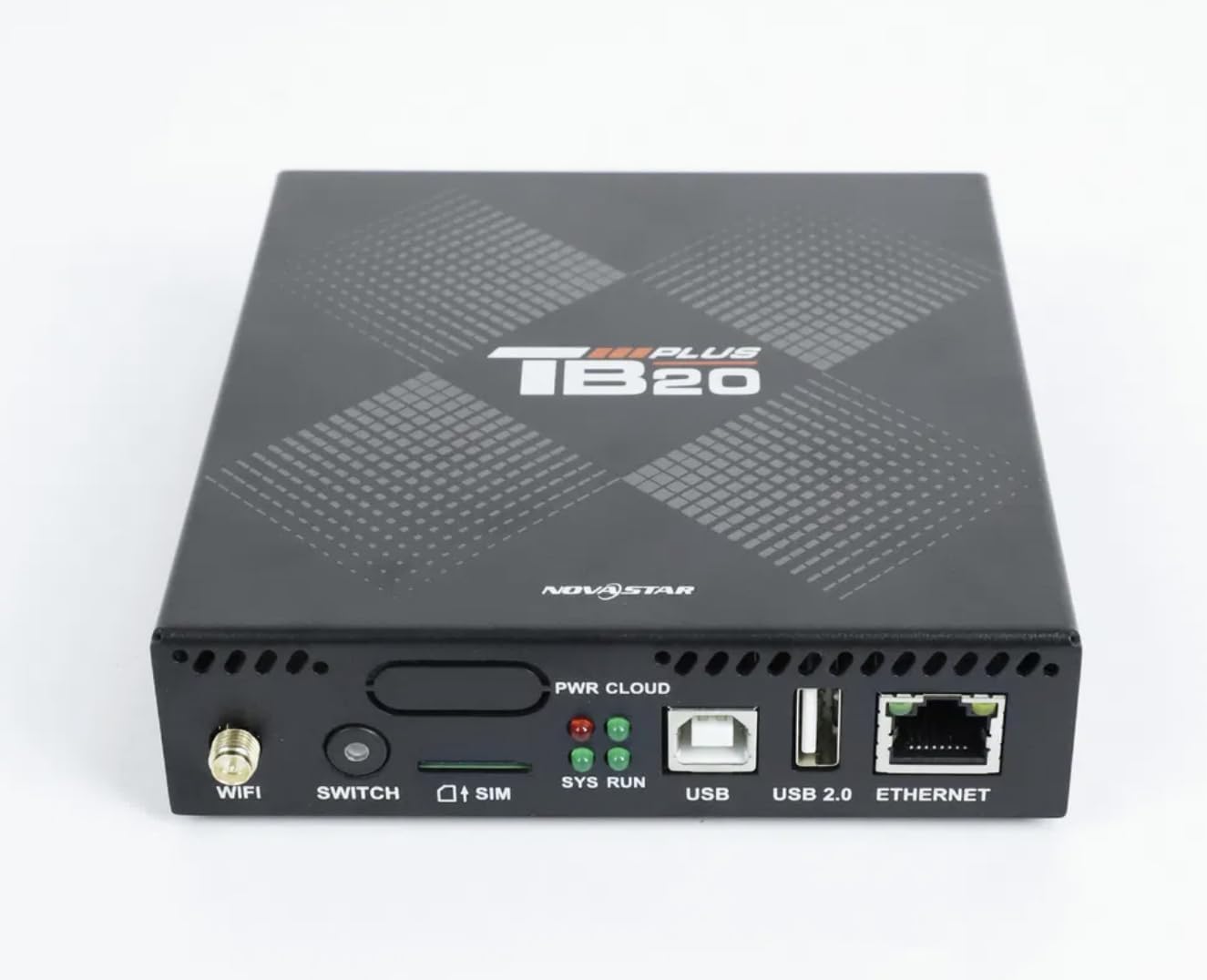
Tasvir: yaqindan oldingi view of the NovaStar TB20 Plus, highlighting the Wi-Fi antenna port, SIM card slot, USB ports, and Ethernet port.
4. Foydalanish bo'yicha ko'rsatmalar
The NovaStar TB20 Plus offers flexible content management and control options:
4.1. Mobil ilovalarni boshqarish
Use the dedicated mobile app for comprehensive control:
- Qurilmani ulash: Open the app and follow the on-screen instructions to discover and pair with your TB20 Plus controller via Wi-Fi or Ethernet.
- Kontentni yuklash: Media yuklash files (videos, images, text) from your mobile device or cloud storage to the controller.
- Playlist Management: Create and manage playlists, schedule playback times, and set display effects.
- Masofaviy monitoring: Monitor the status of your LED display and controller, receive fault alerts, and adjust settings remotely.
- OTA Firmware Updates: Perform over-the-air firmware updates to ensure your device has the latest features and improvements.
4.2. USB Content Playback
For quick content updates without a network connection:
- Save your media files (MP4, JPG, etc.) to a USB drive.
- Insert the USB drive into the USB port on the TB20 Plus.
- The controller will detect the new content and can be configured to automatically play it or add it to the device's internal storage.
4.3. Multimedia Support
The TB20 Plus supports a wide range of media types and display features:
- Video formatlari: MP4, AVI, MOV (H.264).
- Rasm formatlari: JPG, PNG, BMP.
- Dynamic Content: Scrolling text, live clock, real-time weather.
- Maketlar: Multi-zone layouts for professional visual effects, allowing different content to be displayed simultaneously in various areas of the screen.
5. Xizmat ko'rsatish
Proper maintenance ensures the longevity and optimal performance of your NovaStar TB20 Plus:
- Tozalash: Keep the device clean and free from dust. Use a soft, dry cloth for cleaning. Avoid liquid cleaners.
- Ventilyatsiya: Ensure adequate airflow around the device to prevent overheating. Do not block ventilation holes.
- Dasturiy ta'minotni yangilash: Regularly check for and apply firmware updates via the mobile app or web interface. Updates often include performance improvements and bug fixes.
- Saqlash: Agar qurilma uzoq vaqt saqlansa, uni elektrdan uzing va salqin, quruq joyda saqlang.
6. Muammolarni bartaraf qilish; nosozliklarni TUZATISH
Quyidagi umumiy muammolar va yechimlarga murojaat qiling:
| Muammo | Mumkin sabab | Yechim |
|---|---|---|
| LED displeyda displey yo'q | Power issue, incorrect cable connection, display settings. | Check power adapter connection. Verify Ethernet cable connection to LED display. Ensure display is powered on and configured correctly. |
| Cannot connect via Wi-Fi/Ethernet | Incorrect network settings, weak signal, network interference. | Ensure Wi-Fi antenna is attached. Verify network cable is securely connected. Check Wi-Fi password. Restart the controller and router. |
| Content not playing | Qo‘llab-quvvatlanmaydi file format, empty playlist, USB drive issue. | Check if media files are in supported formats (MP4, JPG, etc.). Verify playlist configuration in the app. Ensure USB drive is formatted correctly and contains valid files. |
| Qurilma javob bermayapti | Software glitch, power fluctuation. | Perform a power cycle: disconnect power, wait 10 seconds, then reconnect. If issue persists, contact support. |
7. Texnik spetsifikatsiyalar
| Xususiyat | Spetsifikatsiya |
|---|---|
| Model nomi | TB20 Plus |
| Maksimal yuk hajmi | ~650,000 pixels (up to 1920x1080 resolution) |
| Ichki xotira | 8GB (expandable via microSD/TF card) |
| Tarmoqqa ulanish | Wi-Fi 2.4GHz, 10/100M Ethernet |
| Quvvat kiritish | DC 5V / 2A |
| Ishlash harorati | -20 ° C dan + 60 ° C gacha |
| Mos platformalar | iOS, Android, Windows |
| Mahsulot o'lchamlari | 8"L x 5"W x 2"H (approximately 20.3 x 12.7 x 5.1 cm) |
| Ulagich turi | HDMI (output for display, not for input) |
| Rezolyutsiyani qo'llab-quvvatlash | 1080p |
8. Kafolat haqida ma'lumot
Warranty details for the NovaStar TB20 Plus LED Playback Controller are typically provided at the time of purchase or can be found on the manufacturer's official websayt. Kafolat talablari uchun sotib olish hujjatingizni saqlang. Kafolat odatda normal foydalanish sharoitida ishlab chiqarishdagi nuqsonlarni qoplaydi.
9. Mijozlarni qo'llab-quvvatlash
For further assistance with installation, configuration, technical guidance, or any other inquiries regarding your NovaStar TB20 Plus, please contact the professional support team of your vendor or the manufacturer. Refer to the contact information provided with your purchase or on the official NovaStar websayt.