
1. Kirish
Thank you for choosing Monster Persona 6th ANC Active Noise Cancelling Headphones. These headphones are designed to provide a superior audio experience with advanced features such as Active Noise Cancellation, Bluetooth 6.0 connectivity, 60 hours of playtime, and three distinct music modes. This manual will guide you through the setup, operation, and maintenance of your new headphones to ensure optimal performance and longevity.
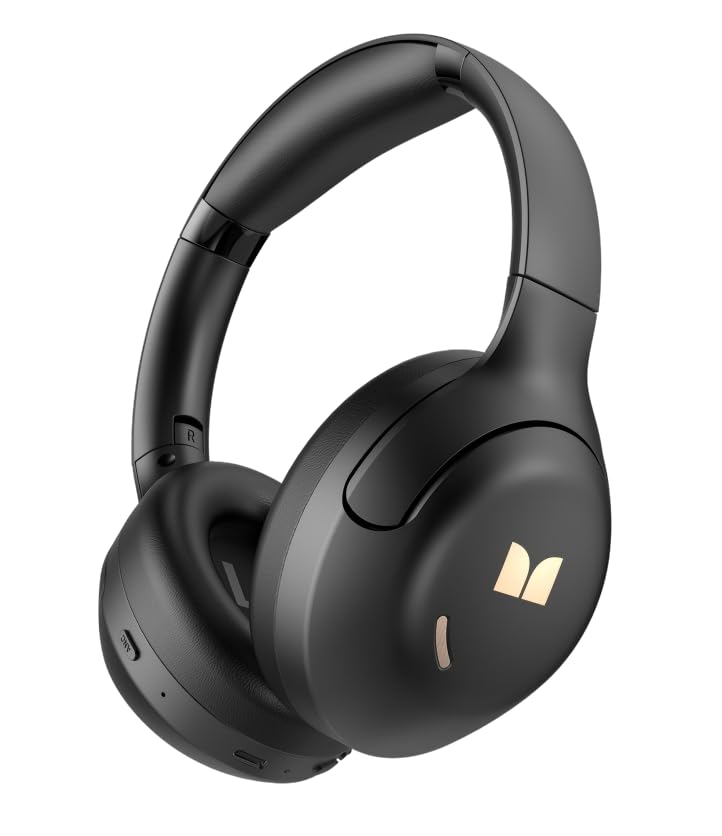
1.1-rasm: Old view of the Monster Persona 6th ANC Active Noise Cancelling Headphones. The headphones feature a sleek, over-ear design with cushioned earcups and an adjustable headband, providing comfort for extended listening sessions.
2. Paket tarkibi
Paketda quyidagi elementlar mavjudligini tekshiring:
- Monster Persona 6th ANC Headphones × 1
- Type-C zaryadlovchi kabeli × 1
- Audio Cable × 1 (for wired connection)
- Foydalanuvchi uchun qo'llanma × 1
3. Sozlash
3.1 Naushniklarni zaryadlash
Before first use, fully charge your headphones. A full charge takes approximately 2-3 hours.
- Connect the Type-C charging cable to the charging port on the headphones.
- Kabelning ikkinchi uchini USB quvvat adapteriga (qo'shilmagan) yoki kompyuterning USB portiga ulang.
- LED indikatori zaryadlash holatini ko'rsatadi (masalan, zaryadlash uchun qizil, to'liq zaryadlangan uchun ko'k).
Tez zaryadlash: 10 daqiqalik zaryad taxminan 5 soat ijro etish imkonini beradi.
Image 3.1: Location of the Type-C charging port on the Monster Persona 6th ANC Headphones. The port is typically located on the bottom edge of one earcup, alongside other control buttons.
3.2 Quvvatni yoqish/o‘chirish
- Yoqilgan: Press and hold the Power button for 3 seconds until the LED indicator flashes blue and you hear a power-on prompt.
- O'chirish: Press and hold the Power button for 3 seconds until the LED indicator flashes red and you hear a power-off prompt.
3.3 Bluetooth ulanishi
Simsiz audio uchun minigarnituralaringizni qurilmangizga ulang.
- Eshitish vositalari o'chirilganligiga ishonch hosil qiling.
- Press and hold the Power button for 5-7 seconds until the LED indicator flashes blue and red alternately, indicating pairing mode.
- Qurilmangizda (smartfon, planshet, kompyuter) Bluetooth-ni yoqing va mavjud qurilmalarni qidiring.
- Select "Monster Persona 6th ANC" from the list of devices.
- Once connected, the LED indicator will flash blue slowly, and you will hear a connection prompt.
Ikki qurilma ulanishi: These headphones support connecting to two Bluetooth devices simultaneously. After pairing with the first device, disable Bluetooth on the first device, pair with the second, then re-enable Bluetooth on the first device. The headphones should connect to both.
4. Naushniklarni ishlatish
4.1 Asosiy boshqaruv elementlari
| Funktsiya | Harakat |
|---|---|
| Quvvatni yoqish/o‘chirish | Quvvat tugmasini 3 soniya bosib turing. |
| Oʻynatish/toʻxtatib turish | Press the Multi-function button (often the Power button when not powering on/off). |
| Ovozni oshirish | Short press '+' button. |
| Ovozni pasaytirish | Short press '-' button. |
| Keyingi trek | Long press '+' button. |
| Oldingi trek | Long press '-' button. |
| Qo'ng'iroqqa javob berish/tugatish | Ko'p funktsiyali tugmani bosing. |
| Qo'ng'iroqni rad qilish | Ko'p funksiyali tugmani uzoq bosing. |
| Ovozli yordamchini yoqing | Ko'p funktsiyali tugmani ikki marta bosing. |
Image 4.1: Diagram illustrating the location and function of control buttons on the Monster Persona 6th ANC Headphones. Buttons typically include Power/Multi-function, Volume Up/Next Track, Volume Down/Previous Track, and an ANC mode button.
4.2 Music Modes (EQ Modes)
Your headphones feature three distinct music modes to optimize your listening experience. Press the dedicated EQ/Mode button to cycle through them:
- Faol shovqinni bekor qilish (ANC) rejimi: Reduces ambient noise for an immersive audio experience. Ideal for travel or noisy environments.
- Shaffoflik rejimi: Allows you to hear your surroundings while still enjoying your audio. Useful for awareness in urban environments or when interacting with others.
- Standart rejim: Provides a balanced, classic sound profile without active noise cancellation or transparency features.
4.3 Simli ulanish
You can use the included audio cable to connect your headphones to devices without Bluetooth capability or when the battery is depleted. Simply plug one end into the headphone's audio jack and the other into your device's 3.5mm audio output.
5. Xizmat ko'rsatish
5.1 Tozalash
- Eshitish vositalarini yumshoq, quruq, tuklarsiz mato bilan artib oling.
- Abraziv tozalash vositalari, spirtli ichimliklar yoki kimyoviy erituvchilardan foydalanmang.
- Har qanday teshikka namlik tushishidan saqlaning.
5.2 Saqlash
- Quloqchinlarni salqin, quruq joyda, to'g'ridan-to'g'ri quyosh nuri va haddan tashqari haroratdan uzoqroq joyda saqlang.
- If storing for an extended period, charge the headphones every three months to maintain battery health.
6. Muammolarni bartaraf qilish; nosozliklarni TUZATISH
Eshitish vositasi bilan bog'liq muammolarga duch kelsangiz, quyidagi umumiy echimlarga murojaat qiling:
| Muammo | Yechim |
|---|---|
| Eshitish vositalari yoqilmaydi. | Quloqchinlar zaryadlanganligiga ishonch hosil qiling. Type-C kabelidan foydalanib quvvat manbaiga ulang. |
| Qurilma bilan ulanib bo‘lmadi. | Ensure headphones are in pairing mode (flashing blue/red). Turn off and on Bluetooth on your device. Move headphones closer to the device. Clear previous Bluetooth connections on your device. |
| Ovoz yo'q yoki past ovoz. | Check headphone and device volume levels. Ensure headphones are properly paired. Try playing different audio sources. If using wired connection, ensure cable is fully inserted. |
| ANC samarali ishlamayapti. | Ensure ANC mode is activated. ANC is most effective against low-frequency, constant noise. It may not completely eliminate all sounds. |
| Vaqti-vaqti bilan ulanish. | Ensure no obstacles between headphones and device. Move away from strong Wi-Fi signals or other Bluetooth devices that may cause interference. Keep within the 33 feet Bluetooth range. |
7. Texnik shartlar
| Xususiyat | Tafsilot |
|---|---|
| Brend | Yirtqich hayvon |
| Model nomi | Monster Persona 6th ANC |
| Quloqlarni joylashtirish | Quloq ustida |
| Shovqin nazorati | Faol shovqinni bekor qilish |
| Ulanish texnologiyasi | Wireless (Bluetooth), Wired (3.5mm Audio Cable) |
| Bluetooth versiyasi | 6.0 |
| Bluetooth diapazoni | 33 fut (10 metr) |
| Batareya muddati | 60 soatgacha |
| Zaryadlash porti | C turi |
| Audio haydovchi o'lchami | 40 millimetr |
| Chastota diapazoni | 20 Gts - 20,000 Gts |
| Boshqarish turi | Tugmachani boshqarish |
| Material | Plastik |
| Qo'shimcha xususiyatlar | 3 Music Modes (ANC, Transparency, Standard), Dual Device Connection, Hands-free Calling |
8. Kafolat va qo'llab-quvvatlash
8.1 Kafolat haqida ma'lumot
Your Monster Persona 6th ANC Headphones come with a 180 kunlik kafolat from the date of purchase. This warranty covers manufacturing defects and workmanship under normal use. It does not cover damage caused by misuse, accidents, unauthorized modifications, or normal wear and tear.
8.2 Mijozlarni qo‘llab-quvvatlash
For technical assistance, warranty claims, or any questions regarding your Monster Persona 6th ANC Headphones, please contact Monster customer support through their official website or the retailer where the product was purchased. Please have your purchase receipt and product model information ready when contacting support.