
1. tugadiview
The Philips TAZ2200 is a versatile portable sound machine designed for enjoying various audio formats. It features a top-loading CD player, a front-loading cassette player, FM radio, Bluetooth 6.0 connectivity, USB playback, and a 3.5mm audio input. Equipped with dynamic bass boost and 6W stereo speakers, it delivers rich sound. The unit can be powered by AC mains or batteries and includes a carrying handle for portability.
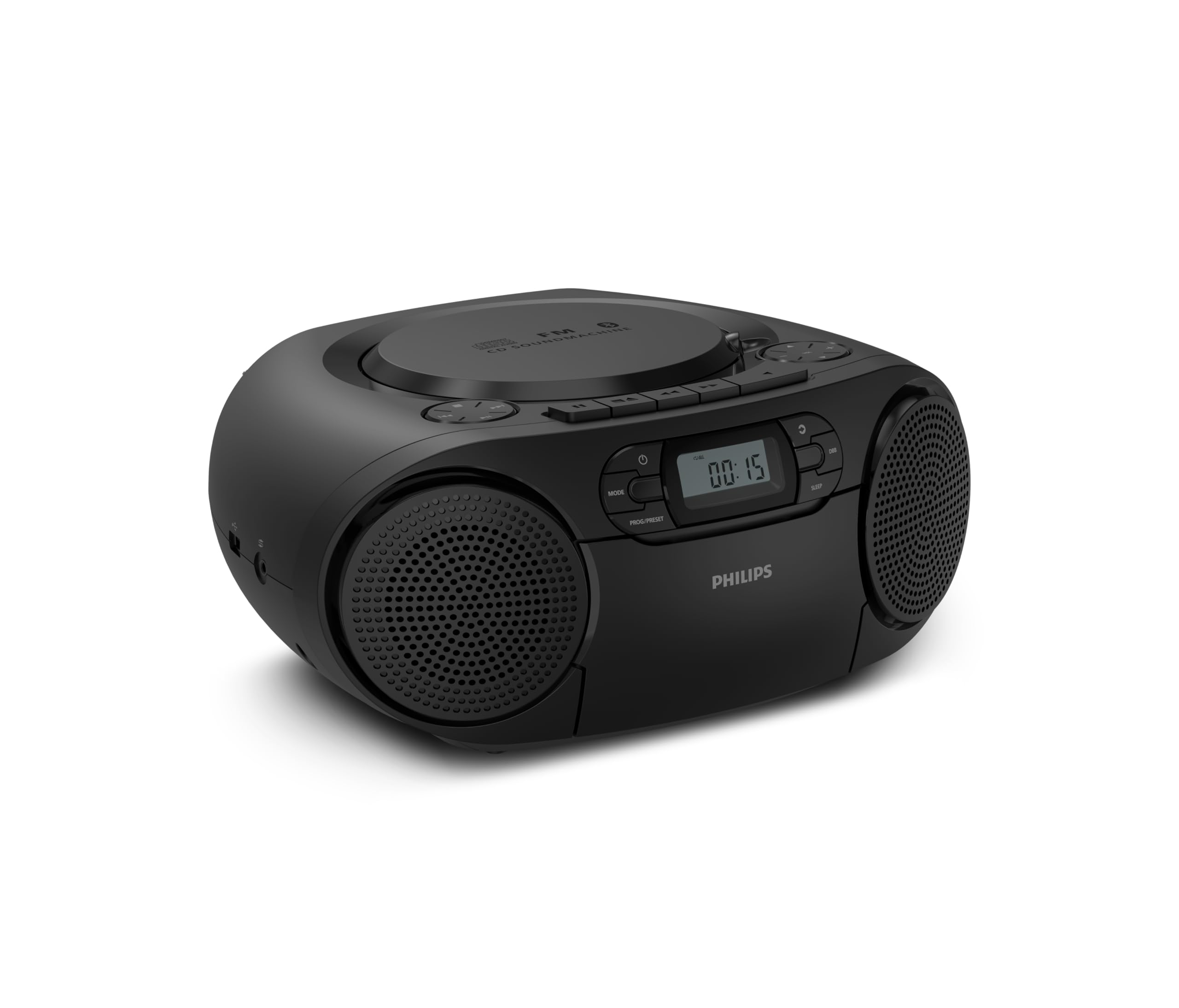
Old view of the Philips TAZ2200 CD Soundmachine, showing the main display and control buttons.
2. Xavfsizlik ma'lumotlari
Please read these safety instructions carefully before using your device and keep them for future reference. Incorrect use may result in hazards.
- Quvvat manbai: Use only the specified power adapter or batteries. Ensure the voltage jihoz talablariga mos keladi.
- Suv va namlik: Jihozni yomg'ir, namlik, tomchilatib yoki sachrashga duchor qilmang. Jihoz ustiga vazalar kabi suyuqlik bilan to'ldirilgan narsalarni qo'ymang.
- Ventilyatsiya: Ensure adequate ventilation. Do not block any ventilation openings. Maintain a minimum distance around the unit for sufficient ventilation.
- Issiqlik: Jihozni radiatorlar, issiqlik moslamalari, pechkalar yoki boshqa qurilmalar (shu jumladan,) kabi issiqlik manbalari yaqiniga qo'ymang. ampissiqlik hosil qiluvchi ko'targichlar).
- Batareyalar: Follow correct polarity when inserting batteries. Do not mix old and new batteries, or different types of batteries. Remove batteries if the unit is not used for a long period.
- Tozalash: Tozalashdan oldin jihozni elektr rozetkasidan uzing. Yumshoq, quruq matodan foydalaning. Suyuq tozalagichlar yoki aerozol tozalagichlardan foydalanmang.
- Xizmat ko'rsatish: Ushbu mahsulotga o'zingiz xizmat ko'rsatishga urinmang. Barcha xizmatlarni malakali xizmat ko'rsatuvchi xodimlarga topshiring.
3. Qutida nima bor
Ochishda, iltimos, quyida keltirilgan barcha narsalar mavjudligiga ishonch hosil qiling:
- Philips TAZ2200 CD Soundmachine
- Quvvat kabeli
- Tez boshlash uchun qo'llanma
- Kafolat kitobi
- Xavfsizlik varaqasi
4. Boshqaruv elementlari va ulanishlar
Old panel boshqaruvlari
The front panel features the main display, power button, mode selection, program/preset buttons, and dynamic bass boost (DBB) control. Playback controls for CD and USB are also located here.

Batafsil old view showing the display, power, mode, program/preset, and DBB buttons.
Side and Rear Connections
The side of the unit provides a USB port for digital audio playback and a 3.5mm audio input jack for connecting external devices.

Yon view illustrating the USB port and Audio Input jack.
The top of the unit houses the CD compartment and additional playback controls, while the rear features the AC power input and the FM antenna.

Yuqori view showing the CD compartment and associated controls.

Orqa view displaying the AC power input and the telescopic FM antenna.
5. Sozlash
5.1 Elektr ta'minoti
AC quvvati
- Jihoz o'chirilganligiga ishonch hosil qiling.
- Connect the supplied power cable to the AC IN socket on the rear of the sound machine.
- Plug the other end of the power cable into a wall power outlet.
Batareya quvvati
For portable use, the unit can operate on 6 x C-type batteries (not included).
- Jihozning pastki qismida joylashgan batareyaning qopqog'ini oching.
- Insert 6 C-type batteries, ensuring correct polarity (+/-) as indicated inside the compartment.
- Batareya bo'limi qopqog'ini mahkam yoping.
5.2 Antennani sozlash
For optimal FM radio reception, fully extend the telescopic antenna located at the rear of the unit. Adjust its position and angle to achieve the clearest signal.
6. Foydalanish bo'yicha ko'rsatmalar
6.1 Umumiy foydalanish
- Quvvatni yoqish/oʻchirish: ni bosing KUCH qurilmani yoqish yoki o'chirish uchun tugma.
- Ovozni boshqarish: dan foydalaning VOL+ or VOL - ovoz balandligini sozlash uchun tugmalar.
- Dynamic Bass Boost (DBB): ni bosing JB button to activate or deactivate the dynamic bass boost feature for enhanced bass sound.
- Rejim tanlash: ni bosing REJIM button repeatedly to switch between CD, Cassette, FM Radio, Bluetooth, USB, and Audio Input modes.
6.2 CDni tinglash
- Open the CD compartment cover on top of the unit.
- Place a CD (CD, CD-R, or CD-RW) with the label side facing up onto the spindle.
- CD bo'limi qopqog'ini yoping.
- ni bosing REJIM CD rejimini tanlash uchun tugmani bosing.
- ni bosing O‘YNAT/TO‘XTATISH ijro etishni boshlash uchun tugma.
- dan foydalaning OʻTKAZISH tugmalar (|< or >> |) to skip tracks.
- bosing va ushlab turing |< or >> | to search within a track.
- ni bosing STOP ijro etishni to'xtatish uchun tugmani bosing.
6.3 Kassetani tinglash
- Open the cassette compartment door on the front of the unit.
- Kasseta lentasini ochiq chetini yuqoriga qaratib joylashtiring.
- Close the cassette compartment door.
- ni bosing REJIM Kasset rejimini tanlash uchun tugmasini bosing.
- ni bosing O‘YNA ijro etishni boshlash uchun tugma.
- dan foydalaning TEZ OLDINA or ORTAGA ORGAN buttons to quickly advance or rewind the tape.
- ni bosing STOP ijro etishni to'xtatish uchun tugmani bosing.
6.4 FM radiosi
- ni bosing REJIM FM Radio rejimini tanlash uchun tugmasini bosing.
- Avtomatik skanerlash: ni bosing va ushlab turing PROG/PRESET Mavjud FM stansiyalarini avtomatik ravishda skanerlash va saqlash uchun tugmani bosing.
- Qo'lda sozlash: ni bosing TUNING tugmalar (|< or >> |) to manually tune to a desired frequency.
- Oldindan sozlamalarni saqlash: After tuning to a station, press PROG/PRESET once, then use |< or >> | oldindan belgilangan raqamni tanlash uchun bosing va PROG/PRESET tasdiqlash uchun yana.
- Oldindan sozlashni eslash: FM rejimida ni bosing PROG/PRESET repeatedly to cycle through saved preset stations.
6.5 Bluetooth ijrosi
- ni bosing REJIM button to select Bluetooth mode. The display will show 'BT' and flash, indicating it's in pairing mode.
- Bluetooth yoqilgan qurilmangizda (smartfon, planshet) Bluetooth-ni yoqing va mavjud qurilmalarni qidiring.
- Select "Philips TAZ2200" from the list of devices.
- Once paired, the unit will emit a confirmation sound, and 'BT' will stop flashing.
- Start playing audio on your connected device. The sound will be streamed to the sound machine.
6.6 USB orqali tinglash
- Insert a USB flash drive into the USB port on the side of the unit.
- ni bosing REJIM USB rejimini tanlash uchun tugmani bosing.
- Qurilma avtomatik ravishda mos keladigan audioni aniqlaydi va ijro etishni boshlaydi files (MP3, WAV, WMA).
- Ijro qilish boshqaruvlaridan foydalaning (O‘YNAT/TO‘XTATISH, OʻTKAZISH, STOP) as you would for CD playback.
6.7 Audio Input (AUX)
- Connect one end of a 3.5mm audio cable (not included) to the AUDIO IN jack on the side of the sound machine.
- Connect the other end of the audio cable to the headphone jack or audio output of your external device (e.g., MP3 player, turntable).
- ni bosing REJIM button to select Audio Input mode.
- Start playing audio on your external device. The sound will be played through the sound machine.
7. Xizmat ko'rsatish
- Jihozni tozalash: Jihozning tashqi qismini yumshoq, ozgina nam mato bilan artingamp mato. Abraziv tozalash vositalarini yoki erituvchilarni ishlatmang.
- CD pleerni parvarish qilish: Keep the CD compartment clean. If the lens is dirty, use a specialized CD lens cleaner. Avoid touching the lens.
- Kasseta pleyerini parvarish qilish: Vaqti-vaqti bilan lenta boshlarini tozalang va roliklarni paxta tayoqchasi bilan yengil qisib qo'yingampizopropil spirti bilan to'ldirilgan.
- Batareyani almashtirish: If using batteries, replace all 6 C-type batteries when the unit's performance diminishes or if the unit will not be used for an extended period.
- Saqlash: Ishlatilmaganda, jihozni toza, quruq joyda, to'g'ridan-to'g'ri quyosh nuri va haddan tashqari haroratdan uzoqroq joyda saqlang.
8. Muammolarni bartaraf qilish; nosozliklarni TUZATISH
If you encounter any issues with your Philips TAZ2200, please refer to the table below for common problems and solutions.
| Muammo | Mumkin sabab | Yechim |
|---|---|---|
| Quvvat yo'q | Power cable not connected; Batteries depleted or incorrectly inserted. | Check AC power connection; Replace batteries or ensure correct polarity. |
| Ovoz yo'q | Ovoz juda past; Noto'g'ri tanlangan rejim; Naushniklar ulangan. | Increase volume; Select the correct source mode (CD, FM, BT, etc.); Disconnect headphones. |
| CD o'ynamaydi | CD inserted incorrectly; CD is dirty or scratched; CD format not supported. | Insert CD with label side up; Clean or replace CD; Ensure CD is CD-R/RW compatible. |
| Cassette not playing | Cassette inserted incorrectly; Tape is damaged. | Insert cassette correctly; Try a different cassette. |
| Yomon FM qabul qilish | Antenna to'g'ri uzatilmagan yoki joylashtirilmagan; Signal kuchsiz. | Fully extend and adjust the telescopic antenna; Try moving the unit to a different location. |
| Bluetooth ulanmayapti | Unit not in pairing mode; Bluetooth device too far; Device already paired with another unit. | Ensure unit is in Bluetooth mode and flashing; Move device closer; Disconnect from other devices. |
| USB orqali ijro etish bilan bog'liq muammolar | USB drive not inserted correctly; Incompatible file format; USB drive corrupted. | Reinsert USB drive; Ensure files are MP3, WAV, or WMA; Try a different USB drive. |
9. Texnik shartlar
| Xususiyat | Spetsifikatsiya |
|---|---|
| Brend | PHILIPS |
| Model raqami | TAZ2200/10 |
| Ulanish texnologiyasi | Bluetooth 6.0, USB, Audio Input (3.5mm) |
| Karnay turi | Stereo (2 speakers) |
| Chiqish quvvati | 6 vatt (maksimal) |
| Qo'llab-quvvatlanadigan ommaviy axborot vositalari | CD, CD-R, CD-RW, Cassette, USB (MP3, WAV, WMA) |
| Radio tyuner | Digital FM with 20 presets |
| Quvvat manbai | AC (wired), 6 x C-type batteries (not included) |
| Olchamlari (UxKxY) | 24.5 x 28.5 x 12.5 sm |
| Og'irligi | 1.35 kilogramm |
| Rang | Kumush |
10. Kafolat va qo'llab-quvvatlash
10.1 Mahsulot kafolati
This Philips TAZ2200 CD Soundmachine comes with a 2 yillik kafolat from the date of purchase. Please retain your proof of purchase for warranty claims. The warranty covers manufacturing defects and malfunctions under normal use conditions.
10.2 Mijozlarni qo‘llab-quvvatlash
For technical assistance, troubleshooting beyond this manual, or warranty service, please refer to the contact information provided in the warranty booklet included with your product. You can also visit the official Philips support website for your region for further assistance and FAQs.