1. Kirish
The Surenoo ESP32-WROOM-32E HMI UART Touch LCD Display Module is a versatile human-machine interface solution, available in 2.8-inch, 3.2-inch, and 3.5-inch resistive touch screen variants. Powered by the ESP32-WROOM-32E module, it offers easy development with a main frequency up to 240MHz and integrated Bluetooth and WiFi capabilities. This module is designed for a wide range of IoT applications and supports multiple development environments including Arduino IDE, Micro Python, Espressif IDF, PlatformIO, and Scratch 3.0, making it ideal for LVGL GUI development.

2. Asosiy xususiyatlar
- Integrated ESP32-WROOM-32E module for easy development.
- Available in 2.8" (240x320 TN ST7789), 3.2" (240x320 IPS ST7789), and 3.5" (320x480 TN ST7796) resolutions.
- Maximum support for 262K colors (RGB666).
- Rich interfaces: I2C, SPI, UART, Extend I/O.
- Supports external speakers for audio playback.
- Includes an RGB three-color indicator for status.
- Resistive touch screen for intuitive human-machine interaction.
- Standard TYPE-C interface for power and program download.
- Micro TF card slot for storage expansion.
- Support for external lithium battery with charging management circuit.
- Built-in WiFi and Bluetooth connectivity.
- Compatible with Arduino IDE, Micro Python, Espressif IDF, PlatformIO, and Scratch 3.0.
- Optimized for LVGL GUI development.
3. O'rnatish bo'yicha qo'llanma
3.1. Paketni ochish va qadoqlash tarkibi
Carefully unpack your display module and verify all components are present:

- E32-Touch-LCD Module x1 (Your selected size: 2.8", 3.2", or 3.5")
- 1.25mm to DuPont 2.54 Terminal Wire 4P 20cm x1
- USB-TypeC Cable x1
3.2. Jismoniy tugashview va Ulanishlar
Familiarize yourself with the module's components and connection points. The layout may vary slightly between different display sizes, but core functionalities remain consistent.

Asosiy tarkibiy qismlarga quyidagilar kiradi:
- RESET tugmasi: Resets the ESP32 module.
- TYPE-C porti: For power supply and USB-UART communication (program upload).
- BOOT tugmasi: Used for entering bootloader mode for firmware flashing.
- Batareya porti: For connecting an external lithium battery.
- UART: Serial communication interface.
- MicroSD: Slot for a MicroSD card for expanded storage.
- RGB LED: Multi-color indicator.
- Karnay porti: For connecting an external speaker.
- SPI External Port: Serial Peripheral Interface for external devices.
- IIC External Port: Inter-Integrated Circuit interface for external devices.
- Extend I/O: General purpose input/output pins for expansion.
3.3. Initial Power-Up and Programming
- Quvvatni ulash: Connect the module to your computer using the provided USB-TypeC cable. This will power the module and establish a serial connection for programming.
- Haydovchi o'rnatish: Your operating system may automatically install necessary USB-to-serial drivers. If not, you may need to manually install drivers for the USB-UART chip (often CP210x or CH340, depending on the specific board revision).
- Rivojlanish muhiti: Install your preferred development environment (e.g., Arduino IDE, Espressif IDF). Refer to the official documentation for your chosen environment for installation instructions.
- Modul tanlash: In your IDE, select the appropriate ESP32 board (e.g., ESP32 Dev Module) and COM port corresponding to your connected display module.
- Upload First Program: You can now upload example code to test the display and touch functionality. Detailed examples and documentation are available on the LCDwiki websayt.

4. Foydalanish bo'yicha ko'rsatmalar
4.1. Asosiy operatsiya
Once programmed, the module will execute the uploaded code. The resistive touch screen allows for user interaction, and the RGB LED can provide visual feedback. The integrated WiFi and Bluetooth enable wireless communication for IoT applications.

4.2. Kengaytirilgan funksiyalar
- LVGL GUI Development: The module is highly suitable for developing rich graphical user interfaces using the LVGL library. This open-source embedded graphics library provides a wide array of graphic elements and supports WYSIWYG UI design tools.
- IoT Applications: Leverage the ESP32's WiFi and Bluetooth capabilities for remote control, environmental data collection, and other IoT applications.
- External Peripherals: Utilize the SPI, I2C, and UART interfaces to connect various sensors, actuators, and other modules to expand functionality.
- Ovoz chiqishi: Connect an external speaker to the Speaker Port to enable audio playback in your projects.
- Ma'lumotlarni saqlash: The MicroSD card slot allows for local storage of data, images, or other assets for your applications.
- Batareya quvvati: For portable applications, connect a compatible lithium battery to the Battery Port. The onboard charging management circuit ensures safe charging.

5. Xizmat ko'rsatish
- Tozalash: Keep the display surface clean and free from dust and debris. Use a soft, dry cloth for cleaning. Avoid abrasive materials or harsh chemicals.
- Harorat va namlik: Operate and store the module within the specified temperature and humidity ranges to ensure longevity.
- Batareya parvarishi: If using an external lithium battery, ensure it is charged using a compatible charger and avoid over-discharging or over-charging to prolong battery life.
- Dasturiy ta'minotni yangilash: Vaqti-vaqti bilan tekshiring LCDwiki websayt or Surenoo's official resources for any firmware updates or driver improvements.
- Ishlov berish: Handle the module with care, avoiding excessive force on the display or connectors.
6. Muammolarni bartaraf qilish; nosozliklarni TUZATISH
6.1. Umumiy muammolar va yechimlar
- Displey yoqilmaydi:
- Check USB-TypeC cable connection and power source.
- Ensure the correct drivers are installed on your computer.
- Verify that the ESP32 board is correctly selected in your IDE and the program has been successfully uploaded. - Sensorli ekran javob bermayapti:
- Ensure the touch screen is properly connected (if applicable, for modules with separate touch controllers).
- Check your code for correct touch driver initialization and event handling.
- Calibrate the touch screen if your application requires it. - WiFi/Bluetooth Connectivity Issues:
- Verify your network credentials (SSID, password) in your code.
- Ensure the module is within range of your WiFi access point or Bluetooth device.
- Check for any interference from other wireless devices. - Program Upload Failure:
- Confirm the correct COM port is selected in your IDE.
- Ensure the module is in programming mode (sometimes requires holding the BOOT button while pressing RESET).
- Check for any error messages in the IDE's console for more specific guidance. - Garbled Display/Incorrect Colors:
- Verify that the display initialization code matches the specific display model (ST7789 or ST7796) and resolution.
- Ensure correct SPI connections and pin assignments in your code.
For more detailed troubleshooting and community support, refer to the LCDwiki websayt and relevant ESP32 development forums.
7. Texnik shartlar
| Element | Tavsif |
|---|---|
| Brend nomi | SURENOO |
| Model raqamlari | E32R28T, E32R32P, E32R35T |
| Displey rangi | RGB 65K Color |
| Displey turi | TN / IPS TFT |
| Rezolyutsiyalar | 2.8" 240*320, 3.2" 240*320, 3.5" 320*480 |
| Driver ICs | ST7789 (for 2.8" & 3.2"), ST7796 (for 3.5") |
| Modul hajmi | 55.50*101.50 (mm) |
| Operatsion jildtage | 5.0V |
| Ishlash harorati | -20℃ ~ 70℃ |
| Saqlash harorati | -30℃ ~ 80℃ |
| Asosiy chastota | 240 MGts gacha |
| Ulanish | WiFi, Bluetooth |
| Interfeys | UART, SPI, I2C, Extend I/O |
| Turga teging | Resistive Touch Panel (RTP) |
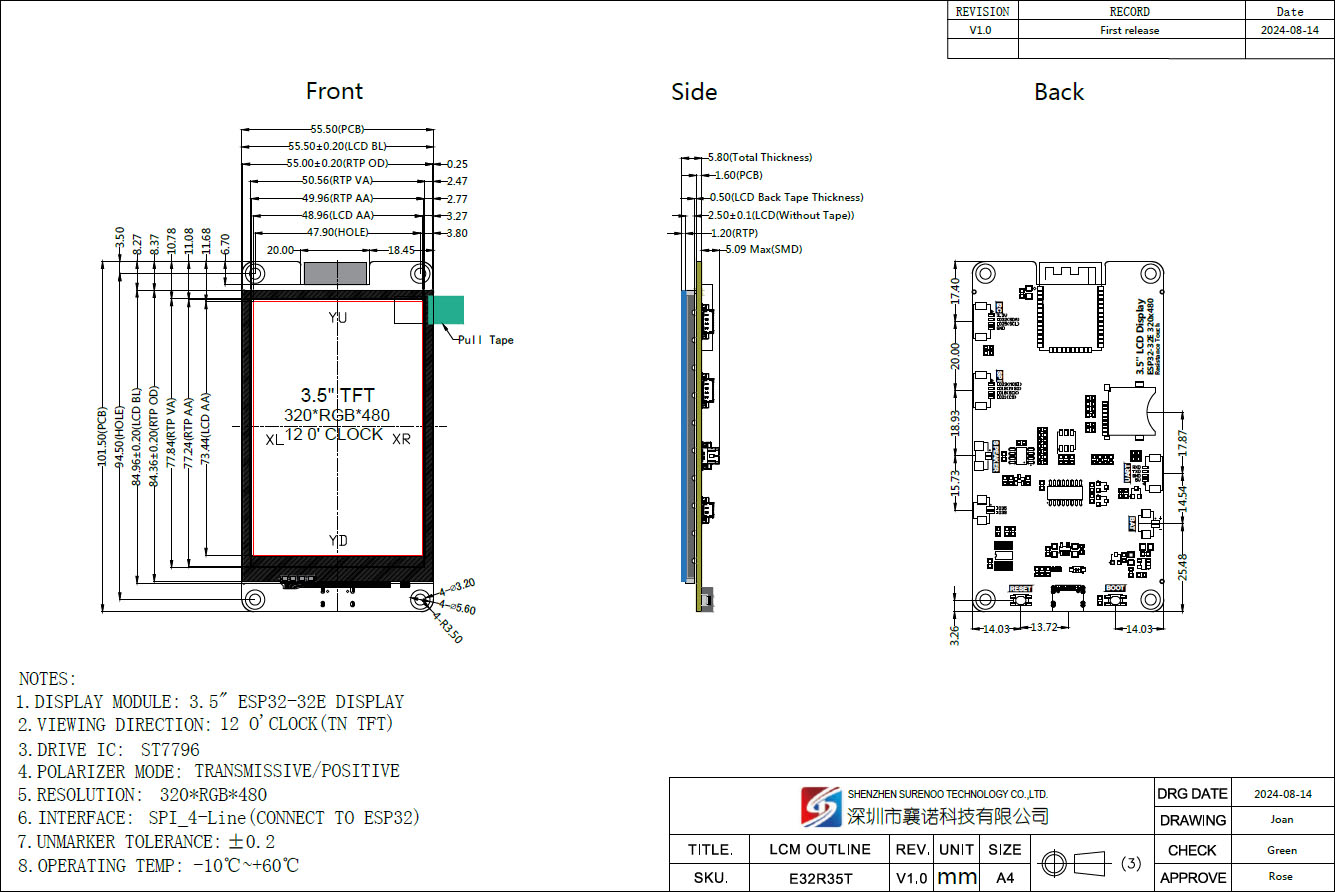
7.1. Outline Drawings
Detailed dimensions for each module variant are provided below. These diagrams are crucial for integration into custom enclosures or projects.
E32R35T (3.5-inch)
E32R32P (3.2-inch)

E32R28T (2.8-inch)

8. Foydalanuvchi maslahatlari
- Leverage LCDwiki: The LCDwiki websayt is an invaluable resource for detailed documentation, example code, and technical support. It is highly recommended to consult it for specific programming guides and project ideas.
- Experiment with GUIs: Explore the capabilities of LVGL for creating visually appealing and interactive user interfaces. There are many tutorials and community resources available online.
- Quvvatni boshqarish: When designing battery-powered applications, pay close attention to the ESP32's power-saving modes to maximize battery life.
- Hamjamiyat ishtiroki: Engage with the broader ESP32 and embedded systems communities online. Many common issues have already been solved and shared by other developers.
9. Kafolat va qo'llab-quvvatlash
For warranty information and technical support, please contact the seller or refer to the official Surenoo Display websayt. The LCDwiki websayt also provides extensive technical resources and community support for these modules.


