TP-Link TL-MR3420 Wireless N300 3G/4G Router User Manual
Model: TL-MR3420
1. Kirish
The TP-Link TL-MR3420 Wireless N300 3G/4G Router is designed to share a 3G/4G mobile broadband connection wirelessly. By connecting a compatible UMTS/HSPA/EVDO USB modem to the router, a Wi-Fi hotspot is instantly established, allowing multiple devices to access the internet. This router also features a 3G/WAN connection backup strategy, ensuring a continuous internet connection by switching between 3G/4G and WAN (Ethernet) connections as needed. It supports wireless N speeds of up to 300Mbps, suitable for various online activities.
2. Paket tarkibi
- TP-Link TL-MR3420 Wireless N300 3G/4G Router
- Quvvat adapteri
- Ethernet kabeli
- Tez o'rnatish uchun qo'llanma
3. Uskuna tugadiview
3.1 Front Panel and LEDs
The front panel of the router features LED indicators that provide information about the device's status, including power, system, WLAN, WAN, LAN, and 3G/4G connection status.

Rasm: old view of the TL-MR3420 router, showing the TP-Link logo and status LEDs.
3.2 Side Panel (USB Port)
The side panel includes a USB 2.0 port, primarily used for connecting a compatible 3G/4G USB modem.
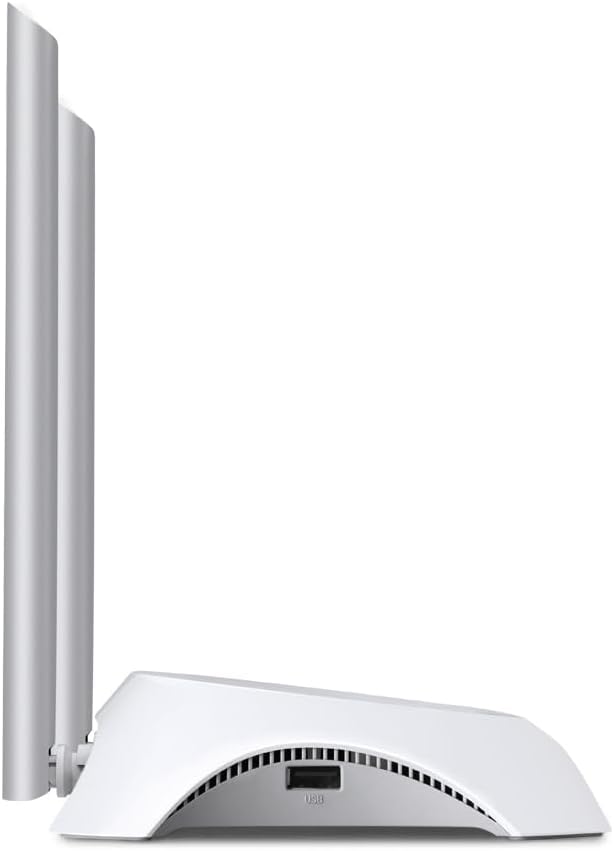
Rasm: yon view of the TL-MR3420 router, highlighting the USB port for modem connection.
3.3 Orqa panel (Portlar va tugmalar)
The rear panel provides various ports and buttons for connectivity and control.
- Quvvat porti: Quvvat adapteriga ulanadi.
- Yoqish / o'chirish tugmasi: Routerni yoqadi yoki o'chiradi.
- WAN porti (ko'k): Connects to a DSL/Cable modem for traditional internet access.
- LAN portlari (sariq): Four ports for connecting wired devices like computers or switches.
- WPS/Qayta tiklash tugmasi: WPS funksiyasi uchun bosing; zavod sozlamalarini tiklash uchun bosing va ushlab turing.
- Antenna ulagichlari: For attaching the two external antennas.

Rasm: orqa view of the TL-MR3420 router, displaying the power port, WAN port, LAN ports, WPS/Reset button, and antenna connectors.
4. O'rnatish bo'yicha qo'llanma
4.1 Jismoniy ulanish
- Antennalarni ulash: Screw the two detachable antennas firmly into their connectors on the rear panel.
- Connect 3G/4G USB Modem: Insert your compatible 3G/4G USB modem into the USB port on the side of the router.
- Yoqilgan: Quvvat adapterini routerning quvvat portiga ulang va uni rozetkaga ulang. Agar kerak bo'lsa, yoqish/o'chirish tugmasini bosing.
- (Optional) Connect to WAN: If using a wired internet connection as a backup or primary, connect an Ethernet cable from your DSL/Cable modem to the blue WAN port on the router.
- (Optional) Connect Wired Devices: Connect your computer or other wired devices to the yellow LAN ports using Ethernet cables.

Image: The TL-MR3420 router with a 3G USB modem connected to its side USB port.
4.2 Dastlabki konfiguratsiya (Web Interfeys)
- Routerga ulaning: Connect your computer to the router either via an Ethernet cable to a LAN port or wirelessly using the default Wi-Fi SSID printed on the router's label (e.g., TP-Link_XXXX).
- Kirish Web Brauzer: Ochish a web brauzer (masalan, Chrome, Firefox) va yozing
http://tplinkwifi.netorhttp://192.168.0.1(yokihttp://192.168.1.1) manzil satriga kiriting. Enter tugmasini bosing. - Tizimga kirish: Odatdagidek standart foydalanuvchi nomi va parolni kiriting
adminfor both. If these do not work, check the label on the bottom of your router. - Tez sozlashni ishga tushiring: Follow the on-screen Quick Setup Wizard to configure your internet connection and wireless settings.
4.3 3G/4G Connection Setup
During the Quick Setup, select 3G/4G Router mode. The router will automatically detect your USB modem. You may need to select your region and ISP, and enter APN (Access Point Name) details if prompted. Ensure your 3G/4G USB modem is compatible with the TL-MR3420.
4.4 WAN Connection Setup (Optional)
If you are using a wired internet connection, configure the WAN settings. This can be done via Dynamic IP, Static IP, or PPPoE, depending on your Internet Service Provider (ISP) requirements. The TL-MR3420 supports a 3G/WAN failover strategy, allowing you to set a preferred connection (3G/4G or WAN) and use the other as a backup.
4.5 Simsiz tarmoqni sozlash
Set your desired Wireless Network Name (SSID) and a strong password (WPA/WPA2 Personal recommended) for your Wi-Fi network. This will secure your wireless connection.
5. Routerni ishlatish
5.1 LED indikatorlarini tushunish
| LED | Status | Ko'rsatma |
|---|---|---|
| Quvvat | On | Router is powered on. |
| Tizim | Miltillovchi | Router normal ishlaydi. |
| WLAN | Yoqilgan/miltillovchi | Wireless function is enabled/data is being transmitted. |
| WAN | Yoqilgan/miltillovchi | WAN port is connected/data is being transmitted. |
| LAN (1-4) | Yoqilgan/miltillovchi | Corresponding LAN port is connected/data is being transmitted. |
| 3G/4G | Yoqilgan/miltillovchi | 3G/4G modem is connected and working/data is being transmitted. |
5.2 Qurilmalarni ulash
- Simsiz qurilmalar: Ni qidirish your Wi-Fi network (SSID) on your device and enter the password you configured.
- Simli qurilmalar: Connect an Ethernet cable from your device to any of the yellow LAN ports on the router.
5.3 3G/WAN Failover
The router can be configured to use either 3G/4G or WAN as the primary internet connection, with the other serving as a backup. If the primary connection fails, the router will automatically switch to the backup, ensuring continuous internet access. This setting can be managed in the router's web interface under Network > WAN Backup.
6. Xizmat ko'rsatish
6.1 dasturiy ta'minotni yangilash
Regularly check for and install firmware updates from the TP-Link official website. Firmware updates can improve performance, add new features, and fix bugs. Download the correct firmware for your model and follow the instructions provided on the TP-Link support page for upgrading via the web interface (System Tools > Firmware Upgrade).
6.2 Konfiguratsiyani zaxiralash va tiklash
Routeringizning konfiguratsiya sozlamalarini a.ga zaxiralashingiz mumkin file on your computer. This allows you to restore your settings quickly after a factory reset or if you need to revert to a previous configuration (System Tools > Backup & Restore).
6.3 Tizimni qayta ishga tushirish
If the router is experiencing issues, a simple reboot can often resolve them. You can reboot the router from the web interface (System Tools > Reboot) or by unplugging and replugging the power adapter.
6.4 Zavod sozlamalarini tiklash
A factory reset will revert all settings to their default values. This can be done by pressing and holding the WPS/Reset button on the rear panel for approximately 5-10 seconds until the System LED flashes rapidly, or via the web interface (System Tools > Factory Defaults).
7. Muammolarni bartaraf qilish; nosozliklarni TUZATISH
- Internetga kirish imkoni yo'q:
- Check LED indicators: Ensure Power, System, WLAN, and 3G/4G (or WAN) LEDs are on or flashing correctly.
- Verify physical connections: Ensure all cables are securely connected.
- Check 3G/4G modem: Ensure it is properly inserted and recognized by the router.
- Confirm ISP settings: Verify that your 3G/4G or WAN settings (APN, connection type) are correct in the router's web interfeys.
- Reboot the router and modem.
- Simsiz ulanish bilan bog'liq muammolar:
- Ensure WLAN LED is on/flashing.
- Verify correct Wi-Fi SSID and password.
- Move closer to the router to check signal strength.
- Change wireless channel in router settings to avoid interference.
- Sekin internet tezligi:
- Check your 3G/4G signal strength or WAN connection speed.
- Ensure no other devices are heavily using bandwidth.
- Update router firmware.
8. Texnik shartlar
| Xususiyat | Tafsilot |
|---|---|
| Model nomi | TL-MR3420 |
| Simsiz standart | IEEE 802.11n, 802.11g, 802.11b |
| Simsiz tezlik | 300 Mbit / s gacha |
| Chastota diapazoni | 2.4 gigagertsli |
| Antenna turi | 2x 5dBi Detachable Omni Directional Antennas |
| Interfeyslar | 1x 10/100Mbps WAN Port, 4x 10/100Mbps LAN Ports, 1x USB 2.0 Port |
| Tugmalar | WPS/Reset Button, Power On/Off Button |
| Olchamlari (G x D x Y) | 11.34 x 8.9 x 2.8 dyuym (Mahsulot o‘lchamlari) |
| Element og'irligi | 9.5 untsiya |
| Quvvatlantirish manbai | 12VDC / 1A (External Power Adapter) |
| Simsiz xavfsizlik | 64/128-bit WEP, WPA/WPA2, WPA-PSK/WPA2-PSK shifrlash |
| Mos qurilmalar | Personal Computer, UMTS/HSPA/EVDO USB Modems |
9. Kafolat va qo'llab-quvvatlash
9.1 Mahsulot kafolati
The TP-Link TL-MR3420 Wireless N300 3G/4G Router typically comes with a 2-year limited warranty. Please refer to the warranty card included in your package or visit the official TP-Link webmintaqangiz uchun batafsil kafolat shartlari va shartlari uchun sayt.
9.2 Texnik yordam
For technical assistance, troubleshooting, or further inquiries, please visit the official TP-Link support website. You can find FAQs, firmware updates, and contact information for customer support.
- TP-Link qo'llab-quvvatlash Websayt: www.tp-link.com/support/