1. Kirish
This manual provides detailed instructions for the installation, operation, and maintenance of your PHONOCAR VM016 DAB+ Bluetooth Car Radio. Please read this manual thoroughly before using the product to ensure correct operation and to prevent damage. Keep this manual for future reference.
2. Xavfsizlik ma'lumotlari
- Ensure the vehicle's ignition is off and the negative battery terminal is disconnected before installation to prevent electrical shorts.
- Connect the unit only to a 12V or 24V DC power supply with a negative ground.
- Jihozni qismlarga ajratmang yoki o'zgartirmang. Bu elektr toki urishi, yong'in yoki boshqa nosozliklarga olib kelishi mumkin.
- Avoid installing the unit in locations where it would obstruct the driver's view yoki avtomobilning ishlashiga xalaqit beradi.
- Protect the unit from direct sunlight, excessive heat, humidity, and dust.
- Always use the correct fuse rating as specified.
3. Mahsulot tugadiview
The PHONOCAR VM016 is a versatile car radio designed for 12V and 24V vehicles, offering a range of audio playback options including DAB+ digital radio, FM radio, Bluetooth connectivity, USB, SD card, and AUX-IN. It features a detachable front panel for security and an amplified output of 4x30 Watts.

3.1-rasm: Old view of the PHONOCAR VM016 Car Radio.
Asosiy xususiyatlar:
- DAB+ qabul qiluvchisi: Enjoy high-quality digital radio broadcasts.
- Bluetooth A2DP: Wireless audio streaming and hands-free calling.
- USB & SD/MMC Card Slot: MP3 tinglash files from external storage (up to 16 GB for SD).
- Old AUX-IN: Tashqi audio qurilmalarni 3.5 mm raz'em orqali ulang.
- Detachable Front Panel: Enhanced security feature.
- Encoder Volume Control: Intuitive volume adjustment.
- Automatic Memory Preset: Stores radio stations automatically.
- RDS System: Radio Data System for FM broadcasts.
- 27 FM Preset Stations: Quick access to your favorite FM stations.
- Last Position Memory: Resumes playback from where it left off.
- Amplified Output: 4 x 30 Watt for clear audio.
- 12V-24V Power: Compatible with both standard car and truck electrical systems.
- AmpYuqori antenna: Included for improved reception.
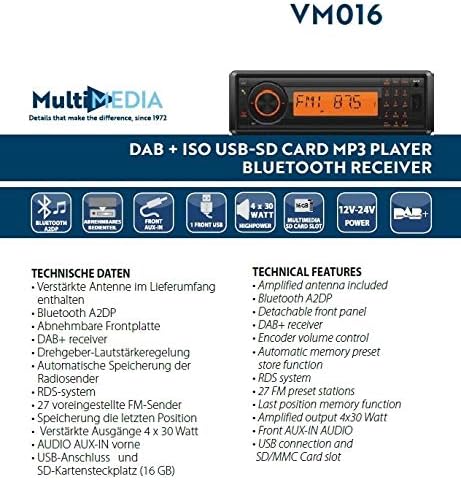
Figure 3.2: Diagram illustrating the technical features and connections of the PHONOCAR VM016.
4. O'rnatish
4.1 O'rnatishdan oldin tekshirish
- Verify that your vehicle's electrical system is 12V or 24V DC with a negative ground.
- Ensure you have all necessary tools and accessories for installation.
4.2 Simli ulanishlar
The unit uses standard ISO connectors for power and speaker connections. Refer to your vehicle's wiring diagram for specific connections if not using standard ISO.
- Quvvat ulanishi: Connect the yellow wire to the constant 12V/24V supply, the red wire to the accessory (switched) 12V/24V supply, and the black wire to a good chassis ground.
- Dinamik ulanishlari: Connect the speaker wires according to their polarity (positive and negative) to the corresponding vehicle speakers. Ensure no speaker wires are shorted to each other or to the vehicle chassis.
- Antenna ulanishi: ni ulang amplified DAB+/FM antenna (included) to the antenna input on the rear of the unit. Ensure proper placement of the antenna for optimal reception.
4.3 O'rnatish
Insert the unit into the DIN-sized opening in your vehicle's dashboard. Secure it using the provided mounting sleeve and brackets. Ensure the unit is firmly seated to prevent movement during driving.
5. Foydalanish bo'yicha ko'rsatmalar
5.1 Asosiy boshqaruv elementlari
- Quvvatni yoqish/oʻchirish: ni bosing KUCH qurilmani yoqish yoki o'chirish uchun tugma.
- Ovozni boshqarish: ni aylantiring KODLARNI BILISH (main rotary knob) to adjust the volume level.
- Rejim tanlash: ni bosing REJIM button to cycle through available sources: DAB+, FM, Bluetooth, USB, SD, AUX-IN.
5.2 Radio Operation (DAB+ / FM)
- Tasmani tanlash: Radio rejimida, ni bosing BAND button to switch between DAB+ and FM bands.
- Avtomatik skanerlash: ni bosing va ushlab turing SCAN button to automatically search for and store available stations.
- Qo'lda sozlash: dan foydalaning SOZLASH +/- buttons for manual frequency adjustment.
- Oldindan o'rnatilgan stantsiyalar: Use the numeric buttons (1-6) to select stored preset stations. To store a station, tune to the desired frequency, then press and hold a numeric button until you hear a confirmation beep.
- RDS System (FM): When available, the Radio Data System will display station information such as program type and station name.
5.3 Bluetooth bilan ishlash
- Ulanish: Select Bluetooth mode. On your mobile device, search for Bluetooth devices and select "PHONOCAR VM016". Enter "0000" if a PIN is required. Once paired, the Bluetooth icon will illuminate.
- Audio oqim (A2DP): Play audio from your paired device. Use the unit's controls or your device to manage playback (play/pause, skip tracks).
- Qo'ng'iroqlarsiz qo'ng'iroq: When a call comes in, the unit will display the caller ID. Press the QO'NG'IROQ button to answer, and press it again to end the call.
5.4 Media Playback (USB, SD Card, AUX-IN)
- USB/SD karta: Insert a USB drive or SD card into the respective slot. The unit will automatically switch to USB/SD mode and begin playing compatible MP3 files. Dan foydalaning OʻTKAZISH treklarni navigatsiya qilish uchun tugmalar.
- Yagona kirish: Connect an external audio device (e.g., MP3 player, smartphone) to the front AUX-IN jack using a 3.5mm audio cable. Select AUX-IN mode to listen to audio from the connected device.
5.5 Detachable Front Panel
To remove the front panel, press the RELIZAT button. Gently pull the panel away from the main unit. To reattach, align the panel with the main unit and push until it clicks into place.
6. Xizmat ko'rsatish
- Tozalash: Use a soft, dry cloth to clean the unit's surface. For stubborn dirt, dampen the cloth with a small amount of mild detergent. Do not use abrasive cleaners or solvents.
- Front Panel Care: Handle the detachable front panel with care. Avoid touching the contacts on the back of the panel. Store it in the provided case when removed.
- Sigortani almashtirish: If the unit does not power on, check the fuse. Replace it with a fuse of the same rating only.
7. Muammolarni bartaraf qilish; nosozliklarni TUZATISH
- Quvvat yo'q: Check the power connections (yellow, red, black wires) and the fuse. Ensure the vehicle's ignition is on if connected to a switched power source.
- Ovoz yo'q: Check speaker connections. Ensure the volume is not at minimum and the MUTE function is not active. Verify the correct audio source is selected.
- Radioni yomon qabul qilish: Check the antenna connection. Ensure the amplified antenna is properly installed and positioned. Try performing an automatic scan again.
- Bluetooth ulanishi bilan bog'liq muammolar: Ensure Bluetooth is enabled on your mobile device and the unit is in Bluetooth mode. Delete previous pairings and try pairing again.
- USB/SD Playback Errors: Ensure the USB drive or SD card is formatted correctly (FAT32) and contains compatible MP3 files. Check for file corruption. The maximum supported SD card size is 16 GB.
8. Texnik shartlar
| Xususiyat | Spetsifikatsiya |
|---|---|
| Model raqami | VM016 |
| Quvvatlantirish manbai | 12V - 24V DC (Negative Ground) |
| Ovoz chiqish quvvati | 4 x 30 vatt |
| Ulanish | Bluetooth (A2DP), USB, SD/MMC Card, Front AUX-IN |
| Radio tyuner | DAB+, FM (with RDS) |
| FM oldindan sozlash | 27 stantsiya |
| Qo'llab-quvvatlanadigan ommaviy axborot vositalari | MP3 (via USB/SD) |
| SD karta sig'imi | 16 GB gacha |
| Maxsus xususiyatlar | Detachable Front Panel, Last Position Memory, Amplified Antenna Included |
| Rang | Qora |
9. Kafolat va qo'llab-quvvatlash
For warranty information and technical support, please refer to the documentation provided with your purchase or contact your authorized PHONOCAR dealer. Keep your proof of purchase for warranty claims.


