1. Kirish va yanaview
This manual provides comprehensive instructions for the setup, operation, maintenance, and troubleshooting of your InFocus IN3124 Projector. Designed for clarity and ease of use, this guide will help you maximize your projector's performance and longevity.
The InFocus IN3124 is a high-performance projector featuring XGA (1024 x 868) native resolution, 4800 lumens of brightness, and a 3000:1 contrast ratio, making it suitable for various presentation environments. Its portable design allows for flexible placement and usage.
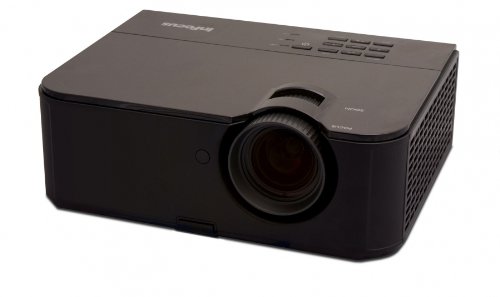
1-rasm: Old tomondan view of the InFocus IN3124 Projector, highlighting the main lens and the top-mounted control panel.
2. Sozlash
2.1 Paketni ochish
Carefully remove the projector and all accessories from the packaging. Verify that all components listed in the packing list are present. Retain the original packaging for future transport or storage.
2.2 Joylashtirish
Position the projector on a stable, level surface. Ensure adequate ventilation around the unit to prevent overheating. Maintain a clear path between the projector lens and the projection screen or surface. The optimal projection distance will vary based on the desired screen size.
2.3 Quvvatni ulash
- Quvvat simini proyektorning quvvat manbaiga ulang.
- Elektr shnurining ikkinchi uchini yerga ulangan elektr rozetkaga ulang.
2.4 Kirish manbalarini ulash
The IN3124 projector supports various input sources. Connect your video source (e.g., computer, DVD player) to the appropriate input port on the projector. Common ports include VGA and HDMI (if available on your specific model).
- VGA: Use a VGA cable to connect to a computer's video output.
- HDMI: Use an HDMI cable for digital video and audio (check projector for HDMI port availability).
3. Foydalanish bo'yicha ko'rsatmalar
3.1 Quvvatni yoqish/o‘chirish
- Yoqish uchun: Press the power button on the projector's control panel or the remote control. The power indicator light will illuminate.
- O'chirish uchun: Press the power button twice. The projector will enter a cooling cycle before shutting down completely. Do not unplug the projector during the cooling cycle.
3.2 Fokus va masshtabni sozlash
Rotate the focus ring on the projector lens until the image appears sharp and clear. Use the zoom ring (if present) to adjust the image size to fit your screen.
3.3 Kirish manbalarini tanlash
Press the "Source" or "Input" button on the projector's control panel or remote control to cycle through available input sources (e.g., VGA, HDMI). Select the input corresponding to your connected device.
3.4 Menu Navigation and Keystone Correction
Use the menu buttons on the projector or remote to access the On-Screen Display (OSD). Navigate through the menu options to adjust settings such as brightness, contrast, color, and keystone correction. Keystone correction helps to square the image if the projector is not perfectly perpendicular to the screen.
4. Xizmat ko'rsatish
4.1 Ob'ektivni tozalash
Proyektor linzalarini optik yuzalar uchun maxsus mo‘ljallangan yumshoq, tuklarsiz mato bilan muloyimlik bilan artib oling. Abraziv tozalash vositalarini yoki ortiqcha kuch ishlatmang, chunki bu linzalarni tirnashi mumkin.
4.2 Cleaning Air Filters
Regularly check and clean the projector's air filters to ensure proper airflow and prevent overheating. Refer to the projector's specific filter access instructions. Use a soft brush or vacuum cleaner to remove dust accumulation.
4.3 lamp O'zgartirish
Proektor lamp cheklangan umrga ega. Qachon lamp life indicator appears or the image becomes dim, the lamp may need replacement. Consult the full service manual or manufacturer's webbatafsil l uchun saytamp almashtirish tartiblari va mos keluvchi lamp models. Always allow the projector to cool down completely before attempting lamp almashtirish.
4.4 Saqlash
When not in use for extended periods, store the projector in a cool, dry place, away from direct sunlight and extreme temperatures. Use the original packaging or a protective case to prevent dust and damage.
5. Muammolarni bartaraf qilish; nosozliklarni TUZATISH
This section addresses common issues you might encounter with your InFocus IN3124 Projector. For more complex problems, contact customer support.
- Rasm ko'rsatilmagan:
- Proyektor yoqilganligiga va quvvat indikatori mustahkam ekanligiga ishonch hosil qiling.
- Verify that the input source cable (VGA, HDMI) is securely connected to both the projector and the source device.
- "Manba" tugmasidan foydalanib, to'g'ri kirish manbasini tanlang.
- Check if the source device is outputting a signal.
- Dim or Faded Image:
- Adjust brightness and contrast settings in the OSD menu.
- l ga ishonch hosil qilingamp is not nearing the end of its lifespan.
- Clean the projector lens and air filters.
- Check the projection mode (e.g., Eco mode might reduce brightness).
- Rasm loyqa:
- Proyektor linzalaridagi fokus halqasini sozlang.
- Proyeksiya yuzasi tekis va proyektor barqaror ekanligiga ishonch hosil qiling.
- Check the resolution settings of your source device to match the projector's native resolution.
- Masofadan boshqarish pulti ishlamayapti:
- Masofadan boshqarish pultidagi batareyalarni almashtiring.
- Masofadan boshqarish pulti va proyektorning IR qabul qilgichi o'rtasida hech qanday to'siqlar yo'qligiga ishonch hosil qiling.
- Masofadan boshqarish pultini to'g'ridan-to'g'ri proyektorga qarating.
6. Texnik shartlar
The following table outlines the key technical specifications for the InFocus IN3124 Projector:
| Xususiyat | Spetsifikatsiya |
|---|---|
| Model raqami | IN3124 |
| Display Resolution (Native) | XGA (1024 x 868) |
| Yorqinlik | 4800 lumen |
| Kontrast nisbati | 3000:1 |
| Displey turi | LCD, LCoS |
| Element og'irligi | 8.16 funt (3.7 kg) |
| Mahsulot o'lchamlari (U x G x Y) | 12.83 x 10.43 x 4.8 dyuym (32.59 x 26.49 x 12.19 sm) |
| Maxsus xususiyat | Portativ |
7. Kafolat va qo'llab-quvvatlash
For detailed warranty information, please refer to the warranty card included with your product packaging or visit the official InFocus websayt. Kafolat odatda sotib olingan kundan boshlab ma'lum bir davr uchun ishlab chiqarish nuqsonlarini qoplaydi.
If you encounter issues that cannot be resolved using the troubleshooting guide, or require technical assistance, please contact InFocus customer support. Contact details can usually be found on the manufacturer's websaytida yoki mahsulot hujjatlarida.


