1. Kirish
This manual provides essential information for the installation, operation, and maintenance of the Schneider Electric Zelio SR2B201BD Logic Relay. Please read this manual thoroughly before using the device to ensure safe and efficient operation.
The Zelio SR2B201BD is a compact programmable logic relay designed for simple automation systems. It features 20 I/O points and operates on a 24Vdc power supply.
2. Xavfsizlik ma'lumotlari
- O'rnatish yoki texnik xizmat ko'rsatishdan oldin elektr tarmog'idan uzilganligiga ishonch hosil qiling.
- Installation and wiring must be performed by qualified personnel in accordance with local and national electrical codes.
- Qurilmani namlik, haddan tashqari harorat yoki korroziy muhitga ta'sir qilmang.
- To'g'ri jildni tekshiringtage supply (24Vdc) before powering on.
3. Mahsulot tugadiview
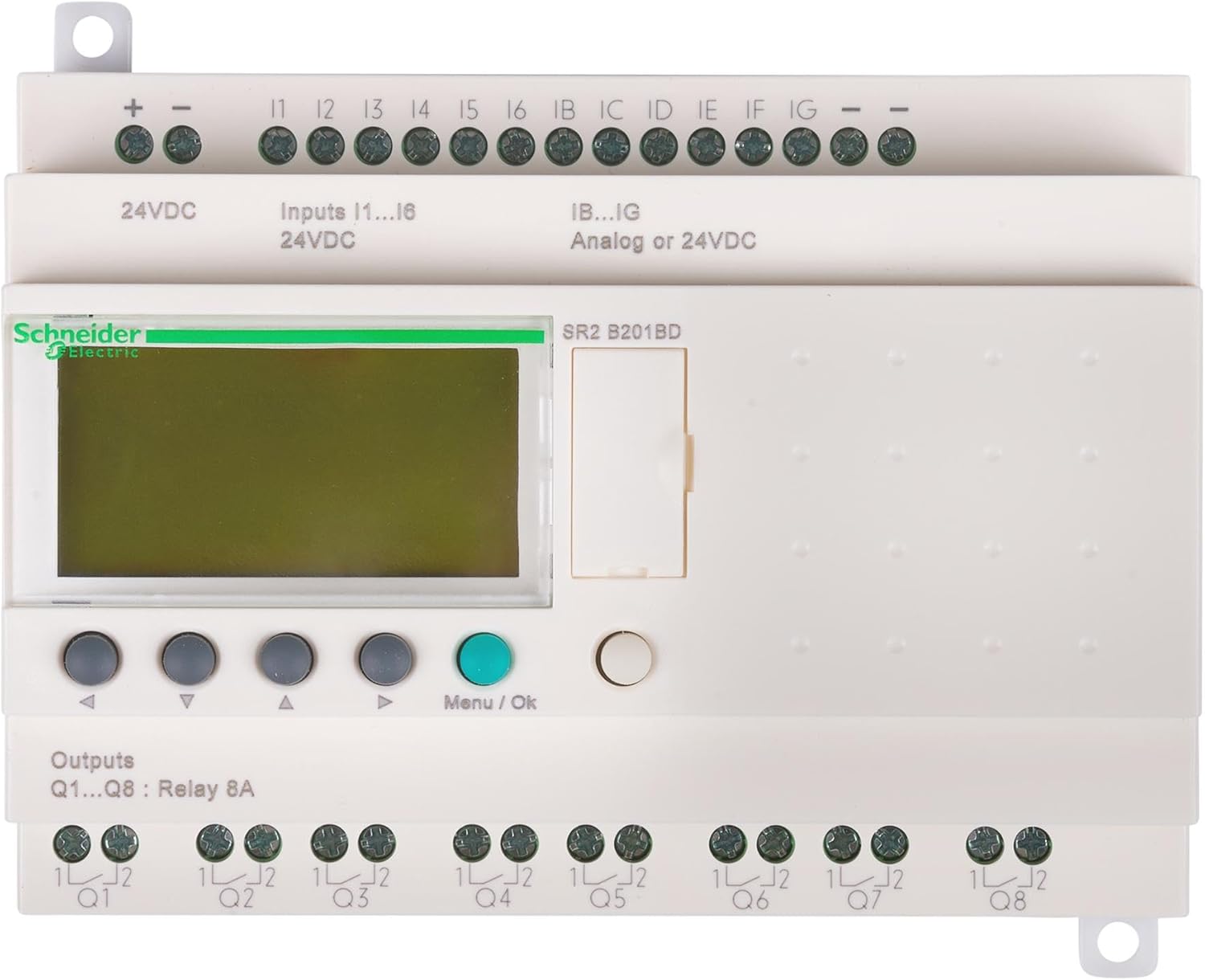
The Schneider Electric Zelio SR2B201BD is a compact logic relay with integrated display and control buttons. It provides various input and output terminals for connecting to sensors, actuators, and other control components.
3.1. Asosiy xususiyatlar
- 20 I/O points (12 digital inputs, 8 relay outputs)
- 24Vdc power supply
- Integrated LCD display and push-buttons for programming and monitoring
- DIN raylarini o'rnatish uchun ixcham dizayn
3.2. O'lchamlari va vazni
- Olchamlari: 5.3 x 2.6 x 3.9 dyuym (134.6 x 66 x 99 mm)
- Og'irligi: 12.6 untsiya (357.2 gramm)
4. O'rnatish va o'rnatish
4.1. O'rnatish
The Zelio SR2B201BD is designed for DIN rail mounting. Ensure adequate ventilation around the device.
4.2. Elektr kabellari
Refer to the terminal markings on the device for correct wiring connections. Use appropriate wire gauges for all connections.
4.2.1. Power Supply (24Vdc)
- ni ulang + terminal to the positive 24Vdc supply.
- ni ulang - terminal to the negative 24Vdc supply.
4.2.2. Inputs (I1-I6, IB-IG)
- I1-I6: Digital inputs, 24Vdc. Connect sensors or switches to these terminals.
- IB-IG: Analog or 24Vdc digital inputs. These inputs can be configured for either analog signal reception or digital 24Vdc input.
4.2.3. Outputs (Q1-Q8)
- 1-8-savol: Relay outputs, 8A. These are potential-free contacts for controlling external loads. Connect the load to the respective Q terminal and its common (1L/2L).
5. Foydalanish bo'yicha ko'rsatmalar
5.1. Yoqish
Once all wiring is complete and verified, apply 24Vdc power to the device. The LCD display will illuminate, and the device will initiate its startup sequence.
5.2. Navigation and Programming
Use the navigation buttons (up, down, left, right) to scroll through menus and parameters on the LCD display. Press the Menyu/OK opsiyani tanlash yoki sozlamani tasdiqlash uchun tugmani bosing.
- Dasturlash: Programs can be created directly on the device using the function block diagram (FBD) or ladder logic (LAD) editors via the display and buttons. Alternatively, programs can be developed using Zelio Soft 2 software on a PC and then transferred to the relay.
- Monitoring: The display allows real-time monitoring of input/output states, timer values, and counter values.
- Parametrni sozlash: Adjust various operational parameters such as timer presets, counter limits, and input/output configurations.
5.3. Software Integration (Zelio Soft 2)
For advanced programming and easier configuration, use the Zelio Soft 2 software. Connect the logic relay to a PC using the appropriate programming cable (sold separately). The software provides a graphical interface for program development, simulation, and transfer.
6. Xizmat ko'rsatish
The Zelio SR2B201BD is designed for minimal maintenance. Regular checks can help ensure long-term reliability.
- Tozalash: Qurilmani toza va changdan toza tuting. Tozalash uchun yumshoq, quruq matodan foydalaning. Abraziv tozalash vositalarini yoki erituvchilarni ishlatmang.
- Ulanishlar: Vaqti-vaqti bilan barcha sim ulanishlarini mahkamlash va korroziya belgilari bor-yo'qligini tekshirib turing.
- Atrof-muhit: Ishlash muhiti belgilangan harorat va namlik oralig'ida qolishiga ishonch hosil qiling.
7. Muammolarni bartaraf qilish; nosozliklarni TUZATISH
| Muammo | Mumkin sabab | Yechim |
|---|---|---|
| Qurilma yoqilmaydi. | No power supply or incorrect voltage. | Verify 24Vdc power supply connections and voltage. Agar mavjud bo'lsa, sug'urtalarni tekshiring. |
| Kirishlar javob bermayapti. | Incorrect wiring, faulty sensor, or program error. | Check input wiring. Test sensor functionality. Review program logic for input conditions. |
| Chiqishlar faollashtirilmayapti. | Incorrect wiring, faulty load, or program error. | Check output wiring and load connections. Test load functionality. Review program logic for output conditions. |
| Displey xato xabarini ko'rsatadi. | Internal fault or programming issue. | Note the error code and consult the detailed Zelio SR2 programming manual or Schneider Electric support. Try resetting the device. |
8. Texnik shartlar
| Parametr | Qiymat |
|---|---|
| Model raqami | SR2B201BD |
| Brend | Schneider Electric |
| Quvvatlantirish manbai | 24 Vd |
| Raqamli kirishlar | 12 (I1-I6, IB-IG configurable) |
| Analog yozuvlar | Up to 6 (configurable from IB-IG) |
| O'rnimizni chiqishi | 8 (Q1-Q8), 8A per output |
| Displey | Integrated LCD |
| O'rnatish | DIN temir yo'li |
| Olchamlari (U x G x Y) | 5.3 x 2.6 x 3.9 dyuym (134.6 x 66 x 99 mm) |
| Og'irligi | 12.6 untsiya (357.2 gramm) |
| Material | Metall |
9. Kafolat va qo'llab-quvvatlash
9.1. Kafolat haqida ma'lumot
Schneider Electric products are covered by a standard manufacturer's warranty. For specific warranty terms and conditions, please refer to the documentation provided with your purchase or visit the official Schneider Electric websayt. Kafolat da'volari uchun xaridingizni tasdiqlovchi hujjatingizni saqlang.
9.2. Texnik yordam
For technical assistance, programming queries, or troubleshooting beyond the scope of this manual, please contact Schneider Electric customer support or visit their official support portal. You can find contact information on the Schneider Electric websayt: www.se.com


