Kirish
This manual provides essential instructions for the safe and efficient operation, maintenance, and care of your Quest 35200 Stainless Steel Cordless Electric Coffee Percolator. Please read all instructions carefully before first use and retain this manual for future reference.

Image: The Quest 35200 Stainless Steel Cordless Electric Coffee Percolator, featuring a polished stainless steel body, black handle, and a black base with a power button.
Xavfsizlik bo'yicha muhim ko'rsatmalar
Elektr jihozlaridan foydalanganda yong'in, elektr toki urishi va/yoki odamlarning shikastlanishi xavfini kamaytirish uchun asosiy xavfsizlik choralariga, shu jumladan quyidagilarga rioya qilish kerak:
- Barcha ko'rsatmalarni o'qing.
- Issiq yuzalarga tegmang. Tutqichlar yoki tugmalardan foydalaning.
- To protect against fire, electric shock, and injury to persons, do not immerse cord, plugs, or the percolator base in water or other liquid.
- Har qanday asbobdan bolalar yoki uning yonida foydalanayotganda yaqindan nazorat qilish zarur.
- Foydalanilmayotganda va tozalashdan oldin rozetkadan uzing. Ehtiyot qismlarni qo'yish yoki yechishdan va jihozni tozalashdan oldin sovushini kuting.
- Hech qanday jihozni shnuri yoki vilkasi shikastlangan holda yoki jihoz ishlamay qolgan yoki biron-bir tarzda shikastlangandan keyin ishlatmang. Qurilmani tekshirish, ta'mirlash yoki sozlash uchun eng yaqin vakolatli xizmat ko'rsatish markaziga qaytaring.
- Jihoz ishlab chiqaruvchisi tomonidan tavsiya etilmagan aksessuarlardan foydalanish yong'in, elektr toki urishi yoki odamlarning shikastlanishiga olib kelishi mumkin.
- Ochiq havoda foydalanmang.
- Shnurni stol yoki peshtaxta chetiga osib qo'ymang yoki issiq yuzalarga tegmang.
- Issiq gaz yoki elektr gorelkasi ustiga yoki yaqiniga yoki isitiladigan pechga qo'ymang.
- Har doim avval vilkasini jihozga ulang, keyin shnurni rozetkaga ulang. O‘chirish uchun har qanday boshqaruvni “o‘chirish” holatiga o‘tkazing, so‘ng vilkasini rozetkadan chiqarib oling.
- Jihozni maqsadli foydalanishdan boshqa maqsadda ishlatmang.
- Pishirish jarayonida qopqoq olib tashlansa, kuyish paydo bo'lishi mumkin.
- Ushbu qurilma faqat maishiy foydalanish uchun mo'ljallangan.
Mahsulot tugadiview va Xususiyatlar
The Quest 35200 Electric Coffee Percolator is designed for convenient coffee brewing. Key features include:
- Simsiz dizayn: Allows for easy pouring and serving.
- Zanglamaydigan po'latdan yasalgan konstruktsiya: Bardoshli va oson tozalanadi.
- Built-in Filter: Eliminates the need for disposable paper filters.
- 1.5 litr hajm: Brews multiple cups of coffee.
- 1100 Vt quvvat: Ensures quick brewing.
- Issiq saqlash funksiyasi: Maintains coffee temperature for 30-45 minutes.
- Avtomatik o'chirish: Enhances safety and energy efficiency.
- 360° Detachable Base: For flexible placement and easy lifting.
- Quvvat ko'rsatkich chiroqchasi: Operatsion holatini ko'rsatadi.
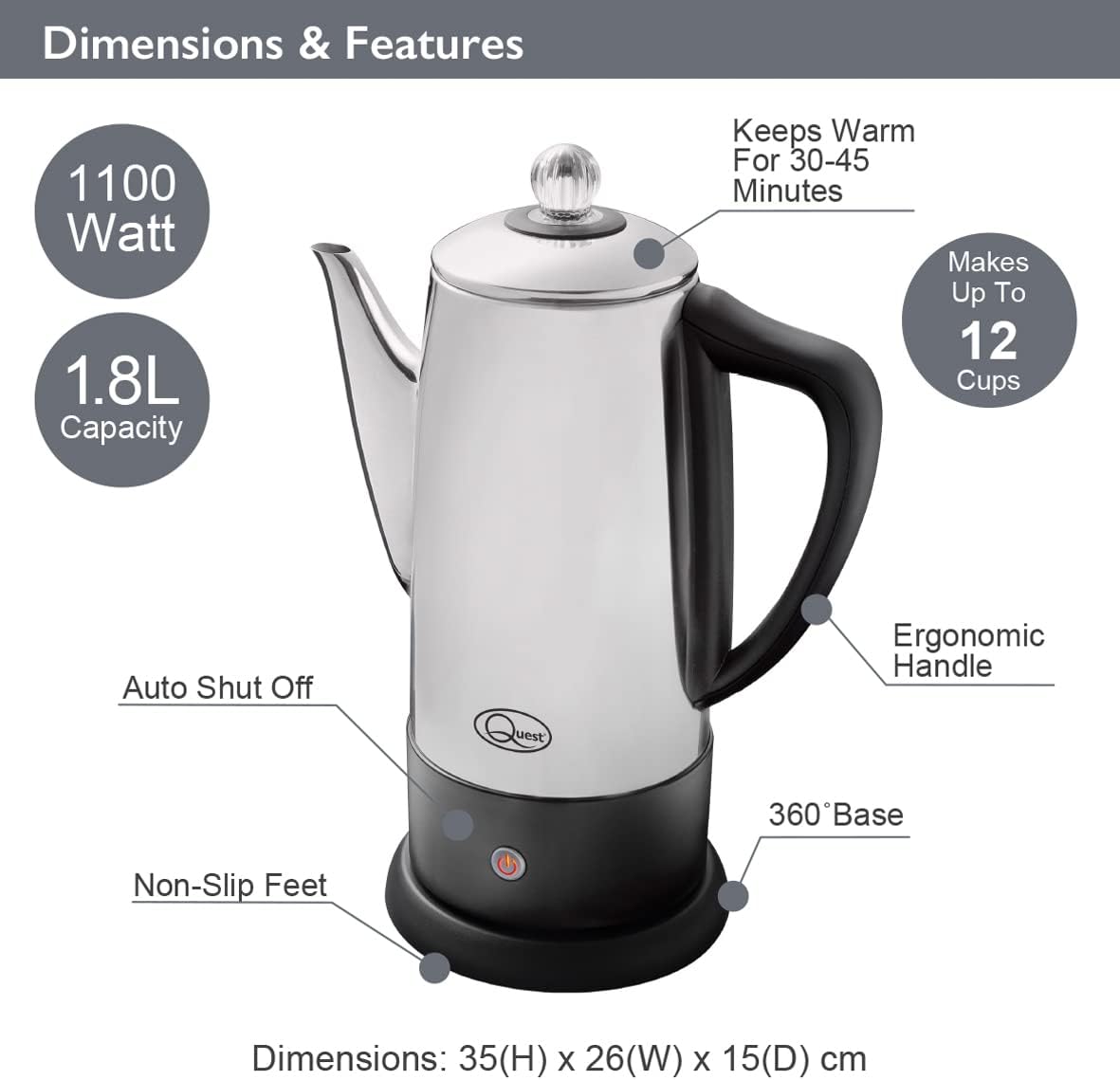
Image: Diagram illustrating the Quest 35200 percolator with callouts for its features: 1100 Watt power, 1.8L capacity (note: product title states 1.5L, using 1.8L from image), auto shut-off, non-slip feet, 360° base, ergonomic handle, keeps warm for 30-45 minutes, and makes up to 12 cups. Dimensions are 35(H) x 26(W) x 15(D) cm.

Image: A collage of four close-up views of the percolator: the interior with water level markings up to 12 cups, the removable filter basket filled with ground coffee, the illuminated power indicator light on the base, and the transparent lid knob.
Sozlash; o'rnatish
- Paketni ochish: Carefully remove all packaging materials and inspect the percolator for any damage.
- Dastlabki tozalash: Before first use, wash the interior of the percolator, the filter basket, and the stem in warm, soapy water. Rinse thoroughly and dry. Wipe the exterior with a damp mato.
- Joylashtirish: Place the percolator base on a stable, flat, heat-resistant surface, away from the edge of the counter.
- Quvvat ulanishi: Elektr shnuriga osongina kirish mumkinligiga va unga to'sqinlik qilmasligiga ishonch hosil qiling.
Foydalanish bo'yicha ko'rsatmalar
Follow these steps to brew coffee with your Quest 35200 percolator:
- Suv qo'shing: Fill the percolator with cold, fresh water to your desired level, observing the internal markings. Do not exceed the maximum fill line.
- Insert Stem and Basket: Place the percolator stem into the center well of the percolator. Then, place the filter basket onto the stem.
- Qahva maydonlarini qo'shing: Add your preferred amount of coarse-ground coffee into the filter basket. Do not use fine-ground coffee as it may seep through the filter.
- Xavfsiz qopqoq: Place the lid firmly on the percolator.
- Quvvatni ulash: Place the percolator onto its 360° detachable power base. Plug the power cord into a suitable electrical outlet.
- Pivo tayyorlashni boshlang: Press the power button on the base. The indicator light will illuminate, signifying that brewing has begun.
- Percolation Cycle: The water will heat and begin to percolate through the coffee grounds. The brewing process typically takes several minutes, depending on the amount of water.
- Issiq tuting: Once the brewing cycle is complete, the percolator will automatically switch to a keep-warm mode, indicated by the power light changing color or remaining illuminated. This function keeps coffee warm for approximately 30-45 minutes.
- Xizmat qilish: Carefully remove the percolator from its base and pour coffee into cups. Be cautious of hot surfaces and steam.
- Ulanish: After serving, unplug the percolator from the wall outlet.

Image: A visual guide showing four steps for using the percolator: 1. Adding cold water to the pot. 2. Adding ground coffee to the filter basket. 3. Pressing the power switch on the base. 4. Pouring the brewed coffee into a cup.

Image: A diagram highlighting the percolator's keep warm functionality, stating it keeps coffee warm for up to 45 minutes, has a 1.8L capacity, and makes up to 12 cups.

Rasm: yaqindan view of the percolator's 360° detachable base, showing the central electrical connector.
Xizmat va tozalash
Regular cleaning ensures optimal performance and longevity of your percolator.
- Har doim elektr tarmog'idan uzing: Before cleaning, ensure the percolator is unplugged from the power outlet and has cooled down completely.
- Demontaj qilish: Remove the lid, filter basket, and stem.
- Yuvish komponentlari: Wash the lid, filter basket, and stem in warm, soapy water. Rinse thoroughly and dry.
- Toza ichki makon: Wash the interior of the percolator with warm, soapy water and a soft sponge or brush. Rinse thoroughly to remove all soap residue.
- Toza tashqi ko'rinish: Wipe the exterior of the percolator with a damp mato. Abraziv tozalagichlar yoki tozalash vositalaridan foydalanmang, chunki ular zanglamaydigan po'latdan yasalgan qoplamaga zarar etkazishi mumkin.
- Asosiy tozalash: Quvvat bazasini reklama bilan o'chiringamp cloth. Never immerse the power base in water or any other liquid.
- Quritish: Ensure all parts are completely dry before reassembling or storing the percolator.
- Qutni tozalash: Over time, mineral deposits may build up. To descale, fill the percolator with a mixture of equal parts water and white vinegar. Bring to a boil and let it sit for an hour before emptying and rinsing thoroughly. Repeat if necessary.
- Idish yuvish mashinasi xavfsizligi: The percolator is EMAS dishwasher safe. Hand wash all components.
Muammolarni bartaraf qilish; nosozliklarni TUZATISH
If you encounter issues with your percolator, refer to the following common problems and solutions:
| Muammo | Mumkin sabab | Yechim |
|---|---|---|
| Percolator does not turn on. | Not plugged in; power button not pressed; no power at outlet. | Ensure unit is plugged in and power button is pressed. Check outlet with another appliance. |
| Qahva juda zaif. | Not enough coffee grounds; coffee grounds too coarse; water level too high. | Increase coffee grounds. Use medium-coarse grounds. Reduce water level. |
| Qahva juda kuchli. | Too many coffee grounds; coffee grounds too fine; water level too low. | Reduce coffee grounds. Use coarser grounds. Increase water level. |
| Qaynatilgan qahvadagi kofe maydalanganlari. | Coffee grounds too fine; filter basket not seated correctly. | Use coarser grounds. Ensure filter basket is properly seated on the stem. |
| Percolator leaks. | Overfilled; lid not seated correctly. | Do not fill above the maximum line. Ensure lid is firmly and correctly placed. |
Agar ushbu echimlarni sinab ko'rganingizdan keyin muammo davom etsa, mijozlarni qo'llab-quvvatlash xizmatiga murojaat qiling.
Texnik xususiyatlari
| Xususiyat | Tafsilot |
|---|---|
| Model raqami | 35200 |
| Brend | QUEST |
| Rang | Kumush |
| Imkoniyat | 1.5 litr (taxminan 12 stakan) |
| Quvvat | 1100 Vt |
| jildtage | 240V |
| Maxsus xususiyat | Cordless, Built-in Filter, Keep Warm Function |
| Olchamlari (U x G x Y) | 13.19 x 9.25 x 6.1 dyuym (33.5 x 23.5 x 15.5 sm) |
| Element og'irligi | 2.2 funt (1 kg) |
| Idish yuvish mashinasida xavfsiz | Yo'q |
Kafolat va qo'llab-quvvatlash
Kafolat haqida ma'lumot va mijozlarni qo'llab-quvvatlash uchun, iltimos, sotib olish vaqtida taqdim etilgan hujjatlarga qarang yoki sotuvchingizga murojaat qiling. Har qanday kafolat da'volari uchun sotib olishni tasdiqlovchi hujjatingizni saqlang.


