1. Kirish
The VTech DigiArt Creative Easel is an interactive learning toy designed to foster creativity and educational development in children aged 3 years and up. This versatile easel transforms into a light-up dry-erase board, a traditional chalkboard, and a drawing table, offering multiple modes of play and learning. It features a magic pen for guided drawing, letter and number stroke order practice, and engaging activities accompanied by classic songs.

Figure 1: The VTech DigiArt Creative Easel in its upright position, displaying a child interacting with the light-up dry-erase board.
2. Qutida nima bor
Please ensure all components are present before assembly:
- DigiArt Creative Easel Unit
- Magic Pen
- Chalk (3 pieces)
- AA Batteries (4, for demo purposes only; new batteries recommended)
- Qo'llanma (bu hujjat)
3. Sozlash
3.1. Batareyani o'rnatish
- Locate the battery compartment on the back of the easel's main unit.
- Tornavidadan (qo'shilmagan) foydalanib, batareya bo'limi qopqog'ini oching.
- To'g'ri qutblanishni (+/-) ta'minlab, ikkita yangi AA batareyasini joylashtiring.
- Batareya bo'limi qopqog'ini joyiga qo'ying va uni vint bilan mahkamlang.
Note: The included batteries are for demonstration purposes only. For regular use, new alkaline batteries are recommended.
3.2. Yig'ish
The VTech DigiArt Creative Easel requires adult assembly. Follow the instructions provided in the separate assembly guide or refer to the diagrams on the product packaging for step-by-step instructions on attaching the legs and ensuring the easel is stable.
4. Foydalanish bo'yicha ko'rsatmalar
The DigiArt Creative Easel offers three primary modes of use: light-up dry-erase board, chalkboard, and drawing table. The interactive features are primarily accessed via the control panel on the dry-erase side.
4.1. Quvvatni yoqish/o‘chirish
ni bosing Quvvat tugmasi (usually marked with a circle and vertical line) on the control panel to turn the easel on or off.
4.2. Light-Up Dry-Erase Board Mode
In this mode, the easel's surface illuminates, guiding children through various learning activities using the magic pen.
- Magic Pen Interaction: Use the attached magic pen to trace the lights on the 5x5 inch LED screen. The pen interacts with the light patterns to provide step-by-step guidance.
- O'quv faoliyati: The easel includes 6 different activities. These typically involve learning to draw over 100 objects and shapes, as well as practicing letter and number stroke order for uppercase letters A-Z and numbers 1-20.
- Free Draw: Children can also use the magic pen for free-form drawing on the light-up surface.
- Musiqa: Enjoy 10 classic songs while drawing.

Figure 2: A child tracing shapes on the light-up dry-erase board using the magic pen, demonstrating the interactive drawing feature.

3-rasm: Batafsil view of the easel's control panel, highlighting the buttons for selecting different learning activities, letters, and musical options.
Video 1: tugadiview of the VTech DigiArt Creative Easel, showcasing its various features and interactive capabilities.
4.3. Chalkboard Mode
Flip the easel to access the traditional chalkboard surface. Use the included chalk to draw and write. Remember to clean the chalkboard with a soft cloth or eraser (not included) after use.

Figure 4: A child actively drawing on the chalkboard side of the VTech DigiArt Creative Easel, demonstrating its dual functionality.
4.4. Drawing Table Mode
The easel can be converted into a drawing table for a different creative experience. This mode is ideal for sitting and drawing or coloring with paper and crayons (not included).

Figure 5: The VTech DigiArt Creative Easel configured as a drawing table, with a child seated and engaged in an activity using the magic pen.
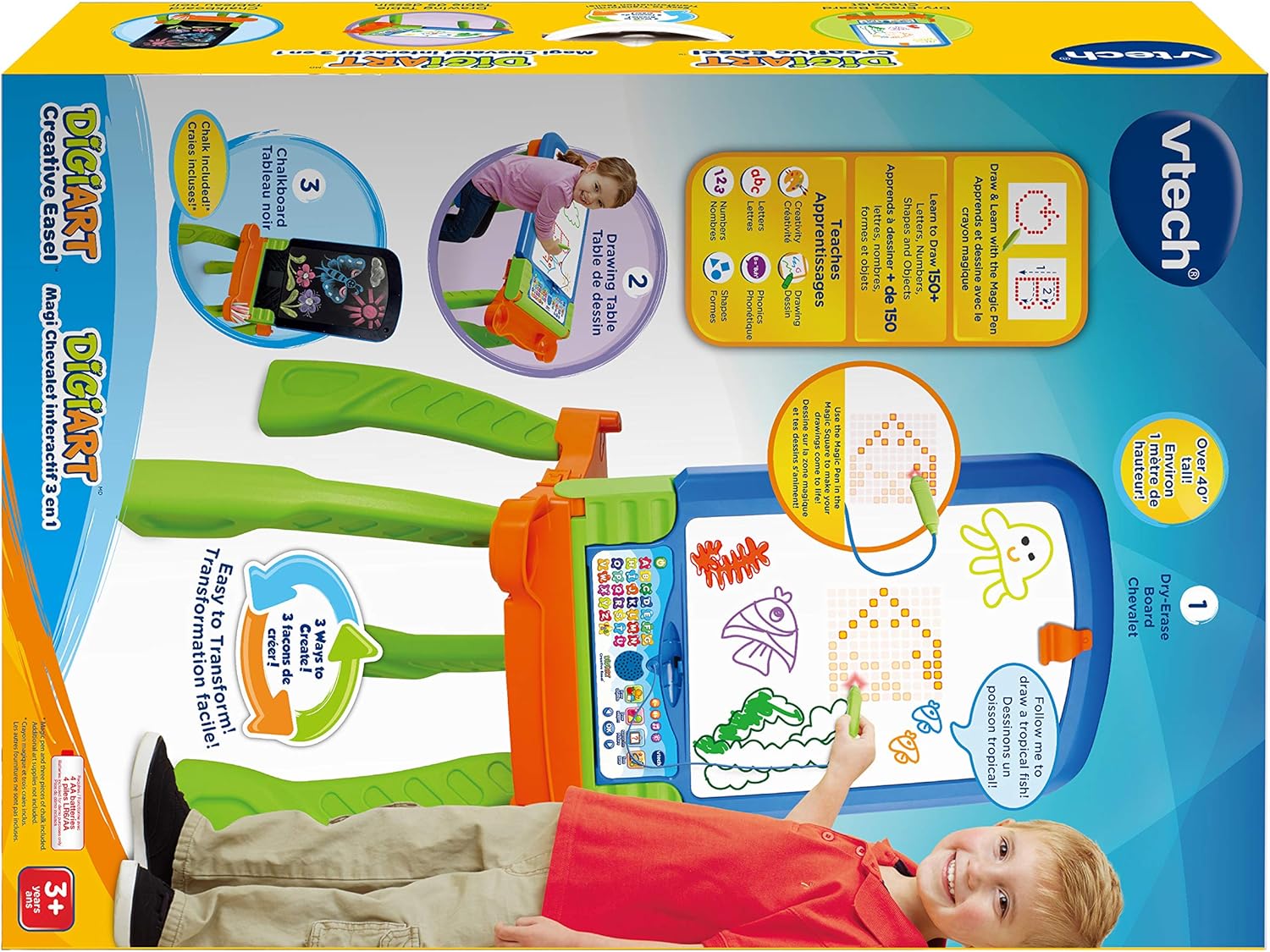
Figure 6: An illustrative diagram showcasing the three versatile configurations of the VTech DigiArt Creative Easel: upright dry-erase board, upright chalkboard, and a flat drawing table.
5. Xizmat ko'rsatish
- Tozalash: Wipe the easel surfaces with a slightly damp cloth. Do not immerse the unit in water. Avoid harsh chemicals or abrasive cleaners.
- Saqlash: Store the easel in a cool, dry place away from direct sunlight. Remove batteries if the unit will not be used for an extended period.
- Chalkboard Care: Use only standard chalk on the chalkboard surface. Clean regularly to prevent chalk buildup.
6. Muammolarni bartaraf qilish; nosozliklarni TUZATISH
- Quvvat yo'q: Batareyalarning to'g'ri o'rnatilganligiga va yangi ekanligiga ishonch hosil qiling. Agar kerak bo'lsa, yangilari bilan almashtiring.
- Ovoz bilan bog'liq muammolar: Check battery levels. If sound is distorted or too low, replace batteries.
- Light-Up Screen Not Responding: Ensure the magic pen is properly connected and the easel is in the correct mode. Check battery levels.
- Umumiy nosozlik: Turn the unit off and then on again. If the issue persists, replace batteries.
7. Texnik shartlar
| Xususiyat | Tafsilot |
|---|---|
| Brend | VTech |
| Model raqami | 80-193500 |
| Mahsulot o'lchamlari | 18.9"D x 19.09"W x 42.2"Y |
| Element og'irligi | 8.38 funt |
| Tavsiya etilgan yosh | 36 oy - 6 yil |
| Batareyalar talab qilinadi | 4 ta AA batareya (demo uchun kiritilgan) |
| Light-Up Screen Size | 5x5 inches (121 LED lights) |
| UPC | 068836527276 |
8. Kafolat va qo'llab-quvvatlash
For warranty information or product support, please refer to the documentation included with your purchase or visit the official VTech websayt. Xarid kvitansiyasini har qanday kafolat da'volari uchun xaridni tasdiqlovchi hujjat sifatida saqlang.