1. Kirish
The GAMDIAS Hermes GKB3000 is a mechanical gaming keyboard designed for enhanced durability and performance. It features GAMDIAS Certified Blue Switches with a 50 million actuation lifecycle, a 7-color spectrum backlight with 14 lighting effects, and various functional keys for an optimized gaming and typing experience. This manual provides instructions for setting up, operating, and maintaining your keyboard.
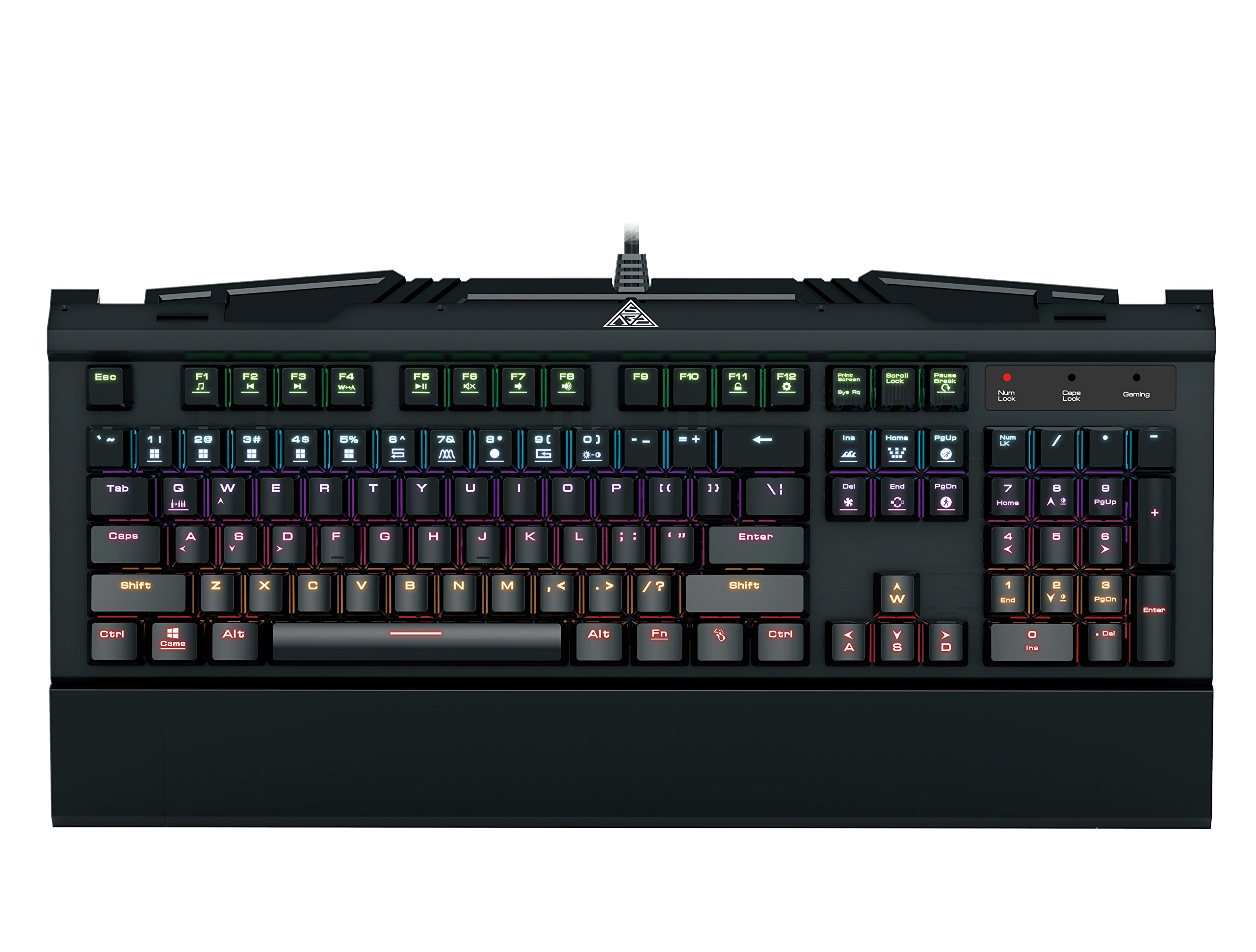
Image 1.1: The GAMDIAS Hermes GKB3000 Mechanical Gaming Keyboard. This image displays the full keyboard with its key layout and design, highlighting its compact yet robust build.
2. Paket tarkibi
Qutini ochayotganda barcha buyumlar mavjudligiga va shikastlanmaganligiga ishonch hosil qilish uchun paket tarkibini tekshiring.
- GAMDIAS Hermes GKB3000 Mechanical Gaming Keyboard
- Foydalanuvchi uchun qo'llanma (ushbu hujjat)
3. Sozlash
Follow these steps to set up your GAMDIAS Hermes GKB3000 keyboard:
- Klaviaturani o'ramdan chiqarib oling: Klaviaturani ehtiyotkorlik bilan o'ramidan chiqarib oling.
- Kompyuterga ulanish: Plug the USB-A connector of the keyboard cable into an available USB port on your computer.
- Haydovchi o'rnatish: The keyboard is plug-and-play. Your operating system (e.g., Windows) will automatically detect and install the necessary drivers. No additional software installation is typically required for basic functionality.
- Joylashtirish: Place the keyboard on a stable, flat surface for comfortable use.
4. Foydalanish bo'yicha ko'rsatmalar
4.1. Yoritish effektlari
The Hermes GKB3000 features a 7-color spectrum backlight with 14 sets of lighting effects. These include 9 preset effects and 5 customizable patterns.
- Switching Effects: Use the dedicated function keys (often combined with the Fn key) to cycle through the preset lighting effects. Refer to the keyboard's keycap legends for specific combinations.
- Customizing Effects: The keyboard supports 5 customizable lighting patterns. Instructions for programming these patterns are typically found in the full software suite available for download from the GAMDIAS website, if applicable.
- Yorqinlikni sozlash: Adjust backlight brightness using designated function key combinations.
4.2. Multimedia Control Keys
Access multimedia functions quickly using the dedicated multimedia control keys, often activated by holding the Fn tugmachasini F-tugmachalari (F1-F12) bilan birgalikda bosing.
- Ovozni boshqarish: Increase, decrease, or mute audio.
- Media ijro etish: Play/pause, stop, previous track, next track.
- Boshqa funksiyalar: May include opening default browser, email client, or calculator.
4.3. Special Gaming Functions
- WASD-Arrow Key Swap: This feature allows you to swap the functionality of the WASD keys with the arrow keys. This is useful for certain games or user preferences. Activate this function using a specific Fn key combination (e.g., Fn + W).
- Consecutive Attack Mode: This mode enhances rapid key input for gaming. Refer to the keyboard's specific documentation or GAMDIAS software for activation and configuration details.
- Klaviatura qulfi: Temporarily disable the keyboard input to prevent accidental presses. Activate using a Fn tugmalar birikmasi.
- Windows Key Disable: Prevent accidental presses of the Windows key during gaming, which can minimize your game. Activate using a Fn key combination (e.g., Fn + Win key).
- N-tugmasini aylantirish: The GKB3000 supports N-key rollover, meaning multiple keys can be pressed simultaneously without ghosting or missed inputs. This ensures accurate and responsive commands during intense gaming sessions.
5. Xizmat ko'rsatish
To'g'ri parvarishlash klaviaturangizning uzoq umr va optimal ishlashini ta'minlaydi.
- Tozalash:
- Tozalashdan oldin klaviaturani kompyuteringizdan uzing.
- Bir oz yumshoq, tuklarsiz matodan foydalaning dampsirtni artib olish uchun suv yoki yumshoq tozalash eritmasi bilan qoplangan.
- Tugmalar orasidagi chang va qoldiqlar uchun siqilgan havodan foydalaning.
- Qattiq kimyoviy moddalar, abraziv tozalash vositalari yoki erituvchilardan foydalanishdan saqlaning.
- Saqlash: Klaviaturani uzoq vaqt ishlatilmaganda to'g'ridan-to'g'ri quyosh nuri va haddan tashqari haroratdan uzoqda, salqin va quruq joyda saqlang.
- Ishlov berish: Avoid dropping the keyboard or exposing it to excessive force, as this can damage the mechanical switches or internal components.
6. Muammolarni bartaraf qilish; nosozliklarni TUZATISH
If you encounter issues with your GAMDIAS Hermes GKB3000 keyboard, refer to the following common solutions:
| Muammo | Mumkin yechim |
|---|---|
| Klaviatura javob bermayapti. |
|
| Backlight is not working or is dim. |
|
| Ba'zi tugmalar ishlamayapti. |
|
| WASD keys are acting as arrow keys. |
|
If the problem persists after trying these solutions, please contact GAMDIAS customer support for further assistance.
7. Texnik shartlar
The following are the technical specifications for the GAMDIAS Hermes GKB3000 Mechanical Gaming Keyboard:
| Xususiyat | Tafsilot |
|---|---|
| Brend | GAMDIAS |
| Model raqami | GKB3000 |
| Kommutator turi | GAMDIAS Certified Mechanical Blue Switches |
| Actuation Lifecycle | 50 million bosish |
| Orqa yoritish | 7-Color Spectrum, 14 Lighting Effects (9 preset, 5 customizable) |
| Ghostingga qarshi | N-tugmachasini aylantirish |
| Ulanish | USB-A |
| Operatsion tizim | Windows |
| Element og'irligi | 2.42 funt (taxminan 1.1 kg) |
| Mahsulot o'lchamlari (LxWxH) | 18.8 x 10.5 x 2 dyuym (taxminan 47.75 x 26.67 x 5.08 sm) |
| Material | Plastic with Elegant Metal Plate Design |
8. Kafolat va qo'llab-quvvatlash
GAMDIAS products are manufactured to the highest quality standards. For information regarding warranty coverage, terms, and conditions, please refer to the warranty card included with your product or visit the official GAMDIAS websayt.
For technical support, troubleshooting assistance, or any product-related inquiries, please contact GAMDIAS customer support through their official websayt yoki mahsulot o'ramida ko'rsatilgan aloqa ma'lumotlari.
GAMDIAS Official Websayt: www.gamdias.com


