1. Kirish
Intermec PM43 ishonchli ishlash va foydalanish qulayligi uchun mo'ljallangan o'rta darajadagi sanoat yorlig'i printeridir. Ushbu printer to'g'ridan-to'g'ri termal va termal uzatish bosib chiqarish usullarini qo'llab-quvvatlaydi, bu esa uni turli xil yorliqlash ilovalari uchun ko'p qirrali qiladi. U ishlashni soddalashtirish va o'qitish talablarini kamaytirish uchun rangli sensorli ekran yoki universal piktogrammalar bilan mavjud bo'lgan foydalanuvchilar uchun qulay interfeysga ega. Ushbu qo'llanma PM43 printeringizni sozlash, ishlatish, texnik xizmat ko'rsatish va muammolarni bartaraf etish bo'yicha muhim ma'lumotlarni taqdim etadi.

1-rasm: Old view Intermec PM43 printerining boshqaruv paneli va media chiqish uyasi ko'rsatilgan.
2. Sozlash
2.1 Qadoqdan chiqarish va joylashtirish
Printerni ehtiyotkorlik bilan o'ramidan chiqarib oling. Barcha qadoqlash materiallari olib tashlanganligiga ishonch hosil qiling. Printerni shamollatish va portlar hamda media yuklash joylariga kirish uchun atrofida yetarli joy bo'lgan barqaror, tekis yuzaga qo'ying.
2.2 Quvvatni ulash
- Printerning quvvat tugmasi OFF (O) holatida ekanligiga ishonch hosil qiling.
- Quvvat simini printerning AC kirish qismiga ulang.
- Elektr shnurining ikkinchi uchini yerga ulangan elektr rozetkaga ulang.
2.3 Xost tizimiga ulanish
PM43 printeri USB va Ethernet ulanishini qo'llab-quvvatlaydi.
- USB ulanishi: Printerning USB portidan USB kabelini kompyuteringizdagi mavjud USB portiga ulang.
- Ethernet ulanishi: Printerning Ethernet portidan Ethernet kabelini tarmoq routeri yoki kalitiga ulang.

2-rasm: PM43 printerining orqa paneli, quvvat kirish joyi, quvvat tugmasi, USB portlari va Ethernet portini ko'rsatadi.
2.4 Media yuklanmoqda
PM43 printeri turli xil media turlaridan, jumladan, yorliqlardan foydalanishi mumkin. tagsva uzluksiz muhit. Termal uzatish bosib chiqarish uchun lenta ham talab qilinadi.
- Printerning media qopqog'ini oching.
- Yorliqlar rulonini muhit ta'minoti miliga joylashtiring, shunda yorliqlar rulonning pastki qismidan o'tishiga ishonch hosil qiling.
- Mediani qo'llanmalar orqali va chop etish kallagi yig'masi ostidan o'tkazing.
- Agar issiqlik uzatishdan foydalansangiz, lentani lenta ta'minoti miliga joylashtiring va ichki diagrammalarga muvofiq rezba qiling.
- Media qopqog'ini yoping.

3-rasm: Ichki view PM43 printerining media va lenta yuklash mexanizmlarini ta'kidlab.
3. Foydalanish bo'yicha ko'rsatmalar
3.1 Quvvatni yoqish/o‘chirish
- Yoqish uchun orqa paneldagi quvvat tugmasini ON (I) holatiga o'tkazing. Printer o'zini o'zi sinab ko'radi.
- Quvvatni o'chirish uchun quvvat tugmasini OFF (O) holatiga o'tkazing.
3.2 Asosiy chop etish
Printer ulangandan va media yuklangandan so'ng, siz xost tizimingizdan chop etish ishlarini yuborishingiz mumkin. Kompyuteringizga to'g'ri printer drayverlari o'rnatilganligiga ishonch hosil qiling.
- Chop etmoqchi bo'lgan hujjat yoki dasturni oching.
- Chop etish muloqot oynasidan Intermec PM43 printerini tanlang.
- Chop etish sozlamalarini (masalan, yorliq o'lchami, chop etish zichligi) kerak bo'lganda sozlang.
- Chop etish ishini boshlang.
3.3 Foydalanuvchi interfeysidan foydalanish
PM43 to'g'ridan-to'g'ri boshqarish va sozlash uchun rangli sensorli ekran yoki universal piktogramma interfeysiga ega. Media kalibrlash, tarmoq konfiguratsiyasi va printer holati kabi sozlamalarni sozlash uchun menyular bo'ylab harakatlaning.
4. Xizmat ko'rsatish
4.1 Chop kallagini tozalash
Chop etish kallagini muntazam tozalash bosma sifatini saqlab qolish va bosma kallagining ishlash muddatini uzaytirish uchun juda muhimdir. Izopropil spirti qo'shilgan tuksiz mato yoki bosma kallagini tozalash uchun ruchkadan foydalaning.
- Printerni o'chiring va quvvat simini ajratib oling.
- Media qopqog'ini oching.
- Chop kallagi elementini markazdan tashqariga qarab muloyimlik bilan artib oling.
- Qopqoqni yopishdan va printerni yoqishdan oldin chop etish kallagining to'liq qurishini kuting.
4.2 Media va lentani almashtirish
Media rulonlari va termal uzatish lentalari tugashi bilan ularni almashtiring. Yuklash bo'yicha ko'rsatmalar uchun 2.4-bo'limga qarang. Optimal ishlash uchun har doim to'g'ri media va lenta turlaridan foydalanilganligiga ishonch hosil qiling.
5. Muammolarni bartaraf qilish; nosozliklarni TUZATISH
Ushbu bo'limda PM43 printeringiz bilan duch kelishingiz mumkin bo'lgan keng tarqalgan muammolar ko'rib chiqiladi.
5.1 Chop etish sifati past
- Xira yoki to'liq bo'lmagan bosma: Chop kallagini tozalang (4.1-bo'limga qarang). Tasma (agar termal uzatish bo'lsa) to'g'ri yuklanganligiga va tugamaganligiga ishonch hosil qiling. Chop zichligi sozlamalarini sozlang.
- Dog'langan bosma: Media turi mos kelishini tekshiring. Chop kallagi bosimi to'g'ri o'rnatilganligiga ishonch hosil qiling.
5.2 Media tiqilib qolishlari
- Printerni o'chiring.
- Media qopqog'ini oching va tiqilib qolgan mediani ehtiyotkorlik bilan olib tashlang.
- Media to'g'ri yuklanganligiga va yo'riqnomalar to'g'ri sozlanganligiga ishonch hosil qiling.
- Qopqoqni yoping va quvvatni yoqing.
5.3 Ulanish muammolari
- Printer aniqlanmadi: Barcha kabel ulanishlarini tekshiring (USB/Ethernet). Printer va xost tizimini qayta ishga tushiring. Drayver o'rnatilganligini tasdiqlang.
- Tarmoq muammolari: Tarmoq kabeli ulanganligini tasdiqlang. Printer va xost tizimidagi tarmoq sozlamalarini tekshiring.
6. Texnik shartlar
Quyidagi jadvalda Intermec PM43 printerining asosiy texnik xususiyatlari keltirilgan.
| Xususiyat | Spetsifikatsiya |
|---|---|
| Model nomi | PM43 |
| Chop etish texnologiyasi | To'g'ridan-to'g'ri issiqlik / issiqlik uzatish |
| Rangni chop etish | Monoxrom (qora) |
| Maksimal bosib chiqarish tezligi | soniyasiga 12 dyuym |
| Maksimal chop etish ruxsati | 203 dpi |
| Qo'llab -quvvatlanadigan media turlari | Qora belgi, uzluksiz yorliq, yelpiq, bo'shliq, yorliq, astarli yorliq, astarsiz, belgi, rulon bilan oziqlangan, Tag |
| Medianing maksimal hajmi | 4 x 6 dyuym |
| Ulanish | USB-Ethernet |
| Xotira | 128 MB |
| Nazorat usuli | Sensorli ekran yoki Universal-ikon interfeysi |
| Mahsulot o'lchamlari | 25 x 18 x 16 dyuym |
| Element og'irligi | 1 funt |
| Quvvat manbai | AC ta'minoti |
| Til emulyatsiyasi | DSim, barmoq izi, IPL, XML |
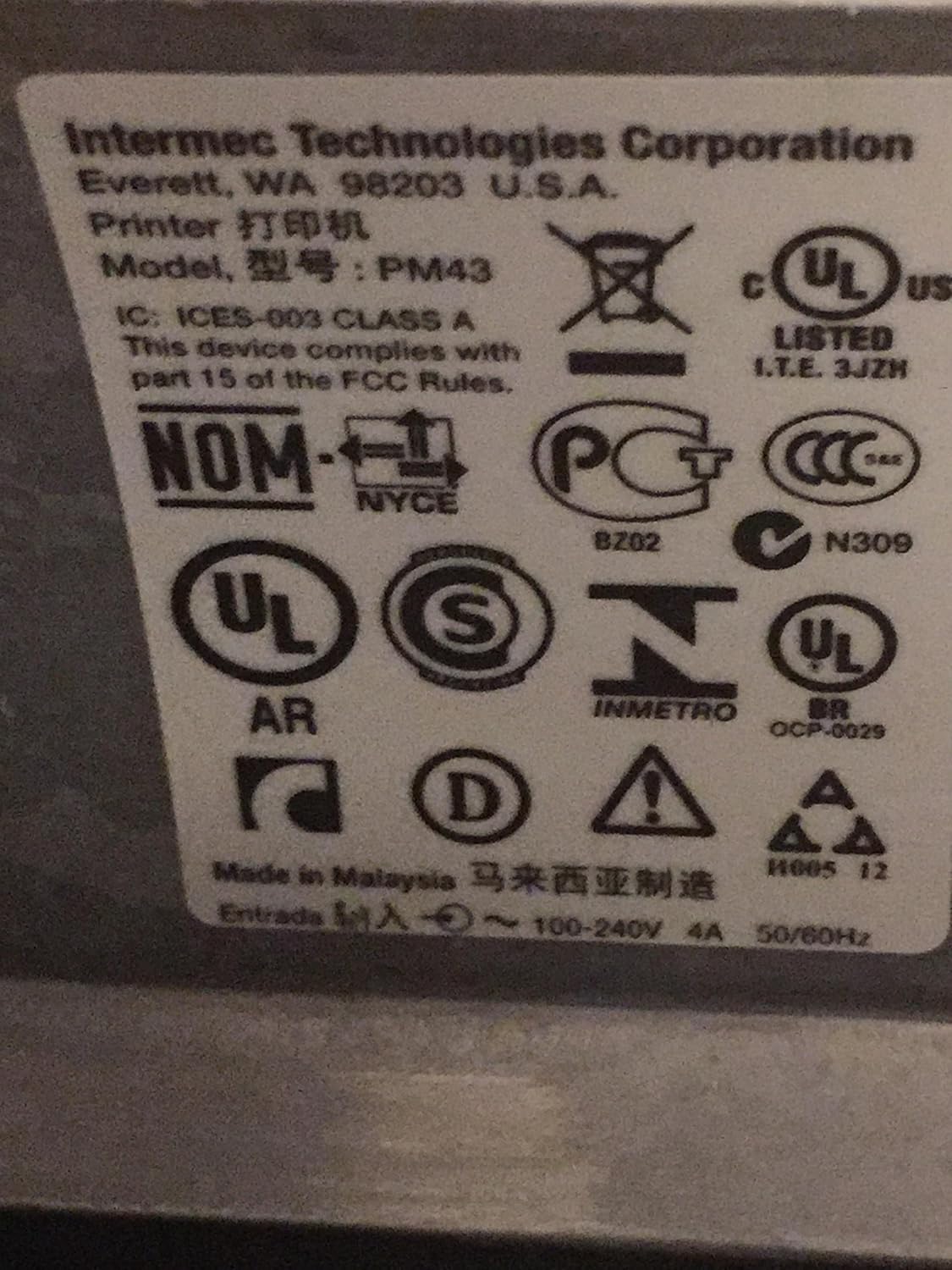
4-rasm: Intermec PM43 printerida joylashgan tartibga solish va muvofiqlik yorliqlari.
7. Kafolat haqida ma'lumot
Intermec PM43 printeri cheklangan kafolat bilan qoplangan. Muayyan shartlar va qoidalar uchun mahsulotingizga kiritilgan kafolat hujjatlariga murojaat qiling yoki rasmiy Intermec qo'llab-quvvatlash xizmatiga tashrif buyuring. websayt.
8. Qo'llab-quvvatlash
Qo'shimcha yordam, texnik yordam yoki eng so'nggi drayverlar va dasturiy ta'minotni yuklab olish uchun rasmiy Intermec qo'llab-quvvatlash xizmatiga tashrif buyuring. websaytiga tashrif buyuring yoki vakolatli Intermec dileringizga murojaat qiling. Yordam so'raganingizda printeringizning model raqami (PM43A01000000201) va seriya raqami mavjudligiga ishonch hosil qiling.


