1. Kirish
This manual provides essential information for the safe and efficient operation of your Neewer NW801H 8-inch TFT-LCD Monitor. Please read this manual thoroughly before using the product and retain it for future reference. The NW801H monitor is designed for versatile applications, including use with DSLRs, PCs, CCTV cameras, DVD players, and car backup camera systems. It features a 4:3 aspect ratio, 1024x768 resolution, and multiple input options.
2. Xavfsizlik ma'lumotlari
- Do not expose the monitor to rain or moisture to prevent fire or electric shock.
- Monitorni ochmang casing. Barcha xizmat ko'rsatishni malakali xodimlarga yuboring.
- Faqat taqdim etilgan quvvat manbaidan foydalaning.
- Haddan tashqari issiqlikning oldini olish uchun to'g'ri shamollatishni ta'minlang.
- Monitorni to'g'ridan-to'g'ri quyosh nurlari ostida yoki issiqlik manbalari yaqinida qo'ymang.
- Clean the screen with a soft, dry cloth. Avoid harsh chemicals.
- Bolalar qo'li etmaydigan joyda saqlang.
3. Paket tarkibi
Quyida keltirilgan barcha narsalar paketingizga kiritilganligiga ishonch hosil qiling. Agar biror narsa yo'qolgan yoki shikastlangan bo'lsa, sotuvchingizga murojaat qiling.
- 1x Neewer NW801H Monitor
- 1x Power Supply (PSE Listed)
- 1x BNC Cable
- 1x Operation Manual (this document)
- 1x Mount (stand)

Image 3.1: The Neewer NW801H monitor shown with its included accessories: power adapter, BNC cable, and desktop stand.
4. Mahsulot tugadiview
4.1 Old panel

4.1-rasm: Old view of the Neewer NW801H monitor, displaying the screen and control buttons located below the display.
The front panel features the 8-inch TFT-LCD display and a row of control buttons for navigating the monitor's settings and input selection.
4.2 Orqa panel va ulanishlar
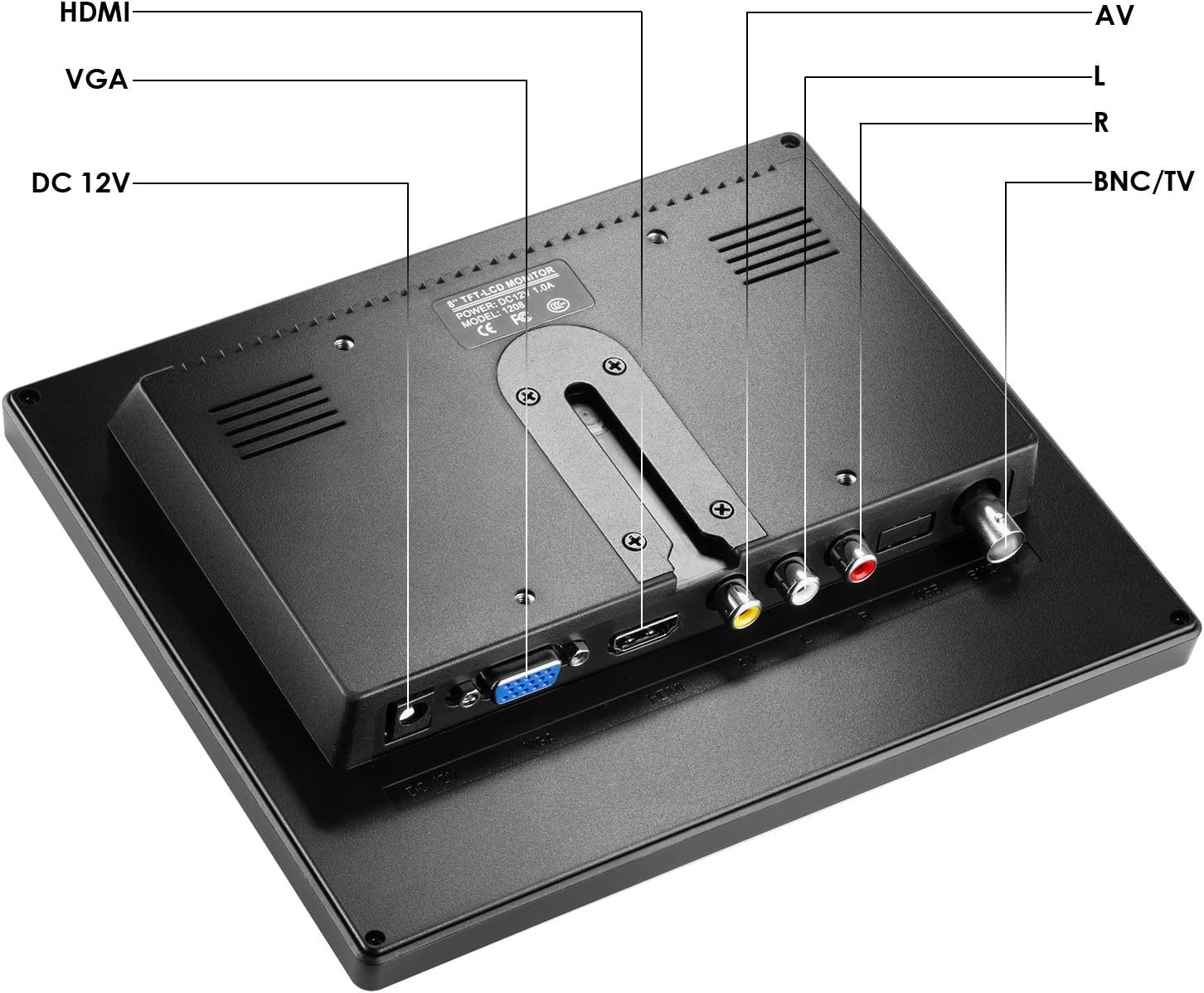
4.2-rasm: orqa view of the Neewer NW801H monitor, highlighting the various input ports and power connection.
- Shahar 12V: Power input port for the included 12V power adapter.
- HDMI: High-Definition Multimedia Interface input for digital video and audio signals.
- VGA: Video Graphics Array input for analog video signals.
- AV (L/R): Audio/Video input for composite video and stereo analog audio signals.
- BNC/TV: BNC input for composite video signals, commonly used with CCTV systems.
5. O'rnatish bo'yicha ko'rsatmalar
5.1 Monitor stendini yig'ish
- Insert the stand's neck into the base.
- Secure the neck to the base using the provided screw and a screwdriver.
- Attach the assembled stand to the back of the monitor by aligning the mounting points and securing it.
- Ensure the monitor is firmly attached to the stand.

Image 5.1: Visual guide demonstrating the four steps to assemble the monitor stand and attach it to the display unit.
5.2 Quvvatga ulanish
Connect the provided 12V power adapter to the "DC 12V" input port on the rear of the monitor. Plug the power adapter into a standard electrical outlet.
5.3 Kirish qurilmalarini ulash
The monitor supports multiple input types. Choose the appropriate cable for your device and connect it to the corresponding port on the monitor's rear panel.
- HDMI: For devices like DSLRs, PCs, or DVD players with HDMI output.
- VGA: For PCs or other devices with VGA output.
- OF: For devices with composite video (yellow RCA) and stereo audio (red/white RCA) outputs, such as older DVD players or some cameras.
- BNC: For CCTV cameras or other surveillance equipment with BNC video output.

Image 5.2: Illustrates the monitor's compatibility with various devices including DSLR cameras, DVRs, PCs, CCD cameras, CCTV cameras, and DVD players.
6. Foydalanish bo'yicha ko'rsatmalar
6.1 Quvvatni yoqish/o‘chirish
Press the power button (usually marked with a circle and vertical line symbol) on the front panel to turn the monitor on or off.
6.2 Kirish tanlash
Use the "Input" or "Source" button on the front panel to cycle through the available input sources (HDMI, VGA, AV, BNC) until your desired input is displayed.
6.3 Menyu navigatsiyasi
The monitor features an On-Screen Display (OSD) menu for adjusting various settings.
- Press the "Menu" button to open the OSD.
- Use the arrow buttons (often labeled with left/right or up/down arrows) to navigate through menu options.
- Press the "Enter" or "OK" button to select an option or confirm a setting.
- Use the "Exit" or "Menu" button again to close the OSD.
Common Menu Settings:
- Yorqinlik/kontrast: Displey yorqinligi va kontrast darajasini sozlang.
- Rang sozlamalari: Rang harorati, rangi va to'yinganligini o'zgartiring.
- Aspekt nisbati: Select between 4:3 or other available aspect ratios (if applicable).
- Audio: Adjust volume for the built-in speaker.
7. Xizmat ko'rsatish
- Ekranni tozalash: Ekranni yumshoq, tuklarsiz mato bilan sekin artib oling. O'jar belgilar uchun biroz dampmatoga suv yoki ekranga xos tozalash eritmasi soling. Suyuqlikni to'g'ridan-to'g'ri ekranga sepmang.
- C ni tozalashasing: Monitorni artish uchun yumshoq, quruq matodan foydalaning casing. Abraziv tozalash vositalaridan yoki erituvchilardan saqlaning.
- Saqlash: Uzoq vaqt davomida foydalanilmaganda, monitorni salqin, quruq joyda, to'g'ridan-to'g'ri quyosh nuri va haddan tashqari haroratdan uzoqroq joyda saqlang.
8. Muammolarni bartaraf qilish; nosozliklarni TUZATISH
| Muammo | Mumkin sabab | Yechim |
|---|---|---|
| Ekranda rasm yo'q | No power; Incorrect input selected; Loose cable connection. | Quvvat ulanishini tekshiring; To'g'ri kirish manbasini tanlang; Kabellarning ishonchli ulanganligiga ishonch hosil qiling. |
| Rasm buzilgan yoki xira | Incorrect resolution setting on source device; Cable quality; Monitor settings. | Adjust source device resolution to 1024x768; Try a different cable; Adjust monitor's brightness/contrast/sharpness. |
| Audio yo'q | Volume too low; Audio cable not connected (for AV/VGA); Source device audio output issue. | Increase monitor volume; Ensure audio cables are connected (if using AV/VGA); Check audio settings on source device. |
| Monitor turns off unexpectedly | Power supply issue; Overheating. | Check power connection and adapter; Ensure adequate ventilation around the monitor. |
9. Texnik shartlar
| Xususiyat | Spetsifikatsiya |
|---|---|
| Displey paneli | TFT-LCD |
| Ekran o'lchami | 8.0 dyuym |
| Rezolyutsiya | 1024x768 |
| Ekran nisbati | 4:3 |
| Yorqinlik | 300cd/m2 |
| Kontrast | 500:1 |
| View Burchak | 160 degrees (80/80 degrees) |
| Yangilanish tezligi | 60-75 Gts |
| Orqa yorug'lik | LED |
| Signalning kiritilishi | HDMI/VGA/AV/BNC |
| Quvvat hajmitage | 12V 1A (100V-220V) |
| Ishlash harorati | -10~60 ℃ |
| Mahsulot o'lchamlari | 13 x 10.5 x 2.9 dyuym |
| Element og'irligi | 1 funt |
10. Kafolat va qo'llab-quvvatlash
For warranty information and technical support, please refer to the warranty card included with your product or visit the official Neewer websayt. Xarid kvitansiyasini xaridni tasdiqlovchi hujjat sifatida saqlang.
Ishlab chiqaruvchi: Yangiroq
Model raqami: 10089910


