1. Kirish
The Behringer MONITOR1 is a premium passive stereo monitor and volume controller designed to provide precise level adjustments and a pure signal path for your audio setup. This device features active-free circuitry, ensuring that your audio remains uncolored and transparent. It is an essential tool for studio environments where accurate monitoring is critical.
2. Xavfsizlik bo'yicha ko'rsatmalar
- Ko'rsatmalarni o'qing: Carefully read and understand all safety and operating instructions before using the device.
- Ko'rsatmalarni saqlash: Kelajakda foydalanish uchun ushbu ko'rsatmalarni saqlang.
- Ogohlantirishlarga e'tibor bering: Mahsulotdagi barcha ogohlantirishlarga va foydalanish ko'rsatmalariga rioya qiling.
- Quruq mato bilan tozalang: Faqat quruq mato bilan tozalang.
- Suv va namlik: Ushbu qurilmani suv yoki namlik yaqinida ishlatmang.
- Ventilyatsiya: Hech qanday shamollatish teshiklarini to'sib qo'ymang. Ishlab chiqaruvchining ko'rsatmalariga muvofiq o'rnating.
- Issiqlik: Radiatorlar, issiqlik moslamalari, pechkalar yoki boshqa qurilmalar (shu jumladan,) kabi issiqlik manbalari yaqiniga o'rnatmang. ampissiqlik hosil qiluvchi ko'targichlar).
- Quvvat simlari: Elektr shnurini, ayniqsa, vilkalar, rozetkalar va ular qurilmadan chiqadigan joyda yurish yoki qisib qo'yishdan saqlang.
- Qo'shimchalar / Aksessuarlar: Faqat ishlab chiqaruvchi tomonidan belgilangan qo'shimchalar/aksessuarlar foydalaning.
- Xizmat ko'rsatish: Barcha xizmatlarni malakali xizmat ko'rsatuvchi xodimlarga topshiring. Har qanday uskuna shikastlanganda xizmat ko'rsatish talab qilinadi.
3. Paket tarkibi
Qutidan chiqarilganda barcha narsalar mavjudligiga ishonch hosil qiling:
- Behringer MONITOR1 Passive Stereo Monitor and Volume Controller
- Foydalanuvchi uchun qo'llanma (ushbu hujjat)
4. Asosiy xususiyatlar
- Premium Passive Design: Ensures a pure signal path without active components.
- Ovoz balandligini aniq nazorat qilish: Features a large volume knob for extremely accurate level adjustments.
- Ko'p qirrali kirishlar: Includes 2 high-quality XLR combo inputs and a 3.5 mm (1/8”) stereo input for connecting to your Digital Audio Workstation (DAW) or other audio sources.
- Flexible Outputs: Provides 2 high-quality XLR outputs and a 3.5 mm (1/8”) stereo output for connecting to your studio monitors or other output devices.
- Mono Function: Allows for checking mono compatibility of your mix.
- Ovozni o'chirish funktsiyasi: Instantly mutes all audio outputs.
5. Boshqaruv elementlari va ulagichlar
5.1 Old panel
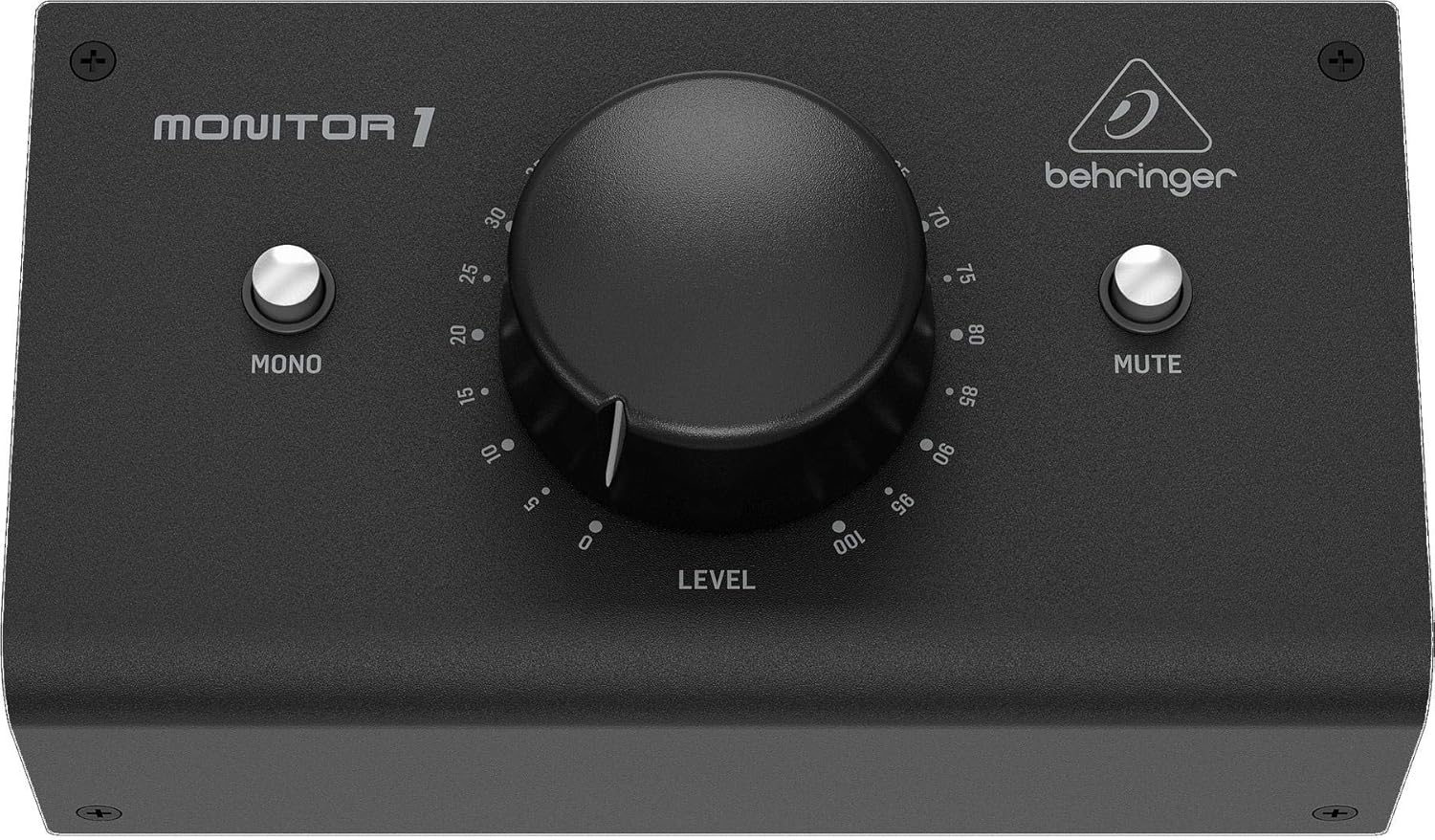
Figure 1: Front Panel of the Behringer MONITOR1.
- Ovoz balandligi tugmasi: The large central knob controls the overall output level to your connected studio monitors. Rotate clockwise to increase volume, counter-clockwise to decrease.
- MONO Button: Press this button to sum the stereo signal to mono. This is useful for checking phase issues and mono compatibility in your mix.
- MUTE tugmasi: Press this button to instantly mute all audio outputs. Press again to unmute.
5.2 Orqa panel

Figure 2: Rear Panel of the Behringer MONITOR1.
- XLR Combo Inputs (L/R): These inputs accept both XLR and 1/4-inch TRS/TS connectors from your audio source (e.g., audio interface, mixer).
- 3.5 mm (1/8”) Stereo Input: A stereo mini-jack input for connecting consumer audio devices like smartphones or laptops.
- XLR Outputs (L/R): Balanced XLR outputs for connecting to your active studio monitors.
- 3.5 mm (1/8”) Stereo Output: A stereo mini-jack output for connecting to headphones or other consumer audio devices.
6. Sozlash
6.1 Connecting to a DAW or Audio Interface
- Ensure your DAW or audio interface and the MONITOR1 are powered off.
- Connect the main outputs of your DAW or audio interface to the XLR Combo Inputs (L/R) on the rear panel of the MONITOR1 using high-quality balanced XLR or TRS cables.
- Alternatively, if your source has a 3.5mm stereo output, connect it to the 3.5 mm (1/8”) Stereo Input on the MONITOR1.
6.2 Connecting to Studio Monitors
- Connect the XLR Outputs (L/R) of the MONITOR1 to the balanced XLR inputs of your active studio monitors using high-quality balanced XLR cables.
- If your monitors accept 3.5mm stereo input, connect the 3.5 mm (1/8”) Stereo Output on the MONITOR1 to your monitors.
- Power on your studio monitors.
6.3 Dastlabki quvvatlanish
- Turn the Volume knob on the MONITOR1 fully counter-clockwise (minimum).
- Power on your audio source (DAW/audio interface).
- Power on your studio monitors.
- Slowly increase the Volume knob on the MONITOR1 to a comfortable listening level.
7. Operatsiya
7.1 Ovoz balandligini sozlash
The large Volume knob on the front panel provides precise control over the output level to your studio monitors. Adjust it to achieve your desired listening volume. For optimal signal-to-noise ratio, it is recommended to set the output level of your audio source (DAW/audio interface) to maximum and use the MONITOR1 for fine-tuning the listening volume.
7.2 Using the MONO Function
Press the MONO button to combine the left and right stereo channels into a single mono signal. This is crucial for checking how your mix translates to mono playback systems and for identifying potential phase cancellation issues. Press the button again to return to stereo playback.
7.3 Using the MUTE Function
Press the MUTE button to instantly silence all audio outputs. This is useful for quickly pausing playback or taking a break without having to adjust the volume. Press the button again to restore audio output.
8. Texnik shartlar
| Xususiyat | Spetsifikatsiya |
|---|---|
| Model nomi | MONITOR1 |
| Brend | Beringer |
| Maxsus xususiyat | Ovozni boshqarish |
| Mos qurilmalar | Ish stoli, noutbuk |
| Birlik soni | 1 hisob |
| Rang | Qora |
| Kiritilgan komponentlar | Stereo Monitor Volume Controller |
| Element og'irligi | 14.1 untsiya (400 gramm) |
| Mahsulot o'lchamlari | 3.35 x 5.71 x 2.72 dyuym (8.5 x 14.5 x 6.9 sm) |
| Ulanish texnologiyasi | XLR, 3.5mm Stereo |
| Audio chiqish rejimi | Stereo |
| O'rnatish turi | Stol usti o'rnatish |
| UPC | 653341304636 |
| Ishlab chiqaruvchi | Musiqa qabilasi US |
| Birinchi mavjud sana | 23 yil 2017 avgust |
| Ampfiksatsiya turi | Passiv |
9. Muammolarni bartaraf qilish; nosozliklarni TUZATISH
- Ovoz yo'q:
- Check all cable connections to ensure they are secure and correctly plugged into the inputs and outputs.
- Verify that the MUTE button is not engaged.
- Ensure the volume knob is turned up sufficiently.
- Confirm that your audio source (DAW/interface) is sending audio and its output level is adequate.
- Check that your studio monitors are powered on and their volume is not set to minimum.
- Buzilgan ovoz:
- Reduce the output level from your audio source (DAW/interface) to prevent clipping.
- Ensure all cables are in good condition and not damaged.
- Hum or Noise:
- Ensure all audio cables are balanced (XLR or TRS) where applicable to minimize noise.
- Check for ground loops. Try connecting all audio equipment to the same power outlet or using a ground loop isolator if necessary.
- Keep audio cables away from power cables and other sources of electromagnetic interference.
10. Xizmat ko'rsatish
- Tozalash: Use a soft, dry cloth to clean the exterior of the MONITOR1. Do not use liquid cleaners or aerosols.
- Saqlash: Uzoq vaqt davomida foydalanilmaganda, qurilmani to'g'ridan-to'g'ri quyosh nuri va haddan tashqari haroratdan uzoqda, salqin va quruq joyda saqlang.
- Ishlov berish: Qurilmani ehtiyotkorlik bilan ishlating. Uni tushirish yoki kuchli ta'sirga duchor qilishdan saqlaning.
11. Kafolat va qo'llab-quvvatlash
The Behringer MONITOR1 comes with a limited warranty provided by Music Tribe US. For detailed warranty terms and conditions, please refer to the official Behringer website or contact Music Tribe US customer support. For technical support, product registration, and service inquiries, visit the Behringer support page or contact your local distributor.


