1. Kirish
This manual provides detailed instructions for the setup, operation, and maintenance of your CAMECHO 10.1-inch Portable HD Monitor (Model K0202UK-Monitor). Please read this manual thoroughly before using the product to ensure proper functionality and safety.
Asosiy xususiyatlar:
- 10.1-inch TFT LCD Widescreen Display with 1024 x 600 HD Resolution.
- Aspect Ratio: 16:9.
- Power Supply: 9 - 30 V.
- Multiple Input Support: VGA, AV, HDMI, BNC.
- Versatile Compatibility: Suitable for PC, DVD, TV, surveillance cameras, and vehicle backup screens.
- Built-in Dual Speakers for audio output.
- Portable design with an adjustable stand for flexible placement.
2. Paket tarkibi
Please check the package contents upon unboxing to ensure all items are present and undamaged. If any items are missing or damaged, please contact customer support.
- 1 x CAMECHO 10.1-inch Portable HD Monitor
- 1 x Power Adapter (EU Plug)
- 1 x HDMI kabeli
- 1 x VGA kabeli
- 1 x AV kabeli
- 1 x masofadan boshqarish pulti
- 1 x Adjustable Bracket/Stand
- 1 x foydalanuvchi qo'llanmasi
- 1 x Adhesive Sticker (for stand mounting)
- 1 x BNC Cable

Figure 2.1: Contents of the CAMECHO 10.1-inch Portable HD Monitor package.
Video 2.1: Unboxing and initial assembly of the CAMECHO 10.1-inch Portable HD Monitor.
3. Mahsulot tugadiview
3.1 Connections and Controls
The monitor features various input ports and control buttons for versatile connectivity and easy operation.
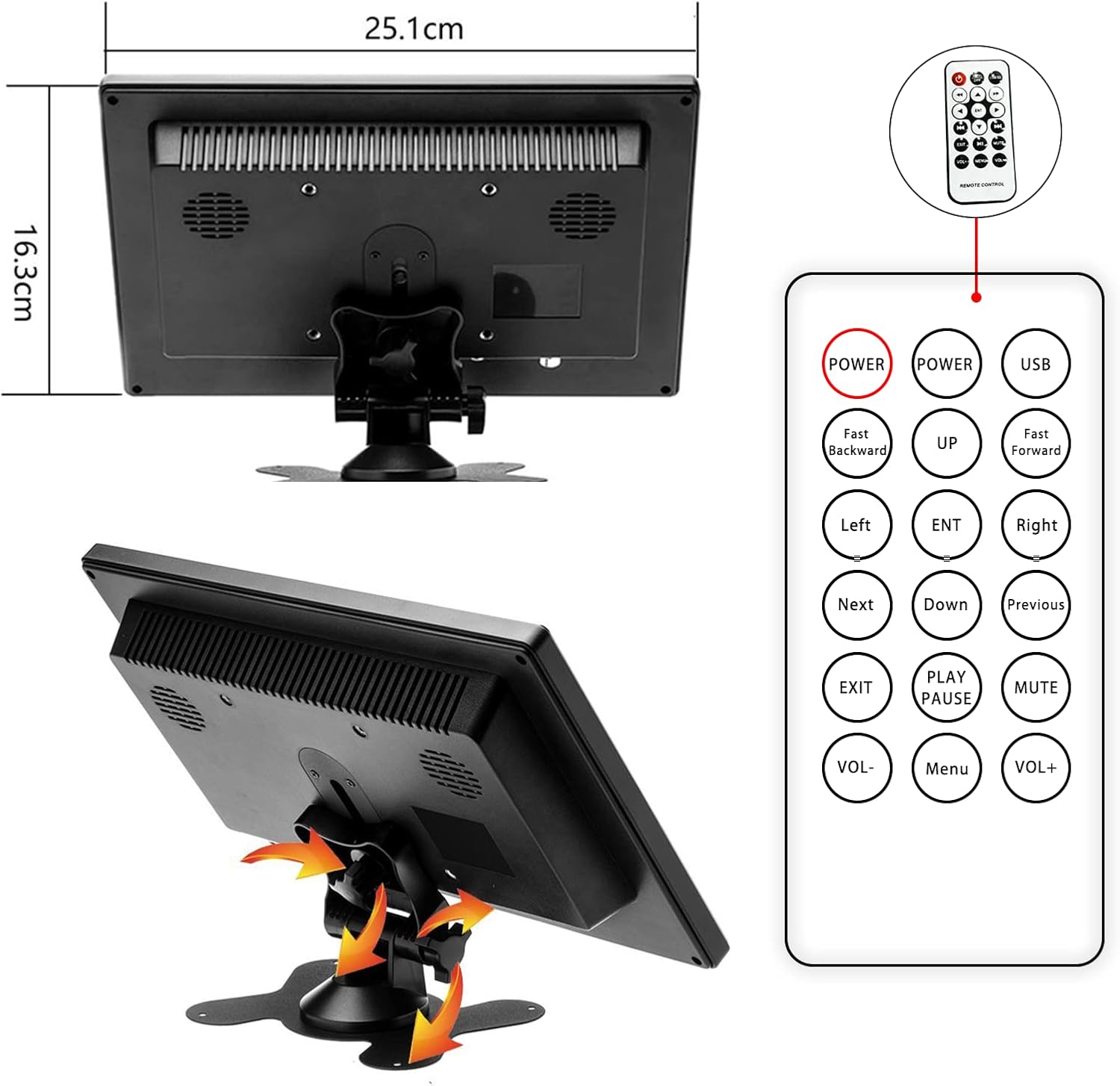
Figure 3.1: Rear panel connections of the monitor.
- Power Input (AC/DC): Taqdim etilgan quvvat adapterini bu yerga ulang.
- VGA porti: For connecting to computers or other devices with VGA output.
- HDMI porti: For high-definition digital video and audio input. (Note: HDMI version 1.1)
- AV Ports (RCA): For analog video and audio input (yellow for video, white/red for audio).
- USB port: For connecting USB devices (e.g., U disk, card reader).
- BNC Port: For connecting to surveillance cameras or other BNC-compatible devices.
- Boshqarish tugmalari: Located on the front panel (AV1/AV2, MENU, +, -, Power).
3.2 Dimensions and Adjustable Stand
The monitor is designed to be compact and portable, featuring an adjustable stand for optimal viewburchaklar.

Figure 3.2: Monitor dimensions and remote control layout.
- Product Dimensions: 25.1 x 16.3 x 3.7 cm (approximately 9.88 x 6.42 x 1.46 inches).
- Weight: Approximately 499 grams (1.1 lbs).
- The adjustable stand allows for tilting the monitor to achieve a comfortable viewkirish burchagi.
3.3 O‘rnatilgan dinamiklar
The monitor includes built-in dual speakers for audio output, supporting HDMI, AV, and USB signal modes.

Figure 3.3: Location of built-in dual speakers.
4. O'rnatish bo'yicha ko'rsatmalar
4.1 Stendni yig'ish
- Unpack the monitor and the adjustable bracket components.
- Assemble the stand by connecting the base to the adjustable arm. Secure it with the provided screw.
- Attach the assembled stand to the back of the monitor using the designated screw holes. Ensure it is securely fastened.
- Adjust the tilt of the monitor to your preferred viewkirish burchagi.
Video 4.1: Step-by-step guide for assembling the monitor stand.
4.2 Qurilmalarga ulanish
Connect the monitor to your desired device using the appropriate cable (HDMI, VGA, AV, or BNC).
- Kompyuter/noutbuk uchun: Use the HDMI or VGA cable to connect the monitor to your computer's output port.
- For DVD/Gaming Console: Use the HDMI or AV cable.
- For Surveillance Camera (CCTV): Use the BNC cable.
- Quvvat ulanishi: Connect the power adapter to the monitor's AC/DC input and then to a power outlet.
5. Foydalanish bo'yicha ko'rsatmalar
5.1 Quvvatni yoqish/o‘chirish
- ni bosing Quvvat button on the front panel or the remote control to turn the monitor on or off.
5.2 Changing Input Modes
- ni bosing AV1/AV2 button on the front panel or the remote control to cycle through available input modes (HDMI, VGA, AV1, AV2, BNC).
- Once the desired input mode is highlighted, press the MENU tugmasi yoki "-" tanlovni tasdiqlash uchun tugmani bosing.
5.3 Adjusting Settings (OSD Menu)
- ni bosing MENU button to access the On-Screen Display (OSD) menu.
- dan foydalaning + va - menyu parametrlari bo'ylab harakatlanish uchun tugmalar.
- bosing MENU yana yoki KBB button on the remote to select an option or confirm a setting.
- Common adjustable settings include: Brightness, Contrast, Color Temperature, Aspect Ratio, and Volume.
- ni bosing CHIQISH button on the remote or cycle through menu options to exit the OSD.
5.4 Display Modes (for PC/Laptop)
When connected to a computer, the monitor can operate in various display modes:
- Nusxa olish rejimi: Duplicates the content of your primary display.
- Kengaytirish rejimi: Extends your desktop space, allowing you to have different content on each screen.
- Only Mode: Displays content only on the CAMECHO monitor, turning off the primary display.

Figure 5.1: Various display modes when connected to a computer.
5.5 Ilovalar
The CAMECHO monitor is suitable for a variety of uses:
- Ishbilarmonlik uchrashuvlari: Use as an auxiliary display for presentations.
- Oʻyin: Connect to gaming consoles for an immersive experience.
- Surveillance Monitoring: Display feeds from CCTV cameras.
- O'yin-kulgi: Watch movies or TV shows.
- Avtomobildan foydalanish: Function as a backup camera display.
Video 5.1: Demonstrating the monitor's use for gaming and CCTV monitoring.
Video 5.2: Demonstrating camera connection and display on the monitor.
6. Xizmat ko'rsatish
- Tozalash: Use a soft, dry cloth to clean the monitor screen and casing. O'jar belgilar uchun biroz dampsuv bilan mato. Qattiq kimyoviy moddalar yoki abraziv tozalash vositalaridan foydalanishdan saqlaning.
- Himoya plyonkasi: It is recommended not to remove the protective film from the screen, as it does not affect product usage and helps protect the display.
- Saqlash: Uzoq vaqt davomida foydalanilmaganda, monitorni salqin, quruq joyda, to'g'ridan-to'g'ri quyosh nuri va haddan tashqari haroratdan uzoqroq joyda saqlang.
- Ventilyatsiya: Haddan tashqari qizib ketishning oldini olish uchun monitordagi shamollatish teshiklari bloklanmaganligiga ishonch hosil qiling.
7. Muammolarni bartaraf qilish; nosozliklarni TUZATISH
If you encounter any issues with your CAMECHO monitor, please refer to the following common problems and solutions:
| Muammo | Mumkin sabab / yechim |
|---|---|
| Ekranda tasvir yo'q. |
|
| Screen flickers or turns off intermittently. |
|
| Audio yo‘q. |
|
| HDMI connection issues with newer devices. |
|
| Masofadan boshqarish pulti ishlamayapti. |
|
8. Texnik shartlar
Detailed technical specifications for the CAMECHO 10.1-inch Portable HD Monitor (Model K0202UK-Monitor).
| Xususiyat | Tafsilot |
|---|---|
| Brend | KAMECHO |
| Model nomi | K0202UK-Monitor |
| Ekran o'lchami | 10.1 dyuym |
| Displey texnologiyasi | TFT LCD |
| Rezolyutsiya | 1024 x 600 pixels (SVGA Wide) |
| Aspekt nisbati | 16:9 |
| Yorqinlik | 400 cd/m² |
| Kontrast nisbati | 500:1 |
| Javob vaqti | 3 millisekund |
| Yangilanish tezligi | 60 Gts |
| Viewburchak | 85 daraja |
| Kirish interfeyslari | HDMI (v1.1), VGA, AV (RCA), BNC, USB |
| O'rnatilgan dinamiklar | Yes (1 Watt output) |
| Quvvat kiritish | 9 - 30 volt |
| Mahsulot o'lchamlari | 25.1 x 16.3 x 3.7 sm |
| Mahsulot og'irligi | 499 gr |
| O'rnatish turi | Tabletop (with adjustable stand) |
8.1 Energy Efficiency Information
The monitor's energy efficiency rating and detailed product data sheet are provided below.


Figure 8.1: Energy Label and Product Data Sheet.
For more details, refer to the official EU EPREL database: https://eprel.ec.europa.eu/qr/1438817
9. Kafolat va qo'llab-quvvatlash
CAMECHO products typically come with a standard manufacturer's warranty. Please refer to your purchase documentation for specific warranty terms and conditions.
Mijozlarni qo‘llab-quvvatlash:
For technical assistance, warranty claims, or any product-related inquiries, please contact CAMECHO customer support. You can often find contact details on the product packaging, the official CAMECHO websayt yoki chakana sotuvchingiz orqali.
Email: CAMECHOVIP@126.com


