1. Kirish
Sotib olganingiz uchun tashakkurasing the Lenco DIR-150 Internet Radio. This manual provides essential information for setting up, operating, and maintaining your device. Please read it thoroughly before use and retain it for future reference.
2. Xavfsizlik ma'lumotlari
- Do not expose the device to rain or moisture to prevent fire or electric shock.
- c ni ochmangasing. Barcha xizmat ko'rsatishni malakali xodimlarga yuboring.
- Jihoz atrofida to'g'ri shamollatishni ta'minlang. Shamollatish teshiklarini to'sib qo'ymang.
- Faqat qurilma bilan birga kelgan quvvat adapteridan foydalaning.
- Keep the device away from direct sunlight, heat sources, and strong magnetic fields.
- Qurilmani faqat yumshoq, quruq mato bilan tozalang.
3. Paket tarkibi
Paketda barcha elementlar mavjudligiga ishonch hosil qiling:
- Lenco DIR-150 Internet Radio
- Masofadan boshqarish
- Quvvat adapteri
- Foydalanuvchi uchun qo'llanma (ushbu hujjat)
4. Mahsulot tugadiview
4.1 Old panel
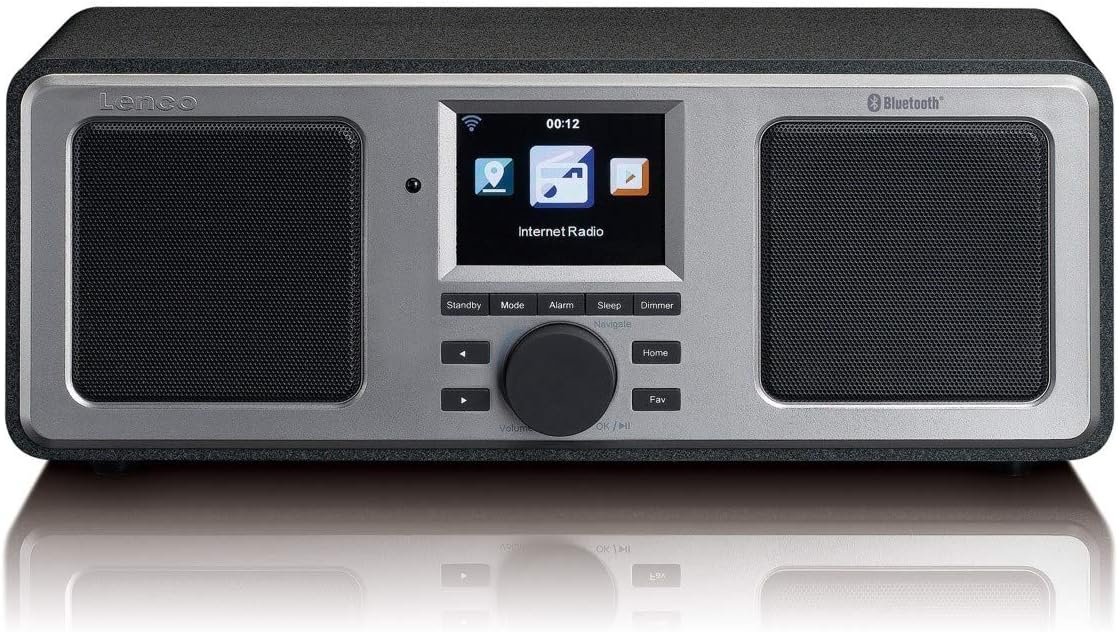
The front panel features a central color display, two integrated speakers, and control buttons. The display shows current mode, station information, time, and menu options. Control buttons include Standby, Mode, Alarm, Sleep, Dimmer, navigation arrows, a rotary knob for volume and selection, Home, and Fav (Favorites).
4.2 Orqa panel

The rear panel includes the power switch, DC IN port, Line Out, AUX In, and a USB port. An extendable telescopic antenna for FM reception is also located on the rear.
5. Sozlash
5.1 Quvvatni ulash
- Connect the supplied power adapter to the DC IN port on the rear of the DIR-150.
- Quvvat adapterini rozetkaga ulang.
- Flip the power switch on the rear panel to the 'ON' position.
5.2 Antennani joylashtirish
For optimal FM radio reception, fully extend the telescopic antenna located on the rear of the unit. Adjust its position for the best signal quality.
5.3 Initial Network Configuration (Wi-Fi)
Upon first power-on, the device will guide you through the initial setup wizard:
- Select your preferred language using the rotary knob and press to confirm.
- Radio mavjud Wi-Fi tarmoqlarini qidiradi.
- Ro'yxatdan uy Wi-Fi tarmog'ingizni tanlang.
- Enter your Wi-Fi password using the rotary knob to select characters and navigation buttons to move. Press the knob to confirm each character and then the final password.
- Once connected, the radio will display a confirmation message.
6. Foydalanish bo'yicha ko'rsatmalar
6.1 Asosiy operatsiya
- Quvvatni yoqish/oʻchirish: ni bosing Kuting button to switch the unit between standby and operational mode.
- Ovozni boshqarish: Rotate the central knob to adjust the volume level.
- Navigatsiya: Use the navigation arrows and the rotary knob to browse menus and select options. Press the rotary knob to confirm a selection.
- Rejim: ni bosing Rejim button to cycle through available modes (Internet Radio, FM, Bluetooth, USB, AUX).
- Uy: ni bosing Uy asosiy menyuga qaytish uchun tugmani bosing.
- Fav (Favorites): ni bosing Fav button to access your saved favorite stations.
6.2 Internet radiosi
Access thousands of internet radio stations worldwide.
- Select 'Internet Radio' from the main menu.
- Browse stations by location, genre, or search by name.
- Select a station using the rotary knob and press to start playback.
- To save a station as a favorite, navigate to the station and press the Fav tugmasi.
6.3 FM radiosi
Listen to local FM broadcasts.
- ni bosing Rejim button until 'FM Radio' is selected.
- The radio will automatically scan for available FM stations.
- Use the navigation arrows to manually tune or select a scanned station.
- The display will show RDS information (station name, program type) if available.
6.4 Bluetooth ijrosi
Bluetooth yoqilgan qurilmangizdan audioni simsiz uzating.
- ni bosing Rejim button until 'Bluetooth' is selected. The radio will enter pairing mode.
- On your mobile device, enable Bluetooth and search for 'Lenco DIR-150'.
- Select 'Lenco DIR-150' to pair. Once connected, you can play audio from your device through the radio.
6.5 USB orqali tinglash
Audio tinglash fileto'g'ridan-to'g'ri USB flesh-diskidan.
- Insert a USB flash drive into the USB port on the rear panel.
- ni bosing Rejim button until 'USB' is selected.
- Browse your audio files (MP3, WAV, AAC formats supported) and select one to play.
6.6 AUX kirish
Tashqi audio qurilmalarni 3.5 mm audio kabel yordamida ulang.
- Connect one end of a 3.5mm audio cable to the AUX IN port on the rear of the DIR-150.
- Ikkinchi uchini tashqi qurilmangizning eshitish vositasi uyasiga yoki audio chiqishiga ulang.
- ni bosing Rejim 'AUX' tanlanmaguncha tugmasini bosing.
- Tashqi qurilmangizdan ijro va ovoz balandligini boshqaring.
6.7 Media Streaming (UPnP)
Stream music from a PC or NAS (Network Attached Storage) device on your home network.
- Ensure your PC or NAS is configured as a UPnP media server and is on the same Wi-Fi network as the DIR-150.
- Navigate to the 'Media Player' or 'UPnP' option in the radio's menu.
- Select your media server from the list and browse your music library.
7. Qo'shimcha xususiyatlar
7.1 Budilnik
Set up to two independent alarms.
- ni bosing Signal tugmasi.
- Select 'Alarm 1' or 'Alarm 2' and configure the time, alarm source (buzzer or radio), and frequency (daily, once, weekends, weekdays).
- Press the rotary knob to confirm settings.
- To snooze an active alarm, press the Kechiktirish button (usually the rotary knob).
7.2 Kutish taymeri
Set the radio to automatically turn off after a specified period.
- ni bosing Uxlash tugmasi.
- Select the desired sleep duration (e.g., 15, 30, 60 minutes).
- The radio will count down and enter standby mode when the timer expires.
7.3 Ob-havo ma'lumoti
View local weather forecasts for the next 5 days.
- Navigate to the 'Weather' option in the main menu.
- Select your location to view prognoz.
8. Xizmat ko'rsatish
- Tozalash: Disconnect the power before cleaning. Use a soft, dry, lint-free cloth to wipe the exterior. Do not use abrasive cleaners or solvents.
- Saqlash: If not used for an extended period, unplug the device and store it in a cool, dry place.
9. Muammolarni bartaraf qilish; nosozliklarni TUZATISH
| Muammo | Mumkin sabab | Yechim |
|---|---|---|
| Quvvat yo'q | Power adapter not connected; Power switch off | Ensure adapter is securely connected and power switch is ON. |
| Internet aloqasi yo'q | Incorrect Wi-Fi password; Router issue; Out of range | Re-enter Wi-Fi password; Restart router; Move radio closer to router. |
| Yomon FM qabul qilish | Antenna not extended or positioned correctly | Teleskopik antennani to'liq uzating va sozlang. |
| Bluetooth bilan ulanish amalga oshmadi | Device not in pairing mode; Other device already connected | Ensure radio is in Bluetooth mode; Disconnect from other devices; Restart both devices. |
| USB orqali tinglash ishlamayapti | Qo‘llab-quvvatlanmaydi file format; USB drive not recognized | Ta'minlash files are MP3, WAV, or AAC; Try a different USB drive. |
10. Texnik shartlar
- Model: DIR-150
- Chiqish quvvati: 16 Vt (RMS)
- Displey: 2.8 dyuymli rangli displey
- Ulanish: Wi-Fi, Bluetooth, USB, AUX (3.5mm), Line-Out
- Radio diapazonlari: Internet Radio, FM (PLL Tuner)
- Qo'llab-quvvatlanadigan audio formatlari: MP3, WAV, AAC (for USB/Streaming)
- Quvvatlantirish manbai: AC adapteri (shu jumladan)
- Olchamlari (G x D x Y): 310 x 126 x 116 mm
- Og'irligi: 1.52 kg
- Xususiyatlari: Alarm Clock (2 alarms), Snooze, Sleep Timer, Weather Forecast, UPnP Streaming
11. Kafolat va qo'llab-quvvatlash
Lenco products are manufactured to high quality standards. In the unlikely event of a defect, Lenco provides a warranty in accordance with the laws of the country of purchase. For specific warranty terms and conditions, please refer to the warranty card included with your product or visit the official Lenco website. For technical support or service inquiries, please contact your retailer or the Lenco customer service department.


