1. Kirish
This manual provides essential information for setting up, operating, and maintaining your AWOW 10.1-inch Windows 10 2-in-1 Tablet PC. This device combines the portability of a tablet with the functionality of a laptop, featuring a detachable keyboard and a multi-touch IPS display. Please read this manual thoroughly to ensure proper usage and to maximize your product experience.
2. Qutida nima bor
Qutini ochganingizda, iltimos, quyidagi barcha narsalar kiritilganligiga ishonch hosil qiling:
- AWOW 10.1-inch 2-in-1 Tablet PC
- Olinadigan klaviatura
- AC Power Adaptor (5V-2.5A)
- Foydalanuvchi uchun qo'llanma (inglizcha)
3. Mahsulot tugadiview
The AWOW 2-in-1 Tablet PC is designed for versatility and portability. Below are key features and physical components.

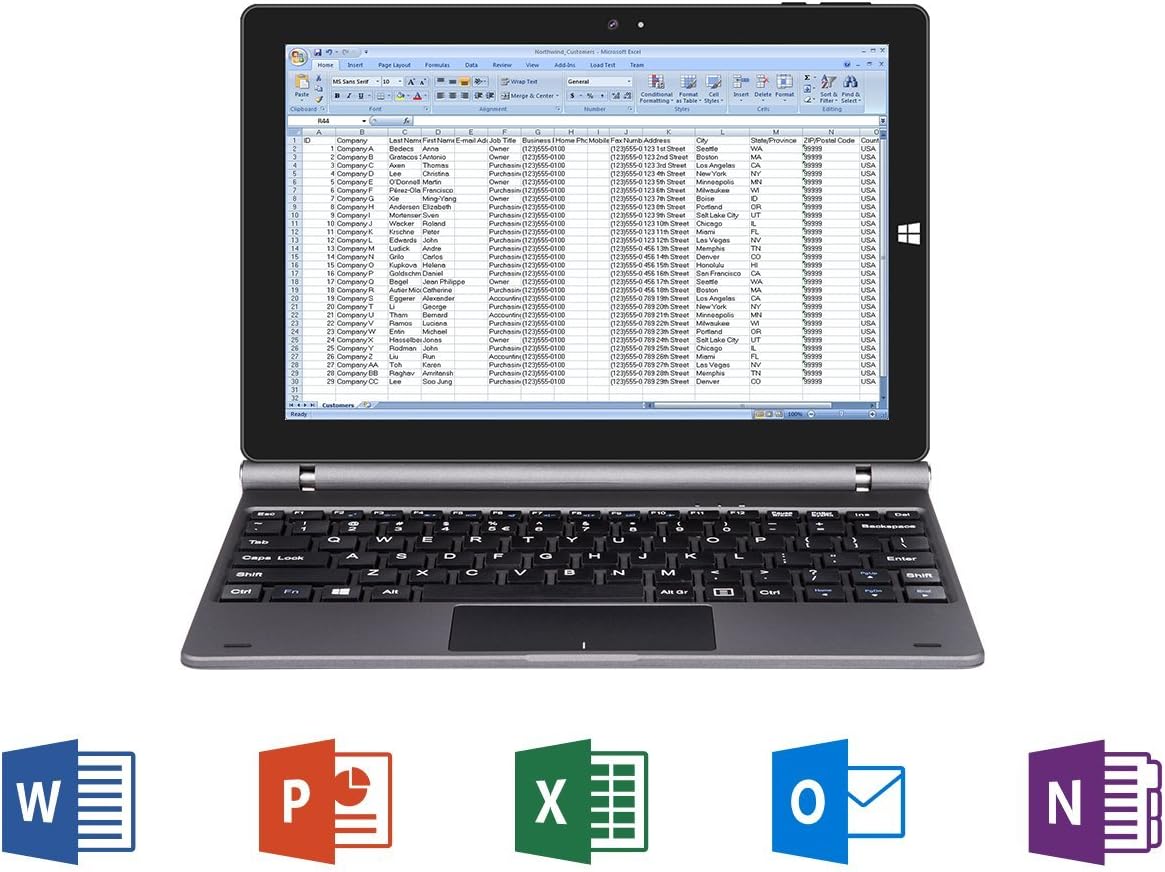
Figure 3.1: AWOW 10.1-inch 2-in-1 Tablet PC with detachable keyboard, displaying Windows 10 desktop.

Figure 3.2: Key features of the AWOW 2-in-1 Tablet PC, including Intel Atom processor, Intel HD Graphics, Windows 10 (64bit), Microsoft Office compatibility, IPS Display, G-sensor, Bluetooth 4.0, and 802.11 b/g/n WiFi.
3.3 -rasm: tugadiview of tablet ports and buttons, including power, volume, audio, charging, and connectivity options.

Figure 3.4: Detachable keyboard layout with full QWERTY keys and integrated trackpad.
4. Dastlabki sozlash
4.1 Qurilmani zaryadlash
Before first use, ensure the tablet is fully charged. Connect the AC Power Adaptor to the DC power input port on the tablet and plug it into a wall outlet.
4.2 Yoqish va Windowsni dastlabki sozlash
- Press and hold the Power button (located on the side of the tablet) until the screen illuminates.
- Follow the on-screen prompts to complete the Windows 10 initial setup. This includes selecting your region, language, and setting up a user account.
- During Windows activation, if you encounter any issues, please contact AWOW customer service for assistance.
4.3 Attaching the Detachable Keyboard
Align the 5-PIN keyboard interface on the tablet with the corresponding connector on the detachable keyboard. Gently push the tablet down until it securely connects to the keyboard. The magnetic connection will help guide it into place.
5. Foydalanish bo'yicha ko'rsatmalar
5.1 Switching Between Tablet and Laptop Mode
The device automatically detects when the keyboard is attached or detached, switching between laptop mode (with keyboard) and tablet mode (without keyboard). In tablet mode, the touchscreen interface is optimized for touch input.
5.2 Sensorli ekrandan foydalanish
The 10.1-inch IPS display supports multi-touch gestures. Use your fingers to navigate, tap to select, pinch to zoom, and swipe for scrolling. For optimal viewing, the IPS display offers a 178-degree wide viewkirish burchagi.

Figure 5.1: IPS display showcasing vibrant colors and wide viewing angles. Note: Stylus is sold separately.
5.3 kamera funksiyasi
The tablet is equipped with dual webcams: a 2MP front camera and a 5MP rear camera. These can be used for video conferencing, taking photos, or recording videos.

Figure 5.2: Illustration of the tablet's dual cameras (2MP front, 5MP rear) for video communication.
5.4 Ishlash tugadiview
The AWOW 2-in-1 Tablet PC is powered by an Intel Atom X5-Z8350 Quad Core processor, designed for smooth multitasking and HD video streaming. It runs on Windows 10 Home (64-bit).
Video 5.3: A performance test demonstrating the tablet's capabilities, including system responsiveness and internet speed. This video shows the device handling various tasks and displaying system resource usage.
6. Xizmat ko'rsatish
6.1 Tozalash
To clean the screen, use a soft, lint-free cloth. For stubborn marks, slightly dampen the cloth with water or a screen-cleaning solution. Avoid harsh chemicals or abrasive materials. For the keyboard and body, use a dry, soft cloth.
6.2 Saqlash
Store the device in a cool, dry place away from direct sunlight and extreme temperatures. If storing for an extended period, ensure the battery is charged to approximately 50% to prolong its lifespan.
7. Muammolarni bartaraf qilish; nosozliklarni TUZATISH
If you encounter issues with your AWOW Tablet PC, refer to the following common solutions:
- Qurilma yoqilmaydi: Ensure the device is charged. Connect the AC adapter and try powering on again.
- Sekin ishlash: Close unnecessary applications. Check for Windows updates and ensure sufficient free storage space.
- Klaviatura javob bermayapti: Ensure the keyboard is securely attached to the tablet's 5-PIN interface. Detach and reattach the keyboard. Restarting the device may also resolve the issue.
- Windows Activation Issues: If you experience problems with Windows activation, please contact AWOW customer service directly for support.
- Wi-Fi ulanishi bilan bog'liq muammolar: Check your router and internet connection. Ensure Wi-Fi is enabled on the tablet and try reconnecting to the network.
8. Texnik shartlar
| Xususiyat | Spetsifikatsiya |
|---|---|
| Brend | AVOW |
| Model nomi | SimpleBook 432 |
| Ekran o'lchami | 10.1 dyuym |
| Ekran ravshanligi | 1280x800 piksel |
| Protsessor | Intel Atom X5-Z8350 (up to 1.92 GHz) |
| Ram | 4 GB DDR3 |
| Xotira (eMMC) | 32 GB SSD |
| Kengaytiriladigan xotira | Micro SD karta uyasi (256 GB gacha qo'llab-quvvatlaydi) |
| Operatsion tizim | Windows 10 Home (64 bit) |
| Grafik protsessor | Intel HD Graphics 400 |
| Simsiz turi | 802.11ab (Wi-Fi) |
| Bluetooth | Bluetooth 4.0 |
| USB portlari | 2 USB ports (Type not specified, typically USB 2.0) |
| HDMI | Mikro HDMI |
| Old Webkamera ravshanligi | 2 MP |
| Orqa Webkamera ravshanligi | 5 MP |
| O'rtacha batareya quvvati | 6 soat |
| Element og'irligi | 2.45 funt |
| Mahsulot o'lchamlari (LxWxH) | 9.91 x 6.53 x 0.59 dyuym |
9. Kafolat va qo'llab-quvvatlash
9.1 Kafolat haqida ma'lumot
Your AWOW 2-in-1 Tablet PC comes with a 1-year product warranty. Please retain your proof of purchase for warranty claims.
9.2 Qaytish siyosati
A 30-day return policy is available from the date of purchase. Please refer to your retailer's specific return guidelines.
9.3 Mijozlarga xizmat ko'rsatish
For any questions, technical support, or warranty inquiries, please contact AWOW customer service. We offer 24-hour customer service to assist you.
This product has been approved and holds CE and FCC certificates.


