Kirish
The GameSir M2 MFi Wireless Gamepad is an Apple MFi certified gaming controller designed for an enhanced gaming experience across various Apple devices. This controller is compatible with Apple TV, iPhone, iPad, iPod touch, and Mac, requiring iOS 7 or later, or Mac OS 10.6 or later. It offers a professional gaming experience for various game genres including shooting, fighting, action, and sports. The M2 controller features Bluetooth 4.0 connectivity for lag-free performance and pressure-sensitive buttons for precise control.
This manual provides detailed instructions for setting up, operating, maintaining, and troubleshooting your GameSir M2 gamepad.

Sozlash; o'rnatish
Qutida nima bor
- GameSir M2 MFi Wireless Gamepad
Please note that a charging cable is not included in the box. The controller uses a Lightning cable for charging.
Tekshirgichni zaryadlash
Before initial use, ensure the GameSir M2 controller is fully charged. The controller is powered by a Lithium Polymer battery (included).
- Locate the Apple Lightning charging port on the controller.
- Connect a standard Apple Lightning cable (not included) to the controller's charging port and a power source.
- The LED indicator on the controller will show charging status. Refer to the LED indicator section for details.

Qurilmangiz bilan ulanish
The GameSir M2 uses Bluetooth 4.0 for wireless connectivity. Follow these steps to pair it with your Apple device:
- Ensure your Apple device (iPhone, iPad, Apple TV, Mac) has Bluetooth enabled.
- Turn on the GameSir M2 controller.
- On your Apple device, navigate to the Bluetooth settings.
- Select the GameSir M2 from the list of available devices to pair.
- Once paired, the controller's indicator light will confirm the connection.

Tekshirish moslamasini ishlatish
Kontrollerning joylashuvi va funktsiyalari
The GameSir M2 features a standard gamepad layout with dual analog sticks, a D-pad, action buttons (A, B, X, Y), and shoulder buttons (L1, L2, R1, R2). The controller also includes an overmolding LED crystal logo button.
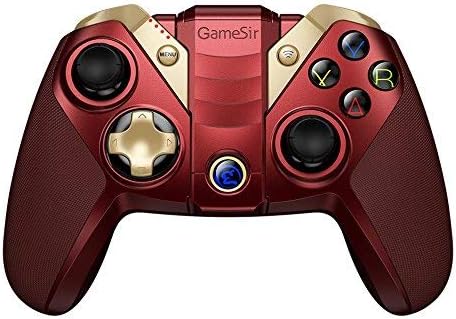

Using the Built-in Smartphone Holder
The GameSir M2 includes a built-in adjustable bracket to securely hold your smartphone, allowing for portable gaming.
- Gently extend the adjustable bracket located on the top of the controller.
- Carefully place your smartphone into the bracket, ensuring it is securely held without obstructing the screen or buttons.
- Optimal qilish uchun burchakni sozlang viewing during gameplay.

O'yin muvofiqligi
The GameSir M2 is compatible with games that are MFi (Made for iPhone/iPad/iPod) gamepad-supported and certified by Apple. It fully supports games like Fortnite. However, it does not support games such as PUBG.
The controller also supports Tello Drones, enhancing the control experience for drone operation.

Rasmiy mahsulot video
Watch the official product video for a visual guide on the GameSir M2 controller's features and usage.
Xizmat
To ensure the longevity and optimal performance of your GameSir M2 controller, follow these maintenance guidelines:
- Tozalash: Tekshirish moslamasini tozalash uchun yumshoq, quruq matodan foydalaning. Sirtga zarar yetkazishi mumkin bo'lgan qattiq kimyoviy moddalar yoki abraziv materiallardan foydalanishdan saqlaning.
- Saqlash: Tekshirgichni to'g'ridan-to'g'ri quyosh nuri va haddan tashqari haroratdan uzoqda, salqin va quruq joyda saqlang.
- Batareya parvarishi: For extended storage, charge the battery to approximately 50% to prevent deep discharge. Avoid fully discharging the battery frequently.
- Ishlov berish: Tekshirgichni tashlab qo'ymang yoki uni kuchli zarbalarga duchor qilmang, chunki bu ichki qismlarga zarar etkazishi mumkin.
Muammolarni bartaraf qilish; nosozliklarni TUZATISH
If you encounter issues with your GameSir M2 controller, refer to the following common troubleshooting steps:
- Kontroller ulanmayapti:
- Tekshirish moslamasi zaryadlanganligiga ishonch hosil qiling.
- Verify Bluetooth is enabled on your Apple device.
- Qurilmangizning Bluetooth sozlamalarida kontrollerni uzib, qayta ulab ko'ring.
- Restart both the controller and your Apple device.
- Buttons Unresponsive or Laggy:
- Ensure the controller is within range of your device and there are no significant obstructions.
- Check for any firmware updates for the controller (refer to GameSir's official website for information).
- Confirm the game you are playing supports MFi controllers.
- Shoulder Buttons (L1/R1, L2/R2) Issues:
- Some users report that shoulder buttons may require pressing closer to the bottom edge to register input. Adjust your grip if necessary.
- Analog Stick Drift/Incorrect Input:
- If an analog stick consistently registers input in one direction (e.g., down-left), this may indicate stick drift. Try recalibrating the controller if an option is available through GameSir software, or contact support if the issue persists.
- No Vibration Feedback:
- The GameSir M2 controller does not feature vibration feedback. This is a design characteristic, not a malfunction.
Texnik xususiyatlari
| Brend | GameSir |
| Seriya | M2-RD |
| Model raqami | M2-RD |
| Uskuna platformasi | Mac |
| Operatsion tizimning muvofiqligi | iOS 7 or later, Mac OS 10.6 or later |
| Element og'irligi | 0.528 untsiya |
| Mahsulot o'lchamlari (LxWxH) | 0.31 x 0.2 x 0.51 dyuym |
| Rang | M2 controller (Red) |
| Quvvat manbai | Batareyadan quvvatlanadi |
| Batareyalar | 1 ta lityum polimer batareya (qo'shilgan) |
| Ulanish texnologiyasi | Bluetooth |
| Mos qurilmalar | Smartphone, TV, Tablet (Apple devices) |
Kafolat va qo'llab-quvvatlash
For warranty information, product registration, or technical support, please visit the official GameSir websayt yoki mijozlarga xizmat ko'rsatish bilan bog'laning. Xarid kvitansiyasini har qanday kafolat da'volari uchun xaridni tasdiqlovchi hujjat sifatida saqlang.
GameSir Official Websayt: www.gamesir.hk