1. Kirish
The Apple USB-C to 3.5 mm Headphone Jack Adapter provides a solution for connecting traditional 3.5mm audio devices, such as headphones or speakers, to your USB-C enabled devices. This adapter facilitates audio output from your USB-C port to a standard analog audio jack.
This manual outlines the proper usage, compatibility, and specifications of your adapter to ensure optimal performance.
2. Sozlash va ulanish
Connecting the Apple USB-C to 3.5 mm Headphone Jack Adapter is a straightforward process. No additional software or drivers are typically required for basic functionality.
- Portlarni aniqlang: Locate the USB-C port on your device (e.g., iPhone, iPad, MacBook, Mac mini) and the 3.5mm audio jack on your headphones or speakers.
- Connect Headphones/Speakers: Insert the 3.5mm plug of your audio device into the 3.5mm port on the Apple USB-C to 3.5 mm Headphone Jack Adapter.
- Connect Adapter to Device: Insert the USB-C connector of the adapter into the USB-C port on your host device.
- Ulanishni tekshirish: Once connected, your device should automatically recognize the adapter and route audio through it.

2.1-rasm: The Apple USB-C to 3.5 mm Headphone Jack Adapter shown with its USB-C connector and 3.5mm jack, illustrating its compact design for connecting audio devices.
3. Foydalanish bo'yicha ko'rsatmalar
After successful connection, the adapter functions as a pass-through for audio signals. Audio playback and volume control will be managed directly from your USB-C host device.
- Audio tinglash: Begin playing audio content (music, videos, calls) on your USB-C device. Sound will be directed to the connected 3.5mm audio device.
- Ovozni boshqarish: Adjust the volume using the physical volume buttons on your USB-C device or through its on-screen volume controls.
- Mikrofon funktsiyasi: If your connected 3.5mm headphones include an inline microphone, it should function automatically for calls and voice commands, provided your device supports this feature through the adapter.

3.1-rasm: To'liq view of the Apple USB-C to 3.5 mm Headphone Jack Adapter, showcasing its simple, white design and compact form factor.
4. Moslik
The adapter is designed for broad compatibility with Apple devices and other USB-C enabled products.
Qo'llab-quvvatlanadigan qurilmalar:
- Devices with a USB-C connector that support iOS 10 or later.
- iMac models featuring a USB-C port.
- MacBook Air models featuring a USB-C port.
- MacBook Pro models featuring a USB-C port.
- Mac mini models featuring a USB-C port.
- Compatible with various USB-C enabled cell phones and PCs.
Operatsion tizim talablari:
For Apple devices, the adapter requires iOS 10 or later to function correctly.
5. Muammolarni bartaraf qilish; nosozliklarni TUZATISH
If you encounter issues while using your adapter, consider the following troubleshooting steps:
- Ovoz yo'q:
- Ensure both the 3.5mm audio plug and the USB-C connector are fully inserted into their respective ports.
- Check the volume level on your host device.
- Test your headphones or speakers with another device to confirm they are working correctly.
- Restart your USB-C device.
- Low Volume (Android Devices):
- Some Android devices may exhibit lower default volume output with this adapter. This is a characteristic of certain Android system audio implementations.
- Consider using a music player application that bypasses Android's default sound source for potentially higher volume output, if available for your device.
- Vaqti-vaqti bilan ulanish:
- Inspect the adapter's connectors and your device's ports for any debris or damage.
- Ensure the adapter cable is not bent or stressed excessively.
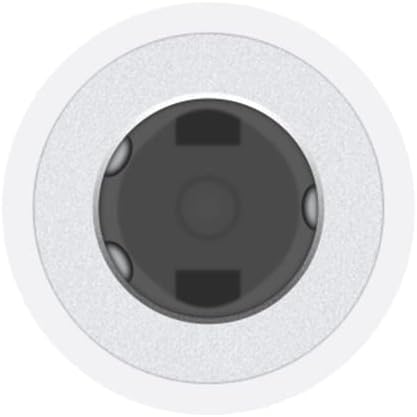
5.1-rasm: Batafsil view of the 3.5mm audio jack on the adapter, highlighting the connection point for headphones or speakers.
6. Texnik shartlar
| Xususiyat | Tafsilot |
|---|---|
| Model raqami | MU7E2AM/A |
| ASIN | B07K25P3N1 |
| Ulagich turi | USB Type-C (Male) to 3.5 mm Auxiliary (Female) |
| Rang | Oq |
| Mahsulot o'lchamlari | 2.65 x 0.66 x 3.43 dyuym |
| Element og'irligi | 0.352 untsiya |
| Ishlab chiqaruvchi | Apple Computer (Direct) |
| Birinchi mavjud | 1 yil 2018 noyabr |
7. Kafolat va qo'llab-quvvatlash
This Apple product is covered by Apple's standard limited warranty. For detailed information regarding warranty terms, conditions, and service options, please refer to the official Apple website or the documentation included with your original device purchase.
For technical assistance, troubleshooting, or to inquire about service, please visit the official Apple qo'llab-quvvatlash websayt or contact Apple customer service directly.


