1. Kirish
Sotib olganingiz uchun tashakkurasing the Infocus 24-inch 720p LED TV, model IM24ED800. This manual provides essential information for setting up, operating, and maintaining your television. Please read this manual thoroughly before using the product and retain it for future reference.
Xavfsizlik ma'lumotlari
- Televizorni yomg'ir yoki namlik ta'sirida qoldirmang.
- Shamollatish teshiklarini to'smang.
- To'g'ri quvvat manbai voltage.
- Elektr shnurini yurish yoki siqilishdan saqlang.
- Barcha xizmat ko'rsatishni malakali xizmat ko'rsatish xodimlariga topshiring.
- Televizorni to'g'ridan-to'g'ri quyosh nuri, issiqlik manbalari va kuchli magnit maydonlardan uzoqroq tuting.
2. Paket tarkibi
Iltimos, quyidagi elementlar uchun katakchani belgilang:
- Infocus 24-inch 720p LED TV (IM24ED800)
- Remote Control (with batteries, if included)
- Quvvat kabeli
- Televizor stend (2 dona)
- Televizor stendlari uchun vintlar
- Foydalanuvchi uchun qo'llanma (ushbu hujjat)
3. Sozlash
3.1 Televizor stendini ulash
To attach the stand to your Infocus TV:
- Chizmalarning oldini olish uchun televizor ekranini ehtiyotkorlik bilan yumshoq va toza yuzaga qo'ying.
- Har bir stend qismini televizorning pastki qismidagi mos keladigan uyalar bilan tekislang.
- Har bir tayanch qismini berilgan vintlar yordamida mahkamlang. Ularning mahkam tortilganligiga ishonch hosil qiling.
- Televizorni ehtiyotkorlik bilan ko'taring va uni barqaror, tekis yuzaga qo'ying.
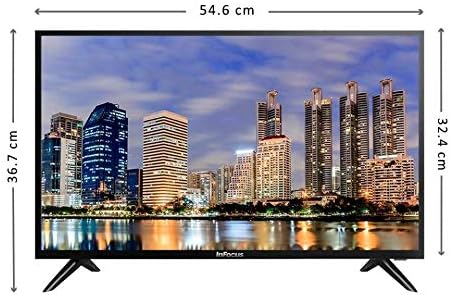
Rasm: old view of the Infocus 24-inch LED TV with dimensions indicated. The TV measures approximately 54.6 cm in width and 36.7 cm in height with the stand.
3.2 Qurilmalarni ulash
Your Infocus TV features multiple input ports for connecting external devices.

Rasm: orqa view of the Infocus 24-inch LED TV, highlighting the location of various input ports including HDMI and USB.
- HDMI ulanishlari: Connect Blu-ray players, game consoles, or cable/satellite boxes to the HDMI ports. The TV has 2 HDMI inputs.
- USB ulanishlari: Connect USB flash drives for media playback to the USB ports. The TV has 2 USB inputs.
- Antenna/Kabel: Connect an antenna or cable TV signal to the RF input (if available, not explicitly listed but standard for TVs).
- Quvvat: Elektr shnurini televizorning quvvat manbaiga, keyin esa devordagi rozetkaga ulang.
3.3 Dastlabki yoqish
After connecting all necessary cables:
- Ensure the power cord is securely plugged into both the TV and a power outlet.
- Masofadan boshqarish pultidagi yoki televizorning o'zidagi Quvvat tugmasini bosing.
- Follow the on-screen instructions for initial setup, which may include language selection, time zone, and channel scanning.
4. Televizoringizni boshqarish
4.1 Masofadan boshqarish pultiview
The remote control allows you to access all TV functions. While specific button layouts may vary, common functions include:
- Quvvat: Televizorni yoqadi yoki o'chiradi.
- Kirish/manba: Kirish manbasini tanlaydi (HDMI 1, HDMI 2, USB, TV).
- Ovozni oshirish/pasaytirish: Ovoz balandligini moslashtiradi.
- Kanal yuqoriga/pastga: Telekanallarni o'zgartiradi.
- Ovozsiz: Televizor ovozini o'chiradi.
- Menyu: Opens the main menu for settings adjustments.
- Navigatsiya tugmalari (yuqoriga/pastga/chapga/o‘ngga/OK): Menyularda harakatlanish va tanlovlarni tasdiqlash uchun foydalaniladi.
- Chiqish/Orqaga: Returns to the previous screen or exits the menu.
4.2 Asosiy funksiyalar
- Kirish manbasini o'zgartirish: ni bosing Kirish or Manba button on your remote control. Use the navigation buttons to select the desired input (e.g., HDMI 1, USB) and press OK.
- Ovoz balandligini sozlash: dan foydalaning Ovozni oshirish (+) or Ovozni pasaytirish (-) tugmalar.
- Kanallarni o'zgartirish: dan foydalaning Channel Up (CH+) or Channel Down (CH-) tugmalar.
4.3 USB Media ijro etish
Media o'ynash uchun fileUSB flesh-diskidan s:
- Insert a USB flash drive into one of the TV's USB ports.
- ni bosing Kirish or Manba masofadan boshqarish pultidagi tugmani bosing va tanlang USB.
- The TV's media browser should appear. Navigate through your files (photos, music, videos) using the remote control.
- a ni tanlang file va bosing OK uni o'ynash uchun.
5. Xizmat ko'rsatish
5.1 Ekranni tozalash
- Turn off the TV and unplug the power cord before cleaning.
- Ekranni muloyimlik bilan artish uchun yumshoq, tuksiz matodan (masalan, mikrofiber mato) foydalaning.
- O'jar belgilar uchun engil dampmatoni suv yoki maxsus ekran tozalagich bilan tozalang. Hech qachon tozalagichni to'g'ridan-to'g'ri ekranga sepmang.
- Abraziv tozalagichlar, spirt, benzol yoki erituvchilardan foydalanishdan saqlaning, chunki ular ekranga zarar etkazishi mumkin.
5.2 Umumiy parvarish
- Keep the TV in a well-ventilated area.
- Televizor ustiga og'ir narsalarni qo'ymang.
- Televizorni chaqmoqli bo'ronlar paytida yoki uzoq vaqt foydalanilmasa, elektr tarmog'idan uzing.
6. Muammolarni bartaraf qilish; nosozliklarni TUZATISH
Televizoringiz bilan bog'liq muammolarga duch kelsangiz, quyidagi umumiy muammolar va echimlarga murojaat qiling:
| Muammo | Mumkin sabab | Yechim |
|---|---|---|
| Quvvat yo'q | Elektr kabeli ulanmagan; rozetkada muammo bor | Elektr shnuri mahkam ulanganligiga ishonch hosil qiling. Rozetkani boshqa qurilma bilan tekshiring. |
| Rasm yo'q, lekin ovoz mavjud | Incorrect input source selected; loose video cable | ni bosing Kirish/manba button to select the correct input. Check video cable connections. |
| Ovoz yo'q, lekin rasm mavjud | Volume muted or too low; audio cable issue | ni bosing Ovozsiz tugmasini bosing yoki ovoz balandligini oshiring. Audio kabel ulanishlarini tekshiring. |
| Masofadan boshqarish pulti ishlamayapti | Batteries depleted; obstruction; remote sensor blocked | Replace batteries. Remove any obstructions between the remote and TV. Ensure the TV's remote sensor is clear. |
| "Signal yo'q" xabari | Incorrect input source; device not powered on; cable issue | Verify the correct input source is selected. Ensure the connected device is powered on. Check all cable connections. |
7. Texnik shartlar
The following are the technical specifications for the Infocus 24-inch 720p LED TV model IM24ED800:
| Xususiyat | Tafsilot |
|---|---|
| Model raqami | IM24ED800 |
| Ekran o'lchami | 24 dyuym (61 sm) |
| Displey texnologiyasi | LED |
| Rezolyutsiya | 1366 x 768 (720p HD) |
| Yangilanish tezligi | 60 Gts |
| HDMI kirishlari | 2 |
| USB kirishlari | 2 |
| Ulanish | HDMI, USB |
| O'rnatish turi | Stol stend |
| Paket o'lchamlari | 60.8 x 37.8 x 12 sm |
| Paket og'irligi | 5 kg |
8. Kafolat va qo'llab-quvvatlash
This Infocus TV is sold as a renewed product, which typically comes with a limited warranty provided by the seller or refurbisher. Please refer to your purchase documentation or contact your retailer for specific warranty terms and conditions.
For technical support or service inquiries, please contact the customer support channel provided by your retailer or the Infocus support websayt.


