1. Kirish
The Notifier NCA-2 Network Control Annunciator is a sophisticated device designed for use in fire alarm and emergency communication systems. It provides a 640-character display for monitoring and controlling network systems. This manual provides essential information for the proper installation, operation, and maintenance of the NCA-2 unit.
When used with single panel NFS2-640 systems, the NCA-2 can serve as the primary display, connecting directly to the CPU2-640. For network systems involving two or more Fire Alarm Control Panels (FACPs), one network display (NCA-2, NCS, or ONYXWorks) is required per system, and each NCA-2 must connect to and utilize an NCM Network Control Module.

1.1-rasm: Old view of the Notifier NCA-2 Network Control Annunciator. This image shows the main unit with its 640-character display screen and integrated keypad, housed within a dark gray enclosure.
2. Komponentlar kiritilgan
Upon unpacking, verify that all components are present and undamaged. The standard package for the Notifier NCA-2 typically includes:
- Notifier NCA-2 Network Control Annunciator Unit
- Qo'llanma (bu hujjat)
- Mounting hardware (may vary based on specific kit)
- Interconnection wiring harness

2.1-rasm: The Notifier NCA-2 instruction manual and a bundled wiring harness, essential for connecting the annunciator within a fire alarm system.
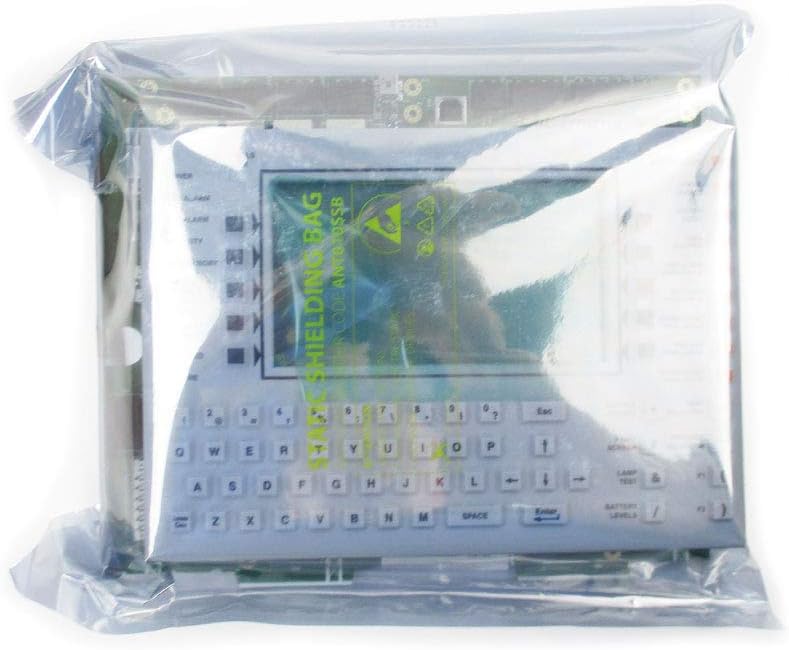
2.2-rasm: The Notifier NCA-2 unit, protected within an anti-static shielding bag, showing its display and keypad through the transparent material.

2.3-rasm: The Notifier NCA-2 unit securely packaged in a cardboard box with bubble wrap for protection during transit.
3. O'rnatish va o'rnatish
Installation of the NCA-2 unit requires adherence to local codes and the National Fire Protection Association (NFPA) standards. It should only be performed by qualified personnel.
3.1 O'rnatish imkoniyatlari
The NCA-2 offers flexible mounting solutions:
- Direct FACP Node Mounting: The unit can be mounted directly in a row of a Fire Alarm Control Panel (FACP) node.
- Annunciator Module Positions: It can occupy two annunciator module positions within a compatible enclosure.
- Specific Mounting Kits:
- NCA/640-2-KIT: For direct mounting to the CHS2-M2 chassis.
- CA-2, ADP-4B: Other compatible mounting plates or kits.
- Annunciator Box Installation: Can be installed in an annunciator box, such as the ABS-2DB (requires the CHS-2D chassis).
3.2 Elektr aloqalari
Ensure all power is disconnected before making any electrical connections.
- Single Panel Systems (NFS2-640): The NCA-2 connects directly to the CPU2-640 for primary display functionality.
- Network Systems (Multiple FACPs): Each NCA-2 unit requires an NCM Network Control Module for connection to the network. Refer to the NCM module's instruction manual for specific wiring diagrams and configuration.
Always follow the detailed wiring diagrams provided with the NCA-2 and associated modules. Incorrect wiring can lead to system malfunction or damage.
4. Foydalanish bo'yicha ko'rsatmalar
The Notifier NCA-2 serves as a central point for monitoring and controlling networked fire alarm systems. Its 640-character display provides detailed event information, system status, and user prompts.
4.1 Quvvatni yoqish ketma-ketligi
- Ensure all connections are secure and verified.
- Apply power to the FACP or network control module as per system specifications.
- The NCA-2 display will illuminate and perform a self-test.
- Upon successful power-up, the display will show the system's normal operating status or any active events.
4.2 Navigating the Display and Keypad
The NCA-2 features a keypad for user interaction. Common functions include:
- Event Acknowledge: Press the 'ACK' button to acknowledge new alarms or troubles.
- Silence Alarms: Use the 'SILENCE' button to silence audible alarms.
- Tizimni tiklash: The 'RESET' button clears active alarms and restores the system to normal operation after an event has been resolved.
- Menyu navigatsiyasi: Utilize arrow keys and 'ENTER' to navigate through menus for viewing event history, system programming, or diagnostic information.
- Matn kiritish: The alphanumeric keypad allows for entering specific commands or information as required by the system.
Refer to the specific system programming manual for detailed instructions on advanced operations and configuration.
5. Xizmat ko'rsatish
Regular maintenance ensures the reliable operation of the Notifier NCA-2 and the overall fire alarm system. Maintenance should only be performed by authorized and trained personnel.
5.1 Muntazam tekshiruvlar
- Vizual tekshirish: Periodically inspect the unit for any visible damage, loose connections, or environmental factors that could affect performance (e.g., excessive dust, moisture).
- Displey funksionalligi: Verify that the 640-character display is clear and all segments are functioning correctly.
- Klaviatura javobi: Test the responsiveness of all keypad buttons.
- Tizim holati: Confirm that the NCA-2 accurately reflects the status of the connected fire alarm system.
5.2 Tozalash
Clean the exterior of the NCA-2 with a soft, dry, lint-free cloth. Do not use abrasive cleaners, solvents, or excessive moisture, as these can damage the display or electronic components.
5.3 Mikrodasturlarni yangilash
Firmware updates may be released periodically to enhance functionality or address issues. Consult Notifier technical support or your system integrator for information on available updates and the proper procedure for installation.
6. Muammolarni bartaraf qilish; nosozliklarni TUZATISH
This section provides basic troubleshooting steps for common issues. For complex problems, contact qualified service personnel.
6.1 Displey yonmayapti
- Quvvatni tekshiring: Ensure the FACP or network control module supplying power to the NCA-2 is operational and receiving power.
- Ulanishlarni tekshirish: Inspect all power and communication wiring for secure connections.
- Tizim holati: Check the status of the main FACP for any power-related troubles.
6.2 Incorrect System Status Displayed
- Tarmoq aloqasi: For networked systems, verify the NCM Network Control Module is functioning correctly and network cabling is intact.
- Konfiguratsiya: Ensure the NCA-2 is correctly configured to communicate with the specific FACP or network segment.
- FACP Status: Confirm the actual status of the FACP or network nodes directly.
6.3 Keypad Unresponsive
- Quvvat aylanishi: Perform a controlled power cycle of the FACP (if safe and permissible) to reset the NCA-2.
- Jismoniy zarar: Inspect the keypad for any physical damage or debris that might be obstructing button presses.
If issues persist after basic troubleshooting, contact Notifier technical support or a certified service technician.
7. Texnik shartlar
| Xususiyat | Spetsifikatsiya |
|---|---|
| Model raqami | NCA-2 |
| Qism raqami | NNCA2 |
| Displey turi | 640-belgili LCD |
| Brend | Xabar beruvchi |
| Ishlab chiqaruvchi | XABAR |
| Element og'irligi | 1 funt |
| Quvvat manbai | System PowerSource (via FACP or NCM) |
| Signal turi | Audible (via system) |
| UPC | 734038305652 |
| Birinchi mavjud sana | 5 yil 2019 may |
8. Kafolat va qo'llab-quvvatlash
For specific warranty information, please refer to the documentation provided with your purchase or contact Notifier directly. Warranty terms typically cover manufacturing defects under normal use conditions.
For technical support, service, or to report issues, please contact your authorized Notifier distributor or a certified fire alarm system technician. Ensure you have your product model number (NCA-2) and any relevant system information available when seeking support.
Notifier Contact Information: Please visit the official Notifier webeng so'nggi aloqa ma'lumotlari va qo'llab-quvvatlash resurslari uchun sayt.


