Mahsulot tugadiview
The lightmaXX CLS Nano RGBW is an LED lighting system featuring four spotlights, designed for use on theater and stage productions. Its compact size and low weight also make it suitable for mobile applications.
Each spotlight is equipped with three powerful 4W QCL LEDs, contributing to a total power consumption of 48 watts. The COB LEDs incorporate red, green, blue, and white primary colors, allowing for the creation of a wide spectrum of other colors through mixing. The beam angle is 25 degrees. Additionally, the QCL LEDs offer stepless dimming from 0-100% and can produce a powerful strobe effect. Control options include DMX and music control.

The lightmaXX CLS Nano RGBW LED Spot Set, showcasing its four individual spotlights mounted on a central bar, with the LEDs emitting green light.
Xavfsizlik bo'yicha ko'rsatmalar
Please read and understand all safety instructions before operating the device. Failure to do so may result in injury or damage to the product.
- Qurilmani har doim tuproqli rozetkaga ulang.
- Haddan tashqari issiqlikning oldini olish uchun jihoz atrofida to'g'ri shamollatilishini ta'minlang.
- Qurilmani yomg'ir yoki namlik ta'sirida qoldirmang.
- Ko'zni yorug'lik manbasiga to'g'ridan-to'g'ri ta'sir qilishdan saqlaning.
- Only qualified personnel should perform service or repairs.
- Tozalash yoki texnik xizmat ko'rsatishdan oldin elektrdan uzing.
Sozlash; o'rnatish
Paketdan yechish
Carefully remove the CLS Nano RGBW from its packaging. Inspect the unit for any signs of damage during transit. Retain the packaging for future storage or transport.
O'rnatish
The CLS Nano RGBW is designed for secure mounting on a lighting stand or truss system. Use appropriate clamps and safety cables (not included) to ensure the unit is securely fastened and cannot fall. Ensure the mounting surface can support the weight of the fixture (7.13 kg).
Ulanishlar
Qurilmani quyidagi tarzda ulang:
- Quvvat ulanishi: Use the provided IEC power cable to connect the unit to a suitable mains power outlet.
- DMX ulanishi (ixtiyoriy): For DMX control, connect a 3-pin XLR DMX cable from your DMX controller's output to the unit's DMX IN port. If linking multiple units, connect from the first unit's DMX OUT to the next unit's DMX IN.

Batafsil orqa view of the lightmaXX CLS Nano RGBW, highlighting the power input, DMX In/Out ports, and the digital control display with navigation buttons.
Foydalanish bo'yicha ko'rsatmalar
Boshqaruv paneli tugadiview
The control panel on the rear of the unit features a digital display and four buttons:
- MENYU: Asosiy menyu parametrlari bo'ylab harakatlanadi.
- YUQORI: Qiymatlarni oshiradi yoki menyu parametrlari orqali yuqoriga siljitadi.
- TUSHDI: Qiymatlarni kamaytiradi yoki menyu parametrlari bo'ylab pastga siljitadi.
- KIRISH: Tanlovlarni tasdiqlaydi yoki ichki menyularga kiradi.
Ishlash rejimlari
The CLS Nano RGBW offers several operating modes:
- DMX rejimi: For external control via a DMX controller.
- Avtomatik rejim: Runs pre-programmed light shows automatically.
- Ovoz bilan faollashtirilgan rejim: Reacts to music or sound via a built-in microphone.
- Statik rang rejimi: Displays a single, constant color.
DMX nazorati
To operate the unit via DMX, set the DMX address using the control panel. Refer to the DMX channel chart in the full manual for specific channel functions (e.g., Dimmer, Red, Green, Blue, White, Strobe, Programs).
Avtomatik dasturlar
Navigate to the Auto mode setting using the MENU button. Use UP/DOWN to select different built-in programs. Press ENTER to confirm. Some programs may allow adjustment of speed or intensity.
Ovoz bilan faollashtirilgan rejim
Select the Sound-Activated mode from the menu. The unit will use its internal microphone to react to ambient sound. Adjust the microphone sensitivity if available in the menu to fine-tune the response.
Statik rang rejimi
In Static Color mode, you can manually select a desired color. Use the UP/DOWN buttons to adjust the intensity of Red, Green, Blue, and White LEDs to create custom colors.

The lightmaXX CLS Nano RGBW LED Spot Set displaying a vibrant red color output from its four spotlights.
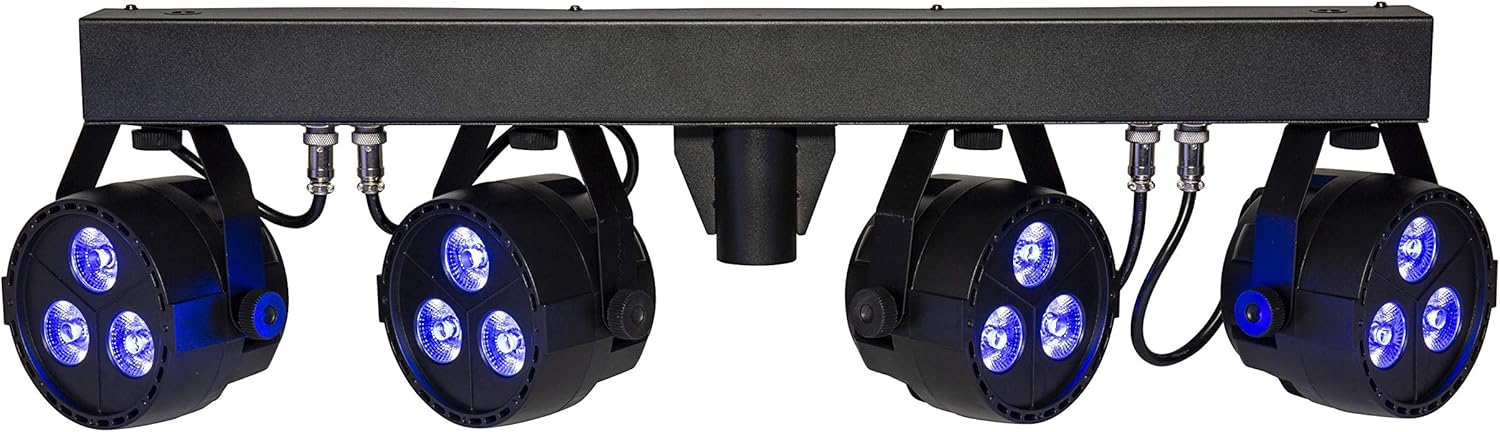
The lightmaXX CLS Nano RGBW LED Spot Set illuminating with a deep blue color.

The lightmaXX CLS Nano RGBW LED Spot Set producing a bright white light.

The lightmaXX CLS Nano RGBW LED Spot Set emitting a warm yellow light.

The lightmaXX CLS Nano RGBW LED Spot Set displaying a cool cyan light.

The lightmaXX CLS Nano RGBW LED Spot Set showcasing a rich purple illumination.

The lightmaXX CLS Nano RGBW LED Spot Set with its spotlights in an off state, showing the clear lenses.
Xizmat
Tozalash
Regular cleaning helps maintain optimal performance and appearance. Disconnect the unit from power before cleaning.
- Tashqi qismini artib olish uchun yumshoq, tuklarsiz matodan foydalaning.
- For lenses, use a specialized lens cleaner and a soft cloth to avoid scratches.
- Abraziv tozalash vositalari, erituvchilar yoki kuchli kimyoviy moddalardan foydalanmang.
Saqlash
When not in use for extended periods, store the CLS Nano RGBW in its original packaging or a suitable flight case. Store in a cool, dry place away from direct sunlight and extreme temperatures.
Muammolarni bartaraf qilish; nosozliklarni TUZATISH
Ushbu bo'limda siz duch kelishi mumkin bo'lgan keng tarqalgan muammolar ko'rib chiqiladi. Agar muammo davom etsa, mijozlarni qo'llab-quvvatlash xizmatiga murojaat qiling.
| Muammo | Mumkin sabab | Yechim |
|---|---|---|
| Quvvat yo'q | Power cable disconnected; Outlet not active; Fuse blown | Check power cable connection; Test outlet with another device; Replace fuse (if applicable and safe to do so) |
| DMX boshqaruvi yo'q | Incorrect DMX address; Faulty DMX cable; DMX controller issue; Master/Slave conflict | Verify DMX address setting; Test/replace DMX cable; Check DMX controller output; Ensure correct Master/Slave configuration |
| Lights not responding in Auto/Sound mode | Incorrect mode selected; Microphone sensitivity too low (Sound mode) | Ensure correct operating mode is selected; Adjust microphone sensitivity in Sound mode |
| Birlik haddan tashqari qizib ketadi | Insufficient ventilation; Blocked cooling vents | Ensure adequate space around the unit; Clean any dust or debris from cooling vents |
Texnik xususiyatlari
| Model | LIG0015656-000 |
| Brend | lightmaXX |
| Olchamlari (U x G x Y) | 88.6 x 38 x 18.8 sm |
| Og'irligi | 7.13 kg |
| LED turi | 4 x (3x 4W QCL RGBW LEDs) |
| Umumiy quvvat iste'moli | 48 vatt |
| Nur burchagi | 25° |
| Boshqarish rejimlari | DMX, Auto, Sound-activated, Static Color |
| Xususiyatlari | Dimmable, Strobe Effect, DMX Control, Music Control, RGBW LED |
| Quvvat manbai | Mains Power (IEC C14) |
| Ishlab chiqaruvchi | lightmaXX |
| Ishlab chiqaruvchi mamlakat; ta'minotchi mamlakat | Germaniya |
| Birinchi mavjud sana | 15 yil 2020 yanvar |
Kafolat va qo'llab-quvvatlash
This lightmaXX product is covered by a manufacturer's warranty. For specific warranty terms and conditions, please refer to the documentation included with your purchase or contact the seller directly.
For technical support, troubleshooting assistance beyond this manual, or spare parts inquiries, please contact your authorized lightmaXX dealer or the manufacturer's customer service department. Keep your purchase receipt and model number (LIG0015656-000) ready when contacting support.


