Kirish
Thank you for choosing the Nanlite LumiPad 25 LED Panel. This manual provides essential information for the safe and effective operation of your device. Please read it thoroughly before use and retain it for future reference.
Xavfsizlik choralari
- Qurilmani suvga yoki yuqori namlikka duchor qilmang.
- LED chiroqqa to'g'ridan-to'g'ri ko'z ta'siridan saqlaning.
- Use only approved power adapters and batteries.
- Jihozni qismlarga ajratish yoki o'zgartirishga urinmang.
- Bolalar qo'li etmaydigan joyda saqlang.
Paket tarkibi
Iltimos, paketingizda barcha narsalar mavjudligini tekshiring:
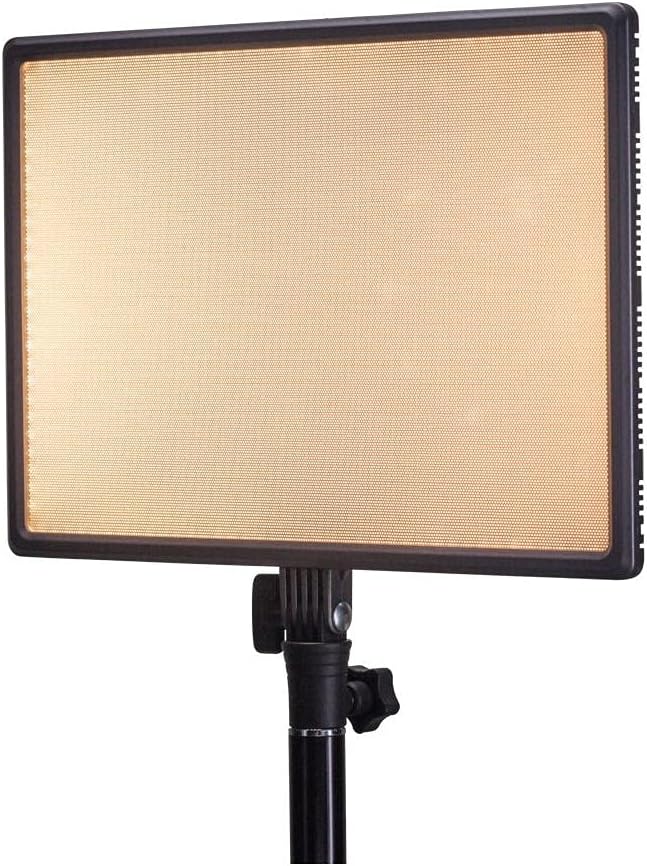
- Nanlite LumiPad 25 LED Panel
- O'rnatish adapteri
- AC Power Adapter (may be sold separately)
- Foydalanuvchi uchun qo'llanma
Sozlash; o'rnatish
1. Mounting the Light Panel
- Attach the included mounting adapter to the 1/4-inch screw thread located at the bottom of the LumiPad 25.
- Secure the mounting adapter to a compatible light stand or tripod.
- Adjust the angle of the LED panel using the tilt mechanism on the mounting adapter.

2. Qurilmani quvvatlantirish
The LumiPad 25 offers multiple power options:
- AC quvvati: Connect the AC power adapter to the DC IN port on the back of the panel, then plug the adapter into a wall outlet.
- Batareya quvvati: Insert two compatible NP-F style batteries (sold separately) into the battery slots on the back of the panel. Ensure correct polarity.


Operatsiya
1. Quvvatni yoqish/o‘chirish
Locate the power switch on the back of the panel. Flip the switch to the 'ON' position to power on the light. Flip it to 'OFF' to power off.
2. Yorqinlikni sozlash
Use the 'DIMMER' control knob on the back of the panel to adjust the light output from 0% to 100% brightness. Rotate clockwise to increase brightness and counter-clockwise to decrease.
3. Rang haroratini sozlash
Use the '5600K' control knob on the back of the panel to adjust the color temperature from warm (3200K) to cool (5600K). Rotate clockwise for cooler temperatures and counter-clockwise for warmer temperatures.

Xizmat
Tozalash
To clean the LED panel, use a soft, dry cloth. For stubborn marks, a slightly damp Qurilmaga suyuqlik tushmasligiga ishonch hosil qilish uchun yumshoq yuvish vositasi solingan matodan foydalanish mumkin. Abraziv tozalagichlar yoki erituvchilardan foydalanmang.
Saqlash
When not in use, store the LumiPad 25 in a cool, dry place, away from direct sunlight and extreme temperatures. If storing for extended periods, remove batteries.
Muammolarni bartaraf qilish; nosozliklarni TUZATISH
| Muammo | Mumkin sabab | Yechim |
|---|---|---|
| Chiroq yoqilmaydi. | No power, faulty connection, or depleted batteries. | Check power adapter connection or replace/recharge batteries. Ensure power switch is ON. |
| Brightness not adjusting. | Dimmer knob not functioning or at minimum/maximum setting. | Rotate the dimmer knob fully in both directions. If issue persists, contact support. |
| Color temperature not changing. | Color temperature knob not functioning or at minimum/maximum setting. | Rotate the color temperature knob fully in both directions. If issue persists, contact support. |
Texnik xususiyatlari
| Xususiyat | Tafsilot |
|---|---|
| Model raqami | 11-2002 |
| Mahsulot o'lchamlari | 13.58 x 37 x 9 inches (overall packaging) / 1.2"L x 1.2"W x 1.2"H (unit) |
| Element og'irligi | 7.1 untsiya |
| Yorqinlik | 2140 lumens (max) |
| Rang harorati | 3200K - 5600K |
| Quvvat imkoniyatlari | AC Adapter, NP-F style batteries, DC via D-tap cable |
Kafolat va qo'llab-quvvatlash
Nanlite products are covered by a limited warranty. For detailed warranty information, technical support, or service inquiries, please visit the official Nanlite websaytga kiring yoki mahalliy distribyutoringizga murojaat qiling.
Official Nanlite Websayt: www.nanlite.com


