Kirish
Thank you for choosing the Tracer Roadster 4 in 1 Steering Wheel. This manual provides detailed instructions for setting up, operating, maintaining, and troubleshooting your new racing wheel. Please read this manual thoroughly before use to ensure optimal performance and longevity of your device.
The Tracer Roadster 4 in 1 Steering Wheel is designed for an immersive gaming experience, compatible with various platforms including PlayStation 4 and Windows PC. It features a responsive steering wheel, integrated shifter, and a pedal set for realistic control.
Paket tarkibi
- Tracer Roadster 4 in 1 Steering Wheel
- Pedal to'plami
- Foydalanuvchi uchun qo'llanma (ushbu hujjat)
O'rnatish uchun qo'llanma
Connecting to PlayStation 4 (PS4)
- Connect the steering wheel's USB cable to an available USB port on your PS4 console.
- Power on your PS4 console. The red LED on the steering wheel will illuminate, indicating power.
- Connect the steering wheel to your PS4 controller using a microUSB cable (not included). This step is crucial for authentication.
- ni bosing UY button on the steering wheel. The green LED will illuminate, indicating successful connection and readiness for use.
Connecting to PC (Windows)
- Connect the steering wheel's USB cable to an available USB port on your Windows PC.
- The system should automatically detect and install the necessary drivers. If not, please refer to the manufacturer's webHaydovchi yuklab olish uchun sayt.
- Once drivers are installed, the steering wheel will be ready for use with compatible PC racing games.

Figure 1: The Tracer Roadster 4 in 1 Steering Wheel, including the main wheel unit, integrated shifter, and separate pedal set. This image shows the complete setup ready for connection.
Foydalanish bo'yicha ko'rsatmalar
Rulda boshqaruvi
The steering wheel features a full range of motion for precise control in racing games. It includes various buttons and a D-pad for in-game navigation and actions, mimicking a standard game controller layout.
- Yo'nalish paneli (D-Pad): For menu navigation and specific in-game controls.
- Action Buttons (X, Circle, Square, Triangle / A, B, X, Y): Standard gaming action buttons.
- L1/R1, L2/R2 Buttons: Shoulder buttons, often used for shifting gears or other actions.
- HOME tugmasi: PS4 system menu access.
- PROG tugmasi: For programming specific functions (refer to game-specific instructions).
- Sensorli panel: Integrated touchpad for additional control options, especially on PS4.
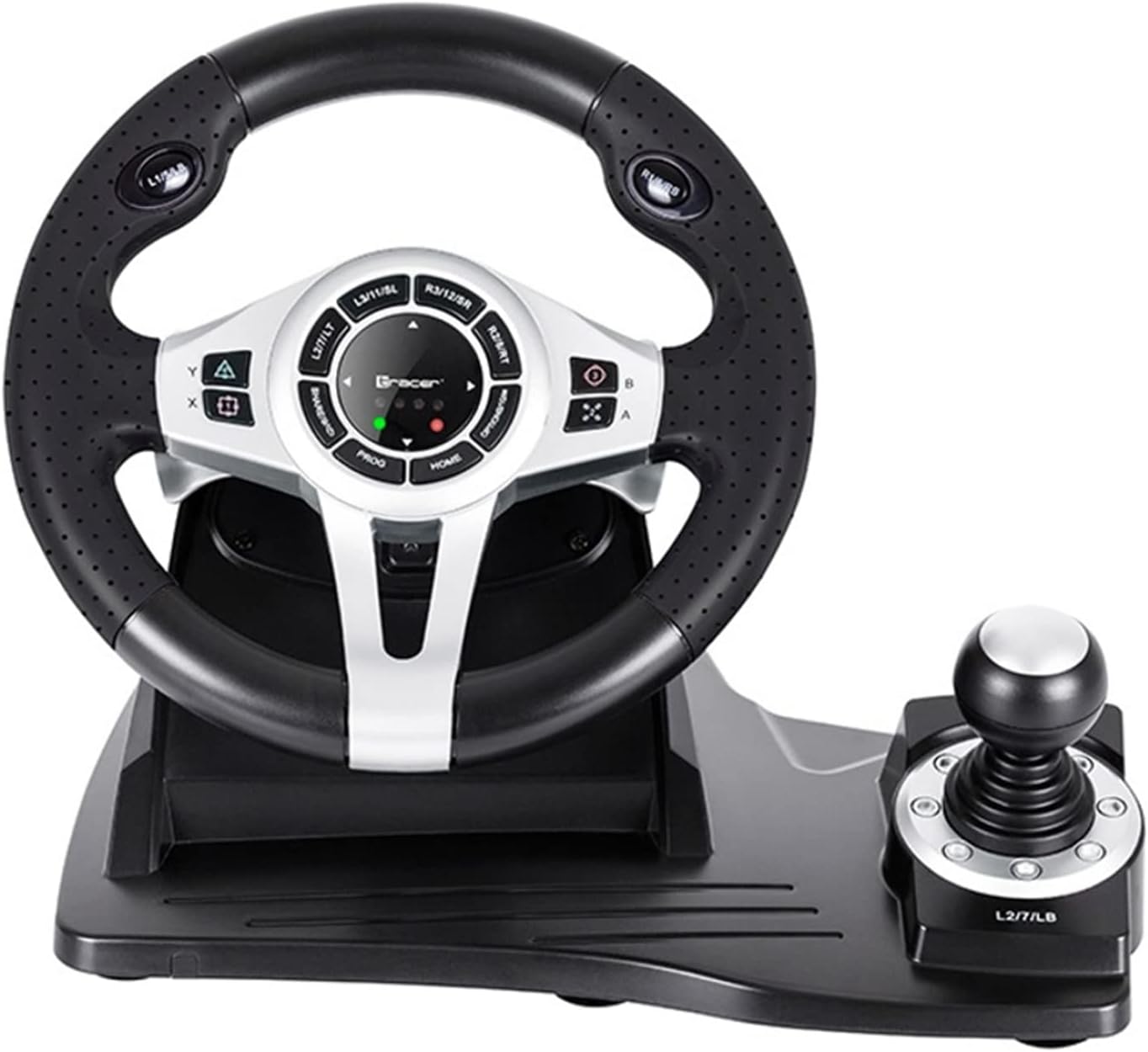
2-rasm: Batafsil view of the central control panel on the steering wheel, showing the various buttons, D-pad, and indicator lights. The integrated shifter is visible to the right.
Pedal to'plami
The separate pedal set includes an accelerator and brake pedal for realistic driving simulation. Ensure the pedal set is placed on a stable surface to prevent slipping during intense gameplay.

Figure 3: The standalone pedal unit, featuring both accelerator and brake pedals. The textured base provides grip to prevent movement during use.
Xizmat va parvarish
- Tozalash: Use a soft, dry cloth to clean the surface of the steering wheel and pedals. For stubborn dirt, a slightly damp matodan foydalanish mumkin, lekin ichki qismlarga namlik kirmasligiga ishonch hosil qiling.
- Saqlash: Ishlatilmayotganda qurilmani quruq, salqin joyda, to‘g‘ridan-to‘g‘ri quyosh nuri va haddan tashqari haroratdan uzoqroq joyda saqlang.
- Suyuqlikdan saqlaning: Qurilmani suv yoki boshqa suyuqliklar ta'sirida qoldirmang.
- Ehtiyotkorlik bilan ishlang: Qurilmani yiqilib tushmaslik yoki kuchli zarbalarga duchor qilishdan saqlaning.
Muammolarni bartaraf qilish; nosozliklarni TUZATISH
| Muammo | Mumkin sabab | Yechim |
|---|---|---|
| Steering wheel not recognized by PS4. | Incorrect connection or authentication issue. | Ensure the steering wheel's USB cable is securely connected to the PS4. Verify the microUSB cable connection between the steering wheel and the PS4 controller. Press the UY rulda joylashgan tugma. |
| No response from steering wheel on PC. | Drivers not installed or USB port issue. | Try a different USB port. Check Device Manager for driver status. Reinstall drivers if necessary from the manufacturer's websayt. |
| LED indicators not lighting up. | No power or connection issue. | Ensure the USB cable is firmly connected to the console/PC. Check if the console/PC is powered on. |
| Pedallar javob bermayapti. | Loose connection to the steering wheel. | Verify that the pedal unit's cable is securely plugged into the steering wheel base. |
Texnik xususiyatlari
| Xususiyat | Tafsilot |
|---|---|
| Brend | Tracer |
| Model nomi | Roadster 4 in 1 |
| Model raqami | TRAJOY46524 |
| Ulanish texnologiyasi | USB |
| Mos qurilmalar | PlayStation 4, Windows PC |
| Nazoratchi turi | Rulda |
| Rang | Qora |
| Maxsus xususiyat | Sensorli panel |
| Tugmalar soni | 8 (excluding D-pad and shifter controls) |
| Element og'irligi | 2 kilogramm |
| Mahsulot o'lchamlari (U x G x Y) | 2.8 x 24.6 x 16.5 sm |
Kafolat va qo'llab-quvvatlash
For warranty information and technical support, please refer to the official Tracer websayt yoki chakana sotuvchingizga murojaat qiling. Har qanday kafolat da'volari uchun xaridingizni tasdiqlovchi hujjatni saqlang.
Qo'shimcha yordam uchun siz tashrif buyurishingiz mumkin product page on Amazon.com.be.


