Kirish
The Razer Tartarus Pro is a gaming keypad designed for enhanced control and customization. It features Analog-Optical Key Switches, Rapid Trigger functionality, Adjustable Actuation, 32 programmable keys, customizable macros, and Chroma RGB Lighting. This manual provides essential information for setting up, operating, and maintaining your device.
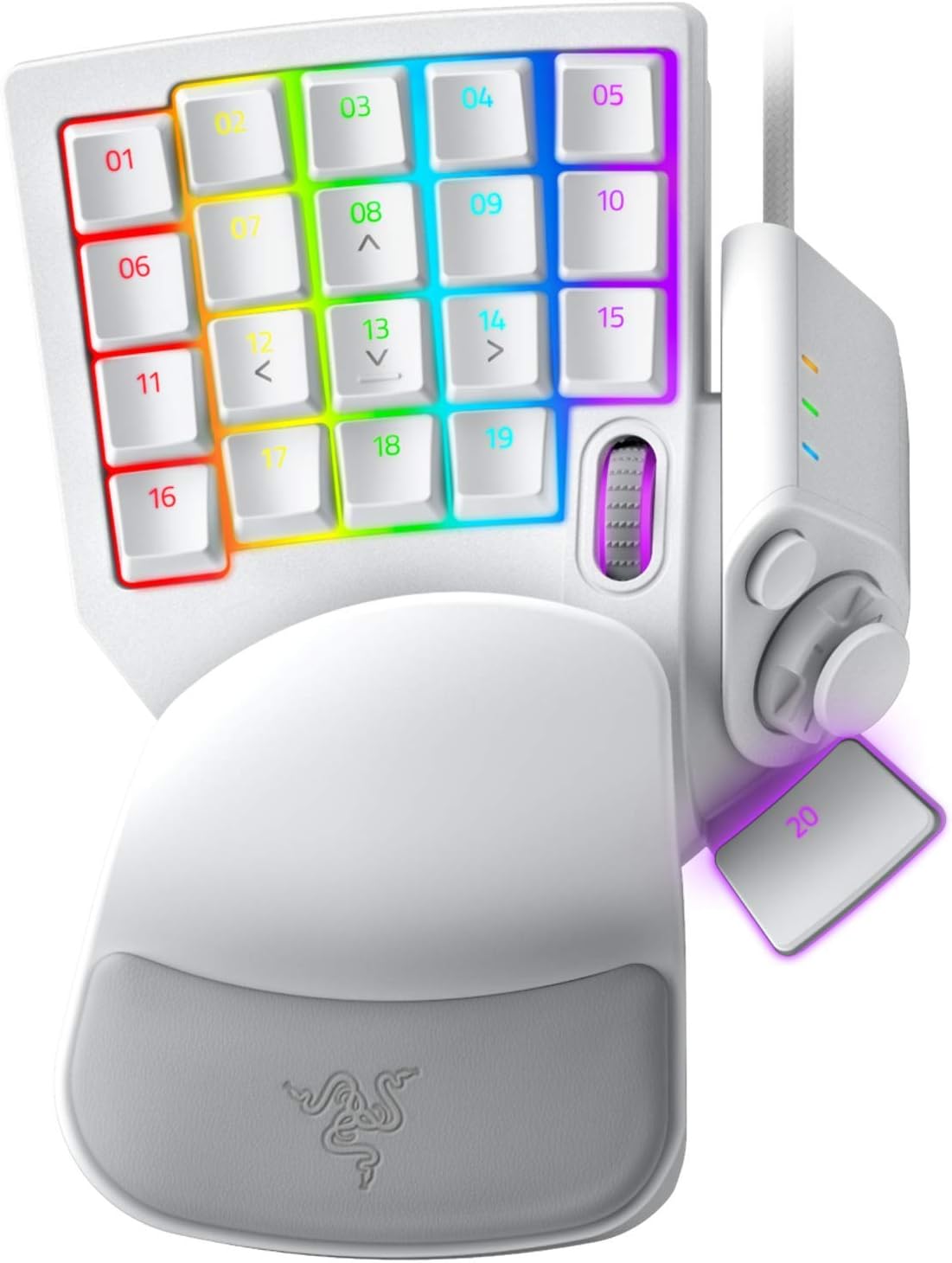
Figure 1: Razer Tartarus Pro Gaming Keypad (Mercury White)
Asosiy xususiyatlar
- Analog-Optical Key Switches: Utilizes light to register keystrokes for precise and rapid input.
- Tezkor tetik: Keys reset instantly with an upward motion as low as 0.1 mm, enabling faster repeated keystrokes.
- Sozlanishi mumkin bo'lgan harakat: Customize actuation points from 1.5 to 3.6 mm for personalized keypress sensitivity.
- 32 Programmable Keys: Offers an extensive range of commands for gaming or creative workflows.
- Yaxshilangan harakat boshqaruvlari uchun barmoq paneli: An 8-way directional thumbpad provides natural controls and ergonomic experience.
- To'liq dasturlashtiriladigan makroslar: Razer Hypershift allows remapping of all keys and keypress combinations for complex commands.
- Chroma RGB Lighting: Ultimate personalization with 16.8 million colors on individually backlit keys, syncing with popular games and hardware.
O'rnatish uchun qo'llanma
- Connect the Keypad: Plug the USB cable from the Razer Tartarus Pro into an available USB port on your PC.
- Razer Synapse-ni o'rnating: Download and install the latest version of Razer Synapse software from the official Razer website. This software is required to customize key bindings, macros, actuation points, and RGB lighting.
- Haydovchi o'rnatish: Allow your operating system to automatically install any necessary drivers. This usually happens upon initial connection.
- Dastur konfiguratsiyasi: Launch Razer Synapse. The software should automatically detect your Tartarus Pro. You can then begin customizing your keypad settings.
Foydalanish bo'yicha ko'rsatmalar
Key Customization and Macros
The Razer Tartarus Pro features 32 fully programmable keys. Use Razer Synapse to assign functions, macros, or even launch applications with a single keypress. The 8-way directional thumbpad can also be customized for movement or additional commands.

2 -rasm: tugadiview of 32 programmable keys.
Adjustable Actuation and Rapid Trigger
Leverage the Analog-Optical Key Switches to fine-tune the actuation point of each key. This allows you to set how far a key needs to be pressed to register an input. The Rapid Trigger feature further enhances responsiveness by resetting keys almost instantly upon release, enabling faster consecutive presses.

Figure 3: Adjustable Actuation settings in Razer Synapse.
Chroma RGB yoritish
Personalize your keypad with Razer Chroma RGB lighting. Through Razer Synapse, you can choose from 16.8 million colors and various lighting effects. Create custom lighting profiles for different games or applications.
Profile Boshqaruv
The Tartarus Pro supports multiple profiles, allowing you to switch between different key layouts and lighting effects on the fly. This is useful for optimizing your setup for various games or tasks.

Figure 4: Quick-toggle profiles for instant switching.
Texnik xususiyatlari
| Xususiyat | Tafsilot |
|---|---|
| Brend | Razer |
| Model raqami | RZ07-03110200-R3M1 |
| Kalit kalitlari | Razer Analog-Optical |
| Dasturlashtiriladigan kalitlar | 32 |
| Actuation Range | 1.5 dan 3.6 mm gacha |
| Barmoq paneli | 8-way directional |
| Makroslar | Unlimited length, fully programmable |
| Yoritish | Razer Chroma RGB (16.8 million colors) |
| Ulanish | USB simli |
| Uskuna platformasi | PC |
| Operatsion tizim | Windows |
| Element og'irligi | 13 untsiya |
| Mahsulot o'lchamlari | 5.95 x 7.96 x 2.5 dyuym |
Xizmat
- Tozalash: Yumshoqdan foydalaning, damp cloth to clean the surface of the keypad. Avoid harsh chemicals or abrasive materials.
- Klaviatura qopqog'ini olib tashlash: If necessary, keycaps can be carefully removed for deeper cleaning using a keycap puller.
- Kabelni parvarish qilish: Zararni oldini olish uchun USB kabelini o'tkir egilish yoki haddan tashqari tortib olishdan saqlaning.
Muammolarni bartaraf qilish; nosozliklarni TUZATISH
- Keypad Not Detected: Try plugging the keypad into a different USB port. Ensure Razer Synapse is installed and up to date. Restart your computer.
- Yoritish bilan bog'liq muammolar: Check Razer Synapse for lighting settings. Ensure the keypad is properly connected and recognized by the software.
- Javob bermaydigan kalitlar: Verify key bindings in Razer Synapse. Test the keypad on another computer if possible to rule out a hardware issue.
Mahsulot videolari
Razer Tartarus Pro Gaming Keypad Review
Video 1: A gamer's perspective on the Razer Tartarus Pro, highlighting its features and performance.
Review of the Razer Tartarus Pro Gaming Keypad
Video 2: Batafsil qaytaview of the Razer Tartarus Pro, covering various aspects of its design and functionality.
Razer One-Handed Keyboards Side-by-Side Comparison
Video 3: A comparison between Razer's one-handed keyboards, including the Tartarus Pro, showcasing differences and similarities.
Razer Tartarus Pro Product Showcase
Video 4: A brief showcase of the Razer Tartarus Pro, highlighting its design and lighting.
Kafolat va qo'llab-quvvatlash
Kafolat ma'lumotlari va texnik yordam olish uchun rasmiy Razer qo'llab-quvvatlash xizmatiga tashrif buyuring website. You can find detailed information regarding product registration, troubleshooting guides, and contact options for customer service.
Optional protection plans are available for purchase, offering extended coverage beyond the standard manufacturer's warranty. These plans include:
- 3 yillik himoya rejasi
- 4 yillik himoya rejasi
- Toʻliq himoya (oʻtmish va kelajakdagi xaridlarni oʻz ichiga olgan oylik reja)


