Kirish
This instruction manual provides detailed information on the installation, operation, and maintenance of your Blaupunkt DENVER 212 DAB BT car radio. Please read this manual thoroughly before using the device to ensure proper functionality and to prevent damage. Keep this manual for future reference.

Image: Blaupunkt DENVER 212 DAB BT product banner.
Xavfsizlik ma'lumotlari
- Ensure proper installation by a qualified professional to avoid electrical hazards or damage to your vehicle.
- Qurilmani haydashdan chalg'itadigan tarzda ishlatmang. Har doim yo'l harakati xavfsizligiga ustuvor ahamiyat bering.
- Jihozni haddan tashqari harorat, to'g'ridan-to'g'ri quyosh nuri yoki namlik ta'siriga qo'ymang.
- Use only approved accessories and parts.
- Disconnect the vehicle's battery before installation to prevent short circuits.
Paket tarkibi
Paketda barcha elementlar mavjudligiga ishonch hosil qiling:
- Blaupunkt DENVER 212 DAB BT Car Radio Unit
- O'rnatish ramkasi
- Wiring Harness (ISO connector)
- DAB+ Antenna (if included with specific models)
- Tashqi mikrofon
- Disassembly Keys
- Foydalanuvchi uchun qo'llanma (ushbu hujjat)
Mahsulot tugadiview
The Blaupunkt DENVER 212 DAB BT is a 1-DIN car radio featuring DAB+ digital radio, Bluetooth hands-free calling, and media streaming. It offers a robust design and short installation depth for versatile vehicle compatibility.

Image: Front panel of the Blaupunkt DENVER 212 DAB BT, showing display, control knobs, and buttons.
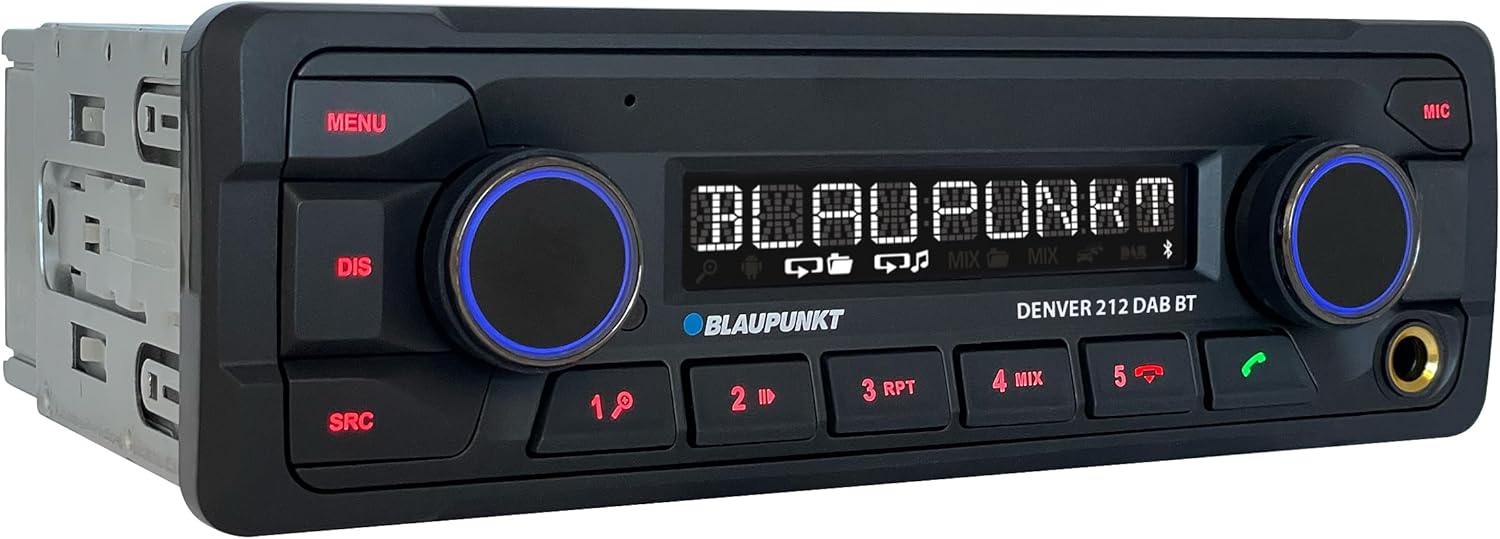
Rasm: burchakli view of the Blaupunkt DENVER 212 DAB BT, highlighting its compact design.
Old panel boshqaruvlari:
- MENU tugmasi: Tizim sozlamalari va parametrlariga kiradi.
- DIS Button: Displey ma'lumotlarini o'zgartiradi.
- SRC tugmasi: Selects audio source (Radio, DAB, Bluetooth, USB, AUX).
- Volume Knob (Left): Adjusts audio volume. Press to mute/unmute.
- Selection Knob (Right): Menyularda harakat qiladi va variantlarni tanlaydi.
- Oldindan o'rnatilgan tugmalar (1-6): Store and recall radio stations, control media playback.
- Call Buttons (Green/Red): Answer/end Bluetooth calls.
- USB port: Media tinglash uchun USB xotira qurilmalarini ulang.
- AUX kirish (3.5 mm raz'em): Tashqi audio manbalarini ulang.
O'rnatish va o'rnatish
O'rnatish bosqichlari:
- Tayyorlanishi: Avtomobilingiz akkumulyatorining salbiy terminalini ajratib oling.
- O'rnatish: Insert the supplied mounting frame into the vehicle's 1-DIN opening. Bend the tabs to secure it.
- Elektr simlari: Connect the wiring harness according to the diagram below. Ensure all connections are secure.
- Antenna ulanishi: Connect the FM antenna and the DAB+ antenna (if applicable) to the corresponding inputs on the rear of the radio.
- Mikrofon ulanishi: Connect the external microphone to the designated input for optimal hands-free call quality.
- Birlikni joylashtiring: Slide the radio unit into the mounting frame until it clicks into place.
- Yakuniy tekshirish: Avtomobil akkumulyatorini qayta ulang va jihozni sinab ko'ring.
Wiring Diagram (General):
| Tel rangi | Funktsiya |
|---|---|
| Sariq | Doimiy 12V (Batareya) |
| Qizil | O'chirilgan 12V (otish) |
| Qora | Tuproq |
| Moviy | Quvvat antennasi / Ampko'taruvchi masofadan boshqarish |
| To'q sariq/oq | Yoritish |
| Speaker Wires (e.g., White, Grey, Green, Purple pairs) | Connect to vehicle speakers (Front Left, Front Right, Rear Left, Rear Right) |
| Rulda boshqaruviga kirish | Connect to vehicle's steering wheel control interface (if applicable) |
Note: Specific wire colors may vary. Always refer to your vehicle's wiring diagram and the radio's included diagram for precise connections.

Image: The Blaupunkt DENVER 212 DAB BT car radio seamlessly integrated into a vehicle's dashboard.
Foydalanish bo'yicha ko'rsatmalar
1. Asosiy funksiyalar:
- Quvvatni yoqish/oʻchirish: Press the volume knob (left) briefly to turn the unit on. Press and hold to turn off.
- Ovozni boshqarish: Rotate the volume knob (left) to adjust the sound level.
- Manba tanlash: ni bosing SRC button repeatedly to cycle through available audio sources (FM, DAB, Bluetooth Audio, USB, AUX).
- Menyu navigatsiyasi: ni bosing MENU button to enter the main menu. Use the right knob to navigate and select options.
2. Radio (FM/DAB+):
- Selecting Radio Mode: bosing SRC until FM or DAB is selected.
- Avtomatik sozlash: In FM/DAB mode, press and hold the right knob or seek buttons (if available) to automatically search for stations.
- Qo'lda sozlash: Briefly press the right knob or seek buttons to fine-tune frequencies.
- Oldindan sozlashni saqlash: Tune to a desired station, then press and hold one of the numeric preset buttons (1-6) until you hear a confirmation beep.
- Oldindan sozlashni eslash: Briefly press a numeric preset button (1-6) to recall a stored station.
3. Bluetooth ishlashi:
- Qurilmani ulash:
- Mobil qurilmangizda Bluetooth yoqilganligiga ishonch hosil qiling.
- Select "Bluetooth" as the source on the car radio. The display will show "PAIRING".
- On your mobile device, search for Bluetooth devices and select "BLAUPUNKT DENVER".
- Agar so'ralsa, ikkala qurilmada ham ulanishni tasdiqlang.
- Qo'ng'iroqlarsiz qo'ng'iroq:
- Qo'ng'iroqqa javob berish: Yashil qo'ng'iroq tugmasini bosing.
- Qo'ng'iroqni tugatish: Press the red call button.
- Qo'ng'iroq qilish: Dial from your phone; audio will transfer to the car radio.
- Bluetooth audio oqimi: Once paired, select "Bluetooth Audio" as the source. Play music from your mobile device, and it will stream through the car radio. Use the preset buttons (e.g., 4 for MIX, 5 for RPT) for playback control (play/pause, skip tracks).
4. USB and AUX Input:
- USB orqali ijro etish: Insert a USB storage device into the front USB port. The unit will automatically switch to USB mode and begin playback.
- AUX kirish: Connect an external audio device (e.g., MP3 player) to the 3.5mm AUX input jack using an audio cable. Select "AUX" as the source.
5. Sound Settings (Equalizer):
- ni bosing MENU button, then navigate to "AUDIO" or "EQ" settings.
- Adjust bass, treble, balance, and fader settings to your preference.
- Pre-set equalizer modes (e.g., Pop, Rock, Classic) may be available.
Video: tugadiview of the Blaupunkt DENVER 212 DAB BT car radio's features and basic operation.
Xizmat
- Tozalash: Jihozning old panelini tozalash uchun yumshoq, quruq matodan foydalaning. Abraziv tozalagichlar yoki erituvchilardan foydalanmang.
- USB port: USB portini chang va qoldiqlardan tozalang.
- Dasturiy ta'minotni yangilash: Check the official Blaupunkt webvaqti-vaqti bilan modelingiz uchun mavjud bo'lgan proshivka yangilanishlari uchun sayt.
Muammolarni bartaraf qilish; nosozliklarni TUZATISH
| Muammo | Mumkin sabab | Yechim |
|---|---|---|
| Quvvat yo'q | Blown fuse; incorrect wiring (constant/switched 12V); loose connection. | Check vehicle fuses and the radio's fuse. Verify wiring connections, especially constant and ignition power. Ensure the unit is properly seated. |
| Ovoz yo'q | Ovoz juda past; ovozni o'chirish faollashtirilgan; karnay simlarini noto'g'ri ulash; ampko'taruvchi muammolar. | Increase volume. Check if mute is active. Verify speaker connections. If an external amplifier is used, check its power and connections. |
| Poor radio reception (FM/DAB) | Antenna not connected; damaged antenna; weak signal area. | Ensure antenna is securely connected. Check antenna for damage. Consider a stronger antenna or signal booster if in a weak signal area. For DAB+, ensure the DAB antenna is correctly installed and positioned. |
| Bluetooth ulanishi bilan bog'liq muammolar | Device not in pairing mode; incorrect wiring (ignition+ and constant+); interference. | Ensure both devices are in pairing mode. Delete previous pairings and try again. Verify that the constant 12V and switched 12V wires are correctly connected to the radio, as improper wiring can affect Bluetooth stability. Move away from other Bluetooth devices. |
| USB tan olinmadi | Qo‘llab-quvvatlanmaydi file format; USB drive not formatted correctly; damaged USB drive. | Ovozni ta'minlash files are in supported formats (e.g., MP3, WMA). Format the USB drive to FAT32. Try a different USB drive. |
Texnik xususiyatlari
| Xususiyat | Tafsilot |
|---|---|
| Brend | BLAUPUNKT |
| Model raqami | Denver 212 DAB BT |
| Rang | Qora |
| Ulanish texnologiyasi | Bluetooth, USB |
| Ulagich turi | 3.5 mm ulagich, USB |
| Maxsus xususiyatlar | DAB, RDS, Equalizer, Bluetooth Hands-free |
| Mos qurilmalar | Smartfon |
| Jami USB portlari | 1 |
| Audio chiqish rejimi | Stereo |
| Surround ovoz kanali konfiguratsiyasi | 4.0 |
| Mahsulot o'lchamlari | 12D x 17.8W x 5.2H santimetr |
| Ishlab chiqaruvchi | Blaupunkt |
| Ehtiyot qismlar mavjudligi | 1 yil |
Kafolat va qo'llab-quvvatlash
This Blaupunkt product comes with a manufacturer's warranty. For specific warranty terms and conditions, please refer to the warranty card included with your product or visit the official Blaupunkt website. For technical support, troubleshooting assistance, or spare parts inquiries, please contact Blaupunkt customer service through their official channels.
Ehtiyot qismlar odatda sotib olingan kundan boshlab 1 yil davomida mavjud bo'ladi.
Rasmiy Blaupunkt Websayt: www.blaupunkt.com