1. O'rnatish bo'yicha qo'llanma
1.1 Paketni ochish
Carefully remove the television from its packaging. Ensure all components are present before discarding packaging materials. The package should include the TV unit, remote control, power cable, and TV stand components.
1.2 Stendni biriktirish
To attach the stand to your Skyworth 40E2A12G TV, follow these steps:
- Place the TV face-down on a soft, flat surface to prevent screen damage.
- Stend tagliklarini televizorning pastki qismidagi mos keladigan uyalar bilan tekislang.
- Secure the stand bases using the provided screws. Ensure they are tightened firmly but do not overtighten.
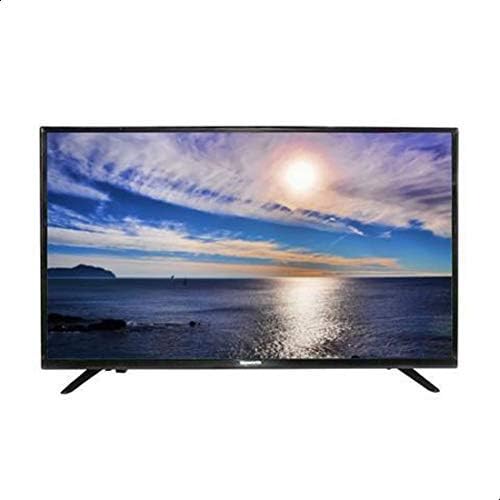
1.1-rasm: Old view of the Skyworth 40E2A12G TV with the stand correctly attached.

1.2-rasm: yon view illustrating the profile of the Skyworth 40E2A12G TV with its stand.
1.3 Devorga o'rnatish (ixtiyoriy)
If you choose to wall mount your TV, ensure you use a VESA-compatible wall mount kit (not included) appropriate for a 40-inch television. Consult a professional for installation to ensure safety and proper mounting.
1.4 Periferik qurilmalarni ulash
Kabellarni ulashdan oldin, televizor va barcha qurilmalar o'chirilganligiga ishonch hosil qiling.
1.4.1 Quvvatga ulanish
Elektr kabelini televizorning quvvat manbaiga, keyin esa devordagi rozetkaga ulang.
1.4.2 HDMI Devices
Use HDMI cables to connect devices such as Blu-ray players, game consoles, or set-top boxes to the HDMI ports on the TV.
1.4.3 USB qurilmalari
Media ijro etish uchun USB drayverlarni USB portlariga joylashtiring.
1.4.4 Antenna/kabel ulanishi
Connect your antenna or cable TV coaxial cable to the 'ANT/CABLE IN' port on the TV.

1.3-rasm: orqa view of the Skyworth 40E2A12G TV, highlighting the various input and output ports for connectivity.
2. Foydalanish bo'yicha ko'rsatmalar
2.1 First Time Setup Wizard
Upon first power-on, the TV will guide you through an initial setup wizard. This includes selecting your language, country, time zone, and scanning for available channels.
2.2 Asosiy funksiyalar
2.2.1 Quvvatni yoqish/o‘chirish
ni bosing KUCH button on the remote control or on the TV to turn the TV on or off.
2.2.2 Kanal tanlash
dan foydalaning CH +/- buttons to navigate through channels or enter channel numbers directly using the numeric keypad on the remote.
2.2.3 Ovoz balandligini boshqarish
Ovoz balandligini sozlash yordamida sozlang VOL +/- masofadan boshqarish pultidagi tugmalar.
2.2.4 Kirish manbasini tanlash
ni bosing MANBA or KIRISH button on the remote to switch between connected devices (e.g., HDMI 1, USB, TV).
2.3 Masofadan boshqarish pultiview
The included remote control allows access to all TV functions. Familiarize yourself with the button layout for easy navigation. It includes buttons for power, volume, channel, input selection, menu, and navigation.
3. Xizmat va parvarish
3.1 Ekranni tozalash
Televizor ekranini tozalash uchun uni yumshoq, tuksiz mato bilan muloyimlik bilan arting. Qattiq dog'lar uchun ozgina arting.ampMatoni suv yoki maxsus ekran tozalagich bilan arting. Hech qachon suyuqlikni to'g'ridan-to'g'ri ekranga purkamang.
3.2 Televizor korpusini tozalash
Use a soft, dry cloth to wipe the TV's frame and back panel. Avoid using abrasive cleaners or solvents.
3.3 Saqlash
If storing the TV for an extended period, disconnect it from power, pack it in its original packaging if possible, and store it in a dry, dust-free environment.
4. Muammolarni bartaraf etish bo'yicha qo'llanma
This section addresses common issues you might encounter with your Skyworth TV.
4.1 Quvvat yo'q
- Elektr kabeli televizorga ham, rozetkaga ham mahkam ulanganligiga ishonch hosil qiling.
- Boshqa qurilmani ulash orqali rozetkaning ishlayotganligini tekshiring.
- Faqat pultni emas, televizorning o'zida quvvat tugmasini bosing.
4.2 Tasvir/ovoz yo'q
- To'g'ri kirish manbai tanlanganligini tekshiring (masalan, HDMI 1, TV).
- Televizor va tashqi qurilmalar o'rtasidagi barcha kabel ulanishlarini tekshiring.
- Ensure the volume is not muted or set to zero.
4.3 Tasvir sifati past
- Check the antenna or cable connection for looseness or damage.
- Televizor menyusida tasvir sozlamalarini (yorqinlik, kontrast, aniqlik) sozlang.
- Agar tashqi qurilmadan foydalansangiz, uning chiqish ruxsati sozlamalarini tekshiring.
4.4 Masofadan boshqarish pulti ishlamayapti
- Masofadan boshqarish pultidagi batareyalarni almashtiring.
- Masofadan boshqarish pulti va televizorning IR sensori o'rtasida hech qanday to'siq yo'qligiga ishonch hosil qiling.
- Pultni to'g'ridan-to'g'ri televizorga qarating.
5. Mahsulot spetsifikatsiyalari
| Xususiyat | Spetsifikatsiya |
|---|---|
| Model raqami | 40E2A12G |
| Brend | Skyworth |
| Ekran o'lchami | 40 dyuym |
| Displey turi | LED |
| Rezolyutsiya | 720p |
| Yangilanish tezligi | 60 Gts |
| Ulanish texnologiyasi | HDMI, USB |
| Kiritilgan komponentlar | Power Cable, Remote Control |
| Maxsus xususiyatlar | Yassi ekran |
| Rang | Qora |
| Paket o'lchamlari | 94.8 x 31.8 x 14 sm |
| Element og'irligi | 9.32 kg |
6. Kafolat va qo'llab-quvvatlash ma'lumotlari
This Skyworth television comes with a manufacturer's warranty. Please refer to the warranty card included in your product packaging for specific terms, conditions, and duration. For technical support, service, or warranty claims, please contact Skyworth customer service through their official channels. Keep your purchase receipt as proof of purchase.


