1. Mahsulot tugadiview
The Cooler Master ARGB & PWM HUB is designed to expand the cooling and lighting capabilities of your computer system. It allows for simultaneous connection of up to six Addressable RGB (3-pin) devices and six PWM (4-pin) fans. This compact hub helps manage cables efficiently and ensures stable power delivery to all connected components.

1-rasm: Yuqori view of the Cooler Master ARGB & PWM Hub, showing all six ARGB and PWM ports, along with the SATA power connector and motherboard sync headers.
2. Asosiy xususiyatlar
- Multi-Connection Capability: Connects up to 6 Addressable RGB (3-pin) headers and 6 PWM (4-pin) headers simultaneously.
- Built-in Magnet Design: Features integrated magnets for easy and secure attachment to any metallic surface within your PC case, simplifying installation and cable management.
- Yilni va qulay: Small form factor saves space and contributes to a neat and tidy internal case appearance.
- SATA quvvati: Utilizes a SATA power connector to ensure stable power output, even when all ports are fully utilized.
3. O'rnatish bo'yicha qo'llanma
3.1 Qutidan chiqarish va tekshirish
Carefully remove the ARGB & PWM Hub from its packaging. Inspect the unit for any signs of damage. Ensure all included cables are present.
3.2 Mounting the Hub
The hub features built-in magnets. Choose a suitable metallic surface inside your PC case, such as the back of the motherboard tray or a drive bay, and simply place the hub onto it. Ensure it is securely attached and does not interfere with other components or airflow.
3.3 Quvvatni ulash
Connect a SATA power cable from your power supply unit (PSU) to the SATA power input port on the hub. This provides the necessary power for all connected fans and ARGB devices.
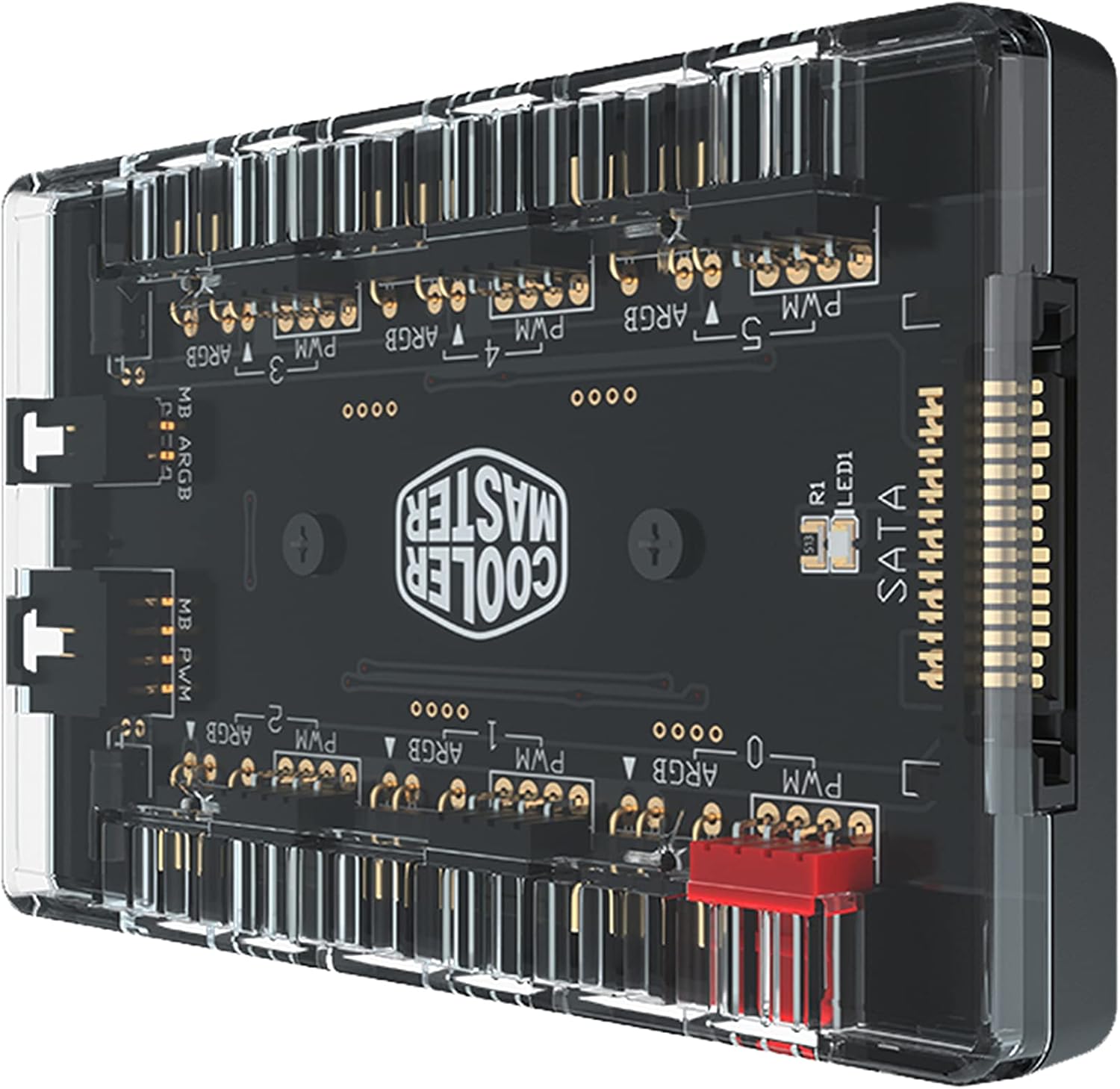
Rasm 2: Burchakli view of the hub, highlighting the SATA power input connector on the side.
3.4 Connecting PWM Fans
Connect your 4-pin PWM fans to the designated PWM headers (labeled PWM 0-5) on the hub. Ensure the connectors are oriented correctly.
3.5 Connecting Addressable RGB Devices
Connect your 3-pin Addressable RGB devices (e.g., ARGB fans, LED strips) to the designated ARGB headers (labeled ARGB 0-5) on the hub. Pay close attention to the pin orientation to avoid damage. Incorrect connection can damage the ARGB device or the hub.
3.6 Motherboard Synchronization (Optional)
If you wish to synchronize the ARGB lighting and PWM fan control with your motherboard's software, connect the included motherboard ARGB sync cable to the 'MB ARGB' header on the hub and to a compatible 3-pin ARGB header on your motherboard. Similarly, connect the 'MB PWM' header on the hub to a 4-pin PWM fan header on your motherboard for fan speed control.
4. Operatsiya
Once the hub is installed and connected, the connected PWM fans and ARGB devices will receive power. If connected to your motherboard, control of fan speeds and ARGB lighting effects will be managed through your motherboard's proprietary software (e.g., ASUS Aura Sync, MSI Mystic Light Sync, Gigabyte RGB Fusion, ASRock Polychrome Sync). Refer to your motherboard's manual for specific software instructions.
Note that this hub provides multiple ports for expansion but typically synchronizes all connected devices to a single control signal from the motherboard. Individual control of each fan or ARGB device may depend on the capabilities of your motherboard and its software.
5. Xizmat ko'rsatish
The Cooler Master ARGB & PWM Hub requires minimal maintenance. Periodically, ensure all cable connections are secure and free from dust buildup. Use a soft, dry cloth to gently clean the hub's exterior if necessary. Do not use liquid cleaners or abrasive materials.
6. Muammolarni bartaraf qilish; nosozliklarni TUZATISH
- No Power to Fans/ARGB Devices: Ensure the SATA power cable is securely connected to both the hub and your power supply. Check that your PSU is powered on.
- ARGB Yoritish Ishlamayapti: Verify that the 3-pin ARGB connectors are correctly oriented and fully seated. Ensure the motherboard ARGB sync cable (if used) is properly connected to both the hub and the motherboard. Check your motherboard's ARGB software settings.
- Fans Not Spinning or Incorrect Speed: Confirm that the 4-pin PWM fan connectors are correctly attached. If using motherboard control, ensure the motherboard PWM sync cable is connected and check fan speed settings in your motherboard's BIOS or software.
- ARGB Connector Fit Issues: Some third-party ARGB connectors may have slightly different dimensions. Ensure your connectors are compatible with standard 3-pin ARGB headers. Do not force connectors, as this can cause damage.
- Hub Not Detected by Software: Ensure the motherboard sync cables are correctly connected. Restart your system and check your motherboard's software for device detection.
7. Texnik shartlar
| Atribut | Qiymat |
|---|---|
| Mahsulot o'lchamlari | 1.73"L x 0.98"W x 0.59"Y |
| Brend | Sovutgich ustasi |
| Quvvat ulagichining turi | SATA |
| jildtage | 12 volt |
| Wattage | 260 vatt |
| Sovutish usuli | Muxlis |
| Mos qurilmalar | Ish stoli |
| Material | Metall |
| UPC | 884102066849 |
| Ishlab chiqaruvchi | Cooler Master Europe BV |
| Elementlar soni | 1 |
| Seriya | ARGB & PWM HUB 1 to 6 Port |
| Element model raqami | MFX-ZHHN-1NNN6-R1 |
| Element og'irligi | 2.19 untsiya |
| Rang | ARGB |

Image 3: The hub shown with its physical dimensions: 1.73 inches (length), 0.98 inches (width), and 0.59 inches (height).
8. Mahsulot videolari
8.1 Mahsulot tugadiview Video
Video 1: Rasmiy mahsulot tugadiview video demonstrating the Cooler Master ARGB & PWM Hub's features and design.
9. Kafolat va qo'llab-quvvatlash
This product is covered by Cooler Master's standard manufacturer warranty. For detailed warranty information, please refer to the official Cooler Master website or the warranty card included with your product. For technical support, troubleshooting assistance, or to inquire about replacement parts, please contact Cooler Master customer service through their official support channels.
Always ensure you are using genuine Cooler Master accessories and following recommended installation procedures to maintain warranty validity.


