1. Kirish
Sinopé TH1310WF Smart Wi-Fi termostatini tanlaganingiz uchun tashakkur. Ushbu qurilma sizning pol isitish tizimingizni aniq va samarali boshqarish, qulaylik va energiya tejashni oshirish uchun mo'ljallangan. U turli xil aqlli uy platformalari bilan uzluksiz integratsiyalashgan bo'lib, mobil ilovalar va ovozli buyruqlar orqali qulay boshqaruvni taklif etadi.
Ushbu qo'llanmada TH1310WF termostatingizni o'rnatish, ishlatish va texnik xizmat ko'rsatish bo'yicha batafsil ko'rsatmalar berilgan. O'rnatishdan oldin uni diqqat bilan o'qib chiqing va kelajakda foydalanish uchun saqlang.

1-rasm: Sinopé TH1310WF Smart Wi-Fi termostati
Rasmda vaqt, ichki harorat va tashqi haroratni ko'rsatuvchi qora raqamli displeyga ega oq to'rtburchaklar qurilma bo'lgan Sinopé TH1310WF termostatining old qismi ko'rsatilgan. Ekran ostida Sinopé logotipi va ikkita dumaloq tugma ko'rinadi.
2. Xavfsizlik ma'lumotlari
OGOHLANTIRISH: Elektr toki urishi xavfi. Ushbu mahsulot malakali elektrik tomonidan mahalliy va milliy elektr qoidalariga muvofiq o'rnatilishi kerak. O'rnatishdan yoki har qanday texnik xizmat ko'rsatishdan oldin avtomatik o'chirgichdagi elektrni uzing.
- Har qanday simlarni ulashdan oldin elektr ta'minoti O'CHIQ ekanligiga ishonch hosil qiling.
- Termostatni nam qo'llar bilan yoki nam sirtlarda turgan holda o'rnatmang.
- Ushbu termostat faqat bino ichida foydalanish uchun mo'ljallangan.
- Termostatning hajmini tekshiringtage va vattage reytinglari isitish tizimingiz talablariga mos keladi (240V, maksimal 3600 Vt).
3. Mahsulot tugadiview
3.1 Asosiy xususiyatlar
- Hub talab qilinmaydi: Wi-Fi tarmog'ingizga to'g'ridan-to'g'ri ulanadi.
- Isitish tizimining polga o'rnatilishiga mosligi: Isitish kabellari va isitish kabellari gilamchalari bilan ishlaydi. 15 futlik pol sensorini o'z ichiga oladi.
- Yordamchi chiqish: Yordamchi isitish tizimini boshqarish yoki 15 A dan yuqori tizimlar uchun 10 tagacha kengaytirish moslamasini (TR1310) ulash uchun ikkinchi chiqishga ega.
- Aqlli uy integratsiyasi: Apple HomeKit, Amazon Alexa, Google Home va Nevi bilan mos keladiweb.
- Neviweb Ilova: Avtomatlashtirish, sahnalar, geofensingatsiya va real vaqt rejimida energiya hisobotlari kabi ilg'or xususiyatlarni taklif etadi.

2-rasm: Aqlli uy platformasi mosligi
Ushbu rasmda Sinopé TH1310WF termostatini mos keladigan aqlli uy platformalarining logotiplari bilan birga ko'rish mumkin: Neviweb, SmartThings, Apple HomeKit, Amazon Alexa va Google Home kabi koʻp qirrali integratsiya imkoniyatlarini taʼkidlab.
3.2 ta komponent
- TH1310WF termostat bloki
- 15 futlik pol sensori
- O'rnatish vintlari
4. Sozlash
4.1 O'rnatish va simlarni ulash
TH1310WF termostatini o'rnatish elektr simlarini ulashni o'z ichiga oladi va faqat malakali elektrik tomonidan bajarilishi kerak. Har qanday simlarni ulashni boshlashdan oldin, asosiy o'chirgichda elektr uzilganligiga ishonch hosil qiling.
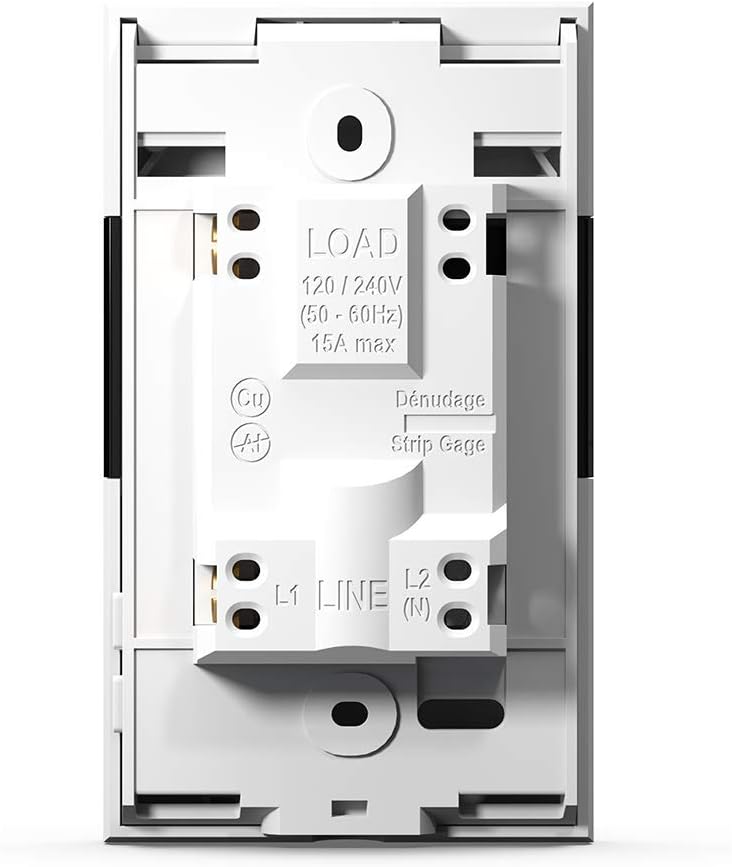
Termostat 240V AC quvvat manbai uchun mo'ljallangan va 3600 vattgacha quvvatni ishlata oladi. Isitish kabellari yoki gilamchalarini LOAD terminallariga va quvvat manbaini LINE terminallariga ulang. Zamin haroratini aniq o'lchash uchun isitish gilamchasi hududiga pol sensori o'rnatilishi kerak.

3-rasm: Termostat simlari terminallari
Ushbu rasmda Sinopé TH1310WF termostatining orqa tomoni ko'rsatilgan bo'lib, LOAD (120/240V, maksimal 15A) va LINE (L1, L2(N)) sim terminallarini ajratib ko'rsatadi. Simlarni to'g'ri tayyorlash uchun tasma o'lchagich ham ko'rinadi.

4-rasm: Termostatning orqa paneli va sensor portlari
Rasmda Sinopé TH1310WF termostatining orqa paneli ko'rsatilgan bo'lib, unda tartibga soluvchi ma'lumotlar (FCC, IC, cETLus sertifikati) va yordamchi (Aux 1, Aux 2) va sensor (Sonde) ulanish portlari ko'rsatilgan.
4.2 Dastlabki konfiguratsiya va Wi-Fi ulanishi
Jismoniy o'rnatishdan so'ng, termostatni yoqing. Sana, vaqt va dastlabki ish rejimini o'rnatish uchun ekrandagi ko'rsatmalarga amal qiling. Aqlli funksiyalarni yoqish uchun termostatni Wi-Fi tarmog'ingizga ulang.
- Nevi yuklab olingweb smartfoningizning ilovalar do'konidan ilova (iOS va Android uchun mavjud).
- Nevi yaratingweb hisob qaydnomangiz yoki agar sizda allaqachon mavjud bo'lsa, tizimga kiring.
- Yangi TH1310WF termostatingizni hisobingizga qo'shish uchun ilova ichidagi ko'rsatmalarga amal qiling. Bu odatda termostatni juftlashtirish rejimiga o'tkazish va uni uyingizdagi Wi-Fi tarmog'iga ulashni o'z ichiga oladi.
5. Operatsiya
5.1 Qurilmadagi asosiy boshqaruv
Termostat aniq LCD displey va asosiy boshqaruv uchun ikkita jismoniy tugmaga ega. Siz belgilangan haroratni sozlashingiz, ish rejimlari o'rtasida almashishingiz (masalan, Qo'lda, Dasturiy) va view joriy harorat ko'rsatkichlari to'g'ridan-to'g'ri qurilmada.
5.2 Neviweb Ilovani boshqarish
Neviweb ilova termostatingiz uchun keng qamrovli boshqaruv va ilg'or xususiyatlarni taqdim etadi:
- Masofadan boshqarish: Sozlamalarni istalgan joydan sozlang.
- Rejalashtirish: Kun va haftaning turli vaqtlari uchun maxsus isitish jadvallarini yarating.
- Avtomatlashtirishlar: Jadvallar yoki boshqa hodisalar asosida triggerlar va harakatlarni o'rnating.
- Sahnalar: Shaxsiylashtirilgan muhitni bitta teginish bilan faollashtiring.
- Geofizka: Uyga yaqinligingizga qarab isitishni avtomatik ravishda sozlang.
- Energiya hisobotlari: Energiya sarfi va tejashingizni real vaqt rejimida kuzatib boring.
- Ko'p joylashuvni boshqarish: Bitta hisobdan bir nechta mulkdagi termostatlarni boshqaring.

5-rasm: Nevuslarweb Ilova qurilmalari ro'yxati
Ushbu rasmda Nevi ko'rsatilgan smartfon ekrani ko'rsatilganweb foydalanuvchilarga o'zlarining aqlli uy ekotizimini boshqarish imkonini beruvchi turli xil ulangan aqlli qurilmalar va ularning joriy holatini ro'yxatlaydigan ilova interfeysi.

6-rasm: Nevuslarweb Ilovalarni ko'p joylashuvda boshqarish
Rasmda Nevi bilan smartfon ekrani ko'rsatilganweb Ilova "Joylashuvlar" bo'limida ochiladi, unda "Uy", "Kvartira" va boshqa mulklar uchun piktogrammalar ko'rsatiladi, bu bitta hisobdan bir nechta joylashuvni boshqarish imkoniyatini ko'rsatadi.
7-rasm: Nevuslarweb Ilova energiyasi hisoboti
Ushbu rasmda Nevi ko'rsatilgan smartfon ko'rsatilganweb Ilovaning energiya hisoboti funksiyasi foydalanuvchilarga energiya tejashni kuzatib borish imkonini beruvchi vaqt o'tishi bilan (24 soat, 30 kun, 24 oy) energiya sarfi va taxminiy xarajatlarning grafik ko'rinishini taqdim etadi.
5.3 Ovozli boshqaruv
TH1310WF termostatini mos keladigan aqlli yordamchilar orqali ovozli buyruqlar yordamida boshqarish mumkin:
- Amazon Alexa: "Alexa, mehmonxona termostatini 72 darajaga qo'ying."
- Google Home: "Hey Google, oshxonada harorat qancha?"
- Apple HomeKit: HomeKit-ga qo'shilgandan so'ng, termostatingizni boshqarish uchun Siri-dan foydalaning.

8-rasm: Ovozli yordamchi integratsiyasi
Rasmda oshxona javonida Amazon Echo Dot aqlli karnayi tasvirlangan bo'lib, unda foydalanuvchilar mos keladigan ovozli yordamchilar orqali ovozli buyruqlar yordamida termostat bilan qanday ishlashlari mumkinligi ko'rsatilgan.
6. Xizmat ko'rsatish
Sinopé TH1310WF termostatiga minimal texnik xizmat ko'rsatish talab etiladi. Qurilmani yumshoq, quruq mato bilan artib, toza tuting. Abraziv tozalagichlar yoki erituvchilardan foydalanmang. To'g'ri ishlashini ta'minlash uchun shamollatish teshiklarining chang to'planmasligiga ishonch hosil qiling.
Termostat ichida foydalanuvchi tomonidan ta'mirlanadigan qismlar yo'q. Har qanday ta'mirlash ishlari malakali mutaxassislar tomonidan amalga oshirilishi kerak.
7. Muammolarni bartaraf qilish; nosozliklarni TUZATISH
| Muammo | Mumkin sabab | Yechim |
|---|---|---|
| Termostat ekrani bo'sh. | Elektr ta'minoti yo'q. | O'chirgichni tekshiring. Simlarning to'g'ri ulanishini ta'minlang. |
| Wi-Fi tarmog‘iga ulanib bo‘lmadi. | Noto'g'ri Wi-Fi paroli; Termostat routerdan juda uzoqda; Router bilan bog'liq muammolar. | Wi-Fi parolini tasdiqlang. Termostatni routerga yaqinroq joylashtiring yoki Wi-Fi kengaytirgichidan foydalaning. Routerni qayta ishga tushiring. |
| Isitish tizimi javob bermayapti. | Termostat OFF rejimida; Simlar bilan bog'liq muammo; Isitish tizimining nosozligi. | Termostat rejimini tekshiring. Simlarni tekshiring. Malakali elektrik yoki HVAC mutaxassisi bilan maslahatlashing. |
| Noto'g'ri harorat ko'rsatkichi. | Zamin sensori to'g'ri o'rnatilmagan yoki shikastlangan. | Zamin sensori isitish gilamchasiga to'g'ri joylashtirilganligiga ishonch hosil qiling. Sensorning shikastlanishini tekshiring. |
8. Texnik shartlar
| Xususiyat | Spetsifikatsiya |
|---|---|
| Model raqami | TH1310WF |
| jildtage | 240 volt |
| Wattage | 3600 vatt |
| Hozirgi | Maksimal 15A |
| Ulanish | Wi-fi |
| Nazoratchi turi | Amazon Alexa, Apple HomeKit, Google Assistant, Neviweb |
| Harorat diapazoni | 41 dan 97 darajagacha Farengeyt |
| Kiritilgan komponentlar | Zamin sensori - 15 fut |
| O'lchamlari | 4.8 x 2.83 x 1.02 dyuym |
| Element og'irligi | 13 untsiya |
| Material | Plastik |
| Displey turi | LCD |
| O'rnatish turi | Devorga o'rnatish |
9. Kafolat va qo'llab-quvvatlash
9.1 Kafolat haqida ma'lumot
Sinopé TH1310WF Smart Wi-Fi termostatiga quyidagilar kiradi: 3 yillik ishlab chiqaruvchi kafolati sotib olingan kundan boshlab. Ushbu kafolat normal foydalanish paytida materiallar va ishlov berishdagi nuqsonlarni qoplaydi. Noto'g'ri o'rnatish, baxtsiz hodisa, noto'g'ri foydalanish, suiiste'mol qilish yoki ruxsatsiz o'zgartirishlar natijasida kelib chiqqan zararni qoplamaydi.
Iltimos, kafolat da'volari uchun sotib olinganligingizni tasdiqlovchi hujjatingizni saqlab qo'ying.
9.2 Mijozlarni qo‘llab-quvvatlash
Texnik yordam, muammolarni bartaraf etish yoki kafolat bo'yicha savollar uchun Sinopé Technologies mijozlarni qo'llab-quvvatlash xizmatiga murojaat qiling:
- Websayt: www.sinopetech.com
- Email: support@sinopetech.com
- Telefon: Rasmiy Sinopé saytidagi aloqa bo'limiga qarang webmintaqaviy telefon raqamlari uchun sayt.
Qo'llab-quvvatlash xizmatiga murojaat qilganingizda, iltimos, mahsulot modelingiz raqamini (TH1310WF) va sotib olingan sanani ko'rsating.


