Kirish
This manual provides instructions for the operation and maintenance of your WIITHINK Portable CD Boombox, model WTB771. This device features multiple audio playback options including CD, FM radio, Bluetooth, USB, and AUX input, designed for versatile use.

Rasm: old view of the WIITHINK Portable CD Boombox WTB771, black color, showing the display, control buttons, speakers, and handle.
Paket tarkibi
- 1 x WIITHINK Portable CD Radio Boombox (WTB771)
- 1 x quvvat kabeli
- 1 x AUX liniyasi
- 1 x foydalanuvchi qo'llanmasi
- 1 x masofadan boshqarish pulti
Sozlash; o'rnatish
Quvvatlantirish manbai
The boombox can be powered by AC power or batteries.
- AC quvvati: Connect the provided power cable to the AC port on the back of the unit and plug it into a standard wall outlet (AC voltage: 220V / 50Hz, 110V / 60Hz).
- Batareya quvvati: For portable use, insert 4 C-sized batteries (not included) into the battery compartment located on the bottom of the unit. Ensure correct polarity.
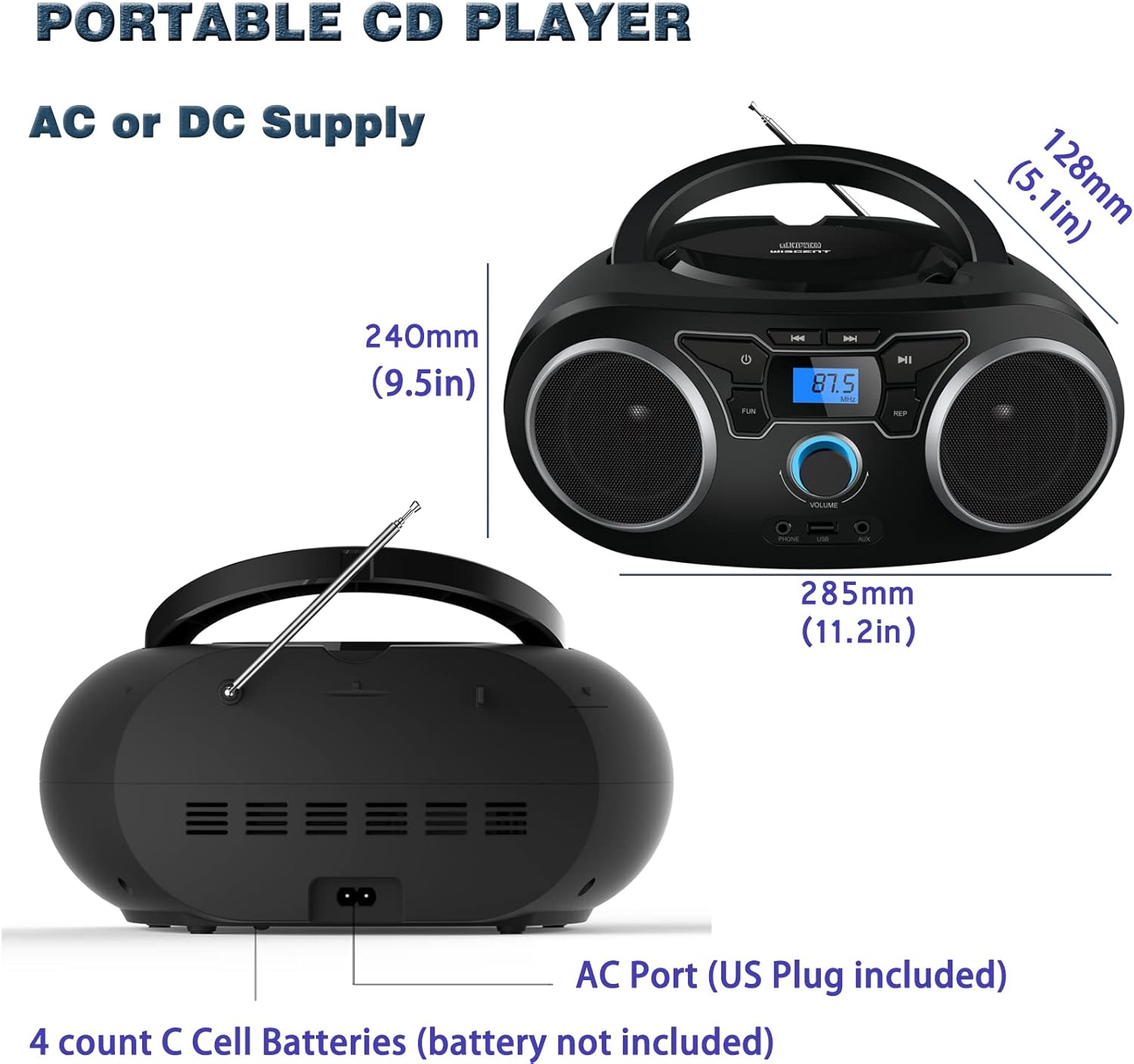
Rasm: orqa view of the boombox, highlighting the AC power port and the battery compartment for 4 C-sized batteries.
Foydalanish bo'yicha ko'rsatmalar
Umumiy boshqaruv
The unit features a digital LCD screen and various control buttons and knobs. The main volume control is a rotary knob on the front. A remote control is also included for convenient operation.

Rasm: yuqoridan pastga view of the boombox, showing the CD compartment, control buttons, and volume knob.
1. CDni tinglash
- Jihozning yuqori qismida joylashgan CD bo'linmasining qopqog'ini oching.
- Place a CD (CD, CD-R, CD-RW, MP3-CD) onto the spindle with the label side facing up.
- CD bo'linmasining qopqog'ini yoping.
- ni bosing REJIM CD rejimini tanlash uchun tugmani bosing.
- ni bosing O‘YNAT/TO‘XTATISH ijroni boshlash uchun tugma.
- dan foydalaning O'tkazib yuborish / qidirish treklar orasida harakatlanish uchun tugmalar.
- The TAKrorlash button allows for repeating a single track or all tracks.
- The DASTUR function allows you to create a custom playback order for tracks.
The boombox supports MP3 and WMA audio formats on compatible discs.
2. FM radiosi bilan ishlash
- Optimal qabul qilish uchun teleskopik antennani kengaytiring.
- ni bosing REJIM FM Radio rejimini tanlash uchun tugmasini bosing.
- Stansiyalarni avtomatik skanerlash va saqlash uchun tugmasini bosib ushlab turing SCAN button. The unit will automatically search for and store up to 30 FM stations.
- Qo'lda sozlash uchun dan foydalaning TUNING tugma yoki O'tkazib yuborish / qidirish buttons to find desired frequencies.
- dan foydalaning PRESS tugmalar saqlangan stantsiyalar bo'ylab harakatlanish uchun.
Video: A user demonstrating the FM radio tuning function on the WIITHINK Portable CD Boombox WTB771, showing the digital display changing frequencies.
3. Bluetooth ulanishi
- ni bosing REJIM button to select Bluetooth mode. The display will indicate "BT" and the unit will enter pairing mode.
- On your Bluetooth-enabled device (e.g., smartphone, tablet), search for available devices and select "WTB771".
- Ulangandan so'ng, siz qurilmangizdan boomboxga simsiz ravishda audio uzatishingiz mumkin.
Video: qisqacha ma'lumotview demonstrating Bluetooth connectivity, showing a smartphone wirelessly connected to the boombox.
4. USB orqali ijro etish
- MP3 o'z ichiga olgan USB flesh-diskini joylashtiring files qurilmaning old qismidagi USB portiga kiriting.
- ni bosing REJIM USB rejimini tanlash uchun tugmani bosing.
- Qurilma avtomatik ravishda MP3 ni aniqlaydi va ijro etishni boshlaydi files USB diskidan.
- Use the playback controls (PLAY/PAUSE, SKIP/SEARCH) to manage your music.
5. AUX usuli
- Connect an external audio device (e.g., MP3 player, laptop) to the AUX input jack on the front of the unit using the provided 3.5mm AUX cable.
- ni bosing REJIM AUX rejimini tanlash uchun tugmani bosing.
- Audio from the connected device will now play through the boombox speakers. Control playback from your external device.
Boshqaruv va portlar tugadiview
| Xususiyat | Tavsif |
|---|---|
| Quvvat tugmasi | Jihozni yoqadi/o'chiradi. |
| MODE tugmasi | CD, FM, Bluetooth, USB va AUX rejimlari o'rtasida almashinadi. |
| Ovoz balandligi tugmasi | Adjusts the audio output level (up to 32 levels). |
| PLAY/PAUSE tugmasi | Starts or pauses playback in CD, USB, and Bluetooth modes. |
| SKIP/SEARCH tugmalari | Navigates tracks in CD/USB mode; tunes frequencies in FM mode. |
| REPEAT tugmasi | Repeats current track or all tracks in CD/USB mode. |
| PROGRAM tugmasi | Sets a custom playback order for CD/USB tracks. |
| FM antenna | FM radio qabul qilish uchun teleskopik antenna. |
| USB port | Connects USB flash drives for MP3 playback. |
| AUX kirish uyasi | Tashqi audio qurilmalarni ulash uchun 3.5 mm kirish. |
| Eshitish vositasi uyasi | Shaxsiy tinglash uchun 3.5 mm chiqish. |
| Masofadan boshqarish | Provides wireless control over all functions. |

Image: Close-up of the front panel, showing the USB port, AUX input, and headphone jack.
Xizmat
- Jihozni yumshoq, quruq mato bilan tozalang. Abraziv tozalash vositalarini yoki erituvchilarni ishlatmang.
- CD bo'linmasini toza va changsiz saqlang.
- Jihozni haddan tashqari harorat, namlik yoki to'g'ridan-to'g'ri quyosh nuriga ta'sir qilishdan saqlaning.
- When not in use for extended periods, remove batteries and unplug the AC power cable.
Muammolarni bartaraf qilish; nosozliklarni TUZATISH
| Muammo | Yechim |
|---|---|
| Quvvat yo'q |
|
| Ovoz yo'q |
|
| CD o'tkazib yuborilmoqda/o'ynatilmayapti |
|
| Yomon FM qabul qilish |
|
| Bluetooth bilan ulanish muammolari |
|
Texnik xususiyatlari
- Model: WTB 771
- Mahsulot o'lchamlari: 7 x 10 x 4.8 dyuym (17.8 x 25.4 x 12.2 sm)
- Mahsulot og'irligi: 2.64 funt (1.2 kg)
- Chiqish quvvati: 2 x 2 Vt RMS
- Ulanish: Yordamchi, Bluetooth, USB
- Karnay turi: Oʻrnatilgan
- Quvvatlantirish manbai: AC (220V/50Hz, 110V/60Hz) or 4 x C batteries (not included)
- Qo'llab-quvvatlanadigan disk turlari: CD, CD-R, CD-RW, MP3-CD
- Qo'llab-quvvatlanadigan audio formatlari: MP3, WMA
- FM radio sozlamalari: Up to 30 stations
Kafolat va qo'llab-quvvatlash
WIITHINK offers an 18-month after-sales service for this product. For any inquiries or technical support, please contact WIITHINK customer service through your purchase platform. Lifetime technical support is provided.
For further assistance, you may refer to the "Your Orders" section on Amazon, locate your order, and contact "WIITHINK Direct".
Image: Graphic illustrating WIITHINK's customer support, including 18-month replacement and lifetime technical support.
