1. Kirish
The D-Link DGS-105GL is a 5-Port Gigabit Unmanaged Desktop Switch designed to provide a simple and efficient solution for expanding network connectivity in small office/home office (SOHO) and small to medium-sized business (SMB) environments. This device offers plug-and-play functionality, requiring no complex configuration. Its fanless design ensures silent operation, and the metal housing provides durability. The DGS-105GL incorporates energy-efficient features, including IEEE 802.3az Energy-Efficient Ethernet, to reduce power consumption without compromising performance.
2. Paket tarkibi
Paketingizda quyidagi elementlar mavjudligiga ishonch hosil qiling:
- D-Link DGS-105GL 5-Port Gigabit Unmanaged Desktop Switch
- Quvvat adapteri
If any items are missing or damaged, please contact your local D-Link reseller.
3. Mahsulot tugadiview
The DGS-105GL switch features a compact, low-profile design with a durable metal housing. It is equipped with five Gigabit Ethernet ports for high-speed network connections.
3.1 Old panel

Rasm: old view of the D-Link DGS-105GL switch, showing the D-Link logo, model number DGS-105GL, a power LED, five port status LEDs (1-5), and five RJ45 Gigabit Ethernet ports (1-5).
The front panel includes the following indicators and ports:
- Quvvat LED: Kalitning quvvat holatini ko'rsatadi.
- Port LEDlari (1-5): Each port has an LED that indicates link status and activity. A solid light indicates a successful connection, and a blinking light indicates data transmission.
- RJ45 Gigabit Ethernet Ports (1-5): These ports are used to connect network devices such as computers, servers, and other switches.
3.2 Orqa panel

Rasm: orqa view of the D-Link DGS-105GL switch, showing the power input port labeled '5V --- 1A'.
The rear panel contains the power input port, where the included power adapter is connected.
4. Sozlash
The DGS-105GL is a plug-and-play device, making installation straightforward. Follow these steps to set up your switch:
- Quvvat adapterini ulang: Plug the included power adapter into the power input port on the rear panel of the DGS-105GL switch. Then, plug the other end of the adapter into a standard electrical outlet. The Power LED on the front panel should illuminate.
- Tarmoq qurilmalarini ulang: Connect your network devices (e.g., computers, network-attached storage, routers) to any of the five RJ45 Gigabit Ethernet ports on the front panel using standard Ethernet cables.
- Ulanishlarni tekshirish: Once a device is connected and powered on, the corresponding Port LED on the switch's front panel should light up, indicating a successful link. If there is network activity, the LED will blink.

Image: The D-Link DGS-105GL switch placed on a desk in an office setting, connected to a laptop and other peripherals, demonstrating a typical setup.
5. Kommutatorni ishlatish
The DGS-105GL operates automatically once connected. It supports auto-negotiation for speed and duplex mode, and auto-MDI/MDIX, eliminating the need for crossover cables. The switch automatically detects the speed of the connected device (10/100/1000 Mbps) and adjusts accordingly.
5.1 LED ko'rsatkichlari
The LEDs provide visual feedback on the switch's status:
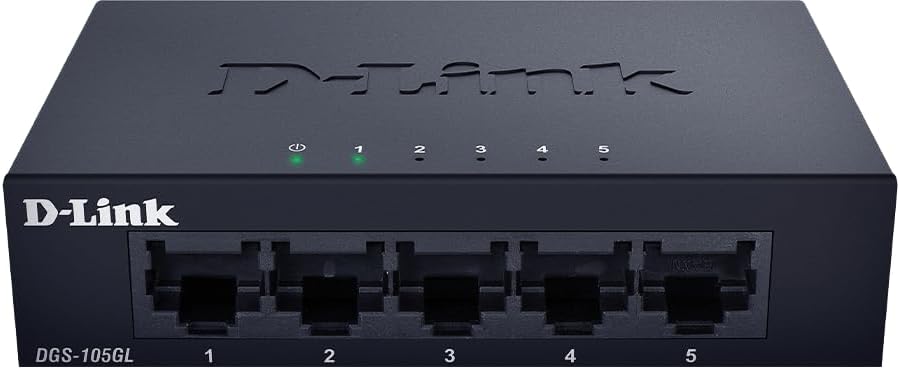
Rasm: old view of the D-Link DGS-105GL switch with the green power LED and green port LEDs 1-5 illuminated, indicating active connections.
| LED | Status | Tavsif |
|---|---|---|
| Quvvat | Qattiq yashil | Kalit yoqilgan. |
| Quvvat | Oʻchirilgan | Kalit quvvat olmayapti. |
| Port (1-5) | Qattiq yashil | A device is successfully connected to the port. |
| Port (1-5) | Miltillovchi yashil | Data is being transmitted or received through the port. |
| Port (1-5) | Oʻchirilgan | Portga hech qanday qurilma ulanmagan yoki ulangan qurilma o‘chirilgan. |
6. Xizmat ko'rsatish
To ensure optimal performance and longevity of your DGS-105GL switch, consider the following maintenance guidelines:
- Tozalash: Periodically clean the exterior of the switch with a soft, dry cloth. Avoid using liquid or aerosol cleaners directly on the device.
- Atrof-muhit sharoitlari: Ensure the switch is placed in a well-ventilated area, away from direct sunlight, heat sources, and excessive moisture. Maintain operating temperatures within the specified range (refer to specifications).
- Kabelni boshqarish: Keep network cables neatly organized to prevent strain on ports and improve airflow around the device.
- Quvvatli velosiped: If you experience network issues, a simple power cycle (unplugging the power adapter, waiting 10 seconds, and plugging it back in) can often resolve minor problems.
7. Muammolarni bartaraf qilish; nosozliklarni TUZATISH
If you encounter issues with your DGS-105GL switch, refer to the following common troubleshooting steps:
- LED quvvat yo'q:
- Quvvat adapterining ham kalitga, ham ishlaydigan elektr rozetkasiga mahkam ulanganligiga ishonch hosil qiling.
- Elektr rozetkasining ishlashini boshqa qurilmaga ulash orqali tekshiring.
- No Link LED for a Connected Device:
- Ethernet kabeli kommutator portiga ham, tarmoq qurilmasiga ham mahkam ulanganligini tekshiring.
- Ulangan tarmoq qurilmasi yoqilganligiga va toʻgʻri ishlashiga ishonch hosil qiling.
- Noto'g'ri kabelni istisno qilish uchun boshqa Ethernet kabelini sinab ko'ring.
- Qurilmani kalitdagi boshqa portga ulashga harakat qiling.
- Sekin tarmoq tezligi:
- Ensure all connected devices and cables support Gigabit Ethernet (Cat5e or higher).
- Check for excessive network traffic or bandwidth-intensive applications running on connected devices.
- Perform a power cycle on the switch and connected devices.
8. Texnik shartlar
Key technical specifications for the D-Link DGS-105GL switch:
| Xususiyat | Spetsifikatsiya |
|---|---|
| Model raqami | DGS-105GL |
| Portlar soni | 5 x Gigabit Ethernet (RJ45) |
| Ma'lumot uzatish tezligi | 1 Gbps per port |
| Interfeys turi | RJ45 |
| Ish materiali | Metall |
| Fanatsiz dizayn | Ha |
| Energiya samaradorligi | IEEE 802.3az energiya tejamkor Ethernet (EEE) |
| Quvvat kiritish | 5 Volts (DC), 1 Amps |
| Element og'irligi | 160 gramm (5.6 untsiya) |
| Mahsulot o'lchamlari | 39.37"U x 25.2"W x 0.94"Y (taxminan) |
| UPC | 790069458606 |
9. Kafolat va texnik yordam
D-Link products are backed by a limited warranty. For specific warranty terms and conditions, please refer to the warranty information included with your product or visit the official D-Link websayt.
For technical assistance, product documentation, or to download the latest software and firmware updates, please visit the D-Link support portal or contact D-Link technical support directly. Contact information can typically be found on the D-Link webmintaqangiz uchun sayt.


