Mahsulot tugadiview

Image: The LTC SS-503 TWS Wireless Earbuds shown with their charging case, highlighting the sleek white design and RGB lighting on the case.
The LTC SS-503 TWS Wireless Earbuds are designed for an immersive audio experience, featuring Bluetooth 5.1 connectivity, dual music and gaming modes, and a distinctive RGB light charging case. They are built for comfort and durability, with an IPX4 waterproof rating suitable for various activities.
Asosiy xususiyatlar:
- Cool RGB Light: Customizable lighting modes on the charging case.
- IPX4 suv o'tkazmaydigan: Resistant to splashes and sweat, ideal for workouts.
- Quick Charging & Long Playtime: Fast charging via USB-C or wireless, with extended battery life.
- Bluetooth 5.1 & Low Latency: Stable connection and minimal audio delay.
- Dual Mode (Music & Gaming): Optimallashtirilgan ovoz profiles for different uses.
- HiFi Stereo Ovoz: Delivers clear audio with deep bass and crisp treble.
- Simply Pairing & Touch Controls: Easy device connection and intuitive touch-sensitive controls.
Sozlash; o'rnatish
1. Qutida nima bor
Upon unboxing, ensure the following components are present:
- LTC SS-503 TWS Wireless Earbuds (Left and Right)
- Simsiz zaryadlash qutisi
- USB-C zaryadlovchi kabeli
- Foydalanuvchi uchun qo'llanma (ushbu hujjat)
2. Dastlabki zaryadlash
Birinchi marta ishlatishdan oldin quloqchinlarni va zaryadlash qutisini to'liq zaryadlang.

Image: The charging case demonstrating both USB-C cable charging and wireless charging capabilities.
- USB-C kabeli orqali: Connect the provided USB-C cable to the charging case and a power source. The charging case will indicate charging status.
- Simsiz zaryadlash: Place the charging case on a compatible wireless charging pad. Ensure the case is properly aligned for efficient charging.
- Zaryadlash vaqti: The charging case takes approximately 1.5 hours to fully charge. Earbuds charge when placed inside the case.
Note: Wireless charging devices with fast charging functions may adversely affect the charging case. Avoid using such devices to charge the case.
3. Qurilmangiz bilan ulash
The earbuds support hassle-free pairing with iOS/Android phones, Mac, or Windows laptops.

Image: A smartphone displaying Bluetooth settings, showing the "SS-503" earbuds available for connection, with the charging case open beside it.
- Birinchi marta ulanish:
- Zaryadlash qutisini oching. Quloqliklar avtomatik ravishda yoqiladi va ulanish rejimiga kiradi.
- Qurilmangizda (smartfon, planshet, noutbuk) Bluetooth-ni yoqing va mavjud qurilmalarni qidiring.
- Select "SS-503" from the list of found devices to connect.
- Ulangandan so'ng, ovozli so'rov muvaffaqiyatli ulanishni tasdiqlaydi.
- Boshqa qurilmalarga ulanish:
- To connect to a new device or reset pairing, open the earbud compartment without removing the earbuds.
- Press and hold the function key (MFB) in the middle of the charging case for approximately 5 seconds until both earbud indicators light up simultaneously. This indicates a successful reset.
- When the earbud indicators begin single blinking, the headset is in pairing state and ready to connect to a new device.
Foydalanish bo'yicha ko'rsatmalar
1. Quvvatni yoqish/o‘chirish
- Yoqilgan: Zaryadlash qutisini oching, shunda quloqchinlar avtomatik ravishda yoqiladi va oxirgi ulangan qurilmaga ulanadi.
- O'chirish: Quloqchalarni qayta zaryadlash qutisiga joylashtiring va qopqog'ini yoping. Ular avtomatik ravishda o'chadi va zaryadlashni boshlaydi.
2. Boshqaruvni bosing
The earbuds feature intuitive touch controls on both the left and right earbuds (MFB - Multi-Function Button).
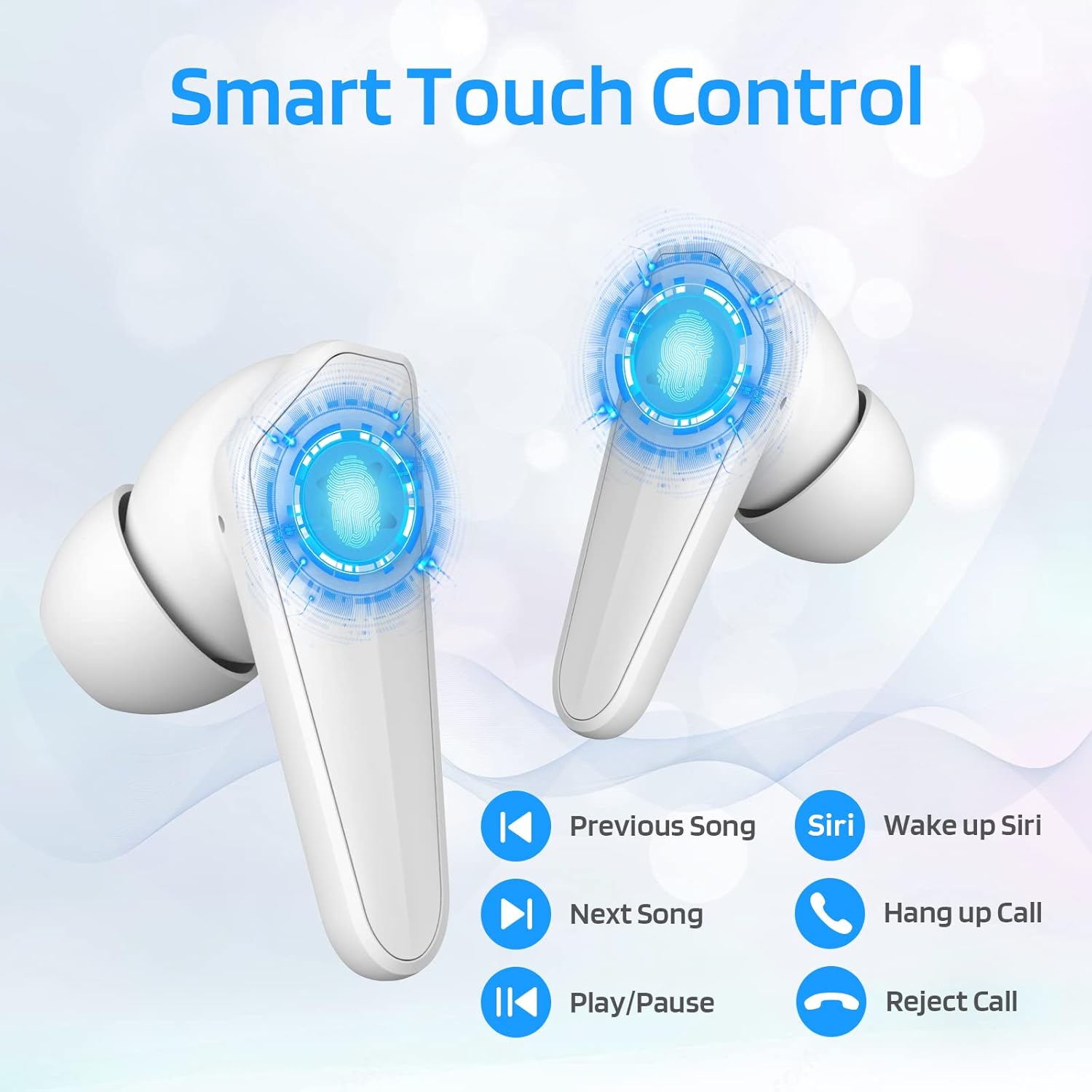
Image: Diagram illustrating the touch control functions on the earbuds, including play/pause, track navigation, call management, and voice assistant activation.
| Funktsiya | Harakat |
|---|---|
| Oʻynatish/toʻxtatib turish | Ikkala quloqchinga bir marta teging. |
| Keyingi qo'shiq | O‘ng quloqchinni ikki marta bosing. |
| Oldingi qo'shiq | Chap quloqchinni ikki marta bosing. |
| Qo'ng'iroqqa javob berish/tugatish | Ikkala quloqchinga bir marta teging. |
| Qo'ng'iroqni rad qilish | Ikkala quloqchinni ham 2 soniya bosib turing. |
| Activate Voice Assistant (Siri/Google) | Chap quloqchinni uch marta bosing. |
3. Dual Mode Switching (Music/Gaming)
The LTC SS-503 earbuds offer two distinct audio modes for optimized performance.

Image: A smartphone screen displaying both music playback and a gaming interface, with icons indicating "Music Mode" and "Gaming Mode" for the earbuds.
- Kommutatsiya rejimlari: Press the right earbud's MFB for 3 seconds to switch between modes.
- O'yin rejimi: This mode is designed to weaken ambient sound and strengthen specific in-game audio cues, such as footsteps, providing a low-latency experience for immersive gaming.
- Musiqa rejimi: This mode produces high-fidelity stereo sound with deep bass and clear treble, optimized for general music listening.
4. RGB Light Control (Charging Case)
The charging case features customizable RGB lighting.

Image: The charging case illuminated with vibrant RGB lights, emphasizing its colorful and fashionable design.
- Yorug'lik rejimlarini almashtirish: Short press the MFB (Multi-Function Button) in the middle of the charging box to cycle through 9 different light modes.
- Chiroqlarni yoqish/o'chirish: Double-press the MFB in the middle of the charging box to turn the RGB lights on or off.
Xizmat
To'g'ri parvarishlash quloqchinlaringizning uzoq umr va optimal ishlashini ta'minlaydi.
- Tozalash: Regularly wipe the earbuds and charging case with a soft, dry, lint-free cloth. Avoid using abrasive materials or harsh chemicals. For ear tips, remove them and clean with mild soap and water, then dry thoroughly before reattaching.
- Suvga chidamlilik (IPX4): The earbuds are IPX4 waterproof, meaning they are resistant to splashing water from any direction. This makes them suitable for workouts and light rain. However, they are not designed for submersion in water, swimming, or showering. Do not expose them to pressurized water or high-velocity water.
- Saqlash: Ishlatilmaganda, quloqchinlarni himoya qilish va zaryadlangan holda saqlash uchun ularni zaryadlash qutisida saqlang. Salqin, quruq joyda, haddan tashqari harorat va to'g'ridan-to'g'ri quyosh nurlaridan uzoqroqda saqlang.
- Batareya parvarishi: To preserve battery life, avoid fully discharging the earbuds and charging case frequently. Charge them regularly, even if not used for extended periods.

Image: The earbuds and charging case shown with water droplets, illustrating their IPX4 waterproof capability.
Muammolarni bartaraf qilish; nosozliklarni TUZATISH
If you encounter issues with your LTC SS-503 earbuds, refer to the following common problems and solutions:
Issue 1: Only one earbud has sound.
This product supports a dual-host function, allowing use of a single earbud. If only one earbud has sound when both are in use, it may require a reset.
- Yechim: Place both earbuds back into the charging case. Close the lid, then open it again. This will reset and re-pair the earbuds. If the issue persists, perform a full reset as described in the "Connecting to Other Devices" section under Setup.
Issue 2: Occasional disconnection or unstable connection.
Bluetooth 5.1 technology provides a stable connection, but environmental factors can affect performance.
- Yechim:
- Ensure the effective connection distance (less than 10 meters) is maintained between the earbuds and your device.
- Avoid signal-blocking objects such as thick walls or large metal structures between your device and the earbuds.
- Ensure there is no significant electromagnetic interference from other electronic devices nearby.
- Quloqchinlarni qayta o'rnatib, ularni qurilmangiz bilan qayta ulab ko'ring.
Issue 3: Earbuds or charging case not charging.
If your device is not charging as expected, check the following:
- Yechim:
- Verify that the USB-C cable is securely connected to both the charging case and the power adapter.
- Ensure the power adapter is functioning correctly and plugged into a live outlet.
- If using wireless charging, ensure the charging case is correctly positioned on the wireless charging pad and the pad is powered.
- Try using a different USB-C cable or power adapter to rule out faulty accessories.
- Clean the charging contacts on both the earbuds and inside the charging case with a dry cotton swab to ensure good connection.
Texnik xususiyatlari
Detailed technical specifications for the LTC SS-503 TWS Wireless Earbuds:
| Xususiyat | Tafsilot |
|---|---|
| Model nomi | Sound Slave (SS-503) |
| Ulanish texnologiyasi | Simsiz (Bluetooth 5.1) |
| Bluetooth diapazoni | 10 metrgacha |
| Suvga chidamlilik darajasi | IPX4 (suvga chidamli) |
| Quloqlik batareyasining ishlash muddati | 5 soatgacha |
| Umumiy oʻyin vaqti (zaryadlovchi qutisi bilan) | 20 soatgacha |
| Zaryadlash vaqti (qism) | 1.5 soat |
| Boshqarish turi | Sensorli boshqaruv (Media boshqaruvi) |
| Audio haydovchi turi | Dinamik haydovchi |
| Chastota diapazoni | 20 Gts - 28 000 Gts |
| Material | Plastik |
| Element og'irligi | 5 untsiya (jami paket) |
| Rang | Oq |
Kafolat va qo'llab-quvvatlash
LTC products are manufactured with high standards of quality. For specific warranty details, please refer to the warranty card included with your product or visit the official LTC websayt. Xarid kvitansiyasini har qanday kafolat da'volari uchun xaridni tasdiqlovchi hujjat sifatida saqlang.
For further assistance, technical support, or inquiries, please refer to the official user manual PDF available online or contact LTC customer service through their official channels. The user manual PDF can be accessed via this link: LTC SS-503 User Manual (PDF).


